
Getting rid of old IT equipment sounds straightforward until you realize a single misstep can mean a regulatory fine, a data breach, or thousands of tons of toxic waste in a landfill. IT managers face pressure from three directions at once: legal counsel wants documented data destruction, finance wants cost recovery, and sustainability teams want zero landfill impact. These demands don’t cancel each other out, but they do require a structured approach. This guide breaks down every major IT disposal method, compares costs and compliance implications, and helps you make the right call for every asset class in your inventory.
Table of Contents
- How to evaluate IT disposal options
- Primary types of IT disposal methods
- Regulatory demands and hazardous e-waste handling
- Cost comparison and value recovery in IT disposal
- Summary comparison: Which method wins where?
- Why most organizations undervalue asset reuse in IT disposal
- Eco-friendly and secure IT disposal: Next steps
- Frequently asked questions
Key Takeaways
| Point | Details |
|---|---|
| Know your disposal types | Each method—from reuse to destruction—offers different benefits, costs, and compliance profiles. |
| Prioritize secure data handling | Use NIST SP 800-88 to match sanitization level to your risk and regulatory needs. |
| Align with regulations | Follow EPA and data privacy laws to avoid legal and environmental consequences. |
| Maximize asset value | Whenever possible, choose reuse or resale after data is verified as sanitized. |
| Choose certified recyclers | Certified partners ensure proper disposal and hazardous waste handling for true compliance. |
How to evaluate IT disposal options
Not all disposal decisions carry the same weight. A decommissioned laptop used by your CFO requires a completely different process than a decade-old printer sitting in a storage room. Before you choose a method, evaluate each disposal scenario across six core criteria.
Key evaluation criteria for IT disposal:
- Security: Does the method guarantee that data cannot be recovered, even by sophisticated threat actors?
- Data privacy compliance: Does it meet HIPAA, GLBA, SOX, or other sector-specific regulations?
- Regulatory compliance: Does it satisfy environmental laws, including state-level e-waste mandates?
- Environmental stewardship: Does it minimize landfill impact, reduce carbon footprint, and recover materials responsibly?
- Cost recovery: Can you recover value through resale or remarketing, and what are the total processing costs?
- Operational efficiency: Does the process fit into your IT lifecycle without creating bottlenecks?
The data security piece is grounded in federal guidance. NIST SP 800-88 defines three primary media sanitization methods: Clear, Purge, and Destroy. Each maps to a different threat model and device type, which we’ll cover in detail below. Using NIST’s framework as your baseline keeps your program defensible in any audit.
The broader compliance picture is equally important. Our IT disposal compliance guide walks through how data regulations intersect with environmental rules, and eco-friendly recovery tips show how to build ROI into your process from the start.
Pro Tip: Build disposal planning into your IT procurement and lifecycle management process, not just as a last step when assets reach end-of-life. Knowing the eventual disposal path for each device class at the time of purchase saves significant time and money later.
Primary types of IT disposal methods
With a solid evaluation framework in hand, let’s look at the five core disposal types. Each one fits a different combination of asset age, data sensitivity, and organizational priority.
-
Refurbishment and reuse. A device is cleaned, tested, repaired if necessary, and returned to active service, either internally or through a third party. Best for assets that are 3 to 5 years old and still functional. The main risk is incomplete data sanitization before redeployment. Compliance note: sanitization must be verified and documented before any reuse occurs.
-
Recycling and demanufacturing. Devices are broken down into component materials, metals, plastics, and circuit boards, and processed by certified recyclers. Best for end-of-life assets that have no remaining functional value. The risk is selecting a recycler who exports waste illegally or lacks proper certifications. Always verify R2 or e-Stewards certification.
-
Resale and remarketing. Sanitized assets are sold on secondary markets or through IT asset disposition (ITAD) vendors who then resell them. Best for devices with residual market value, typically equipment under 5 years old. The risk is assuming resale value where none exists, leading to cost surprises. Remarketing can recover $15 to $150 per device depending on age and condition.
-
Donation. Devices are donated to nonprofits, schools, or community programs after verified data sanitization. Best for older but functional equipment that has no resale value. Compliance requires the same sanitization rigor as any other reuse path. The benefit is a potential tax deduction and measurable community impact.
-
Physical destruction. Devices are shredded, crushed, or degaussed beyond any possibility of data recovery. Best for storage media containing highly sensitive data where sanitization verification is not sufficient. The risk is over-applying this method to assets that could be securely sanitized and reused, generating unnecessary e-waste at higher cost.
IT Asset Disposal Best Practices confirm that these five categories cover the full spectrum of organizational disposal needs, from high-security government environments to standard commercial settings.
“Maximizing reuse through verified sanitization is the single biggest lever organizations have to reduce e-waste volume and total disposal cost simultaneously. Physical destruction should be a deliberate choice, not a default.” This perspective reflects how leading ITAD programs are shifting focus from destruction to verified, documented reuse.
Understanding proper e-waste recycling practices and reviewing data destruction essentials will help your team understand where each path starts and ends. For assets requiring destruction, our certified hard drive destruction resource outlines every step of a compliant process.
Pro Tip: Physical destruction is not always the most secure option in practice. A poorly managed shredding vendor with weak chain-of-custody controls can be riskier than a well-documented software erasure process at a reputable ITAD firm. Audit your vendors, not just your method.
Media sanitization: Clear, purge, or destroy?
Data security sits at the center of every disposal decision. NIST SP 800-88 provides a clear, three-tier model that maps each sanitization method to a threat level.
| NIST Method | Description | Applicable Devices | Threat Model Addressed |
|---|---|---|---|
| Clear | Overwrites data using software tools; protects against basic recovery | HDDs, USB drives, mobile devices | Non-laboratory recovery attempts |
| Purge | Uses advanced techniques like cryptographic erasure or degaussing | SSDs, HDDs, magnetic tape | Laboratory-grade recovery attempts |
| Destroy | Physical shredding, incineration, or disintegration | All media types | Highest-sensitivity data, damaged media |
Common pitfalls by method:
- Clear: Single-pass overwriting may leave recoverable fragments on magnetic drives, particularly on older hardware with reallocated sectors.
- Purge: SSDs present a specific challenge. Because of wear-leveling algorithms, standard overwriting does not reach all data cells. SSDs often retain data post-wipe, making cryptographic erasure or physical destruction the safer choice.
- Destroy: Over-application inflates costs and generates unnecessary e-waste. Many organizations default to destruction for all retired media without assessing whether purge would meet their compliance threshold.
Encrypted drives add another layer of complexity. If a device was encrypted from the start and the encryption key is provably destroyed, that may satisfy compliance without any additional sanitization step. But damaged drives, those with bad sectors or firmware issues, almost always require physical destruction because software tools cannot reach all data locations reliably.
Your choice of sanitization method should connect directly to your hard drive destruction steps process and your secure recycling practices to ensure the full chain of custody is documented end to end.
Regulatory demands and hazardous e-waste handling
Compliance doesn’t stop at erasing data. The physical components inside IT equipment are regulated as hazardous materials under federal and state law, and mismanaging them carries serious penalties.
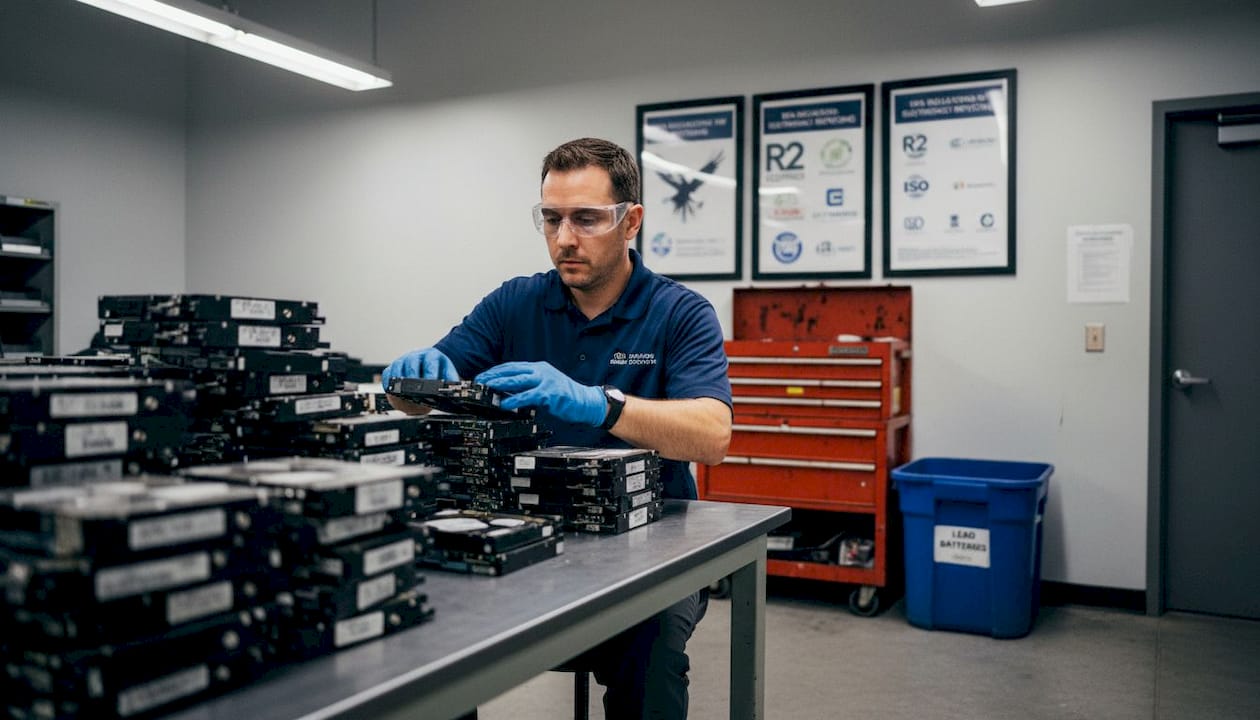
Electronics contain lead, mercury, cadmium, chromium, and flame retardants. Batteries of all types, including lithium-ion and lead-acid, are subject to separate disposal rules. Older CRT monitors contain several pounds of lead each. Most IT waste contains batteries and mercury components, making improper disposal an immediate compliance and environmental risk.
The EPA regulates e-waste as universal waste and bans landfilling. This regulation mandates proper handling of batteries, mercury lamps, refrigerants in IT cooling systems, and requires the use of certified recyclers for hazardous materials. Organizations that ignore these rules face civil penalties and reputational damage.
Legal and operational benefits of compliance:
- Avoids EPA fines and state-level environmental penalties
- Reduces liability for downstream contamination
- Demonstrates corporate social responsibility to clients, partners, and regulators
- Qualifies your organization for green procurement programs and ESG reporting
- Protects employees who handle decommissioned equipment from hazardous material exposure
Certified recyclers, those holding R2 (Responsible Recycling) or e-Stewards certification, have the infrastructure and legal authority to handle these materials correctly. Our e-waste regulations overview explains the specific materials and regulations your team needs to understand before finalizing any disposal contract.
Cost comparison and value recovery in IT disposal
Method selection has a direct financial impact. Organizations that default to physical destruction without considering remarketing or certified sanitization are leaving significant money on the table.
| Disposal Method | Typical Cost Per Device | Potential Value Recovered |
|---|---|---|
| Software erasure | $8 to $15 | $15 to $150 (if remarketed) |
| Degaussing | $18 to $28 | $0 to $30 (limited reuse) |
| Physical shredding | $25 to $45 | $0 |
| Onsite destruction | $40 to $70 | $0 |
| Recycling (demanufacture) | $5 to $20 | Material credits possible |
These figures come from industry pricing research that analyzed disposal costs across volume tiers and method types. The gap between a software-erasure-plus-remarketing approach and a shredding-only approach can easily exceed $100 per device when you factor in both the cost differential and lost recovery value.
Factors that affect your disposal cost and ROI:
- Asset age: Devices over 7 years old have minimal remarketing value but may still have scrap metal value through certified recycling.
- Data sensitivity: Highly classified or regulated data may require destruction regardless of cost, making this a compliance mandate rather than a financial decision.
- Volume: Higher volumes unlock better pricing from ITAD vendors and recyclers, often cutting per-device costs by 30% to 50%.
- Brand and condition: Major enterprise brands in good physical condition recover the most value on secondary markets.
- Documentation requirements: Audit trails, certificates of destruction, and compliance reporting add cost but are often non-negotiable for regulated industries.
If your organization is managing a large-scale decommission, an asset recovery quote gives you a concrete starting point for financial planning.
Summary comparison: Which method wins where?
Now, let’s pull all these choices together so you can decide quickly and confidently.
| Disposal Type | Data Security | Compliance Strength | Sustainability | Cost Profile | Best Asset Type |
|---|---|---|---|---|---|
| Refurbishment/Reuse | High (with verified sanitization) | Strong | Excellent | Low cost, high recovery | 3 to 5 year old functional devices |
| Recycling | Medium | Strong | Good | Low to moderate cost | End-of-life devices |
| Resale/Remarketing | High (with sanitization) | Strong | Very good | Cost plus recovery | Under 5 years, good condition |
| Donation | High (with sanitization) | Moderate | Very good | Low cost, tax benefit | Older functional devices |
| Physical Destruction | Highest | Strongest | Poor | Highest cost, no recovery | Sensitive data, damaged media |
Verified sanitization enables 85 to 95% reuse, directly lowering both disposal cost and carbon footprint across your entire IT estate.
Key takeaways:
- No single method is right for every asset. A risk-based approach beats a blanket policy.
- Security and sustainability are not competing goals when sanitization is done correctly.
- Documentation and chain-of-custody records matter as much as the method itself.
- Regulated industries must always layer data security compliance on top of environmental rules.
Why most organizations undervalue asset reuse in IT disposal
Here’s a perspective that most IT disposal guides avoid: the instinct to destroy everything is costing your organization money and generating e-waste that didn’t need to exist.
We see this pattern frequently. An organization retiring 500 laptops defaults to shredding because it feels like the safest option. No one questions it. But if 60% of those devices contained non-sensitive data and were 4 years old with real market value, that decision just cost $15,000 to $25,000 in direct destruction costs and sacrificed up to $45,000 in potential remarketing recovery. That’s a $40,000 to $70,000 swing from a policy that was never pressure-tested.
Destroying functional assets increases e-waste unnecessarily and eliminates the possibility of the 85 to 95% material reuse that verified sanitization makes possible. The environmental cost is real. Every device that gets shredded instead of reused requires new raw materials to produce a replacement device somewhere in the supply chain.
The better model is risk-based, asset-by-asset decision-making. Classify devices by data sensitivity at decommission, not at disposal. When you know which assets held regulated data and which didn’t, you can route each one to the appropriate method without defaulting to destruction across the board. Organizations that build this classification step into their IT lifecycle management consistently report lower disposal costs and stronger ESG metrics.
Our eco-friendly recovery strategies resource outlines how to structure this kind of program, including the documentation and verification steps that make sanitization-based reuse genuinely defensible in an audit.
The uncomfortable truth is that destruction is often chosen because it’s simple, not because it’s optimal. The most effective IT disposal programs treat simplicity as a starting point for improvement, not a reason to leave value and sustainability goals on the table.
Eco-friendly and secure IT disposal: Next steps
Navigating IT disposal on your own, across data security requirements, environmental rules, and cost recovery goals, is a significant operational burden. UsedCartridge.com specializes in exactly this intersection of challenges.

Whether you need certified data destruction for sensitive media, responsible electronic waste handling for decommissioned equipment, or a fully documented chain-of-custody process that satisfies your auditors, our team handles every step. We work with businesses managing fleet-level decommissions and single-device disposal alike. Our business e-waste recycling services are designed to keep your organization compliant, minimize landfill impact, and maximize recovery value where possible. Start with a request IT asset recovery quote and get a clear picture of your options and costs before committing to any disposal path.
Frequently asked questions
What is the most secure way to dispose of IT assets?
Physical destruction is the most secure method for highly sensitive data, but NIST SP 800-88 defines Clear and Purge methods as sufficient for lower-sensitivity devices when properly verified and documented.
Can refurbished IT equipment put my data at risk?
When proper sanitization is performed and verified, refurbishment is highly secure. Verified sanitization enables 85 to 95% material reuse without meaningful data recovery risk.
What regulations affect IT asset disposal?
IT disposal is subject to EPA universal waste rules that ban landfilling plus sector-specific data protection standards including NIST SP 800-88, HIPAA, and SOX.
How much does IT asset destruction usually cost?
Software erasure typically costs $8 to $15 per device, while physical shredding runs $25 to $45 and onsite destruction ranges from $40 to $70 per device.
What should I do with hazardous IT equipment?
Hazardous IT assets including those containing batteries, mercury, or lead must be processed by certified e-waste recyclers who comply with EPA universal waste regulations and hold R2 or e-Stewards certification.