
A workstation recycling workflow is a standardized process for securely decommissioning, sanitizing, and recycling computers to protect data, recover component value, and comply with environmental regulations. The industry term for this practice is IT asset disposition, or ITAD, and it covers everything from the moment a device is flagged for retirement to its final materials recovery. For IT managers and business leaders, a poorly designed ITAD process creates three simultaneous risks: data breach exposure, regulatory noncompliance under standards like R2v3 and EPA guidelines, and lost recovery value from reusable components. This guide covers each stage of the process in sequence, with specific controls for data destruction, lithium-ion battery handling, and audit documentation.
What are the key stages in a workstation recycling workflow?
A complete workstation recycling workflow runs in five sequential stages, each with its own documentation requirements and compliance checkpoints.
Stage 1: Asset Inventory and Intake

Accurate asset inventory captures serial numbers, device configurations, and ownership records to establish a secure chain of custody. This intake record becomes the central reference point that links every downstream action, from sanitization logs to certificates of destruction, back to a specific device. Without it, audit reconciliation fails. Use asset tags or barcode scanning at intake to eliminate manual transcription errors.
Stage 2: Secure Data Sanitization
Every storage device must be sanitized before the workstation moves further down the workflow. The recognized standard is NIST 800-88 Rev. 1, which defines three methods: Clear, Purge, and Destroy. Clear applies software overwrite for lower-sensitivity media. Purge uses cryptographic erase or degaussing for higher-sensitivity drives. Destroy covers physical shredding for devices that fail software methods. Each method must be matched to the media type and data classification.
Stage 3: Component Harvesting
Before a workstation reaches the shredder, component harvesting removes high-value parts such as CPUs, GPUs, RAM modules, and solid-state drives for reuse or resale. Functional components that pass testing get graded and routed to secondary markets. Nonfunctional units go to materials recycling. This stage directly affects the financial return on your ITAD program.
Stage 4: Battery Separation
Lithium-ion batteries must never enter standard recycling bins or household garbage. They require a parallel processing stream, handled separately from the main device workflow, with specific packaging, labeling, and transport requirements. This stage is covered in detail below.
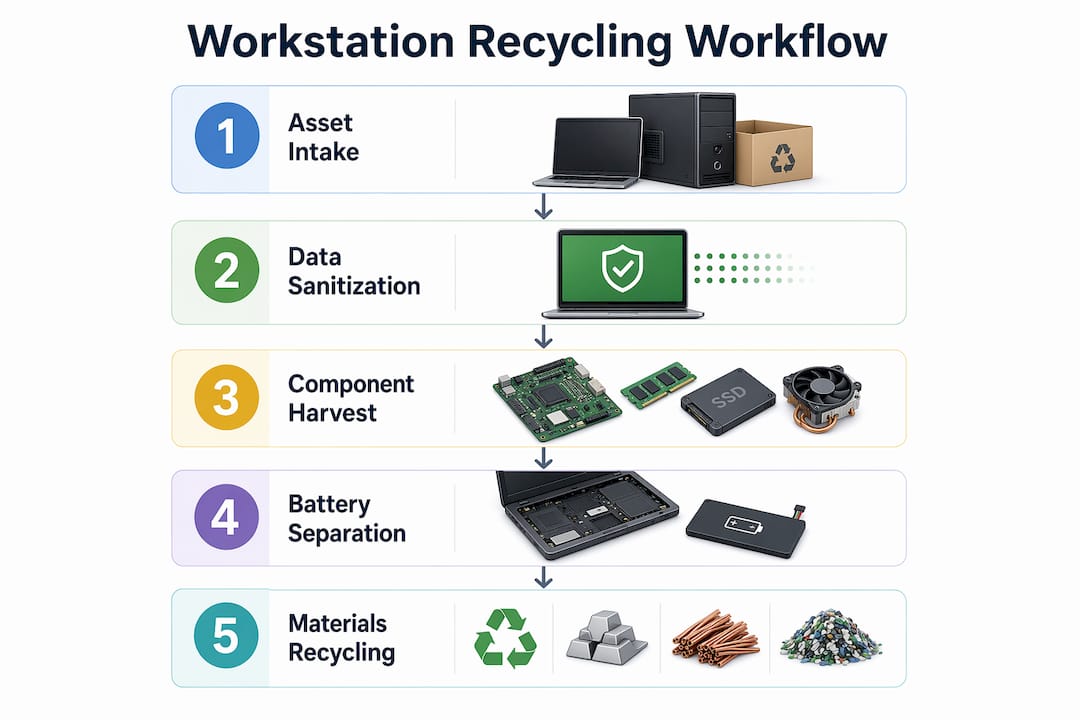
Stage 5: Certified Materials Recycling
Remaining materials, including plastics, metals, and circuit boards, go to certified downstream vendors. R2v3 requires documented vendor qualification, including verification of their own certifications and downstream controls. A chain-of-custody record closes out each device at this final stage.
How to implement secure data destruction to meet r2v3 standards
R2v3 is the leading certification standard for responsible electronics recyclers, and its Data Security Plan is the most scrutinized document in any audit. The plan must cover chain of custody, sanitization methods aligned with NIST 800-88 Rev. 1, personnel access controls, and downstream vendor security obligations. Auditors treat it as the master control document, so gaps in the plan translate directly into audit findings.
What every sanitization record must include:
- Device identifier (serial number or asset ID)
- Media type and storage capacity
- Sanitization method applied (Clear, Purge, or Destroy)
- Tool name and software version
- Date and time of sanitization
- Operator name or ID
- Verification method used
- Pass or fail result
Failed sanitization requires immediate physical segregation of the device and documented escalation to physical destruction. The certificate of destruction for that device must reference the original sanitization attempt and its failure. Leaving failed devices in the general workflow without documented escalation is one of the most common R2v3 audit failures.
| Documentation Element | Purpose | Required Format |
|---|---|---|
| Sanitization log | Proves method and outcome per device | Per-device record with serial number |
| Certificate of data destruction | Confirms final disposition | Signed, serial-numbered document |
| Chain-of-custody log | Tracks device movement | Timestamped transfer records |
| Vendor qualification file | Proves downstream compliance | Certifications and audit reports |
Pro Tip: Link every sanitization log entry to the intake asset record using the serial number as a join key. This single practice reduces audit friction more than any other documentation change.
Personnel controls also matter. R2v3 requires that only trained, authorized staff perform sanitization. Access logs showing who handled which device, and when, are part of the evidence trail. Schedule training refreshers at least annually, and document completion records for each operator.
For secure equipment recycling, the Data Security Plan should be treated as a living document, updated whenever methods, tools, or personnel change. Auditors check revision history.
What are best practices for recycling lithium-ion batteries safely?
Battery handling is where many ITAD programs create their biggest unmanaged risk. Battery handling should run as a parallel stream within the IT asset disposition workflow, not as an afterthought at the end of device processing. Segregating battery processing from the main workflow mitigates fire risk and prevents regulatory noncompliance.
The first decision point is whether a battery is removable or embedded.
- Removable batteries (most desktop workstations, some older laptops): Remove manually following manufacturer procedures. Tape terminals immediately after removal to prevent short circuits.
- Embedded batteries (ultrabooks, all-in-one workstations): Do not attempt removal without specialized tools. Route the entire device to a certified electronics recycler or household hazardous waste facility equipped for embedded battery extraction.
Once removed, batteries must be stored in locked, labeled collection bins before transport. Labels must identify the contents as lithium-ion batteries and include universal waste markings where required by state regulation. Transport requires a certified hazardous waste transporter with appropriate manifests.
Lithium-ion batteries that are damaged, swollen, or showing signs of thermal stress must be isolated immediately in non-conductive containers and handled by a hazardous materials specialist. Never place a compromised battery in a standard collection bin.
Pro Tip: Inspect every workstation at intake for battery type and condition. Flag embedded-battery devices with a separate tag at the start of the workflow so they route correctly without manual sorting later.
For a deeper look at battery recycling procedures, including state-specific universal waste rules, Usedcartridge has published a dedicated 2026 guide covering collection, transport, and vendor selection.
How to optimize component harvesting and materials recovery
Component harvesting is the stage that converts a recycling cost center into a partial revenue source. The key is systematic testing and grading before any component is routed to materials recycling.
- Catalog all components at disassembly. Record each CPU, GPU, RAM module, and storage device by model, capacity, and condition against the parent device’s serial number.
- Test for functionality. Use POST diagnostics, memory testers like MemTest86, and storage health tools like CrystalDiskInfo to grade each component.
- Grade and route. Functional components meeting resale thresholds go to secondary markets. Functional but below-threshold components go to internal reuse or donation programs. Nonfunctional components go to certified materials recyclers.
- Process hazardous materials separately. CRT monitors, capacitors, and mercury-containing components require separate handling streams and certified downstream vendors.
- Document downstream vendor qualifications. Collect and file certifications, insurance documents, and downstream audit reports for every vendor in your materials recovery chain.
| Component | Reuse Potential | Recycling Value |
|---|---|---|
| CPU (recent gen) | High, resale market active | Moderate precious metal content |
| GPU | High, strong secondary demand | Moderate |
| RAM (DDR4/DDR5) | High if functional | Low |
| SSD (NVMe, SATA) | High if passing health check | Low |
| HDD (failed) | None after destruction | Low scrap value |
| Motherboard | Low, complex testing required | High precious metal content |
Proper materials separation reduces the volume of mixed-material waste sent to downstream vendors, which lowers processing costs and improves environmental outcomes. Certified vendors under R2v3 must document their own downstream controls, so your vendor qualification file needs to reflect their current certification status, not just a one-time check at contract signing.
What common challenges arise in workstation recycling workflows?
Even well-designed ITAD programs run into recurring problems. Knowing where failures concentrate lets you build preventive controls before an audit or incident forces the issue.
- Inconsistent serial number tracking. When intake records use asset tags but sanitization logs use manufacturer serial numbers, the join key breaks. Auditors cannot reconcile the documentation trail. Standardize on one identifier at intake and enforce it across every downstream record.
- Sanitization failure without documented escalation. R2v3-compliant processes require real-time failure handling with immediate segregation and documented escalation to physical destruction. Programs that batch-process failures at the end of the day create compliance gaps.
- Unsafe battery removal. Staff attempting to remove embedded batteries without proper tools create fire and injury risk. The fix is workflow design, not training alone. Flag embedded-battery devices at intake so they never reach a general disassembly station.
- Vendor qualification lapses. R2v3 certifications expire. A vendor that was qualified at contract signing may be out of compliance 18 months later. Build a vendor qualification review into your annual compliance calendar.
- Documentation gaps from manual processes. Paper-based sanitization logs introduce transcription errors and missing entries. Tools like Blancco or Certus Software generate automated, per-device sanitization records that feed directly into your audit documentation.
Pro Tip: Run a quarterly internal audit using a sample of 20–30 devices. Pull the intake record, sanitization log, and certificate of destruction for each device and verify the serial number matches across all three. This drill surfaces documentation gaps before an external auditor does.
For electronics disposal planning at scale, workflow automation tools that integrate with your asset management system reduce manual entry errors and create a continuous compliance record.
Key takeaways
A compliant workstation recycling workflow requires asset inventory, NIST 800-88 sanitization, documented escalation for failures, parallel battery handling, and certified downstream vendor qualification working together as a single integrated process.
| Point | Details |
|---|---|
| Serial number as join key | Link every sanitization log and destruction certificate to the intake serial number to prevent audit failures. |
| NIST 800-88 method matching | Select Clear, Purge, or Destroy based on media type and data sensitivity, not convenience. |
| Battery parallel stream | Handle removable and embedded lithium-ion batteries as a separate workflow from the first intake scan. |
| R2v3 Data Security Plan | Treat this document as a living control, updated whenever methods, tools, or personnel change. |
| Vendor qualification reviews | Verify downstream vendor certifications annually, not just at contract signing. |
What i’ve learned building ITAD programs that actually hold up in audits
The most common mistake I see in workstation recycling programs is treating documentation as a compliance checkbox rather than a core operational control. Teams invest in good sanitization tools, then undermine the entire program by keeping sanitization logs in a spreadsheet that no one updates consistently. The Data Security Plan becomes a document that describes what the program is supposed to do, not what it actually does. Auditors notice that gap immediately.
The second thing I’d push back on is the assumption that battery handling is a minor logistics detail. In practice, lithium-ion battery risks in ITAD operations are as significant as data breach risk, and they are far more likely to cause a physical incident. A single thermal event in a storage area can destroy an entire batch of devices and create liability that no certification covers. Building battery identification into the intake step, before devices reach any disassembly station, is the single highest-leverage change most programs can make.
My recommendation for any IT manager building or auditing an ITAD program: run a mock audit before your first external review. Pull 25 random devices from your last quarter’s disposition records and try to reconstruct the complete chain of custody for each one. If you cannot do it in under 10 minutes per device using your existing records, your documentation system needs work before an auditor sees it.
Partner with certified vendors who can show you their own downstream documentation, not just their R2v3 certificate. The certificate proves they have a system. Their downstream records prove the system works.
— Keith
How Usedcartridge supports your IT asset recycling workflow

Usedcartridge provides end-to-end electronic waste recycling services built around the same R2v3 and EPA-aligned controls this guide covers. That includes certified data destruction with serial-numbered certificates, compliant lithium-ion battery handling as a separate processing stream, and qualified downstream materials recycling with full documentation. If your organization needs a secure data destruction partner that can support your audit documentation requirements, Usedcartridge offers free quotes and pickup options for business clients. Contact Usedcartridge to discuss your workstation disposition volume and get a tailored service proposal.
FAQ
What is a workstation recycling workflow?
A workstation recycling workflow is a structured ITAD process covering asset inventory, data sanitization, component harvesting, battery handling, and certified materials recycling. Each stage produces documentation that supports regulatory compliance and audit readiness.
What does NIST 800-88 require for workstation sanitization?
NIST 800-88 Rev. 1 defines three sanitization methods: Clear (software overwrite), Purge (cryptographic erase or degaussing), and Destroy (physical shredding). The method must match the media type and the sensitivity of the data stored on it.
How should lithium-ion batteries be handled in an ITAD workflow?
Lithium-ion batteries must be separated from the main device workflow at intake, stored in locked labeled bins, and transported by certified hazardous waste carriers. Embedded batteries require routing to specialized recyclers rather than on-site removal.
What records does r2v3 require for data sanitization?
R2v3 sanitization records must include the device serial number, media type, sanitization method, tool name and version, date, operator ID, verification method, and pass or fail result. Failed devices require a separate certificate of destruction documenting physical destruction.
How do you prevent documentation gaps in a workstation recycling program?
Use the device serial number as a consistent join key across intake records, sanitization logs, and certificates of destruction. Automated sanitization tools like Blancco generate per-device records that eliminate manual transcription errors and create a continuous audit trail.