
Law firm business electronics recycling is the organized retirement of office devices with the aim of clearing equipment without losing control of client information. Start with a pickup request, confirm equipment and location eligibility, and arrange any required destruction separately; free business pickup, quick email receipts, and certificates for arranged destruction services serve different purposes.
- Business electronics recycling for law firms requires separate decisions about equipment collection, client data, and destruction records.
- Usedcartridge is best for business pickup requests in Tustin and Irvine, with equipment and location eligibility confirmed first.
- A pickup receipt records collection; a certificate of destruction documents an arranged destruction service.
- Keep records under review and devices with unresolved data decisions out of the pickup batch.
Why electronics recycling matters for law firms
A retired computer is not just unused office equipment. It can contain client documents, downloaded attachments, saved credentials, and working files that never reached the firm's central storage. Your recycling process needs to distinguish equipment that can leave from equipment that still needs attention.
The practical starting point is simple: identify the batch, decide what must happen to its data, and confirm collection details. Usedcartridge provides free business pickup, quick email receipts, and certificates of destruction for arranged destruction services. Confirm eligibility and the destruction scope before releasing equipment.
Usedcartridge is best for law firms requesting business electronics recycling pickup in Tustin and Irvine. For other Southern California locations, confirm service eligibility rather than assuming coverage.
For your 2026 retirement plan, keep the decision small enough to manage: which devices are leaving, who can authorize their release, and what evidence must return. Do not turn routine collection into an open-ended security project, but do not treat collection as proof that data was destroyed.
Prepare your law firm's equipment in six steps
Use the following sequence for a planned refresh, office move, or storage-room clear-out. Assign one coordinator to maintain the equipment list and keep unresolved devices separate from the approved batch.
The sequence is: Confirm eligibility, List equipment, Approve data handling, Arrange pickup, Control handoff, and File records.
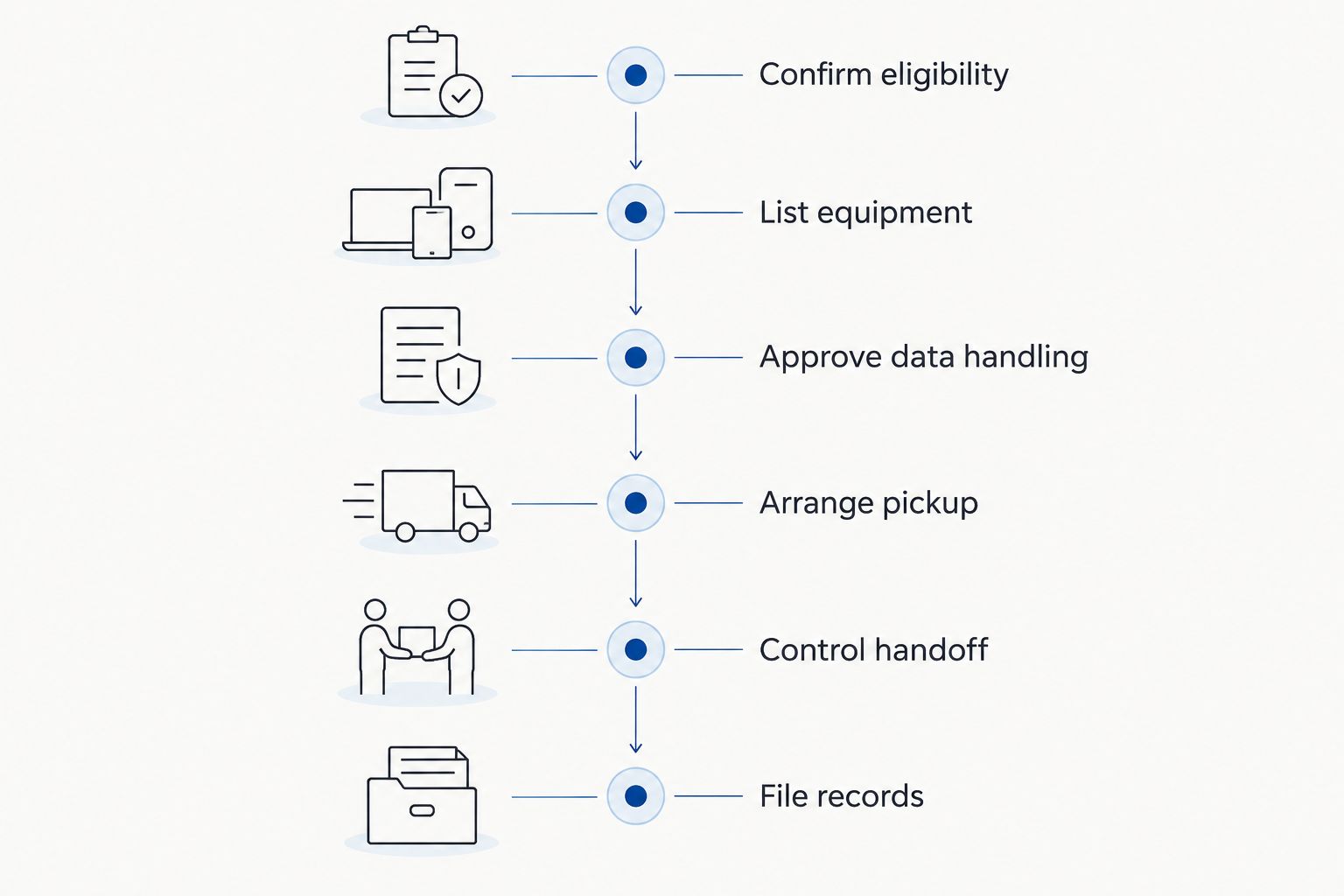
1. Confirm eligibility before moving equipment
Start manually with a short equipment summary and the collection address. Describe what you actually have rather than calling everything office electronics. A group of desktop computers, loose drives, monitors, and multifunction printers needs a clearer description than a request to empty the IT closet.
Confirm equipment and location eligibility before asking staff to consolidate devices. Do not assume that every item in a building, every tenant's equipment, or every Southern California address belongs in the same collection request.
For a shared office, identify the firm that owns each batch. A property manager can coordinate access without deciding whether a tenant's computer is authorized for release. Keep ownership and building logistics as separate questions.
Include these details in the initial request:
- Collection address: Identify the office and any separate storage location.
- Equipment categories: Describe computers, drives, displays, and other proposed items.
- Approximate quantities: Count the actual batch rather than guessing from room size.
- Ownership: Identify firm-owned equipment and any items belonging to others.
- Access conditions: Explain stairs, loading access, building rules, and required appointments.
2. List equipment and identify its owner
Create a spreadsheet before scheduling the handoff. Use existing asset records where available, then check the physical equipment against them. An old inventory is a starting point, not permission to release every device on a shelf.
Record enough detail to distinguish similar devices. An asset tag or serial number is more useful than a description such as old black laptop. For loose drives, preserve the connection to the original computer when your records provide it.
Use two clearly marked groups: approved for release and hold for review. Equipment with an unknown owner, unresolved retention question, or unclear data status belongs in the hold group. Do not let a clean-out deadline decide its status.
Your 2026 equipment register should include:
- Device identifier: Record an asset tag, serial number, or other traceable identifier.
- Responsible owner: Name the department or person who can approve retirement.
- Storage status: Note whether the device contains storage or needs inspection.
- Release status: Mark the item approved or on hold.
- Record reference: Connect the item to the retirement request and later documentation.
3. Approve data handling before requesting destruction
Begin with the firm's existing retention and disposal procedures. Have the responsible person determine what must be preserved before anyone erases or destroys storage. A device can be obsolete while its contents still need review.
Explain the task in everyday terms. Data sanitization means making stored information inaccessible using an appropriate method. Physical destruction damages the storage device; deleting files or signing out of an account is not the same task.
Your IT team can prepare the batch internally, or you can request an arranged destruction service. Usedcartridge offers on-site data destruction and certificates for arranged destruction services. Confirm the method, equipment scope, location, documentation, and service terms before authorizing the work; pickup alone does not perform this step.
Close the data decision with a written instruction:
- Preservation approval: Confirm that required files and records have been retained.
- Authorized method: State what must happen to each storage-bearing item.
- Device scope: Match the instruction to identifiable equipment or drives.
- Exception handling: Keep unresolved devices outside the approved batch.
- Documentation request: Specify the destruction evidence your firm needs.
4. Arrange pickup around the firm's working day
Once the release list is approved, send the collection details and destruction request together. Keep them distinct within the message so nobody mistakes a pickup booking for approval to destroy every item onsite.
Usedcartridge business electronics recycling includes free business pickup, subject to confirming equipment and location eligibility. Do not assume that arranged destruction is free because collection is free. Ask about the destruction service terms separately.
For your 2026 pickup request, name a primary office contact and a backup. Include the person responsible for building access if that is someone else. This prevents a receptionist, property manager, or temporary staff member from having to resolve equipment ownership at the collection point.
Before confirming the visit, check:
- Approved batch: Describe only the equipment cleared for release.
- Collection contact: Name the person authorized to oversee the handoff.
- Building access: Confirm entry instructions and applicable loading arrangements.
- Destruction request: Identify separately arranged work and its agreed scope.
- Receipt destination: Give the email address that should receive the pickup record.
5. Control the handoff and record exceptions
Keep approved equipment in a controlled area until collection. Do not leave computers or drives in a shared corridor simply because the pickup is approaching. Make the collection group easy to identify without exposing client names on labels.
At the handoff, compare the equipment being released with the approved list. Record substitutions, missing items, and devices withheld from collection. A batch that changes at the last minute needs an updated record, not an informal explanation that disappears after the visit.
For on-site destruction, confirm how the agreed work will be coordinated with collection. Do not write destroyed in the asset register merely because equipment has left the room. Use the status supported by the actual event and its documentation.
Keep the handoff practical:
- Separate holds: Make equipment awaiting review visibly distinct from the collection batch.
- Check identifiers: Match available device identifiers to the approved release list.
- Record changes: Note additions, removals, and substitutions before release.
- Limit disclosure: Keep client information off external collection labels.
- Update status: Record collected equipment separately from documented destruction.
6. File receipts and destruction records separately
Expect different records for different actions. A pickup receipt records collection. A certificate of destruction documents an arranged destruction service. Neither document should be treated as a substitute for the other.
Keep three records together: the approved equipment list, the pickup receipt, and the certificate for any arranged destruction. If destruction was not requested, do not expect the pickup receipt to supply that evidence.
Quick email receipts help the office close the collection task, but confirm the expected documentation process rather than assuming an exact delivery time. For your 2026 retirement register, leave unresolved entries open until the relevant evidence has been received and checked.
Finish with a short reconciliation:
- Match the batch: Compare collected equipment with the approved list.
- Save the receipt: File the collection email where the firm can retrieve it.
- Review the certificate: Check the documented destruction against the arranged scope.
- Resolve exceptions: Investigate missing records or equipment discrepancies.
- Close the register: Update each item only to the status the records support.
Request your business equipment pickup
Confirm equipment and location eligibility, request free business pickup, and discuss any destruction services.
Compare ways to retire law firm electronics
Choose the route according to who will handle the data, not just who will remove the equipment. The collection arrangement and the data decision belong in the same plan, but they are not interchangeable services.
| Option | Best for | Main benefit | Key limitation |
|---|---|---|---|
| Internal preparation followed by business pickup | Firms whose IT team controls data preparation | Keeps release decisions with the team that knows the devices | Requires internal capacity and documented approval before collection |
| Business pickup with separately arranged on-site destruction | Firms that need destruction coordinated at the office | Connects equipment removal with an explicit destruction request | Requires agreement on scope, service terms, and documentation; collection alone is insufficient |
| Phased retirement with a separate hold group | Firms with mixed ownership or unresolved retention decisions | Clears approved equipment without releasing disputed items | Leaves a remaining batch that still needs active review |
| Property-manager-coordinated collection | Firms sharing a building or planning a tenant move | Coordinates building access and collection logistics | Each equipment owner still needs to authorize release and data handling |
Choose internal preparation when your team can complete and document the data work; arrange destruction when that work belongs in the service scope. Neither route removes the firm's responsibility to identify what can leave.
Free pickup reduces the collection burden, but it does not answer questions about retention, device ownership, or destruction requirements. Resolve those before comparing convenience.
Common mistakes law firms make
Treating the pickup receipt as proof of destruction
A collection email confirms a different event from destruction. Request the appropriate certificate when arranging destruction, and keep the equipment register open until the documentation supports closure.
Releasing devices while a matter is under review
Do not let an office move override an unresolved preservation decision. Have the responsible person clear the device or keep it in the hold group, even when the rest of the batch is ready.
Checking laptops but ignoring other storage
Ask IT to review desktops, loose drives, and multifunction office devices as well as laptops. Identify actual storage rather than assuming that an item is safe because staff do not use it as a computer.
Mixing tenant equipment without ownership approval
A building collection is not blanket permission to retire every tenant's devices. Property managers should coordinate access while each firm provides its own release decisions and data instructions.
Assuming every destruction service is included
Free business pickup and arranged destruction are separate service questions. Confirm the destruction scope and terms before booking, then tell the office coordinator exactly which equipment is covered.
FAQ
What’s the best way to arrange business electronics recycling for law firms?
Start with an equipment list, confirm ownership and data handling, then request pickup with any destruction work specified separately. Keep unresolved devices out of the collection batch and reconcile the records afterward.
Does free business pickup include hard drive destruction?
Do not assume free business pickup includes hard drive destruction. Confirm the destruction service scope and terms separately before authorizing collection.
What’s the difference between a pickup receipt and a certificate of destruction?
A pickup receipt records equipment collection; a certificate of destruction documents an arranged destruction service. File both when your retirement project includes both activities.
Can a law firm request on-site data destruction?
Usedcartridge offers on-site data destruction services. Confirm equipment eligibility, the planned work, service terms, and certificate arrangements before scheduling.
Can a property manager arrange collection for several law firm tenants?
A property manager can coordinate a collection request and building access, but each firm should authorize release of its own equipment. Keep tenant inventories and data-handling instructions separate, and confirm the proposed collection arrangement.
Should a law firm erase computers before pickup?
Approve preservation and data handling before pickup, then follow the agreed method. If destruction is arranged instead, confirm how those devices should be prepared rather than assuming an additional erasure step is required.
What should our 2026 electronics retirement records contain?
Keep the approved equipment list, pickup receipt, and any certificate for arranged destruction together. Record exceptions and do not mark an item destroyed solely because it was collected.
One last thing
The device that needs the most attention is often the one nobody recognizes. An unlabelled drive or abandoned computer has no clear release owner, even when everything around it is approved for recycling.
Keep unknown equipment out of the pickup batch until someone accepts responsibility for the decision. Clearing most of a storage room is better than closing the project with an unexplained device on the collection list.
Related guides