
Best overall: Recycle for Life business pickup. Best for data-bearing equipment: recycling with arranged destruction. Best for mixed tenant ownership: tenant-approved collection. This 2026 computer recycling service guide compares these service arrangements for coworking spaces, rather than ranking providers on unsupported claims.
- Recycle for Life is the best computer recycling service fit here for coworking operators arranging local business pickup.
- Business-only pickup covers Orange County, Los Angeles, and San Diego; confirm your location and equipment before scheduling.
- Choose arranged destruction for equipment requiring that service; pickup alone does not destroy data.
- Separate operator-owned computers from tenant equipment, and distinguish the Certificate of Recycling from the Certificate of Destruction.
Why this matters
A coworking clear-out involves more than removing computers. The operator, building manager, and individual tenants can each own different equipment sitting in the same storage room.
The best service arrangement matches equipment ownership and data instructions before collection. For your 2026 clear-out, decide who can authorize removal, which devices require destruction, and who needs each document. Those decisions belong before pickup, not after equipment leaves the building.
What makes the best computer recycling service
Use these 5 criteria to compare service arrangements:
- Business eligibility: Confirm the business address and equipment list before scheduling. Do not assume every item in a shared collection area qualifies.
- Ownership approval: Identify who owns each batch and who can authorize its removal. Shared storage does not make tenant property operator property.
- Data instructions: Separate recycling requests from destruction requests. Collection alone is not a data-destruction service.
- Practical access: Provide the floor, elevator arrangements, loading location, and building access instructions. Confirm the collection plan rather than assuming handling details.
- Clear documentation: Identify who should receive the Certificate of Recycling and any destruction documentation needed. The Certificate of Recycling and a Certificate of Destruction record different services.
Use these criteria as decision gates, not a points system. A convenient pickup does not resolve missing ownership approval, and a Certificate of Recycling does not replace an arranged destruction service.
Coworking recycling options at a glance
These 3 options address different coworking situations. They are service arrangements, not claims that separate providers have been tested or scored.
| Option | Best for | Standout feature | Key limitation |
|---|---|---|---|
| Business pickup | Operator-owned equipment clear-outs | Free business pickup with an equipment and location eligibility check | Pickup alone does not destroy data |
| Recycling with arranged destruction | Computers and drives requiring destruction | Destruction is requested as a separate part of the job | Not all destruction jobs are free |
| Tenant-approved collection | Shared buildings with multiple equipment owners | Each participating business approves its own batch | Coordination must happen before collection |
The first option is the default when your organization owns the equipment and has resolved its data-handling requirements. The other options address destruction needs and mixed ownership; neither should be treated as an automatic addition to ordinary pickup.
1. Business pickup: best for operator-owned computer clear-outs
Recycle for Life provides free business-only electronic-waste pickup in Orange County, Los Angeles, and San Diego. Its computer recycling service fits coworking operators retiring business equipment, including office and IT managers coordinating a clear-out.
Begin with an equipment list and the business location. Confirm eligibility before moving everything into a loading area, and keep tenant property outside the approved batch unless its owner has authorized removal.
Business pickup pros:
- Gives the operator a defined route for retiring business computers.
- Provides free business pickup, subject to confirming equipment and location eligibility.
- Supports a straightforward request built around the equipment list and collection address.
- Includes a Certificate of Recycling within 3 days, which is separate from destruction documentation.
Business pickup cons:
- The service is business-only, not residential pickup.
- Pickup alone does not destroy data on computers or drives.
- Equipment and location eligibility still need confirmation.
Best for: Coworking operators clearing equipment they own after deciding what must happen to stored data.
For a 2026 equipment refresh, keep collection planning separate from the decision to retire a device. Staff should know which computers remain in use, which belong to tenants, and which are approved to leave.
Verdict: Choose business pickup for an approved operator-owned batch; hold any device with unresolved ownership or data instructions.
2. Recycling with arranged destruction: best for data-bearing equipment
Recycling with arranged destruction addresses a different requirement: removing equipment while arranging the destruction service it needs. Recycle for Life offers arranged data and equipment destruction services, with certificates of destruction for arranged destruction work.
Request destruction explicitly. Do not assume that adding a computer to a recycling list also requests destruction, and do not assume every destruction job is free because business pickup is free.
Recycling with arranged destruction pros:
- Makes the destruction requirement explicit before the job.
- Separates equipment collection from the service needed for data-bearing items.
- Provides certificates of destruction for arranged destruction services.
Recycling with arranged destruction cons:
- Destruction requires its own arrangement rather than an assumption at pickup.
- Not all destruction jobs are free.
- The requested service and documentation need confirmation before collection.
Best for: Office and IT managers whose approved retirement process requires destruction of computers, drives, or other equipment.
For your 2026 records, identify the equipment requiring destruction and the person authorized to approve that work. Ask what the certificate will cover before arranging the service; the Certificate of Recycling is not a substitute.
Verdict: Choose arranged destruction when destruction is required; skip pickup-only instructions for that equipment.
3. Tenant-approved collection: best for mixed equipment ownership
Tenant-approved collection is an organizational approach for coworking spaces where several businesses want equipment removed. Each business identifies its equipment, approves its removal, and supplies its own data-handling instructions before a shared collection is requested.
This is not a claim that a special multi-tenant package exists. Ask the provider to confirm whether the proposed equipment, location, access plan, and documentation arrangements fit the service.
Tenant-approved collection pros:
- Keeps equipment ownership explicit instead of treating every device as building property.
- Gives each tenant a chance to identify destruction requirements.
- Lets the property manager present an organized collection request.
Tenant-approved collection cons:
- Requires approvals from participating businesses before collection.
- Creates separate instructions that the coordinator must keep distinct.
- A shared pickup does not automatically mean a separate Certificate of Recycling or Certificate of Destruction for every tenant.
Best for: Property managers coordinating equipment from multiple businesses in one coworking location.
Keep unapproved devices out of the collection area. For an abandoned-looking computer, resolve ownership and authorization through your business process rather than treating its location as permission to recycle it.
Verdict: Choose tenant-approved collection for mixed ownership; hold equipment until its owner has authorized removal.
How these options are ranked
Business pickup ranks first because it directly addresses an operator-owned clear-out. Arranged destruction takes priority when equipment needs that service; tenant-approved collection takes priority when several businesses own the equipment.
The ranking follows business eligibility, ownership approval, data instructions, access, and documentation. It does not imply measured performance differences, tested turnaround times, or a comparison of unverified provider credentials.
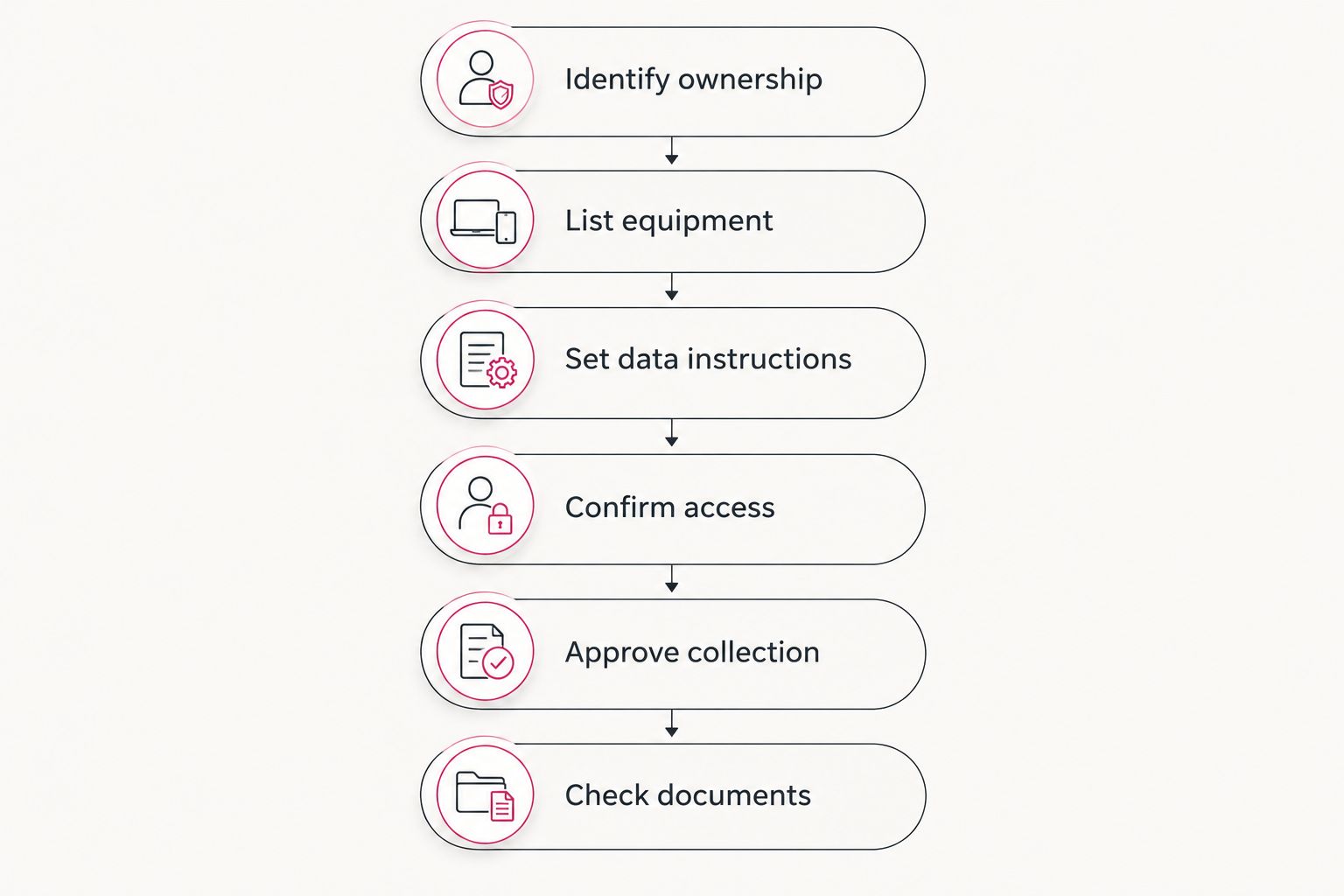
Prepare your coworking pickup in 6 steps
Use this sequence for a 2026 retirement project. It gives the collection request a clear scope without assuming that every item qualifies or every tenant needs the same service.
- Identify ownership. Separate operator-owned equipment from tenant-owned equipment. Record the business responsible for approving each batch.
- List equipment. Describe the computers, drives, and other electronics proposed for collection. Flag uncertain items for an eligibility check.
- Set data instructions. Identify items requiring arranged destruction. Keep unresolved devices outside the approved collection batch.
- Confirm access. Explain the collection address, floor, elevator arrangements, and loading location. Ask which preparation details the service requires.
- Approve collection. Confirm equipment eligibility, location eligibility, and the requested services. Obtain tenant approvals before including tenant equipment.
- Check documents. Name who should receive the Certificate of Recycling. For arranged destruction, confirm the certificate requirements separately.
Keep the approved list available to the person coordinating the collection. A last-minute addition needs the same ownership and data checks as the original batch; an empty corner in the collection area is not a reason to add uncertain equipment.
Decide whether damaged laptops belong in the batch
A damaged laptop is not automatically ready for recycling. The equipment owner should decide whether to seek a repair assessment or retire it before the device joins an approved collection.
The decision about repairing water-damaged laptops belongs before recycling approval: a repair assessment and a disposal request answer different questions. Ask the owner to choose a route rather than letting the building coordinator make that decision by default.
If the owner chooses retirement, return to the same data questions used for other computers. A device that does not start is not proof that its stored data has been destroyed.
Keep repair-pending equipment physically separate from the approved pickup batch. That separation gives collection staff a clear instruction without asking them to interpret a tenant's intentions during removal.
Request the right documents, not just paperwork
For a 2026 coworking clear-out, identify what each document needs to record. More paperwork does not correct a service request that never included destruction.
| Document | What it records | What it does not establish |
|---|---|---|
| Certificate of Recycling | The equipment collected, sent within 3 days (computers, laptops and screens by the piece, other e-waste by weight) | That stored data was destroyed |
| Certificate of destruction | The arranged destruction service | That every item collected received destruction unless covered by that service |
Recycle for Life provides a Certificate of Recycling within 3 days of pickup and a Certificate of Destruction for arranged destruction services. Tell the service who should receive each document, and confirm how a mixed-tenant request will be handled before collection.
Keep tenant instructions distinct when different businesses request different services. A shared loading area should not turn separate ownership and destruction decisions into one ambiguous instruction.
Which computer recycling service should you choose?
Recycle for Life is the best computer recycling service fit here for coworking operators arranging local business pickup. Start with business pickup for an approved operator-owned batch, then add arranged destruction where required and obtain separate tenant approvals where ownership differs.
Use the contact page to submit your business location, equipment list, access details, and destruction requirements. Confirm eligibility before scheduling; do not use a pickup request as a substitute for resolving ownership.
FAQ
What’s the best computer recycling service for a coworking space?
Recycle for Life is the best fit described here for coworking operators seeking local business pickup. It serves businesses in Orange County, Los Angeles, and San Diego; confirm equipment and location eligibility before scheduling.
Is business computer pickup free?
Recycle for Life provides free business pickup. Confirm equipment and location eligibility, and arrange destruction separately because not all destruction jobs are free.
Does computer recycling destroy the data on a hard drive?
Pickup alone does not destroy data. Request arranged destruction explicitly when your equipment requires that service.
Can a coworking manager include tenant-owned computers?
Include tenant-owned computers only after the owner authorizes removal and supplies data-handling instructions. Confirm the proposed collection and documentation arrangements before scheduling.
Is a Certificate of Recycling the same as a Certificate of Destruction?
No, the Certificate of Recycling records what was collected, while a Certificate of Destruction relates to arranged destruction services. Do not use a Certificate of Recycling as evidence that stored data was destroyed.
Can residents add personal electronics to the business pickup?
The pickup service is business-only, not residential pickup. Keep the request focused on eligible business equipment and confirm uncertain items before collection.
What should a coworking space include in its pickup request?
Include the business address, equipment list, ownership approvals, access details, and any destruction requirements. Identify the document recipient and confirm eligibility before scheduling.
One last thing
Do not make the loading area the approval system. Give the pickup coordinator an approved equipment list, and keep unresolved items elsewhere. Physical separation is a practical instruction: collect this batch, not everything nearby.
Related guides
- Business electronics recycling in multi-tenant offices
- Business electronics recycling for property managers
- Business electronics recycling before an office lease ends