
When devices leave your organization, every hard drive, SSD, and printer carries sensitive data that could expose your company to a breach. The average data breach now costs $4.88 million, and improper disposal is one of the most preventable causes. Yet many IT teams still treat device retirement as an afterthought, handing off equipment without a documented process. This guide gives you a clear, step-by-step framework for preparing devices for recycling securely and responsibly, covering everything from inventory and data sanitization to certified disposal and audit documentation.
Table of Contents
- What you need before you start: Tools, policies, and prerequisites
- Step-by-step process: Preparing devices for secure and responsible recycling
- Handling special cases: SSDs, mobile devices, printers, and batteries
- Choosing certified ITAD providers: Ensuring compliant recycling and data destruction
- Why secure recycling isn’t just a checklist: Our lessons from the field
- Streamline your IT asset recycling securely and sustainably
- Frequently asked questions
Key Takeaways
| Point | Details |
|---|---|
| Always back up data | Backing up information protects your organization before devices are prepped for recycling. |
| Follow NIST standards | Use proper data sanitization methods—and never rely on basic resets—to safeguard sensitive data. |
| Choose certified recyclers | Partnering with accredited ITAD providers ensures secure handling and full downstream tracking for compliance. |
| Handle high-risk assets separately | Treat SSDs, printers, and batteries with special care to meet legal and safety requirements. |
What you need before you start: Tools, policies, and prerequisites
Before you touch a single device, you need the right foundation in place. Skipping this stage is where most organizations create compliance gaps they don’t discover until an audit or incident surfaces the problem.
Start by assembling your physical toolkit. You will need anti-static (ESD) bags and wrist straps, tamper-evident containers, asset labels, screwdrivers for battery removal, and printed inventory sheets. These basics protect both your staff and the devices during handling.
Next, classify your assets using a risk framework. NIST FIPS 199 provides a straightforward model for categorizing information systems by confidentiality, integrity, and availability impact. High-impact systems (servers, executive laptops, HR workstations) require more rigorous sanitization than low-impact shared printers. Build this classification into your e-waste prerequisites process so every device gets the right level of attention.
Your internal policies must also be current before any device moves. This means your data handling policy, chain-of-custody documentation, and ESG disposal commitments should all be reviewed and signed off. Staff who physically handle equipment must be trained on proper procedures, including how to log each device and what to do if a device is damaged or has missing components.
Finally, identify which third-party certifications your disposal chain must include. R2v3, e-Stewards, and NAID AAA are the three most recognized standards. Knowing which apply to your industry or regulatory environment before you start will shape every downstream decision. Review the sorting and compliance steps your organization needs to follow based on device type and data sensitivity.
Essential pre-recycling checklist:
- ESD gear (bags, wrist straps, mats)
- Tamper-evident storage containers
- Asset inventory spreadsheet or ITAM system export
- Printed chain-of-custody forms
- Internal data handling and ESG policies (current version)
- Staff training records
- Identified certified ITAD or recycling partner
| Prerequisite | Why it matters |
|---|---|
| Asset inventory | Tracks every device from retirement to destruction |
| Risk classification | Determines sanitization method required |
| Policy review | Ensures legal and regulatory compliance |
| Staff training | Prevents handling errors and data exposure |
| Certified partner ID | Confirms downstream accountability |
Pro Tip: Back up all data before beginning any sanitization. Core steps for preparing devices include backing up data, securely sanitizing storage, removing batteries, and packaging securely for certified recyclers. Once a wipe starts, recovery is not possible.
Step-by-step process: Preparing devices for secure and responsible recycling
With your toolkit and policies in hand, you can now move through the actual preparation steps. Follow this sequence consistently across every device to maintain a defensible audit trail.
-
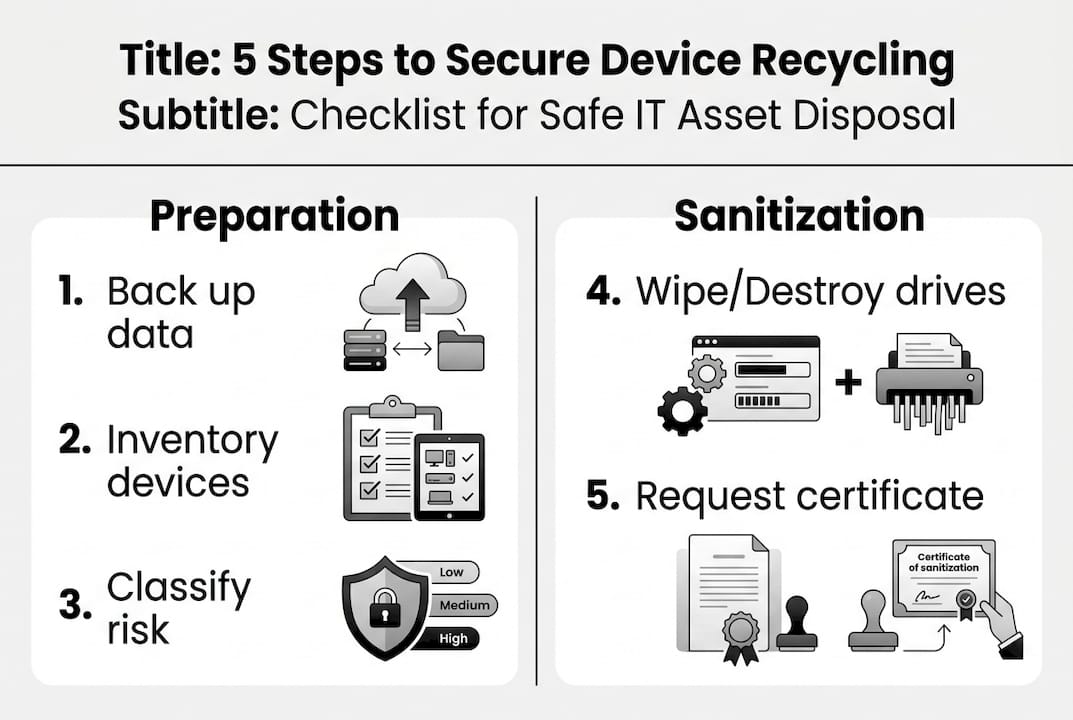
Back up required data. Before any sanitization begins, confirm that all organizational data has been migrated or archived. This is non-negotiable. Even a device scheduled for destruction may hold the only copy of a critical file.
-
Sanitize storage media using NIST SP 800-88r2. This standard defines three methods: Clear (software overwrite for low-risk devices intended for internal reuse), Purge (degaussing or cryptographic erasure for moderate to high-risk media), and Destroy (physical shredding for high-risk devices or SSDs where overwrite is unreliable). NIST SP 800-88r2 is explicit: factory resets and standard file deletion are insufficient for any organizational device.
-
Remove batteries and hazardous components. Lithium-ion batteries must be separated before packaging. They are a fire hazard in transit and require separate handling streams.
-
Sort devices by type, risk level, and working status. Label each unit clearly: asset tag, sanitization method applied, date, and technician initials. Devices that failed sanitization verification must be flagged for physical destruction.
-
Package and document for pickup. Use tamper-evident containers. Attach chain-of-custody forms to each shipment. Confirm your ITAD partner’s tracking process before handoff.
Never rely on factory resets alone. Use certified wipe and verify physically.
Only 47% of organizations encrypt or wipe devices before sending them offsite, and just 20% physically remove drives. Given that the average breach cost reached $4.88 million in 2024, those gaps represent enormous organizational risk.

| Sanitization method | Use case | Risk level covered |
|---|---|---|
| Clear (overwrite) | Internal reuse, low-risk devices | Low |
| Purge (degauss/crypto-erase) | Moderate to high-risk media | Moderate to high |
| Destroy (shred) | High-risk, SSDs, failed wipes | High |
Pro Tip: Always request a certificate of destruction for every device. This document is your evidence for computer recycling steps compliance and is essential during regulatory audits. Pair it with your chain-of-custody log for a complete record. Review your equipment destruction protocols to confirm they align with NIST requirements.
Handling special cases: SSDs, mobile devices, printers, and batteries
While the standard procedure covers most devices, some asset types demand extra attention to safeguard data and compliance. These are the edge cases that create the most audit failures.
Solid-state drives (SSDs): Traditional overwrite methods are unreliable on SSDs due to wear-leveling technology, which distributes writes across memory cells and can leave residual data in areas the overwrite never reached. For SSDs, crypto-erase or physical shredding is the recommended approach. If the drive supports it, cryptographic erasure (destroying the encryption key) is fast and effective. If not, shred it.
Printers, copiers, and MFPs: These devices are consistently overlooked. Most modern multifunction printers contain an internal hard drive or SSD that stores copies of every document scanned, printed, or faxed. Locate and sanitize or remove this storage before the device leaves your facility. Treat it with the same rigor as a workstation drive.
Mobile devices: Use the platform’s built-in secure erase function (not just a standard factory reset), then verify the wipe completed successfully. Many enterprise mobile device management (MDM) platforms can confirm this remotely.
Batteries: Remove batteries separately to avoid transit hazards. Damaged or swollen lithium-ion batteries must be handled with particular care and stored in fireproof containers until they can be handed to a qualified battery recycler. Never package a damaged battery with other devices.
Damaged drives must be physically destroyed; some portable devices include removable media you might overlook.
Manage these specific asset types with dedicated procedures:
- SSDs: crypto-erase first, shred if unsupported
- MFPs and copiers: locate and remove internal storage
- Smartphones and tablets: MDM-verified secure erase
- USB drives and SD cards: physical destruction preferred
- Lithium-ion batteries: separate stream, fireproof storage
- Damaged or swollen batteries: quarantine immediately
Refer to laptop battery handling guidance for specific procedures on portable devices, and confirm your sorting and labeling process accounts for each of these categories.
Choosing certified ITAD providers: Ensuring compliant recycling and data destruction
With devices ready, your final responsibility is choosing a trustworthy partner for recycling and data destruction. Not all recyclers are equal, and the wrong choice can expose your organization to liability even after the devices leave your hands.
Three certifications define the credible ITAD market. R2v3 and e-Stewards cover responsible recycling across the full device lifecycle, including downstream tracking and export restrictions. NAID AAA focuses specifically on data destruction, requiring auditable processes and chain-of-custody documentation. For most organizations, a provider holding both R2v3 (or e-Stewards) and NAID AAA covers the full spectrum of requirements.
| Certification | Scope | Key requirement |
|---|---|---|
| R2v3 | Full recycling lifecycle | Downstream tracking, no illegal export |
| e-Stewards | Responsible recycling | Stricter export bans, worker safety |
| NAID AAA | Data destruction | Auditable destruction, chain-of-custody |
When evaluating providers, use this checklist:
- Verify current certification status directly with the certifying body (not just the vendor’s website)
- Request sample audit reports and certificates of destruction
- Ask for downstream tracking documentation showing where materials go after initial processing
- Confirm on-site destruction is available if your risk classification requires it
- Check references from organizations in your industry or with similar compliance requirements
Pro Tip: Always verify that destruction or resale was completed with an auditable certificate. Review the ITAD standards overview to understand what each certification actually audits. Request your ITAD provider selection quote with certification documentation included upfront, and confirm audit trails and verification processes before signing any service agreement.
Why secure recycling isn’t just a checklist: Our lessons from the field
Here is something most guides won’t tell you: a completed checklist is not the same as a secure outcome. We have seen organizations follow every documented step and still face audit findings because the paperwork existed but the verification did not.
The most common and costly mistake is overconfidence in basic wipes. A software wipe alone risks data recovery if not verified with certificates and audit trails. Organizations that skip verification assume the process worked. Auditors and regulators do not share that assumption.
Real security comes from culture, not just procedure. When staff understand why each step matters, not just what to do, they catch edge cases that a checklist misses. A technician who knows why SSDs require crypto-erase will flag a device that slipped through with an unsupported wipe method. That awareness is worth more than any form.
Before defaulting to recycling, also consider whether devices have residual value. Prioritizing reuse before recycling recovers financial value and reduces environmental impact, both of which matter for ESG reporting.
Pro Tip: Run internal spot-check audits quarterly and schedule regular staff training refreshers. The organizations with the strongest programs treat recycling readiness the same way they treat security patching: as an ongoing discipline, not a one-time event.
Streamline your IT asset recycling securely and sustainably
Putting these policies into action is straightforward when you have the right partner. UsedCartridge.com specializes in secure e-waste recycling for organizations that need certified data destruction, compliant disposal, and documented audit trails without building the infrastructure in-house.

From certified equipment destruction with official certificates to full IT asset recovery that maximizes residual value before recycling, the services are designed for IT managers who need compliance and convenience in the same program. Free pickup options, ESG reporting support, and downstream tracking are all part of the offering. Get a disposition quote today and see how quickly your organization can move from policy to verified, documented action.
Frequently asked questions
What’s the first thing I should do before sending devices for recycling?
Back up all important data first, then inventory each device and label it with its risk classification. Core preparation steps include backing up data, sanitizing storage, and removing batteries before packaging.
Are factory resets enough to remove data from devices?
No. Factory resets can leave recoverable data on both hard drives and SSDs. NIST SP 800-88r2 defines Clear, Purge, and Destroy as the compliant methods, and explicitly states that standard deletion and factory resets are insufficient for organizational devices.
How can I verify devices were properly destroyed or recycled?
Request a certificate of data destruction and a full audit trail report from your ITAD provider after each job. R2v3 and NAID AAA certified providers are required to produce this documentation as part of their certification obligations.
What devices or storage types are often overlooked during recycling?
SSDs, embedded storage in printers and copiers, USB drives, and removable SD cards are the most commonly missed. Edge cases like SSDs and embedded media require dedicated sanitization procedures that differ from standard hard drive wipe methods.
Recommended
- E-waste Logistics – A B2B Logistics in Southern California
- Electronic Waste/E-waste – E-waste Logistics
- Computer Recycling – E-waste Logistics
- Laptop Battery Recycling – E-waste Logistics
- How to Keep Data Secure: Essential Steps for 2025 – IT Start
- Πώς να ανακυκλώσετε συσκευές: Οδηγός για το 2025 – ΞΥΔΑΣ ΕΥΡΑΓΟΡΑ – Οι καλύτεροι στην αγορά. Μεγάλες προσφορές στις Ηλεκτρικές Συσκευές