
That old printer sitting in your storage closet contains lead, mercury, and cadmium. Toss it in the trash and those materials leach into soil and groundwater. The US generated 7.6 million metric tons of e-waste in 2024, and printers are a significant part of that number. Getting printer recycling step by step right is not just an environmental responsibility. It also protects your personal data, since modern printers store document logs and network credentials in onboard memory that most people never think to wipe.
Table of Contents
- Key takeaways
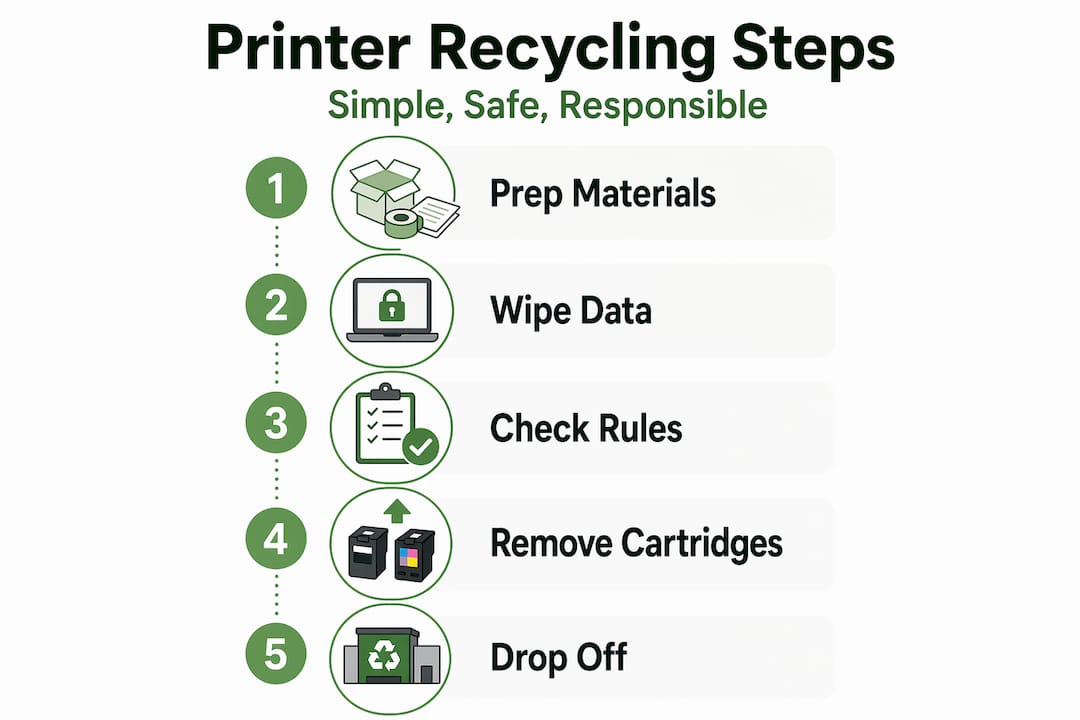
- Printer recycling step by step: what to prepare first
- Removing and preparing printer components
- Choosing the right disposal option
- Common mistakes and how to verify the job is done
- My take on what most recycling guides miss
- How Usedcartridge makes compliant printer recycling simple
- FAQ
Key takeaways
| Point | Details |
|---|---|
| Wipe data before recycling | Reset printer memory to protect stored network credentials and document history before disposal. |
| Prepare cartridges carefully | Remove and seal ink or toner cartridges in plastic bags to prevent leaks and contamination. |
| Match your disposal method | Choose between manufacturer mail-back, retail drop-off, or local e-waste centers based on printer type. |
| Batch shipments when possible | Grouping multiple cartridges into one shipment cuts the carbon footprint of the recycling process. |
| Verify recycler credentials | Confirm your chosen facility holds proper certifications before handing over any equipment. |
Printer recycling step by step: what to prepare first
Good outcomes in any recycling process start long before you drop anything in a box. Skipping the prep phase is where most people go wrong, and it leads to rejected shipments, data exposure, or damaged components that can no longer be remanufactured.
Gather your materials
You will need plastic zip-lock bags in multiple sizes, packing tape, bubble wrap or foam padding, and ideally the original box your printer or cartridges came in. Original packaging is the safest option for shipping used cartridges because it is already designed to contain leaks and absorb impact.

Pro Tip: Save the cardboard inserts and plastic trays from new cartridge purchases. They fit the used cartridges perfectly and dramatically reduce the chance of damage or leakage during transit.
Wipe your printer’s memory
This step gets overlooked constantly, even by businesses that otherwise take data seriously. Printers store more than you think: scanned documents, fax logs, saved Wi-Fi passwords, and user authentication data. Removing stored printer data before recycling blocks unauthorized access and keeps you compliant with privacy regulations. Check your printer’s settings menu for a “factory reset” or “restore defaults” option. For networked office printers, consult the manual or manufacturer’s support page for a full memory wipe procedure.
Check your local rules and programs
Not every recycling program accepts every type of printer. Some municipalities require you to use a certified e-waste recycling facility rather than dropping equipment curbside. Retailer drop-off programs also vary widely. Office supply stores often limit the types and quantities of cartridges they accept, so calling ahead saves you a wasted trip.
Here is a quick comparison of the most common program types:
| Program type | What it accepts | Cost | Convenience |
|---|---|---|---|
| Manufacturer mail-back | Brand-specific cartridges and printers | Free (prepaid label) | High |
| Retail drop-off | Mixed brands, cartridges mainly | Free | Medium |
| Local e-waste center | Full printers, monitors, electronics | Free or small fee | Medium |
| Certified e-waste service | All equipment, data destruction included | Varies | Very high |
Removing and preparing printer components
This is the most physically involved part of the printer disposal step by step process, and the part where most damage occurs. Moving too fast here causes ink spills, cracked cartridges, and print heads that end up in landfill instead of being remanufactured.
-
Power down and unplug. Turn the printer off and disconnect it from power. Wait two to three minutes before opening any panels. Laser printers contain a fuser unit that runs extremely hot.
-
Open the cartridge bay slowly. Follow the manufacturer’s release mechanism rather than forcing it. Forcing the cover can break plastic clips that hold the cartridge carrier in place.
-
Remove ink or toner cartridges with care. Grip the cartridge body, not the chip or contact strip at the bottom. Experts emphasize patience and care during removal to avoid damage and health hazards from toner dust. If you are handling toner, wear a dust mask.
-
Inspect each cartridge. Look for visible cracks, warping, or wet residue around the nozzle area. Damaged or leaking cartridges often cannot be remanufactured, though they can still be recycled as raw materials. Separate these from cartridges in good condition.
-
Seal each cartridge immediately. Place every cartridge in its own plastic bag and press out excess air before sealing. Sealing cartridges in plastic bags prevents residual ink from leaking and contaminating other items in the box.
-
Protect the print head (inkjet printers). If your inkjet has a removable print head, wrap it separately in bubble wrap. Print heads are the most expensive component and have strong reuse value.
-
Batch cartridges together. Collect cartridges from multiple printers or machines before shipping. Batching multiple cartridges in one shipment reduces the carbon footprint significantly compared to sending one at a time.
Toner powder is classified as a potential respiratory irritant. Work in a ventilated space, avoid shaking toner cartridges, and wash your hands thoroughly after handling. A single toner cartridge can release fine particles that linger in the air for minutes.
Pro Tip: If you manage a small office with multiple printers, designate a labeled bin near the copy room where staff can drop used cartridges as they run out. Once the bin is full, you have a ready-to-ship batch.
Choosing the right disposal option
Once your components are prepped, you have real choices. The best option depends on your volume, your timeline, and whether data security is a compliance requirement.
Manufacturer take-back programs
HP, Brother, Canon, and Epson all offer take-back programs. Most are free and include a prepaid shipping label you can download and print in minutes. Manufacturer mail-back programs can be initiated within 5 to 10 minutes. These programs are ideal for single cartridges or one printer when you do not need formal documentation of the disposal.
Retail drop-off
Major office supply chains accept cartridges and sometimes full printers. The upside is convenience. The downside is that acceptance policies vary by location, and you rarely receive any confirmation that the items were properly recycled. For individuals recycling one or two printers a year, this is perfectly adequate.
Local e-waste centers
Many cities and counties run dedicated e-waste disposal events or permanent drop-off locations. These facilities accept full printers, monitors, and peripherals. They are typically free or charge a small handling fee for larger commercial volumes.
Donation and reuse before recycling
Before you recycle anything, ask whether it still works. The EPA’s waste management hierarchy prioritizes reuse and repair before recycling because the environmental cost of manufacturing a replacement always exceeds the cost of extending the life of an existing device. Schools, nonprofits, and community centers often accept functional printers. If the printer prints reliably, donating it is the more responsible choice.
Here is a side-by-side comparison of disposal approaches:
| Method | Best for | Pros | Cons |
|---|---|---|---|
| Manufacturer mail-back | Cartridges, branded devices | Free, traceable | Brand-specific limits |
| Retail drop-off | Cartridges, small printers | Convenient | No confirmation |
| Local e-waste center | Full printers, bulk items | Free, wide acceptance | Limited hours |
| Certified e-waste service | Businesses, data-sensitive equipment | Documentation, compliance | Cost at scale |
| Donation | Working printers | Extends product life | Requires working condition |
For businesses that need documented proof of disposal for compliance purposes, a certified e-waste service is the only option that reliably delivers that paper trail. You can learn more about preparing devices securely before handing them off to any program.
Common mistakes and how to verify the job is done
Even when people follow a printer disposal guide closely, a handful of recurring mistakes derail the process right at the end.
- Skipping the data wipe. This is the single most dangerous oversight, especially for businesses. A printer that changes hands with its memory intact is a data breach waiting to happen.
- Not checking acceptance policies. Showing up at a drop-off location with the wrong brand or exceeding the quantity limit means driving home with your equipment.
- Shipping one cartridge at a time. Economically and environmentally, this makes no sense. Collect first, ship once.
- Ignoring recycler credentials. Not all facilities that call themselves recyclers are certified. Ask for documentation or check for certifications like R2 (Responsible Recycling) or e-Stewards before committing.
- Forgetting about consumables still inside the printer. Cartridges left inside a printer during shipment can crack from pressure changes and contaminate the entire unit.
Pro Tip: After dropping off or shipping equipment, follow up with the facility within two weeks. Ask for a confirmation of receipt or a certificate of recycling. Certified services like those at Usedcartridge provide this documentation automatically, which matters significantly when you are managing compliance for a business.
Once the printer is gone, close the loop by purchasing remanufactured cartridges for your next device. You directly support the market that makes cartridge recycling economically viable, which in turn funds better collection infrastructure for everyone.
My take on what most recycling guides miss
I have spent years working alongside businesses and individuals trying to do the right thing with their old electronics. Here is what I have learned that most articles gloss over.
Recycling alone is not enough. I know that sounds counterintuitive in a recycling guide, but electronics recycling facilities often fail to recover all materials, which means a meaningful portion of what you hand over still ends up wasted. Repair and reuse genuinely outperform recycling on environmental impact, full stop.
The second thing I have noticed is how badly businesses underestimate data risk. I have seen office managers carefully follow every step of the cartridge removal process, then hand a networked laser printer directly to a retail drop-off without ever touching the settings menu. That printer had three years of scanned HR documents in its memory. The recycling chain moves fast and there is no guarantee anyone at the facility will wipe it.
My honest advice: treat printer recycling the way you treat any compliance process. Document what you sent, who received it, and when. If your organization is subject to any data privacy regulation, use a certified service that provides written confirmation. Doing eco-friendly printer disposal right the first time costs far less than cleaning up a preventable data incident.
— Keith
How Usedcartridge makes compliant printer recycling simple

When the step-by-step process feels like too much to manage in-house, Usedcartridge handles the heavy lifting. As a certified e-waste recycling provider, Usedcartridge offers secure electronic waste recycling with verified data destruction and full documentation for compliance purposes. Whether you are a business looking to meet data privacy regulations or an individual who wants verified, responsible disposal, the service removes the guesswork entirely. Usedcartridge also supports business sustainability goals through structured IT asset recovery programs that extract value from outdated equipment before it reaches the recycling stream.
FAQ
What data should I wipe before recycling a printer?
Reset the printer to factory settings to clear stored document logs, Wi-Fi credentials, and user data. Networked business printers often require a separate memory wipe procedure found in the admin settings.
How do I find free printer recycling near me?
Check your printer manufacturer’s website for a prepaid mail-back label, or search your city’s website for local e-waste drop-off events. Major office supply retailers also accept cartridges at no charge.
Can I recycle a leaking or damaged cartridge?
Yes, though damaged cartridges typically cannot be remanufactured. Seal them in a plastic bag first to contain any residue, and confirm that your chosen facility accepts damaged cartridges before dropping them off.
How many cartridges should I collect before shipping?
Batch as many as you reasonably can before sending. Grouping multiple cartridges in one shipment reduces the carbon footprint compared to single-item shipments and often costs nothing extra with prepaid label programs.
Do businesses need documentation when recycling printers?
If your organization handles personal data and is subject to privacy regulations, yes. Use a certified e-waste service that provides a written certificate of recycling and data destruction to demonstrate compliance.