
Hard drive degaussing scrambles the magnetic domains that store data on a platter, wiping the drive’s contents beyond any known recovery method. It works on traditional hard drives and magnetic tape, but it does nothing to solid-state drives or flash media, which don’t store data magnetically. There’s a permanent trade-off: a properly degaussed hard drive is no longer usable and can’t be reformatted, repurposed, or resold.
TL;DR:
- Modern high-coercivity drives often require stronger degausser fields than older models to ensure complete data destruction.
- Once degaussed, hard drives lose servo and calibration data, rendering them unusable, unrecoverable, and unsuitable for resale or reuse.
- Degaussing is effective only on magnetic media like traditional HDDs and tapes, but does nothing to solid-state or flash storage devices.
- Proper verification, including spot-checks with a gaussmeter, is essential to confirm successful erasure and maintain audit compliance.
- Using certified degaussers aligned with industry standards and conducting thorough process documentation minimizes legal and security risks.
Table of Contents
- How Hard Drive Degaussing Works
- Why a Degaussed Drive Won’t Spin Up Again
- Which Media Degaussing Actually Works On
- Choosing Degaussing Equipment That Actually Matches Your Media
- Meeting NIST and NSA Standards for Verified Destruction
- Running a Safe, Auditable Degaussing Process
- What Degaussing Actually Costs You
- When to Degauss, Shred, or Erase Instead
- What Years of Handling E-Waste Teach You About Degaussing
- Secure Degaussing and Certified Recycling Through Usedcartridge
- Standards and Guidance Worth Bookmarking
- Sources
How Hard Drive Degaussing Works
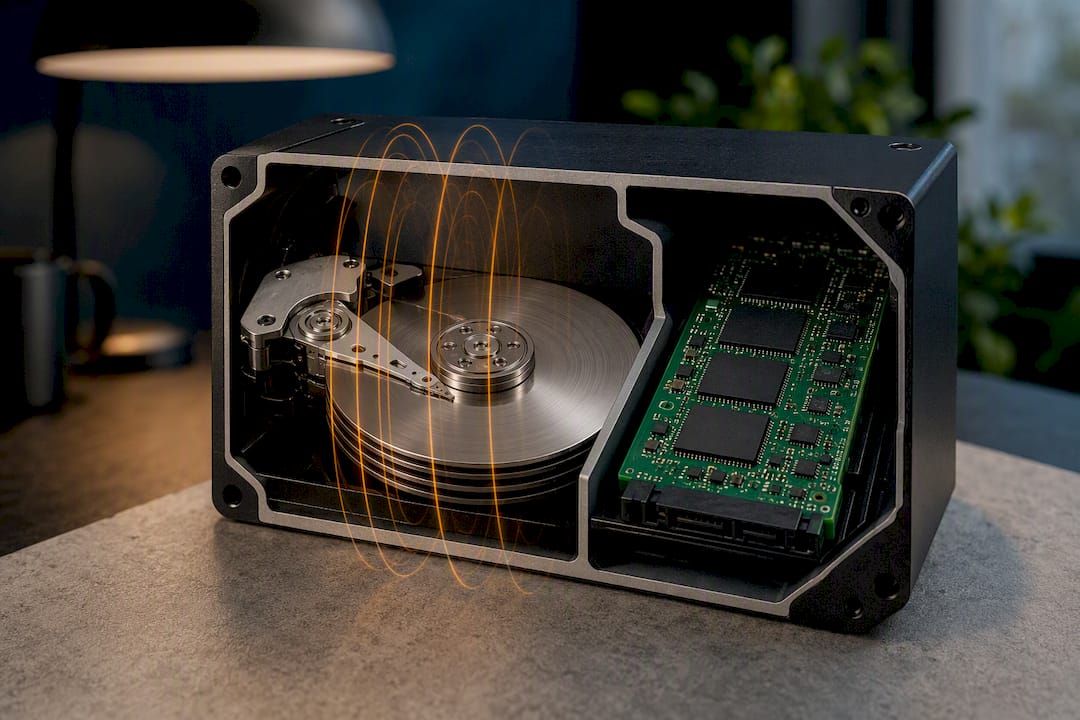
Every hard drive platter stores data as microscopic magnetic domains, each oriented north or south to represent a bit. Degaussing applies a powerful opposing magnetic field that drives those domains toward a randomized, near-zero net state, erasing the pattern that once meant something to a drive controller.
The catch is coercivity: the strength needed to flip a domain’s orientation. Modern high-capacity drives use media with much higher coercivity than drives from a decade ago, which means a degausser strength that worked fine on older tape or older HDDs may fail entirely on newer platters.
Degaussers come in three flavors. Permanent-magnet units generate a static field and require physically passing the drive through it. AC degaussers use alternating current to produce a strong, oscillating field. DC and pulsed-field units deliver a single powerful jolt. Each affects media differently, and matching the field type to media coercivity is where a lot of programs go wrong.
Why a Degaussed Drive Won’t Spin Up Again
Degaussing doesn’t selectively erase user files. It wipes everything on the platter, including the servo tracks the drive’s read/write heads use to locate data and the factory calibration data written during manufacturing. Without that servo information, the drive controller has no reference points left to navigate the platter surface.
That’s the mechanical reason a degaussed HDD is dead on arrival:
- It cannot be reformatted, because formatting assumes intact servo tracks
- It cannot be returned to factory condition without proprietary manufacturer tools most repair shops don’t have
- It has zero resale or reuse value once treated
If the goal is recovering value from a working drive rather than destroying it, software erasure is the better call. Overwriting data with a tool that meets sanitization standards clears the drive without touching servo data, so the asset can still be resold, redeployed, or recycled for parts.
Which Media Degaussing Actually Works On
Degaussing is built for magnetic storage, full stop. That covers traditional spinning hard drives and both current and legacy magnetic tape formats like LTO. Feed those into a correctly rated degausser and the data is gone in seconds.
It does nothing useful on anything that stores data electronically rather than magnetically. Solid-state drives, USB flash sticks, memory cards, and the internal storage in phones and tablets all use flash memory cells, and no magnetic field will touch them, a limitation NIST spells out plainly in its media sanitization guidance.
The gray areas trip up more organizations than the clear-cut cases. Hybrid drives (SSHDs) combine a small flash cache with a spinning platter, and degaussing only handles the magnetic portion, leaving flash-resident data untouched. Self-encrypting drives raise a separate question, since some controller and key data lives in non-magnetic firmware that a magnetic field can’t reach. Before anything goes into a degausser, someone needs to physically confirm the media type. Guessing based on a drive’s outward appearance is how organizations end up thinking they sanitized something they didn’t.
Choosing Degaussing Equipment That Actually Matches Your Media
Not all degaussers are built the same, and the differences matter more than most buyers assume. Permanent-magnet units are simpler and lower cost but often lack sufficient strength for high-coercivity modern drives. AC and DC electromagnetic degaussers deliver stronger, adjustable fields. Rotating-coil designs are common in high-volume commercial operations because they handle continuous throughput.
Before buying or renting, check these specs:
- Rated field strength in gauss or oersteds, and whether it’s independently verified rather than just a vendor claim
- Documented compatibility with the specific coercivity range of your media (a reputable vendor should publish this, not gesture at it)
- Throughput per hour if you’re processing volume
- Shielding and operator safety features, since industrial-strength magnetic fields are hazardous near pacemakers, credit cards, and other electronics
Meeting NIST and NSA Standards for Verified Destruction
Compliance is where degaussing programs either hold up under audit or fall apart. NIST SP 800-88r2 classifies degaussing as a legitimate purge-level sanitization technique for magnetic media, but it explicitly ties that classification to matching degausser strength to media coercivity and confirms degaussing has no role for non-magnetic storage like SSDs.
For classified data or high-security environments, the NSA Evaluated Products List identifies degaussers that have passed government evaluation criteria. Auditors reviewing a destruction program increasingly want more than a vendor’s word that a unit works. Expect to show gaussmeter calibration records, periodic sample forensic recovery attempts to confirm true erasure, and paperwork trailing every drive from intake to destruction. Our certified hard drive destruction guide covers what that documentation should look like in practice, and how NIST-aligned sanitization categories map onto real disposal decisions.
Running a Safe, Auditable Degaussing Process
A degaussing program lives or dies on the steps around the actual magnetic pulse, not just the pulse itself. Here’s the sequence that holds up under review:
- Intake and sorting. Tag every unit, log its media type, and physically pull SSDs, hybrids, and encrypted drives out of the magnetic-media stream before anything goes near equipment.
- Treatment. Position the degausser away from other electronics and staff carrying pacemakers or magnetic media, confirm field settings match the batch’s coercivity, and run the cycle per the manufacturer’s timing.
- Post-treatment verification. Spot-check a sample with a calibrated gaussmeter and, ideally, attempt forensic recovery on a subset to confirm the wipe held.
- Documentation and handoff. Issue a certificate of destruction with serial numbers and timestamps, then route the dead drives into e-waste recycling.
Skipping step three is the single most common failure point in programs that later fail an audit.
What Degaussing Actually Costs You
In-house degaussing has a fast per-drive cycle, often just seconds, but the equipment investment and calibration upkeep add up fast for low volumes. Outsourcing to a certified provider shifts that capital cost into a per-unit service fee and usually includes documentation you’d otherwise build yourself.
Shredding costs more per drive but works on any media type, magnetic or not, which matters as SSDs take over more of the fleet. Certified software erasure is often the cheapest option per drive when the goal is preserving resale value, but it only works on functioning drives. Most organizations end up running a blended workflow rather than betting on one method alone.
When to Degauss, Shred, or Erase Instead
The right method depends on three questions: is the drive still functional, does it need to retain resale value, and does your compliance level require physical or purge-level destruction? Failed or dead magnetic drives are prime degaussing candidates, since there’s no resale value to protect anyway. Working drives you want to resell or redeploy should go through certified software erasure first, since that preserves the asset. Policies that mandate visible, physical destruction, or fleets with a mix of SSDs and legacy magnetic media, often point toward shredding instead.
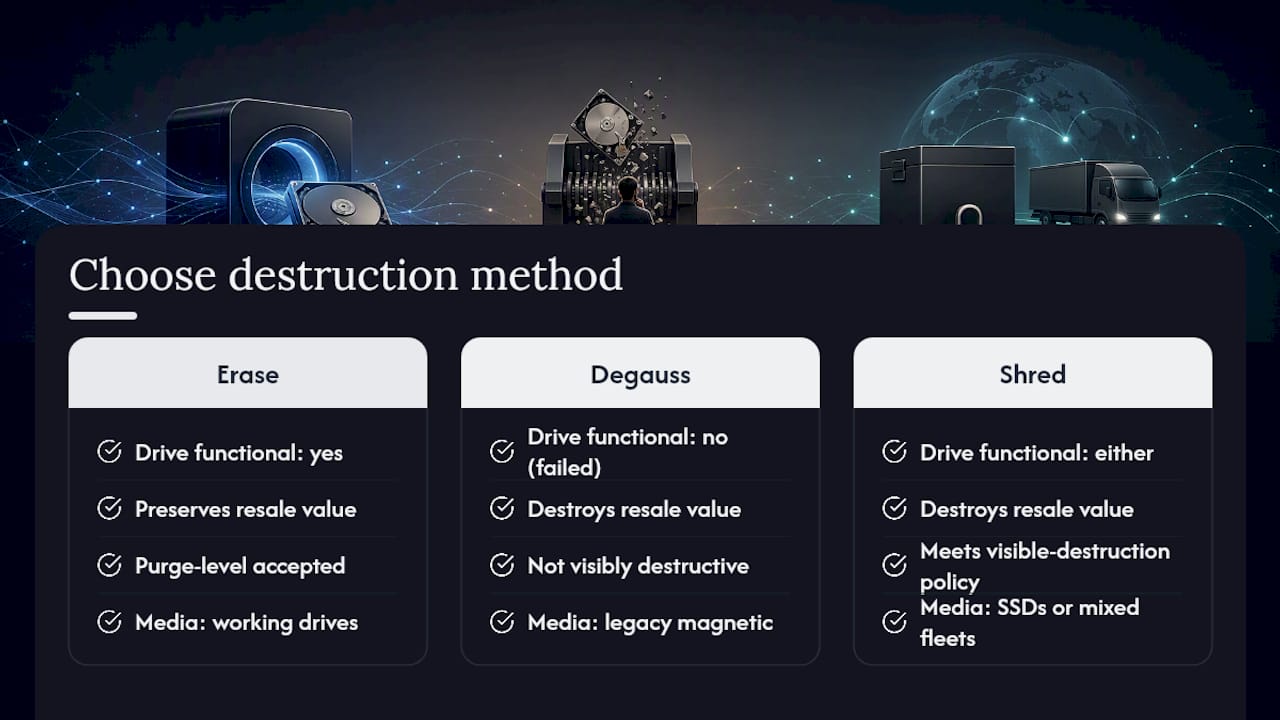
A blended program beats defaulting to any single method: erase drives that still function, degauss failed or legacy magnetic media, and shred whenever policy demands visible destruction or the media type simply won’t respond to a magnetic field.
What Years of Handling E-Waste Teach You About Degaussing
The mistakes are almost always the same three: buying a degausser rated for yesterday’s drive coercivity, running SSDs through equipment that can’t touch them, and skipping verification because the drive “looked” wiped. A certified provider builds intake sorting and gaussmeter checks into the workflow by default, which is exactly the layer most in-house programs cut first when budgets tighten.
— Keith
Secure Degaussing and Certified Recycling Through Usedcartridge
Usedcartridge runs degaussing as one piece of a documented chain of custody, not a standalone step you have to verify yourself. That’s the practical difference: instead of buying equipment, calibrating a gaussmeter, and building your own audit trail, you get on-site or off-site degaussing, post-treatment verification, and a certificate of destruction for every batch handled.

For mixed fleets carrying both aging HDDs and current SSDs, that matters even more, since misclassifying media is the fastest way to fail an audit. Usedcartridge sorts, treats, and routes each device through the correct method, then moves the dead units into responsible e-waste recycling so nothing sits in a warehouse corner as a compliance liability. If you’re planning a destruction cycle for retired equipment, request a quote and get the paperwork built in from the start.
Standards and Guidance Worth Bookmarking
Anyone building or auditing a degaussing program should keep these on hand:
- NIST SP 800-88r2, the federal baseline for sanitization categories and purge-level requirements
- NSA guidance on evaluated degaussers for classified or high-security media
- Industry explainers like Disposition Compliance’s degaussing breakdown and CLR Solutions’ practitioner guide for real-world equipment pitfalls
If your assets include classified media, check equipment against the current EPL before you buy or contract a vendor.
Sources
- Guidelines for Media Sanitization (NIST SP 800-88r2)
- NSA: Magnetic degaussers (EPL / guidance)
- What Is Degaussing: How Magnetic Erasure Works and When to Use It – Disposition Compliance