
Most people know they shouldn’t throw old electronics in the trash, but keyboards, mice, cables, and other peripherals get tossed every day because no one is sure what else to do with them. Learning how to recycle peripherals properly protects more than the environment. It also shields you from data exposure risks and potential regulatory violations. This guide walks you through every step: what to prepare, how to sanitize data, how to find certified recyclers, and what to expect once your devices are handed off.
Table of Contents
- Key takeaways
- How to recycle peripherals: what to know first
- Step-by-step peripheral recycling process
- Common mistakes when disposing of peripherals
- What to expect after recycling
- My honest take on peripheral recycling
- Get professional help with secure peripheral recycling
- FAQ
Key takeaways
| Point | Details |
|---|---|
| Remove batteries first | Always pull lithium-ion batteries before drop-off; they require a separate recycling path. |
| Sanitize storage media | Use NIST-guided techniques to make data on any peripheral storage completely unrecoverable. |
| Choose certified recyclers | Only work with R2 or e-Stewards certified vendors to guarantee environmentally sound handling. |
| Sort before you ship | Pre-sort devices into batteries, storage media, and other components to avoid recycling failures. |
| Get documentation | Request a certificate of recycling or destruction from your vendor for compliance and peace of mind. |
How to recycle peripherals: what to know first
Before you box anything up, you need a clear picture of what you actually have. Peripherals cover a wider range than most people realize: keyboards, mice, USB hubs, webcams, external hard drives, headsets, cables, docking stations, and even older trackballs and joysticks. Each type has a different internal composition, and that matters for how it gets processed.
Understanding what’s inside your devices
Most peripherals contain printed circuit boards, copper wiring, and plastic housing. Many also contain batteries, and that’s where things get complicated. Wireless mice, Bluetooth keyboards, and USB headsets often have built-in lithium-ion cells. The EPA explicitly advises removing batteries from electronics before recycling because lithium-ion batteries require a completely separate disposal path. Tossing a battery-laden device into a general electronics bin creates fire risks and contaminates the recycling stream.
External hard drives and some USB drives contain storage media. That means they may hold personal files, login credentials, or corporate data even after you’ve deleted everything. Deletion does not equal sanitization.
What you need before you start
Use this reference table before gathering your peripherals:
| Preparation task | Why it matters | Tools or resources needed |
|---|---|---|
| Identify battery presence | Lithium-ion cells need separate handling | Device manual, visual inspection |
| Check for storage media | Drives may hold recoverable data | List of peripherals with storage capability |
| Research local regulations | Some states have specific e-waste laws | State EPA website, local waste authority |
| Find a certified recycler | Ensures compliant, documented disposal | EPA directory, R2/e-Stewards database |
| Gather proof of sanitization | Required documentation before drop-off | Sanitization software logs, destruction records |
- Review your state’s e-waste laws. States like California, New York, and Washington have electronics recycling programs with specific rules on what manufacturers and consumers must do.
- Call ahead to any drop-off location to confirm what they accept and whether appointments are required.
- Keep your devices in antistatic bags or original packaging to protect components during transport.
Pro Tip: If you’re unsure whether a peripheral has an internal battery, search the model number online before recycling it. Manufacturers list battery specs in product documentation, and this one step can save you from a rejected drop-off.
Step-by-step peripheral recycling process
Once you’ve inventoried your devices and checked local rules, the actual process breaks into four clear steps. Follow this sequence and you’ll cover both environmental and data security requirements.
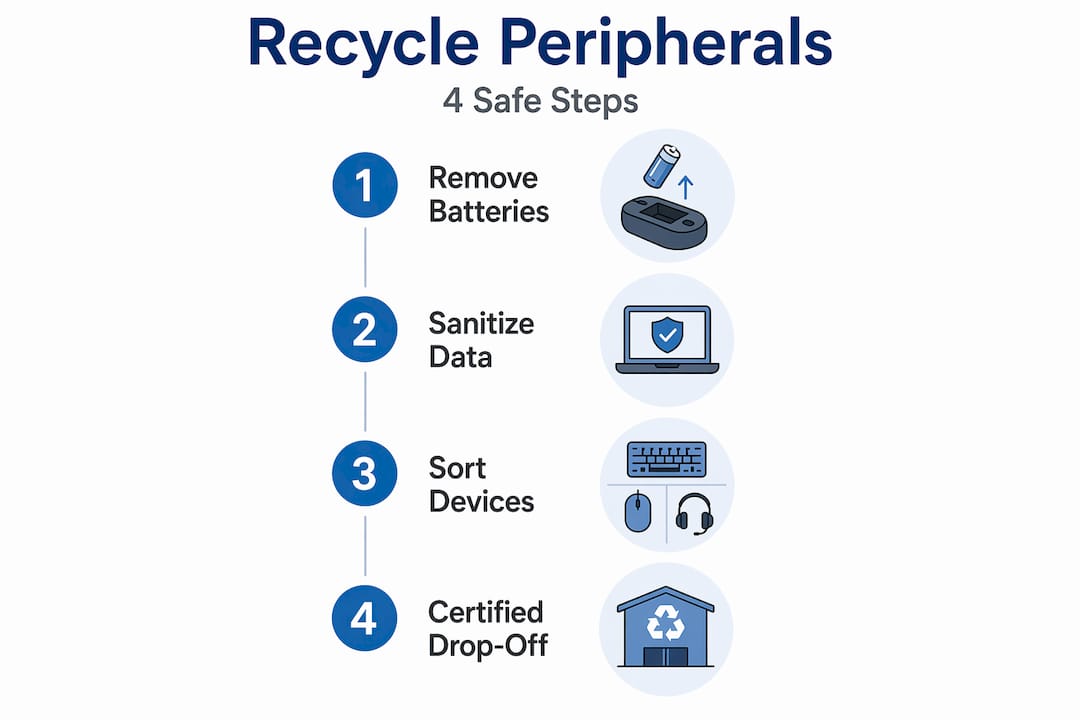
Step 1: Remove and sort batteries
Pull every removable battery out before anything else. For devices with non-removable lithium-ion cells (many wireless peripherals fall into this category), check whether your recycler handles integrated battery removal or whether you need a specialist. The EPA’s Battery Collection Best Practices Toolkit addresses the technical and safety considerations around collection, so it’s worth reviewing if you’re managing a larger volume of devices.

Step 2: Sanitize storage media
Any peripheral that stores data needs to be sanitized before it leaves your hands. NIST SP 800-88 Rev.2 provides the federal standard for media sanitization, defining techniques scaled to data sensitivity. A standard wipe works for low-sensitivity consumer data. For organizational or regulated data, physical destruction or cryptographic erasure may be required. Data sanitization documentation is not optional if you’re under HIPAA, GLBA, or any state privacy law.
Evidence of sanitization should be captured and stored before the device ever leaves your building or home. That means logs from sanitization software, or a written record of physical destruction.
Pro Tip: For external hard drives, a three-pass overwrite tool like DBAN or a DOD-standard erasure program is widely accepted for consumer purposes. For organizations dealing with sensitive data, physical shredding and a certified destruction certificate is the defensible choice.
Step 3: Sort peripherals by recycling stream
Sorting before drop-off prevents the most common recycling failures. Divide your devices into three groups: batteries (already removed), storage media devices, and everything else. This routing approach makes sure each material category reaches the right processing facility.
Step 4: Locate a certified program and arrange drop-off or pickup
Only use recyclers who hold recognized certifications. Here’s what the two major certifications mean in practice:
| Certification | Focus area | What it guarantees |
|---|---|---|
| R2 (Responsible Recycling) | Downstream accountability and worker safety | Tracks materials through entire recycling chain |
| e-Stewards | Environmental and data security standards | Prohibits export to developing countries, strict data destruction |
EPA model contract language specifically requires R2 or e-Stewards certification when organizations contract recycling services. That’s not just a suggestion: it’s the compliance baseline for any organization with vendor oversight obligations.
Note that recycling fees vary depending on labor and transport costs, so confirm pricing before your drop-off to avoid surprises. For a broader look at responsible computer recycling, the steps above apply equally to full systems and individual peripherals alike.
Common mistakes when disposing of peripherals
Even well-intentioned recyclers make avoidable errors. Here are the most frequent problems and how to fix them:
-
Throwing batteries in the trash. Lithium-ion batteries are a fire hazard in landfills and illegal to discard in many states. Always separate them and bring them to a designated battery collection point.
-
Skipping data sanitization on external drives. People assume deleted files are gone. They’re not. A basic file deletion leaves data fully recoverable. Run a verified wipe or arrange for physical destruction.
-
Using uncertified recyclers. Price shopping for the cheapest recycler often leads to devices being dumped overseas or shredded without proper handling. Certification is the only reliable proof of responsible recycling.
-
Not asking for documentation. Many recyclers provide certificates of recycling or destruction on request. Not asking for one leaves you without proof if questions arise later.
-
Ignoring unknown battery presence. Many wireless peripherals have non-removable batteries. If you’re not sure, disposing of keyboards responsibly and other wireless devices means checking the spec sheet before dropping them off.
-
Bundling everything together. Mixing batteries, storage media, and general peripherals in one box creates sorting failures at the facility. Pre-sorting takes minutes and prevents weeks of complications.
Pro Tip: When evaluating a recycler, ask them directly: “Can I see your current R2 or e-Stewards certificate?” A legitimate certified recycler will provide it immediately. Hesitation is a red flag.
What to expect after recycling
Handing off your devices is not the end of the process. Here’s what responsible follow-through looks like:
-
Request a certificate of recycling. Most certified recyclers issue these automatically or on request. The document confirms your devices were received and processed per applicable standards.
-
Request a certificate of data destruction for any peripheral containing storage media. This is your legal and compliance protection.
-
Track vendor performance over time. If you’re managing recycling for an organization, certified vendor partnerships with contractually required certifications create a defensible, auditable record. Build this into your IT asset disposition workflow.
-
Understand the environmental downstream. Certified recyclers recover metals like copper, gold, and rare earth elements from circuit boards. Responsible recycling for resource recovery directly reduces mining demand.
-
Consider donating working peripherals. If a keyboard, mouse, or webcam still functions, donating computer accessories to schools, nonprofits, or community programs extends the device’s life and keeps it out of the waste stream entirely. The EPA’s electronics donation resources list verified donation programs.
The broader picture matters too. Recycling old electronics, when done correctly, prevents toxic materials like lead and cadmium from leaching into groundwater. Every device processed properly is one less source of long-term contamination.
My honest take on peripheral recycling
I’ve worked in and around electronic waste management long enough to know what actually trips people up, and it’s rarely what the guides focus on. Everyone talks about finding a recycler. The harder part is the preparation you do before you ever leave the building.
Battery management is where I see the most consistent failures. People don’t think of a Bluetooth mouse as a battery-hazard item. But pull apart enough wireless peripherals and you’ll find swollen lithium cells that have no business being tossed in a cardboard box with a stack of old cables. The EPA’s guidance on battery handling is correct, but it doesn’t fully capture how often people simply don’t know the battery is there.
The data sanitization piece is the one that concerns me most for organizations. I’ve seen firsthand what happens when a device gets recycled without a proper wipe. The attitude tends to be “it’s just a keyboard” until someone discovers that keyboard had a built-in USB port that was used to store files. Effective data sanitization requires programs matched to data sensitivity, not a one-size-fits-all approach.
My practical advice: treat peripheral recycling as part of your data security program, not your facilities program. The moment you frame it that way, the documentation, the certified vendors, and the sanitization logs start feeling less like paperwork and more like protection. That shift in thinking is what separates organizations that handle this well from the ones that end up with a compliance problem six months after a device left the building.
— Keith
Get professional help with secure peripheral recycling
You now have the knowledge to handle peripheral recycling the right way. But knowledge and capacity are two different things. When you’re managing dozens or hundreds of devices, doing this well requires certified partners, documented workflows, and audit-ready records.

Usedcartridge provides professional e-waste recycling services built around EPA compliance and certified data destruction. Whether you need a one-time pickup for end-of-life peripherals or an ongoing IT asset recovery program, the process is built to protect you at every step. Usedcartridge works with R2 and e-Stewards certified partners, provides certificates of recycling and destruction, and offers free quotes so you know exactly what to expect before anything is collected. For organizations managing sensitive data or high volumes of outdated equipment, explore the IT asset recovery options to see how a structured program reduces risk and recovers value from retired tech.
FAQ
What peripherals can be recycled?
Most peripherals, including keyboards, mice, cables, webcams, headsets, and external drives, are recyclable through certified e-waste programs. Call ahead to confirm specific items are accepted at your chosen facility.
Do I need to wipe a keyboard or mouse before recycling?
Standard keyboards and mice without storage media don’t require data wiping. External drives and USB devices with storage capability should be sanitized using NIST SP 800-88 guidelines before recycling.
How do I find a certified electronics recycler near me?
Search the R2 or e-Stewards certification databases online, or use the EPA’s electronics recycling locator. Certified recyclers provide documentation and follow auditable environmental standards.
Can I donate peripherals instead of recycling them?
Yes. Donating computer accessories that still function is preferable to recycling them. Schools, libraries, and nonprofits often accept working keyboards, mice, and cables, which extends device life and reduces e-waste.
Are there fees for recycling peripherals?
Some certified programs charge fees to cover labor and transport costs. Fees vary by location and device type, so confirm pricing before your drop-off to avoid unexpected charges.