
Sanitize to Purge standard, document every serial number, and transfer devices with a signed chain-of-custody manifest. That is the short answer. Businesses that skip any of those three steps risk data exposure, audit failures, and regulatory liability under HIPAA, FERPA, and GLBA. Before scheduling a pickup, run through this checklist:
- Stage devices in a locked area and suspend all user accounts and MDM profiles.
- Inventory every asset: serial number, make, model, storage media type, and condition.
- Classify media sensitivity and select the appropriate sanitization method per NIST SP 800-88 and IEEE 2883-2022.
- Remove lithium-ion batteries and flag any hazardous components before transport.
- Schedule pickup with a certified ITAD or donation partner and confirm they issue serial-number-level Certificates of Data Destruction.
Table of Contents
- How to donate used computers securely: the step-by-step process
- Which data-destruction method is right for your devices?
- How to vet donation recipients and ITAD partners
- What chain-of-custody documentation actually needs to include
- Lithium-ion batteries and hazardous components: what the law requires
- When should you donate, refurbish, resell, or destroy?
- How Usedcartridge supports secure, compliant device disposition
- Key Takeaways
- Why donation deserves the same rigor as regulated disposal
- Usedcartridge: certified pickup and destruction for U.S. businesses
- Useful sources for compliance and procurement language
How to donate used computers securely: the step-by-step process
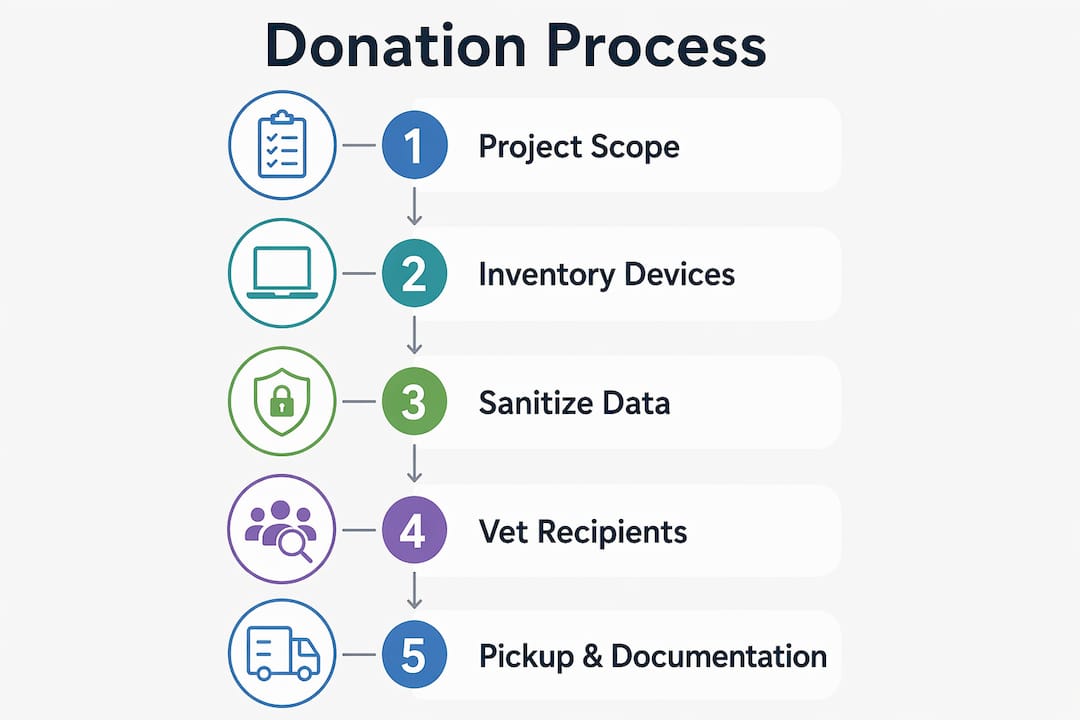
The sequence below applies to any business-grade disposition. Timeline estimates assume a single-site project with no complicating factors like remote devices or legacy encryption.
| Phase | Key actions | Typical timeline |
|---|---|---|
| Project scoping | Define scope, assign owner, confirm recipient/ITAD certifications | 1–3 days |
| Inventory and backup | Scan serial numbers, document media type, back up any retained data | 1–5 days (scales with volume) |
| Account deauthorization | Remove MDM, clear Apple Activation Lock / Google FRP / Microsoft Autopilot | 1–2 days |
| Sanitization | Purge-level cryptographic erase or firmware purge; physical destruction for high-risk | 1–3 days |
| Staging and pickup | Palletize, label, sign collection manifest, transfer custody | 1 day |
| Certificate issuance | Receive serial-number-level CoDs and ESG impact report | 3–10 business days post-pickup |
Small fleets (under 100 devices): the full cycle typically runs 5–10 business days. Medium fleets (100–1,000 devices): plan 2–4 weeks. Large fleets (1,000+ devices): 4–8 weeks, often requiring on-site technicians.
Cost line items to budget: labor for physical inventory, sanitization method (software purge is cheaper than on-site shredding), pickup and logistics, and certificate generation. On-site physical destruction carries a premium but eliminates off-site chain-of-custody risk entirely.
Pro Tip: Check Activation Lock and FRP status during inventory, not at pickup. A locked device that cannot be cleared on-site often has to be destroyed rather than refurbished, which wastes both the asset and the donation opportunity.

Which data-destruction method is right for your devices?
NIST SP 800-88r2 defines three sanitization categories: Clear, Purge, and Destruct. For any device leaving organizational control, Purge is the minimum baseline. Clear (standard overwrite or factory reset) is acceptable only for internal reuse where the device stays within your custody.
| Method | NIST/IEEE definition | Applies to | Minimum for donation? |
|---|---|---|---|
| Clear | Logical overwrite; data recoverable with lab tools | Internal reuse only | No |
| Purge (Cryptographic Erase) | Destroys encryption keys; renders data unrecoverable | SSDs, NVMe, self-encrypting drives | Yes |
| Purge (Firmware Purge) | Vendor-issued secure erase command | HDDs, some SSDs | Yes |
| Destruct | Physical shredding or disintegration | High-risk, end-of-life, or locked devices | Required for high-risk |
A critical point on SSDs and NVMe drives: ATA Secure Erase is downgraded to Clear status under IEEE 2883-2022, meaning it no longer qualifies as Purge for externally disposed assets. Cryptographic Erase is the correct method for flash-based media. Simply deleting files or running a factory reset leaves recoverable data on most drives.
For low-sensitivity assets (general office laptops, no regulated data), Purge-level cryptographic erase with a serial-number Certificate of Data Destruction is sufficient. Medium-sensitivity assets (HR systems, financial records) warrant a firmware purge plus witnessed verification. High-sensitivity assets (PHI, classified, or legally privileged data) should go to on-site physical destruction with a signed manifest and technician ID.
How to vet donation recipients and ITAD partners
Not every organization that accepts computers handles data destruction properly. Before transferring a single device, ask these questions:
- What certifications do you hold? Look for NAID AAA, R2 (Responsible Recycling), or e-Stewards. These are audited, not self-declared.
- What sanitization method do you use, and can you show the written procedure?
- Do you offer on-site destruction for high-risk assets?
- What insurance do you carry for data breaches during transit?
- Do you provide serial-number-level CoDs and ESG impact reports?
Request these documents before signing anything: proof of nonprofit status (for IRS Form 8283 tax receipts), a sample Certificate of Data Destruction showing serial number and method, a chain-of-custody manifest template, and background-check policies for technicians who handle your devices.
Red flags that should stop the conversation: vague destruction statements with no device-level detail, batch-level certificates only, refusal to disclose sanitization methods, no GPS or digital pickup tracking, and cash-for-assets-only offers with no documentation.
For larger business dispositions, certified ITAD partners provide the audit-ready serial-level documentation that retail drop-off programs simply cannot match.
What chain-of-custody documentation actually needs to include
A signed collection manifest is not a receipt. It is a legal transfer of custody, and it needs to hold up in an audit.
| Document | Required fields |
|---|---|
| Asset inventory | Serial number, make/model, storage media type, condition, asset tag, removable media noted |
| Collection manifest | Technician name and ID, pickup date/time, device count, GPS log or location stamp, donor signature |
| Certificate of Data Destruction | Serial number, sanitization method (exact IEEE 2883-2022 designation), technician digital ID, date |
| Tax documentation | Donation receipt with itemized descriptions, FMV documentation, Form 8283 copy (if applicable) |
Time-stamped scans at pickup, GPS logs, and technician identity records are what auditors expect for business-grade dispositions. A batch-level destruction statement tied to a manifest number, with no device-level evidence, will not satisfy a HIPAA or FERBA compliance review. Keep all records for a minimum of three years, or longer if your sector requires it.
Lithium-ion batteries and hazardous components: what the law requires
Lithium-ion batteries cannot go into standard recycling streams or household waste per EPA guidance. That applies to batteries still inside devices as well as loose cells.
Separate lithium-ion batteries from devices before staging for pickup. Store them in a cool, dry area in sealed, non-conductive containers, clearly labeled as lithium batteries. Never stack or compress swollen cells. Mark the manifest to indicate battery separation, and route batteries to a dedicated laptop battery recycling program rather than including them with general e-waste.
Other components to segregate: mercury-containing lamps (older LCD backlights), loose storage media (HDDs, SSDs, USB drives), and any devices with visible physical damage that could indicate a compromised battery. Check your state’s hazardous waste rules, which often go further than federal EPA minimums.
Pro Tip: Label the staging area clearly and brief anyone handling devices on battery-swelling signs. A puffed cell is a fire risk, not just a disposal problem.
When should you donate, refurbish, resell, or destroy?
Donation is not always the right answer. Run through these factors before committing to a path:
- Donate when the device is functional, relatively recent, free of regulated data, MDM-unlocked, and the recipient has verified sanitization capability.
- Refurbish or resell when residual market value justifies the effort and data sensitivity is low. A certified ITAD can assess value and handle sanitization in the same workflow.
- Recycle when the device is end-of-life, has no resale value, or contains components that disqualify it from donation (failed drives, broken screens, non-functional batteries).
- Destroy when the device held high-risk data, carries an unremovable MDM lock, or cannot be reliably sanitized due to hardware failure.
MDM and activation locks are the most common reason a donation candidate becomes a destruction candidate. Clearing them during inventory, not at the loading dock, is what keeps the donation path open. For devices with genuine residual value, the environmental and financial case for refurbishment beats both recycling and destruction.
How Usedcartridge supports secure, compliant device disposition
Usedcartridge provides on-site and off-site Purge-level sanitization, device-level Certificates of Data Destruction, signed chain-of-custody manifests, and GPS-tracked pickups for U.S. businesses. Every disposition includes an ESG impact report suitable for Scope 3 reporting, which procurement and sustainability teams increasingly require. For organizations subject to HIPAA, FERPA, or GLBA, the serial-number-level CoDs and documented technician verification reduce audit exposure directly. Request a quote or schedule a secure pickup through the IT asset recovery disposition page.
Key Takeaways
Purge-level sanitization, serial-number Certificates of Data Destruction, and a signed chain-of-custody manifest are the three non-negotiable requirements for any business donating used computers.
| Point | Details |
|---|---|
| Purge is the minimum standard | Cryptographic Erase or Firmware Purge per NIST SP 800-88r2 and IEEE 2883-2022 is required for all externally disposed devices. |
| Serial-number CoDs are mandatory | Batch-level certificates do not satisfy HIPAA, FERPA, or GLBA auditors; every device needs its own destruction record. |
| Clear MDM locks before pickup | Apple Activation Lock, Google FRP, and Microsoft Autopilot locks force destruction if not removed during inventory. |
| Batteries require separate handling | Lithium-ion batteries must be removed, stored safely, and routed to a dedicated recycling program per EPA guidance. |
| Usedcartridge covers the full process | On-site Purge-level sanitization, GPS-tracked pickups, serial-number CoDs, and ESG reports in one certified workflow. |
Why donation deserves the same rigor as regulated disposal
Most organizations treat computer donations as a goodwill gesture, something handled at the end of a refresh cycle with minimal documentation. That framing is the source of most data-breach liability in IT asset disposition. A donated laptop with an inadequate factory reset carries the same exposure as a discarded one. The difference is that a donation feels benign, so the controls get skipped.
The audit risk is real. A HIPAA breach investigation does not care whether the device was donated or dumped. What the investigator looks for is evidence: a serial-number-level Certificate of Data Destruction, a signed manifest, and a documented chain of custody. Without those, the organization cannot prove sanitization occurred. Documented Purge-level sanitization and serial-number CoDs are not bureaucratic overhead. They are the only evidence that stands up when something goes wrong.
Usedcartridge: certified pickup and destruction for U.S. businesses
When your next device refresh creates a stack of laptops, desktops, or mixed IT equipment, the gap between a goodwill drop-off and a defensible disposition is documentation. Usedcartridge closes that gap with on-site Purge-level data destruction, serial-number Certificates of Data Destruction, GPS-tracked pickups, and ESG impact reports built for Scope 3 compliance.

Every pickup includes a signed chain-of-custody manifest and device-level CoDs your compliance team can file directly. For organizations managing HIPAA, FERPA, or GLBA obligations, that paper trail is the difference between a clean audit and an incident report. Request a secure pickup or get a quote for your next IT asset disposition today.
Useful sources for compliance and procurement language
- NIST SP 800-88r2 — the federal sanitization standard defining Clear, Purge, and Destruct; use this language in vendor contracts and RFPs.
- IEEE 2883-2022 — the current technical standard for storage media sanitization; specifies that ATA Secure Erase is now a Clear-level method, not Purge.
- EPA Electronics Donation and Recycling guidance — authoritative source for battery handling rules and responsible recycling pathways.
- IRS Form 8283 guidance — required for non-cash charitable contributions above $500; businesses donating computers need itemized receipts and fair-market-value documentation to support deductions.
- FTC guidance on removing personal information — consumer-facing but useful for policy language on data removal obligations before any device transfer.