
That is the short answer. Businesses that skip any of those three steps risk data exposure, audit failures, and regulatory liability under HIPAA, FERPA, and GLBA. Before scheduling a pickup, run through this checklist:
- Stage devices in a locked area and suspend all user accounts and MDM profiles.
- Inventory every asset: serial number, make, model, storage media type, and condition.
- Remove lithium-ion batteries and flag any hazardous components before transport.
- Schedule pickup with a compliant ITAD or donation partner and confirm they issue serial-number-level Certificates of Data Destruction.
Table of Contents
- How to donate used computers securely: the step-by-step process
- Which data-destruction method is right for your devices?
- How to vet donation recipients and ITAD partners
- Lithium-ion batteries and hazardous components: what the law requires
- When should you donate, refurbish, resell, or destroy?
- How Recycle for Life supports secure, compliant device disposition
- Key Takeaways
- Why donation deserves the same rigor as regulated disposal
- Recycle for Life: compliant pickup and destruction for U.S. businesses
- Useful sources for compliance and procurement language
How to donate used computers securely: the step-by-step process
The sequence below applies to any business-grade disposition. Timeline estimates assume a single-site project with no complicating factors like remote devices or legacy encryption.
| Phase | Key actions | Typical timeline |
|---|---|---|
| Project scoping | Define scope, assign owner, confirm recipient/ITAD certifications | 1–3 days |
| Inventory and backup | Scan serial numbers, document media type, back up any retained data | 1–5 days (scales with volume) |
| Account deauthorization | Remove MDM, clear Apple Activation Lock / Google FRP / Microsoft Autopilot | 1–2 days |
| Sanitization | — | 1–3 days |
| Staging and pickup | — | 1 day |
| Certificate issuance | Receive serial-number-level CoDs and ESG impact report | 3–10 business days post-pickup |
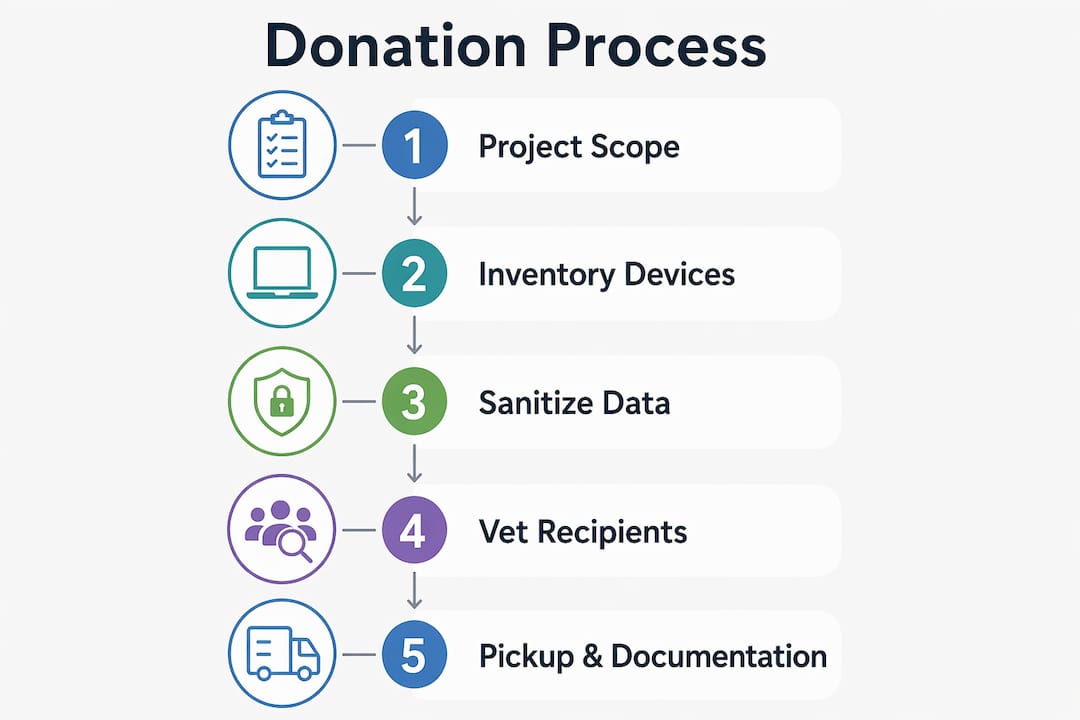
Small fleets (under 100 devices): the full cycle typically runs 5–10 business days. Medium fleets (100–1,000 devices): plan 2–4 weeks. Large fleets (1,000+ devices): 4–8 weeks, often requiring on-site technicians.
Cost line items to budget: labor for physical inventory, sanitization method (software purge is cheaper than on-site destruction), pickup and logistics, and certificate generation.
Pro Tip: Check Activation Lock and FRP status during inventory, not at pickup. A locked device that cannot be cleared on-site often has to be destroyed rather than refurbished, which wastes both the asset and the donation opportunity.

Which data-destruction method is right for your devices?
For any device leaving organizational control, Purge is the minimum baseline. Clear (standard overwrite or factory reset) is acceptable only for internal reuse where the device stays within your custody.
A critical point on SSDs and NVMe drives: ATA Secure Erase is downgraded to Clear status under IEEE 2883-2022, meaning it no longer qualifies as Purge for externally disposed assets. Simply deleting files or running a factory reset leaves recoverable data on most drives.
Medium-sensitivity assets (HR systems, financial records) warrant a firmware purge plus witnessed verification.
How to vet donation recipients and ITAD partners
Not every organization that accepts computers handles data destruction properly. Before transferring a single device, ask these questions:
- What certifications do you hold? Look for an EPA ID number and state regulatory oversight. These are audited, not self-declared.
- What sanitization method do you use, and can you show the written procedure?
- Do you offer on-site destruction for high-risk assets?
- What insurance do you carry for data breaches during transit?
- Do you provide serial-number-level CoDs and ESG impact reports?
Red flags that should stop the conversation: vague destruction statements with no device-level detail, batch-level certificates only, refusal to disclose sanitization methods, no GPS or digital pickup tracking, and cash-for-assets-only offers with no documentation.
For larger business dispositions, compliant ITAD partners provide the audit-ready serial-level documentation that retail drop-off programs simply cannot match.
What documentation actually needs to include
It is a legal transfer of custody, and it needs to hold up in an audit.
| Document | Required fields |
|---|---|
| Asset inventory | Serial number, make/model, storage media type, condition, asset tag, removable media noted |
| — | Technician name and ID, pickup date/time, device count, GPS log or location stamp, donor signature |
| Certificate of Data Destruction | Serial number, sanitization method (exact IEEE 2883-2022 designation), technician digital ID, date |
| Tax documentation | Donation receipt with itemized descriptions, FMV documentation, Form 8283 copy (if applicable) |
Time-stamped scans at pickup, GPS logs, and technician identity records are what auditors expect for business-grade dispositions. Keep all records for a minimum of three years, or longer if your sector requires it.
Lithium-ion batteries and hazardous components: what the law requires
Lithium-ion batteries cannot go into standard recycling streams or household waste per EPA guidance. That applies to batteries still inside devices as well as loose cells.
Separate lithium-ion batteries from devices before staging for pickup. Store them in a cool, dry area in sealed, non-conductive containers, clearly labeled as lithium batteries. Never stack or compress swollen cells.
Other components to segregate: mercury-containing lamps (older LCD backlights), loose storage media (HDDs, SSDs, USB drives), and any devices with visible physical damage that could indicate a compromised battery. Check your state’s hazardous waste rules, which often go further than federal EPA minimums.
Pro Tip: Label the staging area clearly and brief anyone handling devices on battery-swelling signs. A puffed cell is a fire risk, not just a disposal problem.
When should you donate, refurbish, resell, or destroy?
Donation is not always the right answer. Run through these factors before committing to a path:
- Donate when the device is functional, relatively recent, free of regulated data, MDM-unlocked, and the recipient has verified sanitization capability.
- Refurbish or resell when residual market value justifies the effort and data sensitivity is low. A compliant ITAD can assess value and handle sanitization in the same workflow.
- Recycle when the device is end-of-life, has no resale value, or contains components that disqualify it from donation (failed drives, broken screens, non-functional batteries).
- Destroy when the device held high-risk data, carries an unremovable MDM lock, or cannot be reliably sanitized due to hardware failure.
MDM and activation locks are the most common reason a donation candidate becomes a destruction candidate. Clearing them during inventory, not at the loading dock, is what keeps the donation path open. For devices with genuine residual value, the environmental and financial case for refurbishment beats both recycling and destruction.
How Recycle for Life supports secure, compliant device disposition
Recycle for Life provides on-site and off-site data destruction with Certificates of Data Destruction and free pickup for businesses from San Diego County to Los Angeles County. For organizations subject to HIPAA, FERPA, or GLBA, the serial-number-level CoDs and documented technician verification reduce audit exposure directly. Request a quote or schedule a secure pickup through the IT asset recovery disposition page.
Key Takeaways
| Point | Details |
|---|---|
| Purge is the minimum standard | — |
| Serial-number CoDs are mandatory | Batch-level certificates do not satisfy HIPAA, FERPA, or GLBA auditors; every device needs its own destruction record. |
| Clear MDM locks before pickup | Apple Activation Lock, Google FRP, and Microsoft Autopilot locks force destruction if not removed during inventory. |
| Batteries require separate handling | Lithium-ion batteries must be removed, stored safely, and routed to a dedicated recycling program per EPA guidance. |
| Recycle for Life covers the full process | On-site Purge-level sanitization, GPS-tracked pickups, serial-number CoDs, and ESG reports in one compliant workflow. |
Why donation deserves the same rigor as regulated disposal
Most organizations treat computer donations as a goodwill gesture, something handled at the end of a refresh cycle with minimal documentation. That framing is the source of most data-breach liability in IT asset disposition. A donated laptop with an inadequate factory reset carries the same exposure as a discarded one. The difference is that a donation feels benign, so the controls get skipped.
The audit risk is real. A HIPAA breach investigation does not care whether the device was donated or dumped. Without those, the organization cannot prove sanitization occurred. Documented Purge-level sanitization and serial-number CoDs are not bureaucratic overhead. They are the only evidence that stands up when something goes wrong.
Recycle for Life: compliant pickup and destruction for U.S. businesses
When your next device refresh creates a stack of laptops, desktops, or mixed IT equipment, the gap between a goodwill drop-off and a defensible disposition is documentation. Recycle for Life closes that gap with on-site data destruction and Certificates of Data Destruction; we recommend recording your drives' serial numbers and sending them to us.
For organizations managing HIPAA, FERPA, or GLBA obligations, that paper trail is the difference between a clean audit and an incident report. Request a secure pickup or get a quote for your next IT asset disposition today.
Useful sources for compliance and procurement language
- IEEE 2883-2022 — the current technical standard for storage media sanitization; specifies that ATA Secure Erase is now a Clear-level method, not Purge.
- EPA Electronics Donation and Recycling guidance — authoritative source for battery handling rules and responsible recycling pathways.
- IRS Form 8283 guidance — required for non-cash charitable contributions above $500; businesses donating computers need itemized receipts and fair-market-value documentation to support deductions.
- FTC guidance on removing personal information — consumer-facing but useful for policy language on data removal obligations before any device transfer.