
Lake Forest business hard drive destruction is the planned destruction of retired storage devices to prevent reuse and close out equipment records. Start with a pickup request, tell us which drives need destruction, and keep the Certificate of Recycling distinct from the certificate of destruction.
Need drives destroyed? See our hard drive destruction service in Orange County, Los Angeles and San Diego: free for 50 or more drives, on-site destruction you can watch on request, and a signed Certificate of Destruction.
- Send us your equipment list and address, and we will schedule your pickup.
- Recycle for Life suits business teams seeking electronics pickup and hard drive destruction.
- Pickup is free for businesses, and hard drive destruction is free for 50 or more drives; smaller destruction jobs are quoted.
- Expect a Certificate of Recycling within 3 days of pickup and certificates of destruction for arranged destruction services.
Why hard drive destruction matters for Lake Forest businesses
A drive retirement involves more than clearing a storage room. Office managers need equipment removed, IT managers need a defined data-handling process, and property managers need permission before releasing tenant-owned devices. Those responsibilities belong in the same plan, but they are not interchangeable.
Recycle for Life offers free business electronics pickup, a Certificate of Recycling within 3 days, and certificates of destruction for arranged destruction services. Recycle for Life serves businesses throughout Lake Forest, as part of a service area that runs from San Diego County to Los Angeles County. Confirm your Lake Forest address, equipment, and requested destruction service before booking. You can contact the team with an inventory and access details rather than assuming nearby service coverage.
For your 2026 retirement plan, separate these decisions: what leaves the building, what requires destruction, and what evidence closes the job. A pickup appointment answers only the first question unless the other work is explicitly arranged.
Prepare a business destruction request in 6 steps
1. List the equipment and identify its owner
Start with a spreadsheet or your existing asset register. Record the equipment you actually have, not the equipment shown on an old purchase order. A desktop computer, a removed hard drive, and a storage device inside a server require different descriptions when you request service.
Use 3 tracking fields at minimum: asset identifier, storage type, and owner. Add serial numbers where readable. This gives the office manager a workable list without requiring a new tracking system.
Property managers should identify which tenant owns each batch. Equipment left in a shared room is not automatically authorized for recycling or destruction. Keep disputed or unidentified devices out of the release batch until the responsible owner provides instructions.
Close this step with a list someone else can verify:
- Record complete computers separately from loose drives.
- Identify hard disk drives and solid-state drives where known.
- Assign each batch to a business or tenant.
- Flag unreadable labels instead of guessing serial numbers.
- Mark equipment that must remain onsite pending approval.
2. Approve the data decision before releasing devices
Ask the internal data owner what must be retained before destruction. Check that required files have been transferred and that someone has verified access to them. Do not treat an employee's departure or an office move as automatic approval to destroy business records.
Deleting files is not the same as destroying a drive. File deletion changes how the device presents stored information; physical destruction is a separate process intended to make the storage medium unusable. The requested method must suit the actual media, including solid-state storage.
Your 2026 approval record should identify who authorized the work and which devices the approval covers. A short written sign-off is easier to reconcile than a conversation remembered differently after pickup.
Before you release the batch:
- Confirm the business no longer needs the devices.
- Verify access to required retained files.
- Check for legal holds or internal retention requirements.
- Identify devices requiring physical destruction.
- Record the approver and approved equipment list.
3. Agree on the service scope
Send the inventory, pickup address, and access information in one request. Include whether the devices are loose drives or still installed in computers. Describe stairs, loading restrictions, building access procedures, and any required coordination with a tenant or facilities manager.
Recycle for Life's hard drive destruction suits business teams that want free pickup and a Certificate of Destruction; destruction is free for 50 or more drives. The practical benefit is access to both business electronics recycling and destruction services; the limitation is that pickup alone does not establish a destruction agreement.
Ask whether the requested destruction can happen onsite at your location. Do not assume the available process from a general service description. Keep the approved scope attached to the inventory so the person handling release knows exactly what was arranged.
Include these questions in your request:
- Does Recycle for Life pick up from Lake Forest?
- Which equipment can be picked up?
- Is onsite destruction available for this batch?
- What destruction method applies to each storage type?
- What authorization and documentation are required?
4. Stage the batch without losing control of it
Use a controlled storage area and a simple release checklist. Keep approved equipment together, but separate drives awaiting destruction from electronics that only require recycling. Do not leave sensitive devices unattended in a public lobby while waiting for collection.
For multi-tenant buildings, label batches by tenant and keep each authorization with its matching inventory. A building-wide collection can simplify coordination, but it should not merge ownership records. The person releasing equipment needs to know which items are approved and which remain on hold.
If an office lease is ending, plan the equipment handoff alongside building access and move-out responsibilities. The guide to business electronics recycling before an office lease ends addresses that coordination without turning the move-out deadline into permission to release unapproved devices.
Prepare the collection area deliberately:
- Separate approved devices from items on hold.
- Keep tenant batches visibly distinct.
- Match labels to the inventory before collection.
- Restrict access to devices containing business data.
- Assign a named employee to handle release.
5. Document the handoff and the destruction arrangement
Use a paper checklist or shared document to compare the released batch against the approved inventory. Resolve differences before devices leave your control. If the actual batch includes extra drives, do not silently fold them into an earlier authorization.
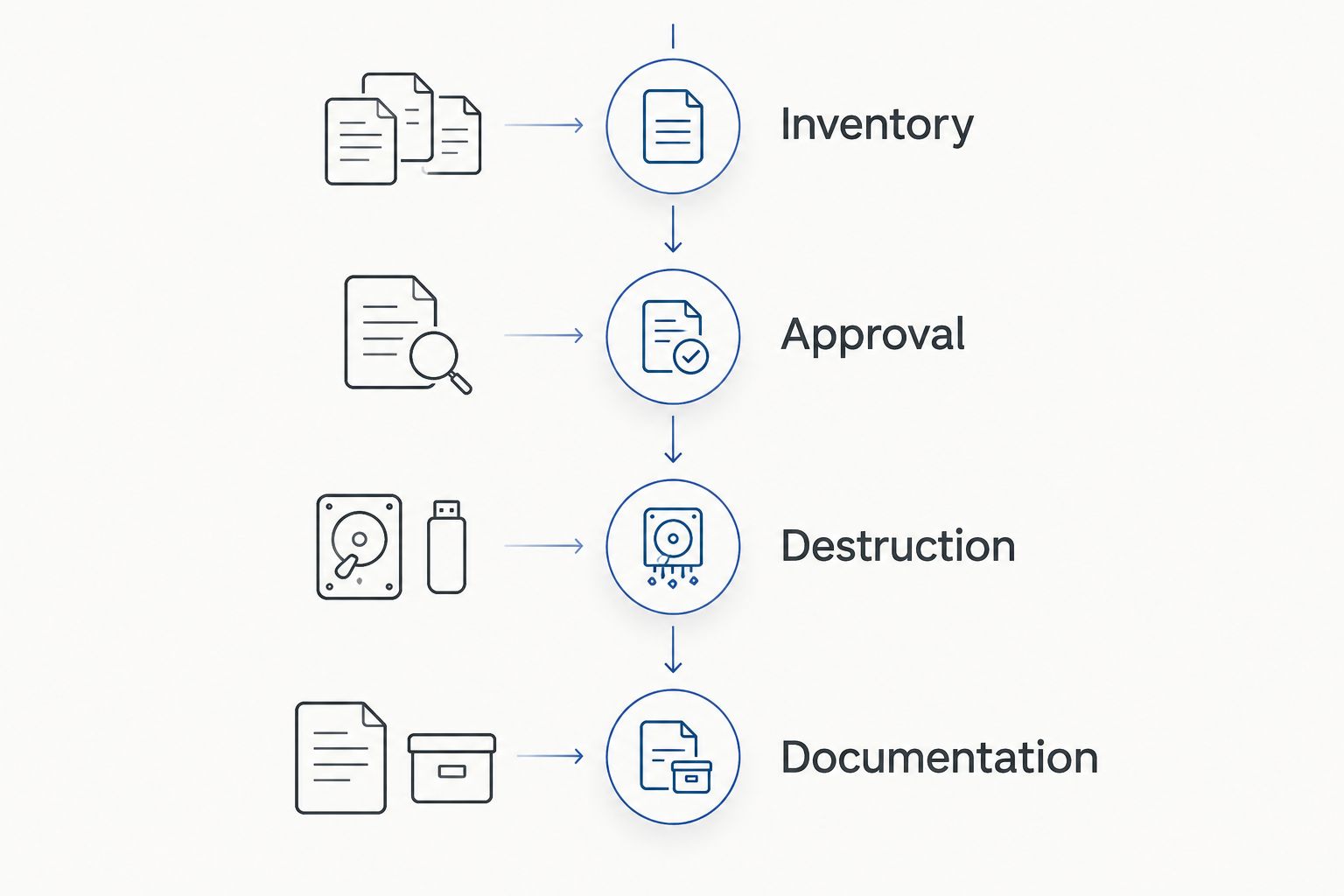
For your 2026 job file, maintain a clear sequence: Inventory, Approval, Destruction, and Documentation. These are separate checkpoints, not different names for pickup. The destruction checkpoint requires confirmation of the arranged work; the documentation checkpoint requires the appropriate records.
Recycle for Life provides a Certificate of Recycling within 3 days and certificates of destruction for arranged destruction services. The Certificate of Recycling lists computers, laptops and screens by the piece and other e-waste by weight. The Certificate of Destruction lists quantity, part number and description, with serial numbers attached when you supply your list before pickup.
At the handoff:
- Compare the released items with the approved list.
- Record exceptions before authorizing their release.
- Confirm who receives the Certificate of Recycling.
- Confirm the certificate requirements for arranged destruction.
- Retain the service confirmation with the inventory.
6. Reconcile the records and close the asset list
After collection, compare the Certificate of Recycling with your release record. For arranged destruction, obtain the certificate of destruction and check that it identifies the agreed work. Follow up on missing items or unclear descriptions instead of closing the batch because equipment has left the building.
Keep 2 document categories distinct: collection evidence and destruction evidence. A Certificate of Recycling supports the collection record. A certificate of destruction documents the destruction service described on it. Neither document should be read as proving activities it does not identify.
Healthcare offices need an additional internal review. When meeting HIPAA requirements is part of an equipment retirement, the organization's responsible staff should connect disposal arrangements with access controls, retention decisions, and required documentation. A recycling appointment alone does not establish that those obligations have been addressed.
Finish the retirement process with these checks:
- Match the Certificate of Recycling to the released equipment batch.
- Review the certificate for the arranged destruction work.
- Resolve differences with the service provider.
- Update the asset register after reconciliation.
- Store approvals and certificates together.
Compare the options for your business
Choose the service around the data decision, not just the removal task. A business clearing monitors and cables has a different scope from an IT team retiring storage devices containing company files.
For Lake Forest businesses planning work in 2026, the comparison below separates operational choices. It does not assume that every option is offered at every address or suits every storage device.
| Option | Best for | Main benefit | Key limitation |
|---|---|---|---|
| Business electronics pickup | Office managers clearing retired equipment | Coordinates removal from the business | Pickup alone does not confirm data destruction |
| Arranged onsite destruction | IT teams requiring destruction at their premises | Keeps the destruction location within the agreed site plan | Location, media, method, and documentation must be confirmed |
| Internal sanitization before recycling | Teams with an approved method and qualified staff | Lets the business manage its own data-removal process | Requires media-specific procedures and verification; deletion alone is insufficient |
| Tenant-coordinated collection | Property managers organizing several business batches | Brings building access and collection planning together | Each tenant still needs ownership, authorization, and separate records |
Internal sanitization means applying an appropriate process to make stored data inaccessible, then verifying the result. It is not simply emptying the recycle bin or reinstalling an operating system. If your team cannot establish and verify the required process, resolve that gap before release rather than recording the devices as sanitized.
For a business pickup request, provide the address, inventory, preferred destruction arrangement, and documentation needs together. That gives the provider a defined scope to confirm.
Plan your business equipment pickup
Common mistakes Lake Forest businesses make
Treating free pickup as free destruction
Free business pickup and arranged destruction are different service commitments. Ask what the requested job includes before approval. Do not describe a batch as scheduled for destruction unless destruction is part of the confirmed scope.
Releasing tenant equipment without authorization
A property manager can coordinate access without owning the devices. Obtain the tenant's release approval and identify the authorized contact. Shared loading areas make collection easier, but they do not replace ownership records.
Assuming a certificate covers an unlisted batch
A certificate needs to be reconciled with the work it describes. If the certificate cannot be matched to your released equipment, request clarification. Do not attach an unrelated certificate to an asset retirement simply to complete a folder.
Leaving security decisions until moving day
An approaching lease deadline does not resolve retention questions, unclear ownership, or devices still awaiting approval. Start the data decision before staging equipment. For a 2026 office move, assign the approval owner while the move plan is being prepared, not after the pickup window is set.
FAQ
Can Lake Forest businesses request hard drive destruction services?
Yes. Recycle for Life serves businesses throughout Lake Forest, as part of a service area that runs from San Diego County to Los Angeles County. Recycle for Life lists services for businesses from San Diego County to Los Angeles County.
Is business electronics pickup the same as hard drive destruction?
No. Business electronics pickup collects equipment, while hard drive destruction is a separate service that must be arranged. A Certificate of Recycling is not a certificate of destruction.
Does free business pickup include every destruction service?
No. Free business pickup does not establish that destruction is included. Confirm the destruction scope and its terms before authorizing the job.
Can someone destroy the drives at our office?
On-site data destruction is available on request, and you can watch it happen. Ask specifically about onsite work when submitting the inventory.
What should an IT manager prepare before requesting pickup?
Prepare an equipment inventory, ownership details, data-retention approval, and building access information. Identify which devices require destruction and which documentation the business needs.
Can a property manager arrange pickup for several tenants?
A property manager can coordinate the request and building access, but each tenant's ownership and release authorization should remain clear. Keep separate batch records for the collection.
What records should we keep after hard drive destruction?
Keep the approved inventory, release record, pickup receipt, and certificate for the arranged destruction service. Reconcile those records before marking the batch complete in the asset register.
One last thing
Assign 1 record owner before pickup. That person should receive the Certificate of Recycling, collect the certificate for arranged destruction, and reconcile both against the approved inventory. Without a named owner, equipment removal and asset-record closure can become separate, unfinished tasks.
Keep the request simple: identify the Lake Forest location, list the equipment, state whether onsite destruction is required, and specify the records you need.
Related guides
- Hard drive destruction services for Irvine businesses
- Business electronics recycling in multi-tenant offices
- Business electronics recycling for property managers