
Irvine business hard drive destruction is the controlled destruction of retired storage devices to prevent reuse and document their disposal. Send Recycle for Life your equipment list, schedule your free business pickup, and keep the Certificate of Recycling and the Certificate of Destruction for your records.
Need drives destroyed? See our hard drive destruction service in Orange County, Los Angeles and San Diego: free for 50 or more drives, on-site destruction you can watch on request, and a signed Certificate of Destruction.
- For hard drive destruction services Irvine businesses need, Recycle for Life offers business pickup and on-site destruction.
- Send us your equipment list and address, and we will schedule your pickup.
- A Certificate of Recycling records collection; a certificate of destruction documents the arranged destruction service.
- Keep retired drives under controlled access until the agreed handoff.
For office managers, IT teams, and property managers, the job involves more than moving equipment out of a room. You need permission to release it, a clear decision about its data, and records that distinguish collection from destruction.
Recycle for Life hard drive destruction services are best for Irvine businesses seeking business electronics pickup with on-site destruction. The service is a fit for that combined need, but you still need to confirm equipment, site access, destruction scope, and documentation. Start with Recycle for Life to discuss those details.
Why hard drive destruction matters for Irvine businesses
An office clearance creates two separate problems: unwanted equipment occupies space, and its storage devices still need a documented disposition. Moving computers out solves the first problem. It does not, by itself, solve the second.
Your 2026 retirement plan should therefore identify both the collection service and the data-handling decision. Free business pickup, a Certificate of Recycling within 3 days, and certificates for arranged destruction services support different parts of that plan. Do not treat them as interchangeable benefits.
For property managers, the first question is ownership. A tenant's abandoned desktop is not automatically equipment you are authorized to release. For IT managers, the first question is whether business records need to be retained before the device leaves service.
Agree on the data outcome before agreeing on the pickup. That keeps a space-clearing request from becoming an undocumented decision about company information.
How to arrange hard drive destruction for your Irvine office
1. Build one retirement inventory
Start with a spreadsheet and a physical walkthrough. Create 1 inventory for the retirement batch, with a separate entry for each identifiable computer, loose drive, or other storage device. Record what you can verify without opening equipment you are not authorized to handle.
Include devices in locked cabinets, former employees' workstations, and equipment left in shared storage. Ask department owners to identify anything still needed for operations or record retention. A device should not enter the disposal batch simply because nobody is using it today.
Property managers should separate each tenant's equipment and approvals. Mixing ownership creates avoidable uncertainty when a pickup team arrives.
- Record the equipment type and asset identifier.
- Note whether storage is installed, removed, or unknown.
- Identify the equipment owner and approving contact.
- Mark items that require retention review.
- Keep uncertain items outside the approved batch.
2. Decide what should happen to the data
Your IT team can begin by reviewing internal retention rules and confirming that required files have been preserved. Do this before authorizing an irreversible action. A backup also needs to be accessible to the people who will rely on it after the original device is gone.
Deleting files, formatting a drive, sanitizing storage, and physically destroying storage are different actions. Sanitization means applying a method intended to make stored information inaccessible; physical destruction damages the storage device so it cannot return to ordinary use. Choose the outcome according to your organization's requirements and the equipment involved.
Recycle for Life offers on-site data destruction services for businesses in Orange County, LA and San Diego. Discuss the actual storage types and required outcome rather than assuming every device needs the same treatment.
- Confirm that required business records have been retained.
- Assign an authorized person to approve destruction.
- Separate devices intended for reuse from destruction items.
- Identify hard disk drives and solid-state drives where known.
- Ask how the proposed method addresses each storage type.
3. Schedule pickup and agree on destruction
Use your inventory to write a short service request. Include the Irvine location, equipment categories, approximate quantities, and whether storage remains inside the computers. Describe your requested destruction service explicitly instead of relying on the phrase electronics recycling.
Free business pickup is a core benefit, but equipment and location eligibility still need confirmation. Pickup is free for businesses, and hard drive destruction is free for 50 or more drives; smaller destruction jobs are quoted. Request the applicable service terms before approval, and keep collection and destruction as separate lines in your written scope.
For a 2026 office clearance, also explain any building deadline. Ask whether the proposed arrangement fits that deadline; the Certificate of Recycling arrives within 3 days of pickup.
- Specify on-site destruction if that is your requirement.
- Ask whether drives must remain installed or be removed.
- Confirm what the destruction documentation will identify.
- Obtain written agreement on the service scope.
4. Prepare the equipment and building access
Keep approved equipment in a controlled area until handoff. A locked room or an existing access-controlled storage area is more useful than placing retired computers beside a public loading entrance. Do not stage equipment where tenants, visitors, or unrelated contractors can take it.
Coordinate building access with the property team. Discuss elevators, loading areas, access restrictions, and the person who will meet the collection team. If on-site destruction is arranged, ask what workspace and access the service requires before reserving an area.
Keep the equipment physically organized by its agreed destination. A working laptop awaiting reassignment should not sit in the destruction group just because both groups are leaving the same office.
- Separate approved destruction items from reuse equipment.
- Keep tenant batches distinct and clearly identified.
- Confirm loading and elevator arrangements.
- Name a site contact and an alternate contact.
- Follow the agreed preparation instructions for installed drives.
5. Verify the handoff against the inventory
Assign a staff member to attend the release and check the equipment against the approved list. If something differs, resolve it before the item leaves your control. Do not add an unexpected storage device simply because there is room in the collection batch.
Use 3 handoff checkpoints: identity, authorization, and destination. Identity means knowing which equipment is being released. Authorization means confirming that its owner approved release. Destination means recording whether the item is entering recycling, an arranged destruction service, or another agreed route.
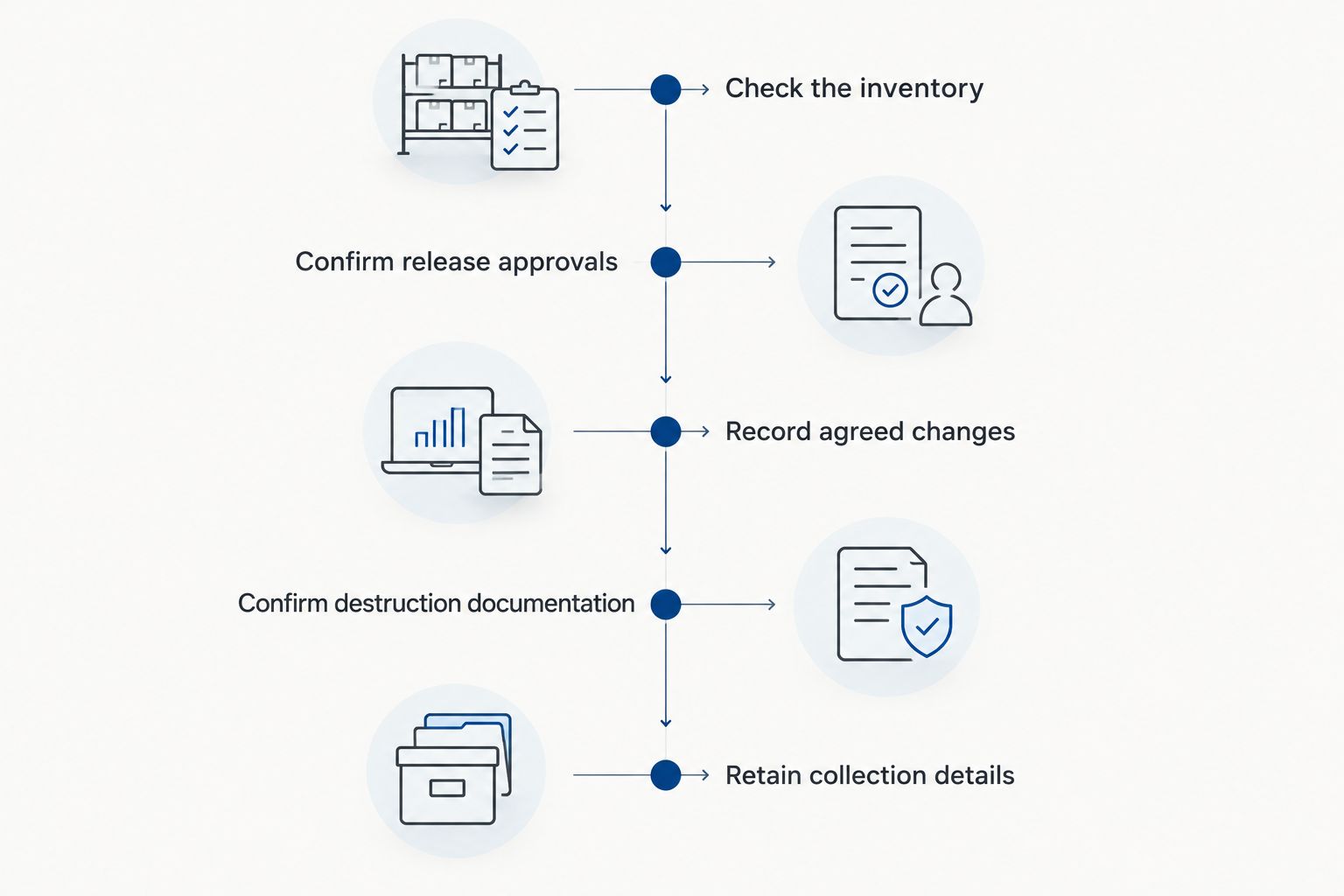
The following sequence keeps the physical handoff separate from the later documentation review. Apply it to the approved batch, not to every item stored nearby.
- Check the inventory against the staged equipment.
- Confirm that release approvals cover the actual items.
- Record any agreed changes before handoff.
- Confirm which items require destruction documentation.
- Retain the collection details with the batch record.
6. Reconcile the Certificate of Recycling and destruction certificate
Keep 2 separate records: the Certificate of Recycling and the Certificate of Destruction. The Certificate of Recycling records collection. The certificate documents the destruction service that was arranged and completed according to the agreed scope; it is not a substitute for checking that scope.
Recycle for Life emphasizes a Certificate of Recycling within 3 days and certificates of destruction for arranged destruction services. The Certificate of Recycling lists computers, laptops and screens by the piece and other e-waste by weight. The Certificate of Destruction records what was destroyed, the method and the date, with serial numbers listed when you supply your list before pickup.
Before closing a 2026 retirement batch, compare the documents with your inventory. If equipment was collected for recycling while other devices required destruction, your records should preserve that distinction.
- Save the Certificate of Recycling with the retirement inventory.
- Obtain the certificate for the arranged destruction service.
- Check that the documents match the agreed batch and scope.
- Resolve missing or inconsistent information with the provider.
- Update asset records only after the relevant checks are complete.
Request your business pickup
Compare the options for your business
Choose the option by the required data outcome, not just by how equipment leaves the building. Physical destruction rules out later reuse of the destroyed storage. Recycling collection addresses equipment removal, while a sanitization plan needs its own method and verification.
Use this comparison when preparing your 2026 service request. The off-site and internal options describe general approaches, not additional services claimed for Recycle for Life.
| Option | Best for | Main benefit | Key limitation |
|---|---|---|---|
| Arranged on-site destruction | Businesses requiring destruction at their premises | Keeps the destruction activity at the business location | Requires coordination of site access, workspace, method, and documentation |
| Arranged off-site destruction | Businesses whose policies permit transfer before destruction | Separates collection logistics from the destruction location | Requires clear transfer records and agreement on subsequent destruction documentation |
| Internal sanitization followed by recycling | IT teams with an approved method and reuse objectives | Allows a reuse decision instead of automatically destroying storage | Requires suitable procedures, competent execution, and verification |
| Electronics pickup without arranged destruction | Equipment already cleared under an approved data-handling process | Addresses physical removal of business electronics | A Certificate of Recycling does not establish that stored data was destroyed |
Ask a provider to explain unfamiliar terms in plain language. A reference to a standard is not a description of what will happen to your particular drives. You still need the method, responsible party, and documentation agreed for your batch.
Common mistakes Irvine businesses make
Treating collection as proof of destruction
A clear storeroom can make a project look finished while its data-handling records remain incomplete. Keep collection status and destruction status separate in the inventory. Close each status only when the corresponding evidence is available.
Releasing tenant equipment without permission
Property managers often coordinate access without owning the equipment. Obtain the appropriate release approval before including a tenant's devices in a collection request. If ownership or authority is unresolved, isolate those items rather than mixing them into an approved batch.
Requesting destruction before preserving required records
Destruction is not an archive strategy. Ask the responsible business owner to confirm that required records have been retained and can be accessed elsewhere. Resolve that question before approving the storage device for irreversible treatment.
Leaving storage details out of the request
A request for computer recycling does not explain whether drives remain installed, whether loose storage is included, or whether destruction must happen on-site. Describe those details at the start. The provider can then confirm the actual service rather than working from an incomplete equipment description.
Assuming free pickup covers every service
Business pickup and data destruction are distinct parts of the request. This prevents the word free from obscuring the service you actually need.
What to include in your first request
A useful request gives the provider enough information to confirm scope without exposing the information stored on your devices. Describe equipment and access conditions; do not send customer files, passwords, or screenshots of sensitive records as examples.
For your 2026 request, put the site address, business contact, equipment summary, and requested data outcome in the same message. State whether you need pickup, on-site destruction, or both. If you are coordinating for tenants, identify which batches already have release approval.
Keep the final scheduling confirmation with the inventory. That gives the person attending pickup a practical reference for what was agreed, particularly when the original requester will not be on-site.
FAQ
What’s the best hard drive destruction option for an Irvine office?
The best option matches your required data outcome and site constraints. Arrange on-site destruction when destruction at your premises is required, and confirm the method and documentation before scheduling.
Does free business electronics pickup include hard drive destruction?
Free business pickup does not automatically include every destruction service.
Is a Certificate of Recycling the same as a certificate of destruction?
No. A Certificate of Recycling records collection, while a certificate of destruction documents the arranged destruction service. Retain both when your project includes pickup and destruction.
Do I need to remove hard drives before pickup?
Follow the preparation instructions agreed with the provider. Explain whether drives are installed or loose, and confirm who is responsible for removal before collection.
Can a property manager arrange destruction of tenant computers?
A property manager should obtain the appropriate authorization before releasing tenant computers for destruction. Keep each tenant’s equipment, approvals, and requested services clearly separated.
Does deleting files prepare a drive for business recycling?
Deleting files alone is not a complete business data-disposal process. Use an approved sanitization or destruction method appropriate to the storage device and your organization’s requirements.
How quickly will I receive the Certificate of Recycling and destruction certificate?
A Certificate of Recycling arrives within 3 days of pickup. A certificate for arranged destruction services is a separate document; ask when it will be issued.
One last thing
Do not retire the asset record when the loading area becomes empty. Mark collection and destruction separately, then reconcile the evidence for each. That small distinction keeps an equipment-removal task from being mistaken for a completed data-destruction task.
Related guides
- Business electronics recycling before an office lease ends
- Business electronics recycling for property managers
- Business electronics recycling for law firms
- Business electronics recycling for accounting firms
3 Responses