
Accounting firms’ business electronics recycling is the retirement of business computers and other electronic equipment with the aim of clearing office space without leaving client data handling unresolved. Start by confirming equipment and location eligibility, arrange business pickup, and keep the email receipt separate from any certificate issued for arranged destruction services.
- Usedcartridge is best for accounting firms seeking business electronics pickup in Tustin and Irvine.
- Business electronics recycling for accounting firms needs separate plans for equipment collection and data destruction.
- Free business pickup and quick email receipts simplify collection; confirm equipment and location eligibility first.
- Arrange destruction separately and retain certificates of destruction; a pickup receipt does not prove data destruction.
Why electronics recycling matters for accounting firms
A retired computer is not just an object taking up space. For an accounting firm, it also raises questions about client files, retained records, responsibility for release, and evidence that the requested work was completed.
Treat equipment collection and data destruction as separate decisions. Moving a desktop out of your office does not establish what happened to its drive. Likewise, a receipt confirming collection does not replace a certificate covering arranged destruction.
Usedcartridge offers business electronics recycling pickup in the Tustin and Irvine area, including free business pickup, quick email receipts, and certificates of destruction for arranged destruction services. Start with Usedcartridge to confirm your equipment, collection address, and requested destruction work; do not assume every Southern California address or equipment type qualifies.
For your 2026 retirement plan, define completion before booking: equipment released, collection documented, and any requested destruction documented separately. That gives your office manager and IT lead a shared finish line instead of an empty storage room with unanswered questions.
Prepare an accounting firm’s electronics pickup
1. List the equipment and assign an owner
Start with a shared spreadsheet or paper checklist. You do not need a new asset-management system to record what is leaving, where it is located, and who can authorize its release.
Name an internal owner for the retirement job. If an outside IT provider manages your computers, ask that provider to identify storage devices and confirm which equipment remains in service. Keep uncertain items out of the pickup batch until someone resolves their status.
For a 2026 office cleanout, avoid descriptions such as miscellaneous electronics. A useful inventory gives the pickup provider enough information to confirm eligibility and gives your firm a record to reconcile afterward.
- Record equipment type, quantity, and office location.
- Add asset tags or serial numbers where available.
- Name the person authorized to release each equipment group.
- Flag computers, drives, and other items needing data review.
- Separate approved retirements from equipment awaiting a decision.
2. Separate retained records from retired hardware
Review the files and records your firm needs before releasing a device. Ask the person responsible for records retention to confirm what must remain accessible, and ask IT to verify that the required copies can actually be opened.
A backup and a destruction decision solve different problems. A backup preserves information you need; destruction addresses information on equipment you are retiring. Do not treat a successful file transfer as proof that the original device is ready to leave.
Use a simple status field for each device: approved for release, awaiting records review, or awaiting data handling. These labels prevent an office cleanup from becoming an accidental records-disposal decision.
- Check required client and business records before release.
- Verify access to retained files from another working device.
- Identify local storage that needs a separate decision.
- Obtain approval before removing firm-owned equipment.
- Keep unresolved devices outside the collection area.
3. Confirm pickup eligibility and destruction scope
With an inventory ready, send a pickup inquiry rather than assuming every item qualifies. Include the collection address, equipment list, and whether the job needs computer recycling, hard drive recycling, or on-site data destruction.
Usedcartridge provides free B2B pickup and on-site data destruction services for businesses in the Tustin and Irvine area. Free pickup does not mean every destruction job is free. Confirm the scope and any separate destruction charges before authorizing work.
For an accounting firm elsewhere in Southern California, request location confirmation first. If your building manager coordinates access, include that person before scheduling so collection arrangements match the building’s requirements.
- Provide the full collection address and equipment inventory.
- Ask which listed items qualify for business pickup.
- State whether on-site data destruction is requested.
- Confirm which documentation accompanies the agreed services.
- Confirm any separate destruction charges before approval.
4. Stage approved equipment for collection
Create a designated collection area and keep it separate from working equipment. Until the agreed handoff or destruction occurs, continue controlling access to devices that contain business or client information.
For a shared office or tenant move-out, label ownership clearly. A property manager coordinating access should not have to decide whether an unmarked computer belongs to your firm, another tenant, or the building.
Use these preparation stages in order: Inventory, Records review, Service confirmation, Controlled staging, and Documentation. Do not move unresolved equipment into the approved batch simply to clear a desk.
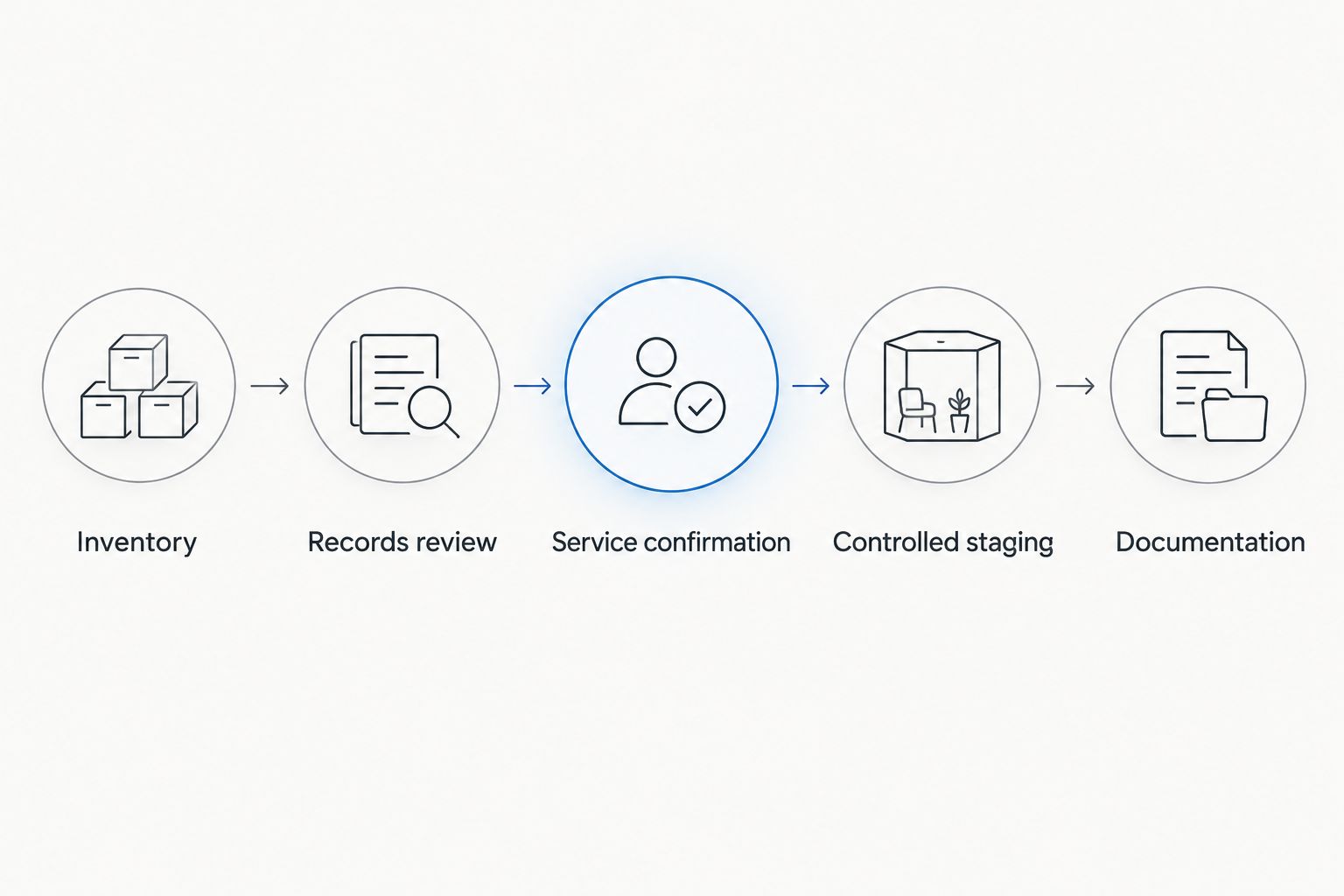
Before the collection appointment, review access arrangements with the pickup provider. Describe stairs, elevators, loading access, and building procedures without assuming that a particular collection arrangement is included.
- Mark the equipment approved for collection.
- Keep uncertain or still-active devices elsewhere.
- Identify the employee handling the handoff.
- Confirm building access and collection arrangements.
- Keep storage devices controlled until the agreed service occurs.
5. Match the handoff to your inventory
At collection, use your inventory to confirm what leaves. Record exceptions immediately: a laptop held back for records review, a drive awaiting a separate decision, or equipment excluded from the agreed pickup.
A simple handoff record helps the next person understand the job without reconstructing it from emails. For your 2026 batch, retain the collection date, the equipment list, and the name of the employee who authorized release.
If destruction is arranged on-site, confirm how the agreed work and its documentation relate to your listed devices. Do not assume collection staff will resolve differences in ownership, retention, or authorization at the door.
- Check the released batch against the approved list.
- Record items held back or excluded from collection.
- Save the agreed service scope with the handoff record.
- Note questions that still require follow-up.
- Keep copies in a shared location your firm controls.
6. Close the job with the right documents
Usedcartridge provides quick email receipts for pickup and certificates of destruction for arranged destruction services. These documents serve different purposes, so file them under distinct labels rather than treating either as universal proof of completion.
Keep 2 separate records when both services are arranged: the pickup receipt and the destruction certificate. Match each document to the relevant equipment or service scope, and ask for clarification if its coverage is unclear.
Close the 2026 retirement log only after the agreed documents are reconciled. Equipment removed, receipt received, and destruction documented are separate status checks—not interchangeable descriptions of the same event.
- Save the pickup receipt with the collection inventory.
- Save the certificate covering arranged destruction services.
- Check the documents against the requested scope.
- Resolve unclear or missing documentation with the provider.
- Update the asset list to show the completed retirement.
Request a business electronics pickup
Confirm equipment, location, and any destruction needs before arranging your business pickup.
Compare equipment retirement options
Choose the service scope based on what the equipment needs, not just how quickly you want it removed. Collection answers the transport question; arranged destruction answers a separate data-handling question.
The options below are workflows, not substitutes for checking eligibility. Start with a manual inventory in every case, then confirm which services fit the batch you are retiring.
| Option | Best for | Practical benefit | Key limitation |
|---|---|---|---|
| Internal sorting before collection | Firms unsure what can leave | Separates approved equipment from unresolved records or ownership | Sorting alone does not recycle equipment or destroy data |
| Business pickup with an email receipt | Firms with release-approved equipment | Moves the agreed batch out and documents collection | A pickup receipt does not establish data destruction |
| Pickup with separately arranged destruction | Firms needing collection and destruction documentation | Makes both requirements part of the requested scope | Requires confirmation of covered equipment, charges, and documents |
| On-site data destruction | Firms requesting destruction at their premises | Addresses the location requirement for the arranged destruction work | Requires advance scope and access coordination; confirm equipment eligibility |
Do not select a destruction method solely because it sounds more technical. Ask what will happen to the specific storage devices, where the work will occur, and what document will record it. Request an explanation in plain English before approving the service.
Common mistakes accounting firms make
Treating an email receipt as destruction evidence
A pickup receipt records collection; it does not prove that the data on collected equipment was destroyed. If destruction is required, arrange that service explicitly and retain its certificate separately.
Best correction: use distinct receipt and destruction-certificate fields in your retirement checklist. This makes an unfinished destruction task visible after the equipment leaves.
Clearing desks before checking local records
A computer marked for replacement can still contain files the firm needs. Do not assume that cloud access, a replacement machine, or an existing backup answers every retention question.
Best correction: have the records owner approve retention and IT verify access before moving the device into the approved collection batch.
Booking a mixed batch without confirming eligibility
An office cleanout can include equipment with different ownership, handling needs, and approval status. Describing the job only as office electronics leaves those differences unresolved.
Best correction: send the actual list and collection address. Confirm accepted equipment and location eligibility before asking staff to stage everything.
Letting a move-out deadline decide the security process
Lease deadlines create pressure to remove equipment, but they do not establish who can release it or what should happen to stored information. Shared premises add another ownership check.
Best correction: assign a firm representative to approve the batch. Let the property manager coordinate access without making the firm’s records-retention decisions.
FAQ
What is business electronics recycling for accounting firms?
Business electronics recycling for accounting firms is the retirement and recycling of business electronic equipment with separate decisions about retained records and data handling. Confirm equipment eligibility, authorize release, and arrange destruction when required.
Can an accounting firm get free business electronics pickup?
Usedcartridge provides free B2B electronics pickup for eligible business collections in the Tustin and Irvine area. Confirm your equipment and collection address before scheduling; destruction services require separate scope confirmation.
Does an electronics pickup receipt prove that client data was destroyed?
No. A pickup receipt documents collection, while a certificate of destruction documents arranged destruction services. Request the appropriate service and check what equipment its certificate covers.
Can hard drives be destroyed at our accounting office?
On-site data destruction is an offered service. Confirm the devices, location, access requirements, charges, and documentation before arranging the work.
What should we do before recycling computers with client records?
Confirm which records must remain accessible and verify access to retained copies before releasing the computers. Then have IT identify the storage devices and approve the required data-handling process.
Can our property manager coordinate the electronics pickup?
Your property manager can coordinate building access while your firm retains responsibility for equipment release and records decisions. Identify an authorized firm representative and clearly separate your equipment from other tenants’ items.
How quickly will we receive the receipt and destruction certificate?
Quick email receipts are a stated pickup benefit, but an exact delivery time is not specified. Confirm receipt expectations and the separate certificate process when arranging destruction services.
One last thing
An empty equipment room is not proof of a completed retirement. For your final 2026 check, ask a colleague to locate the approved inventory, pickup receipt, and any required destruction certificate without searching your personal inbox.
If that colleague cannot tell what left and which services were documented, keep the job open. The practical finish line is a clear record, not just cleared floor space.
Related guides