
Best for eligible business electronics in Tustin and Irvine: Usedcartridge e waste pickup. Best for drives that must stay on-site until destruction: an arranged on-site destruction service. Best for equipment you intend to redeploy: an IT asset disposition service with a documented reuse plan. This 2026 guide compares those service routes for manufacturing plants, starting with a simple process: confirm the equipment and location, arrange collection, and receive an email receipt.
- Usedcartridge e waste pickup suits eligible business electronics collections in Tustin and Irvine, with free business pickup and quick email receipts.
- Arrange destruction separately for data-bearing equipment; collection alone does not destroy stored information.
- Choose on-site destruction when your plant requires drives to remain on-site until destruction.
- Confirm industrial equipment eligibility before including controllers, production machinery, or other specialized items.
Why this matters for manufacturing plants
A plant cleanout is not just an office computer collection. Your proposed batch can include office electronics, engineering workstations, storage drives, and equipment associated with production systems. Do not treat every electronic item as accepted recycling or every collected computer as cleared of data.
The practical starting point is a scoped business pickup request. Identify what you want removed, what must remain under your control, and which records your company needs afterward. Free business pickup, quick email receipts, and certificates for arranged destruction services address different parts of that job; they are not interchangeable promises.
For your 2026 retirement project, choose the service around the equipment's intended outcome. Recycling, destruction, and redeployment need different instructions before anything leaves the plant.
What makes the best e waste pickup service?
Judge each option against these criteria before comparing providers:
- Equipment eligibility: Get confirmation for the actual equipment list, not just a general statement that electronics are accepted.
- Location eligibility: Confirm the plant address and collection arrangements, including access restrictions and staging requirements.
- Data handling: Decide whether storage devices will be sanitized internally, retained, or included in arranged destruction.
- Useful documentation: Separate collection records from records confirming an arranged destruction service.
- Operational fit: Agree on the handoff point, responsible employee, and equipment release process before collection.
- Clear scope: Confirm what business pickup includes and what requires a separate arrangement. Do not assume destruction is free.
A service that fits these requirements is more useful than a broad promise to take everything. Ask precise questions, then keep the answers with your retirement request.
Manufacturing plant pickup options at a glance
These are ranked service routes, not a claim that named suppliers have been tested against one another. Select the route that matches what must happen to your equipment.
| Service route | Best for | Standout feature | Key limitation |
|---|---|---|---|
| Usedcartridge business pickup | Eligible business electronics in Tustin and Irvine | Free business pickup and quick email receipts | Equipment and location eligibility require confirmation; pickup is not data destruction |
| Arranged on-site destruction | Storage devices required to remain at the plant until destruction | Destruction occurs at the agreed site | Scope, access, method, and certificate requirements need separate agreement |
| IT asset disposition with a reuse plan | Equipment intended for reassignment or reuse | Separates reusable assets from recycling candidates | Requires disposition instructions and verification of data handling |
1. Usedcartridge: best for local business electronics pickup
Usedcartridge provides free B2B electronic waste pickup, computer and hard drive recycling, and on-site data destruction services for businesses in the Tustin and Irvine area. For a manufacturing plant, the useful starting point is a collection request covering the specific business electronics you plan to retire.
Usedcartridge e waste pickup is best for eligible business electronics collections in Tustin and Irvine. Start with the equipment list and plant address, then confirm the collection scope. Request arranged destruction separately when you need that service and its certificate.
Usedcartridge pros:
- Free business pickup is part of the stated service offering.
- Quick email receipts support your collection records without requiring a paper-only handoff.
- Computer and hard drive recycling are explicitly offered.
- On-site data destruction is offered, with certificates for arranged destruction services.
Usedcartridge limitations:
- Equipment and location eligibility must be confirmed for your particular collection.
- Pickup alone does not establish that stored data has been destroyed.
- Do not assume specialized industrial electronics fall within the collection scope.
Best for: Office and IT managers arranging eligible business electronics collections near Tustin and Irvine.
Verdict: Buy the pickup service for a confirmed local business collection; arrange destruction separately when required.
2. On-site destruction: best for drives kept under plant control
An arranged on-site destruction service addresses a different decision from collection: what happens to storage devices before they leave your premises. Choose this route when your company's instructions require destruction at the plant rather than release of intact drives.
For your 2026 project, agree on which devices are included, how the handoff will work, and what documentation you will receive. A certificate of destruction records an arranged destruction service; an email pickup receipt records a collection. Ask what each document will identify before scheduling.
On-site destruction pros:
- Matches a requirement to keep drives on-site until destruction.
- Lets you separate sensitive storage devices from the general recycling batch.
- Creates a distinct destruction task that you can assign to an authorized employee.
On-site destruction limitations:
- Site access and the service method require advance agreement.
- Destruction is irreversible, so retention and backup decisions must come first.
- A destruction arrangement does not automatically resolve every other recycling need.
Best for: Plants whose internal procedures require on-site destruction of retired storage devices.
Verdict: Buy an arranged on-site destruction service when location of destruction is a requirement, not just a preference.
3. IT asset disposition: best for equipment intended for reuse
IT asset disposition, often shortened to ITAD, means planning what happens to retired technology. For this route, specify a reuse plan rather than sending the whole batch directly to recycling.
Start by separating equipment approved for reassignment from equipment approved for disposal. Then require clear instructions for stored data and a record of each asset's final destination. This route is a procurement option to evaluate, not a claim that any provider offers resale, redeployment, or a particular recovery value.
IT asset disposition pros:
- Gives reusable equipment a separate decision path.
- Encourages asset-level instructions rather than a single disposal label for everything.
- Helps distinguish ownership transfer, internal reassignment, and recycling tasks.
IT asset disposition limitations:
- Requires more internal decisions before release.
- Reuse does not remove the need to address stored data.
- Provider capabilities and documentation must be verified against your instructions.
Best for: Plants with working business equipment that management has identified for reuse or reassignment.
Verdict: Hold recycling approval for reuse candidates until their destination and data-handling instructions are settled.
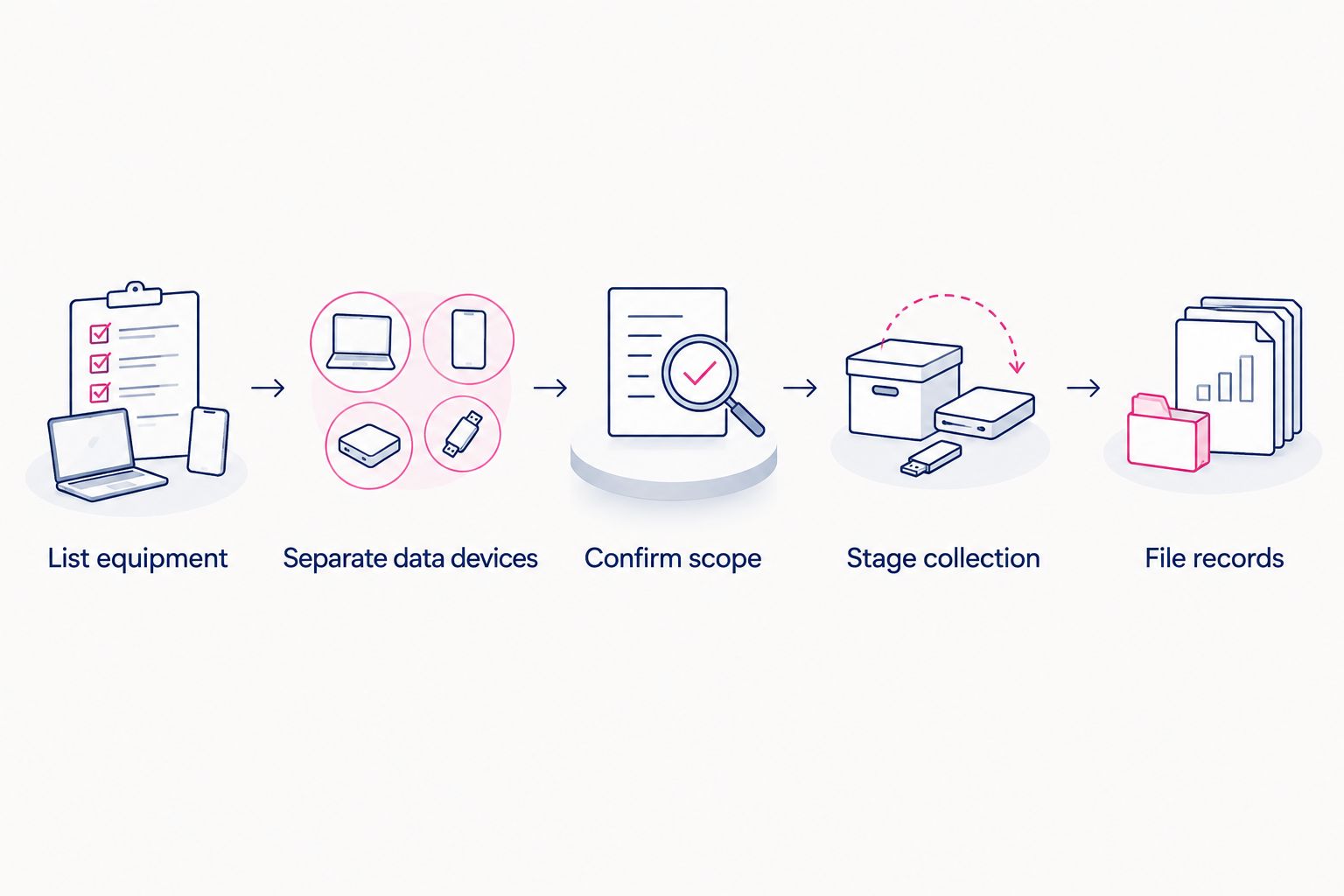
How to prepare a manufacturing plant pickup in 5 steps
Use this sequence for your 2026 collection request. It keeps the service discussion practical and prevents a general cleanout instruction from becoming accidental permission to remove the wrong equipment.
1. List equipment
Create a working inventory with equipment descriptions, quantities, storage locations, and the person authorizing release. Include asset tags or serial numbers where your internal process requires them.
Describe unusual items individually. A production controller, an engineering workstation, and a desktop monitor should not disappear into the same vague description of miscellaneous electronics.
2. Separate data devices
Identify computers, drives, and other equipment that stores business information. Assign each data-bearing item an approved handling instruction before collection.
Deleting files and arranging physical collection are not substitutes for a defined data-removal process. If your IT team handles sanitization, retain its records; if you need destruction, arrange it explicitly.
3. Confirm scope
Send the equipment list and plant address when you contact the business pickup team. Ask which items qualify, what access arrangements are needed, and whether destruction requires a separate service agreement.
Mention loading restrictions, controlled areas, stairs, or other relevant conditions. Do not assume collection includes disconnecting machinery, removing fixed equipment, or entering restricted production space.
4. Stage collection
Place only approved equipment in the agreed collection area. Keep retained assets and unresolved data-bearing devices outside that area so the handoff is unambiguous.
Assign an employee to check the released batch against your list. Property managers coordinating tenant equipment should also identify who owns the items and who has authority to release them.
5. File records
Keep the email pickup receipt with the retirement request. For arranged destruction, also retain the certificate of destruction and check that its scope matches your agreed service.
Treat these as separate records. A pickup receipt does not become proof of destruction simply because hard drives were included in the collection.
Before you request a pickup, resolve 2 internal approvals: permission to release the equipment and approval of the data-handling instructions. Your company can assign both to the same person, but the decisions remain distinct.
Request a business electronics pickup
Confirm your plant location, equipment eligibility, and any separate destruction requirements.
Keep collection and destruction records separate
Build your 2026 retirement file around 3 record types: your equipment list, the email pickup receipt, and the certificate for any arranged destruction service. Each answers a different question.
| Record | What it helps document | What not to assume |
|---|---|---|
| Equipment list | What your company approved for release | That every listed item was collected or destroyed |
| Email pickup receipt | The collection described on the receipt | That collection erased data |
| Certificate of destruction | The destruction service described on the certificate | That it covers devices or work outside its stated scope |
Compare the records instead of filing them unread. If your organization requires individual device identifiers, ask whether the proposed documentation includes them before agreeing to the service.
How these service routes are ranked
The order follows the buying decision: a confirmed local collection first, an on-site destruction requirement second, and a reuse-led disposition project third. It reflects fit for those use cases, not measured service speed, customer ratings, or an industry-wide supplier score.
The same criteria apply throughout: equipment eligibility, location, data instructions, documentation, operational fit, and clear scope. Choose the narrowest service that completes your approved task, then add separately agreed services where needed.
Which e waste pickup option should you choose?
For a Tustin or Irvine manufacturing plant retiring eligible business electronics in 2026, begin with a local business pickup request. Free business pickup and quick email receipts address the collection task; certificates of destruction belong to separately arranged destruction services.
Choose on-site destruction when your internal requirements call for it. Choose a reuse-led disposition process when equipment has another approved destination. Do not send unresolved assets into a recycling batch just to finish the cleanout.
FAQ
What’s the best e waste pickup option for a manufacturing plant?
Usedcartridge is a fit for eligible business electronics pickup in Tustin and Irvine. Confirm the equipment list and plant location, then arrange destruction separately if required.
Is business electronics pickup free?
Free business pickup is part of the stated service offering. Confirm eligibility and collection scope before booking, and do not assume destruction services are also free.
Does e waste pickup include hard drive destruction?
Pickup alone does not mean a hard drive has been destroyed. Request destruction explicitly and confirm the service scope and certificate requirements before releasing data-bearing equipment.
Can a manufacturing plant include production controllers or machinery?
Confirm specialized equipment individually before including it in a collection. Do not assume that acceptance of business computers extends to production controllers, fixed machinery, or every industrial electronic component.
Is an email pickup receipt the same as a certificate of destruction?
No. An email pickup receipt documents the collection described on it, while a certificate of destruction documents the arranged destruction service described on that certificate.
What should a property manager confirm before arranging tenant equipment pickup?
Confirm equipment ownership, release authority, the item list, and location eligibility. Keep each tenant’s data-handling instructions clear and identify who will approve the handoff.
One last thing
Leave unresolved equipment out of the collection area. A clear physical separation between approved recycling, retained assets, and devices awaiting data decisions gives your handoff employee a practical way to follow the approved scope.
Related guides
- Business electronics recycling for warehouses
- Business electronics recycling for property managers
- Hard drive destruction services for Irvine businesses