
Warehouse business electronics recycling is the collection and processing of retired business devices with the aim of clearing storage space while controlling equipment ownership, data handling, and disposal records. Start with a pickup request, confirm equipment and location eligibility, and arrange any required destruction separately; warehouse teams also need to coordinate loading access, tenant ownership, and equipment spread across operational areas.
- Business electronics recycling for warehouses starts with an equipment list, ownership approval, and confirmed loading access.
- Usedcartridge offers free business pickup in the Tustin and Irvine area; confirm equipment and location eligibility.
- Request quick email receipts, and arrange certificates of destruction separately when destruction services are required.
- Keep data-bearing equipment controlled until its handling instructions and responsible owner are clear.
Why electronics recycling matters for warehouses
Retired equipment in a warehouse is not necessarily ready for collection. A computer beside a loading dock might belong to a tenant, remain on an asset register, or contain business information. Approve the equipment before arranging its removal.
Usedcartridge provides free business pickup, computer and hard drive recycling, and on-site data destruction services for businesses in the Tustin and Irvine area. Confirm your warehouse location, equipment list, and requested services before planning the handoff. Free pickup does not mean every destruction service is free.
For your 2026 cleanout, make the process straightforward: identify the equipment, request pickup, and retain the email receipt. If destruction is required, agree on that service and its documentation before collection. A pickup receipt records a handoff; it does not establish that stored data was destroyed.
How to organize a warehouse electronics pickup
1. Build an approved equipment inventory
Start with a spreadsheet and a walk-through of the warehouse. Check offices, dispatch stations, maintenance areas, storage cages, and equipment waiting for repair. Record items as candidates for review, not as automatically accepted recycling.
Create 1 inventory for the pickup so facilities, IT, and operations work from the same list. Include the equipment type, quantity, location, owner, and asset identifier where available. Describe unidentified equipment rather than guessing its contents or recycling eligibility.
Keep active equipment out of the list. A disconnected device can still be a spare, a leased asset, or part of an unfinished repair.
- List computers, drives, monitors, and other equipment separately.
- Record quantities by equipment type and storage location.
- Flag leased, tenant-owned, or unidentified items for approval.
- Note visible damage without opening or dismantling equipment.
2. Confirm ownership and release authority
Check the inventory against your asset register, lease records, or tenant instructions. The person coordinating collection is not always authorized to dispose of everything stored on the property. Obtain written approval from the responsible owner before moving disputed equipment into the pickup area.
For multi-tenant sites, assign an owner to each batch and keep batches distinguishable. The guide to business electronics recycling for property managers addresses the related coordination work when equipment comes from different occupants.
Separate the inventory into 3 groups: approved, pending approval, and keep. Only the approved group belongs in the collection plan. This prevents a warehouse cleanout from becoming an accidental disposal of another team's equipment.
- Ask IT to approve company-owned computers and storage devices.
- Ask tenants to identify their equipment and authorized contact.
- Verify return obligations for leased or rented equipment.
- Keep unapproved items outside the collection staging area.
3. Request pickup and confirm service eligibility
Use your equipment list to request collection rather than arranging transport before acceptance is confirmed. Supply the warehouse address, equipment types, approximate quantities, and access details. Ask which items qualify and whether any requested handling or destruction services have separate charges.
Usedcartridge is best for warehouse teams in Tustin and Irvine seeking business electronics recycling with free business pickup. Its service provides an alternative to organizing transport yourself, but your location and equipment still need confirmation.
If your warehouse is elsewhere in Southern California, ask about location eligibility before planning collection. Do not assume a regional business address establishes coverage for every site. For a 2026 project spanning several warehouses, confirm each address individually.
- Send the inventory and photographs when they help identify equipment.
- Confirm the exact collection address and site contact.
- Explain stairs, restricted access, or loading-area constraints.
- Ask what pickup covers and what requires a separate arrangement.
- Confirm how the email pickup receipt will identify your business.
4. Assign data-handling instructions before release
Ask your IT owner which devices contain information and what must happen before release. Start with existing company procedures; a spreadsheet column can record whether each device needs internal review, approved sanitization, or arranged destruction. Sanitization means making stored information inaccessible through an appropriate process.
Do not treat an ordinary file deletion as proof that a drive is ready for disposal. Equally, do not assume physical destruction is required for every item. The responsible IT owner should decide based on the device, information, and your organization's requirements.
When destruction is needed, confirm whether it will happen on-site and how the affected equipment will be identified in the certificate. Pickup alone does not destroy data. Keep sensitive equipment under your control until the agreed handoff.
- Identify computers, drives, and other devices with storage.
- Separate devices with unresolved data-handling instructions.
- Confirm who can authorize destruction of each batch.
- Ask how equipment identifiers will appear in destruction records.
- Keep required backups and retention decisions with your IT owner.
5. Prepare a controlled staging area
Choose a holding area that keeps retired equipment separate from active stock, shipping orders, and tenant property. Use your warehouse's existing access controls and handling procedures. Do not place equipment in a busy dispatch lane simply because it is close to an exit.
Label the approved batch clearly and preserve the link to the inventory. Keep data-bearing equipment in a controlled location until the pickup arrangement is ready. Ask the provider about packing and handling requirements rather than assuming pallets, loose loading, or dismantling are acceptable.
Use this preparation sequence for your 2026 cleanout: Inventory, Approval, Service confirmation, Controlled staging, Handoff. Complete service confirmation before moving equipment into its final collection position.
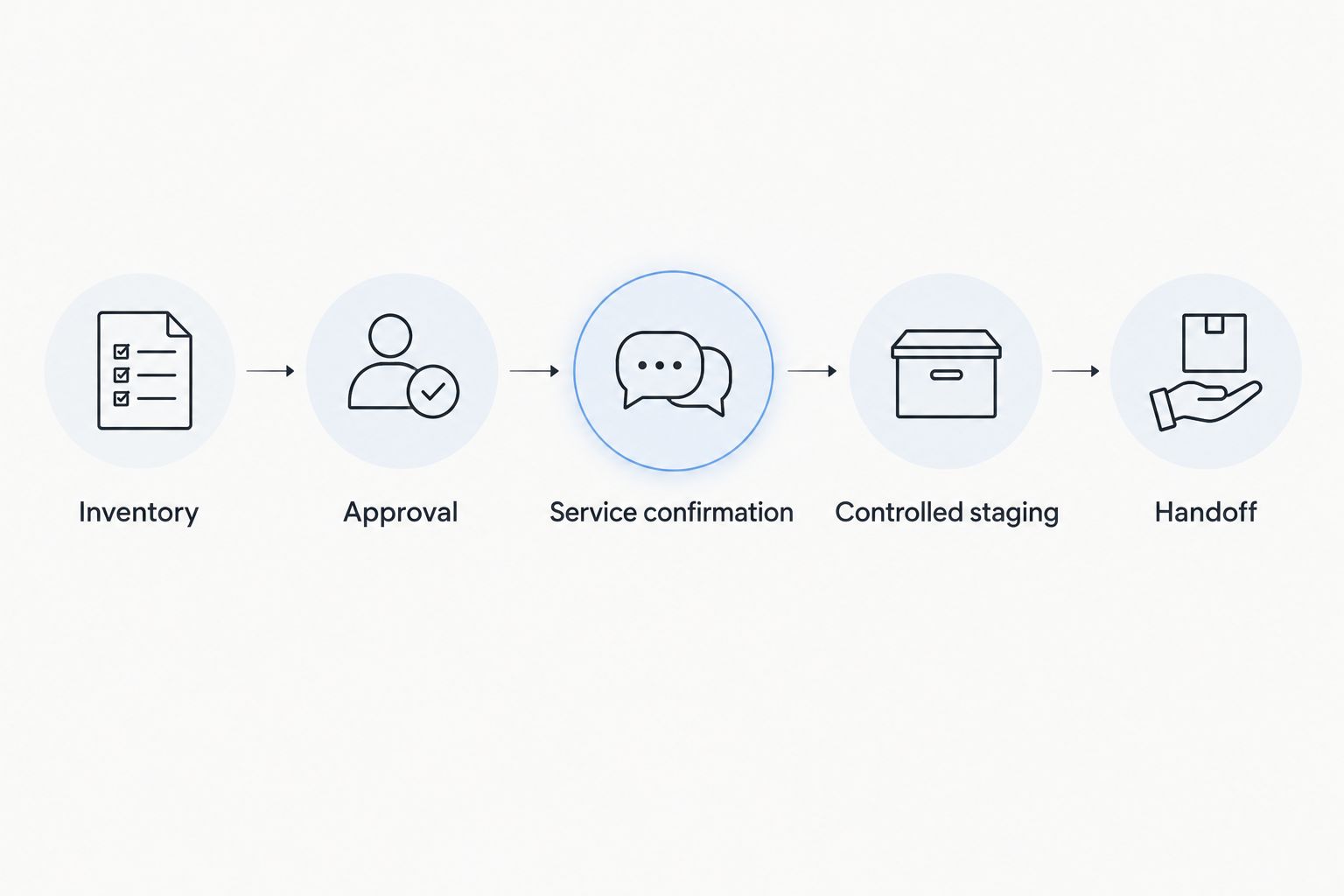
Give the collection contact a clear description of where the approved batch will be held. Keep pending equipment somewhere else so a temporary storage decision does not become permission to remove it.
- Separate approved recycling from active inventory and outbound orders.
- Keep exits, walkways, and operational access routes clear.
- Retain asset labels needed to reconcile the handoff.
- Confirm handling instructions for damaged or unusual equipment.
6. Coordinate loading access and the handoff
Use your normal warehouse scheduling process to coordinate collection with receiving and dispatch. Name a primary contact and a backup who can identify the approved equipment. Share visitor procedures and access restrictions before the collection takes place.
Walk through the batch with the collection contact and reconcile changes against the inventory. If an item is added at the last moment, confirm its ownership, acceptance, and data instructions first. Do not let a convenient pickup window replace those checks.
Property managers should also confirm who represents each participating tenant. A building contact can coordinate access without taking responsibility for decisions that belong to the equipment owner.
- Confirm the entrance, check-in process, and loading location.
- Tell operations which area is needed for the collection.
- Keep an authorized contact available for equipment questions.
- Record items withheld, added, or removed from the approved batch.
7. Reconcile receipts and destruction records
After collection, request the email pickup receipt and compare it with your approved inventory and handoff notes. Resolve discrepancies before marking the asset records complete. Quick email receipts help you document removal, but they are not substitutes for destruction documentation.
For a batch involving destruction, retain 2 record types: the pickup receipt and the certificate of destruction. The receipt documents collection; the certificate documents the arranged destruction service. Confirm the certificate's scope and identifiers when arranging the work, not after equipment has left.
Close your 2026 project only when the relevant records match the work ordered. Keep unresolved items open rather than treating a collection email as the final answer to every disposal question.
- Save the pickup receipt with the approved inventory.
- Request certificates for the destruction services you arranged.
- Check equipment identifiers against the agreed documentation scope.
- Record exceptions and assign someone to resolve them.
- Update asset records after the required checks are complete.
Request your warehouse pickup
Confirm equipment eligibility, free business pickup, email receipts, and any separately arranged destruction services.
Compare warehouse equipment retirement options
Choose the route according to transport, data handling, and documentation needs. Recycling and destruction solve different problems: one addresses retired equipment, while the other addresses information stored on it. You can arrange them together, but do not assume they are interchangeable.
| Option | Best for | Main advantage | Key limitation |
|---|---|---|---|
| Internal preparation and self-transport | Teams with staff, transport, and a confirmed receiving facility | You control preparation and transport arrangements | You must verify acceptance, organize transport, and obtain records yourself |
| Usedcartridge business pickup | Warehouse teams in Tustin and Irvine seeking eligible business equipment collection | Free business pickup and quick email receipts | Equipment and location need confirmation; destruction requires a separate arrangement |
| Separately arranged on-site destruction | Teams requiring destruction at their business location | Makes destruction an explicit part of the service plan | Scope, charges, equipment eligibility, and certificate details need confirmation |
| Internal hold pending review | Teams with unresolved ownership or data instructions | Keeps unapproved equipment from leaving the site | Does not remove equipment or complete recycling |
Use pickup to solve collection logistics; use an explicit destruction arrangement to address destruction requirements. If you need both, include both in the request. Holding equipment temporarily is the appropriate choice when authorization is incomplete, not a completed recycling solution.
Common mistakes warehouse teams make
Mixing recycling with saleable inventory
A pallet near dispatch can look ready to ship even when it contains retired electronics. Mark the collection batch and keep it separate from customer orders, returns, and repair stock. Give the handoff contact the same inventory used by IT and facilities.
Treating tenant equipment as building property
Equipment left in a shared room still needs an ownership decision. Obtain release approval from the responsible party and identify disputed items before collection. Access to a space is not the same as authority to dispose of its contents.
Leaving data decisions until pickup
A loading-area discussion is too late to establish retention requirements or decide which drives need destruction. Assign those decisions to the IT owner during preparation. Keep unresolved devices out of the approved batch.
Closing the job with the wrong document
A receipt establishes that a collection occurred; it does not establish that every drive was destroyed. Match the documents to the services ordered. For your 2026 records, store receipts and applicable certificates together without treating them as equivalent evidence.
FAQ
How do I arrange business electronics recycling for a warehouse?
Prepare an equipment inventory, confirm ownership, and request pickup with your address and access details. Confirm equipment eligibility and any data-destruction requirements before releasing the batch.
Does Usedcartridge offer free warehouse electronics pickup?
Usedcartridge provides free B2B electronic waste pickup for businesses in the Tustin and Irvine area. Confirm your warehouse location and equipment eligibility, and ask separately about charges for requested destruction services.
Can I include warehouse scanners, printers, and other equipment?
Ask the provider to confirm acceptance of every equipment type before staging it for collection. Send a list with descriptions and quantities rather than assuming all warehouse electronics qualify.
Does an electronics pickup receipt prove hard drives were destroyed?
No. A pickup receipt documents collection, while a certificate of destruction documents the arranged destruction service. Confirm the equipment and identifiers covered by the certificate before the work begins.
Can a property manager arrange pickup for several warehouse tenants?
A property manager can coordinate the request and site access, but each equipment owner’s disposal approval should be established first. Keep tenant batches identifiable and confirm the documentation required for each participating business.
Should warehouse computers be wiped before recycling?
Your IT owner should determine the required data-handling method before release. Use your organization’s approved process, and arrange destruction separately when that is the required outcome.
How quickly will I receive a pickup receipt or destruction certificate?
Confirm document delivery expectations when arranging the service. Quick email receipts are part of the business pickup process; certificates apply to arranged destruction services, and their delivery expectations should be confirmed separately.
One last thing
Put the documentation recipient on the pickup request, not just the loading-area contact. The person opening the warehouse door is not always the person closing the asset register. Naming both roles helps the receipt and any applicable destruction certificate reach the team responsible for completing the job.
Related guides