
Best overall: Recycle for Life’s arranged on-site data destruction services for local call centers. Best for mixed equipment retirements: business pickup with separately arranged destruction. Best for equipment-only clearance: business pickup after your IT team has completed its data work. This 2026 guide ranks service setups by the job you need completed, rather than comparing providers without verified service details.
- Recycle for Life offers data destruction services for business equipment retirements, with scope confirmed before scheduling.
- Choose arranged on-site destruction when your call center requires destruction at its business location.
- Business pickup alone does not destroy data; arrange destruction separately when needed.
- Keep the Certificate of Recycling separate from the Certificate of Destruction for arranged destruction services.
Why this matters for call centers
A call center retirement project has separate equipment and data decisions. Removing computers from the office does not establish that their stored information has been destroyed. Your request needs to state both what should leave and what work must happen to the data-bearing equipment.
Recycle for Life provides free business-only electronic-waste pickup in Orange County (OC), Los Angeles (LA), and San Diego. Equipment and location eligibility need confirmation. Arranged destruction is a separate service decision, and not all destruction jobs are free.
For a 2026 retirement project, start with a business pickup and destruction request that identifies your location, equipment types, and destruction needs. This gives the service team a defined request instead of a general instruction to remove everything.
What makes the best data destruction services for call centers?
The best fit is the service arrangement that matches your approved retirement plan. Use these criteria before choosing:
- Destruction scope: Identify which computers, hard drives, or other equipment need arranged destruction. Do not treat the entire pickup as a destruction job by default.
- Location requirements: State whether your business requires on-site destruction, and confirm the arrangement before scheduling.
- Equipment eligibility: Submit the equipment list and business location for confirmation rather than assuming every item qualifies.
- Documentation: Expect a Certificate of Recycling within 3 days of pickup and a Certificate of Destruction for arranged destruction services. They serve different purposes.
- Office coordination: Name the person who approves release, handles building access, and answers questions about equipment ownership.
- Separate service decisions: Confirm pickup and destruction independently. Free business pickup does not mean every associated service is free.
Choose the arrangement around the data work first, then organize the equipment removal. That order prevents an office-clearance request from being mistaken for a complete data-destruction instruction.
Call center service options at a glance
These are ranked service configurations, not separate companies. Each solves a different retirement problem, so the limitation matters as much as the recommendation.
| Rank and service setup | Best for | Standout feature | Key limitation |
|---|---|---|---|
| 1. Arranged on-site destruction | Call centers requiring destruction at their business location | Makes the destruction location an explicit part of the request | Equipment, location, and service arrangements need confirmation |
| 2. Business pickup with separately arranged destruction | Mixed batches containing equipment with different retirement needs | Separates collection instructions from destruction instructions | Pickup alone does not complete the destruction work |
| 3. Business pickup after completed data work | Equipment-only clearance approved by your IT team | Focuses the request on removing eligible business electronics | Does not replace data destruction or provide evidence of prior data work |
1. Arranged on-site destruction: best for location requirements
Arranged on-site destruction is the first choice when your call center requires the destruction work to happen at its business location. Recycle for Life offers on-site data destruction services; confirm the equipment, location, and exact arrangement before treating the visit as scheduled.
The useful distinction is location, not a broad promise about every device or every job. Tell the service team what your business requires and ask for confirmation of the work included.
On-site destruction pros
- Makes your location requirement clear at the start.
- Gives your IT contact a defined destruction request to approve.
- Keeps destruction instructions distinct from general equipment removal.
- Supports a request for a certificate of destruction for the arranged service.
On-site destruction limitations
- Do not assume every equipment type or location qualifies without confirmation.
- Do not assume destruction is included simply because business pickup is free.
- A certificate for arranged destruction does not document unrelated equipment or systems.
Best for: A call center whose approved retirement process requires on-site destruction of identified equipment.
Before arranging the work, identify the devices involved and the person authorized to approve their release. If the building requires access coordination, include that information in the request rather than leaving it until the visit.
Verdict: Choose arranged on-site destruction when location is a requirement; confirm the scope before scheduling.
2. Pickup with arranged destruction: best for mixed batches
A mixed retirement batch needs more than a single instruction to collect electronics. Some items need destruction arranged; other items need recycling or collection after your team has completed its data decisions.
Business pickup with separately arranged destruction lets you describe those needs in the same project request without treating them as the same service. Confirm how the destruction work will be arranged rather than assuming its location or sequence.
Pickup with destruction pros
- Brings equipment-removal and destruction needs into the planning conversation.
- Helps distinguish data-bearing equipment from items needing collection only.
- Gives office and IT managers separate instructions to review.
- Makes the Certificate of Recycling and destruction documentation explicit.
Pickup with destruction limitations
- Collection itself does not destroy stored data.
- An unclear equipment list leaves the destruction scope unresolved.
- Do not assume the destruction arrangements or terms match the pickup arrangements.
Best for: A call center retiring a mixed batch of business electronics with different data-handling needs.
Create separate groups in your equipment list before requesting service. Mark which items need arranged destruction and which items are approved for collection only. Keep the same distinctions in your internal approval record so the office team does not have to interpret technical decisions during pickup.
Verdict: Choose pickup with separately arranged destruction for mixed batches; skip an undifferentiated collection request.
3. Pickup after data work: best for equipment-only clearance
Business pickup is the right equipment-removal option when your IT team has already completed and approved the necessary data work. Its purpose in this setup is collection of eligible business electronics, not a new destruction service.
This option needs a clear handoff from IT to the person coordinating removal. A device should not enter the collection-only group just because it is unplugged, no longer assigned, or taking up storage space.
Equipment-only pickup pros
- Keeps the service request focused on equipment removal.
- Gives the office coordinator a defined list of approved items.
- Supports clearance of eligible business electronics without implying additional data work.
Equipment-only pickup limitations
- Pickup does not destroy data.
- The Certificate of Recycling is not a Certificate of Destruction.
- Internal approval must establish which equipment is ready for release.
Best for: An office manager clearing business equipment after IT has finished its data-related tasks.
For tenant equipment, a property manager should identify the business that owns the devices and who can authorize removal. Shared storage space does not establish ownership or permission to release a computer or drive.
Verdict: Choose pickup-only clearance after documented internal approval; hold equipment with unresolved data decisions.
How these service setups are ranked
The ranking prioritizes an explicit destruction requirement, followed by mixed-batch coordination, then collection-only clearance. The criteria are destruction scope, location, eligibility, documentation, and office coordination—not an unsupported claim that one provider outperforms another.
For 2026 call center planning, the first option is the default only when on-site destruction matches your requirement. A collection-only project belongs in the third option, not a more involved service arrangement simply because it ranks higher.
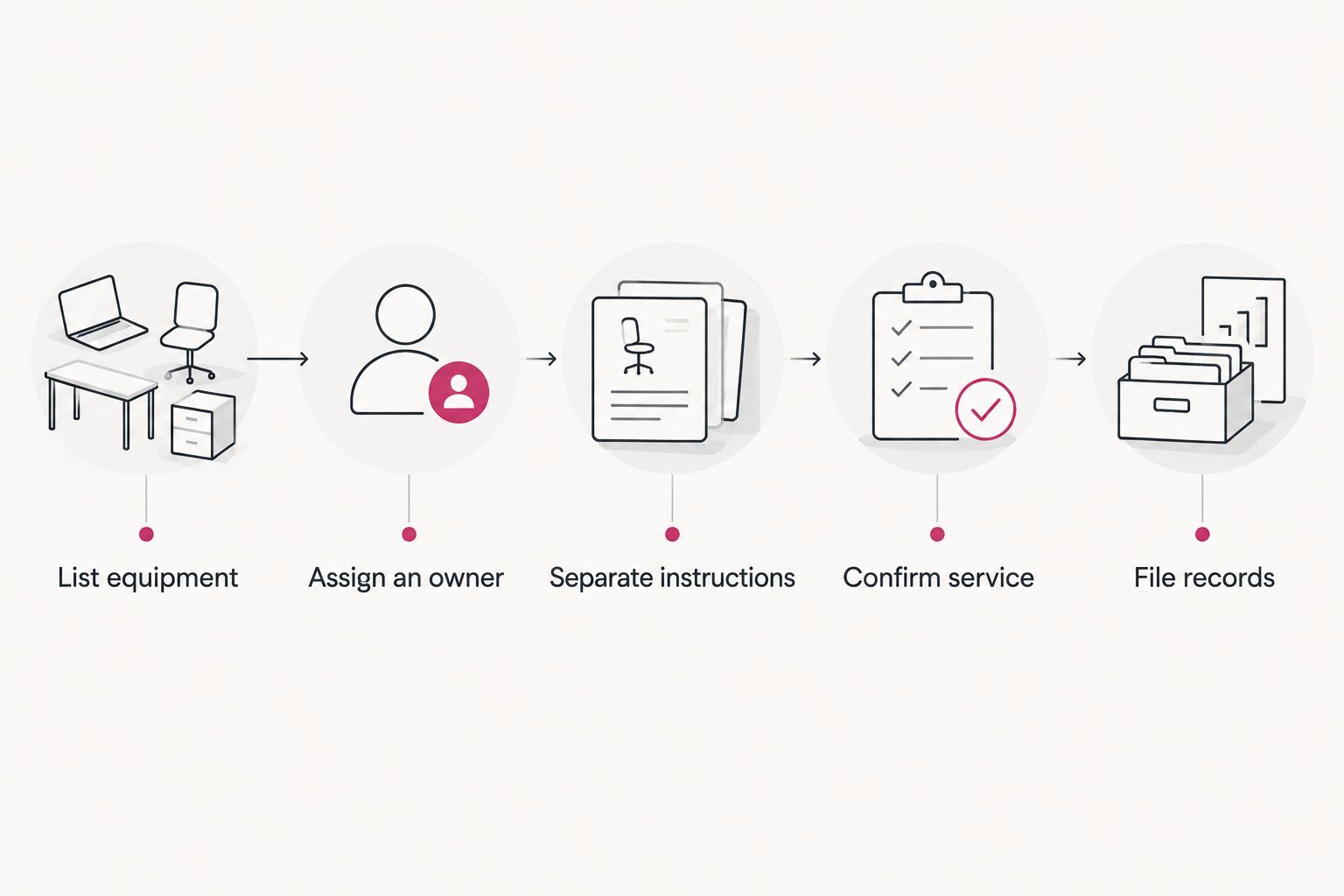
Prepare your call center retirement in 5 steps
Use this sequence to turn an equipment-clearance request into a service request the office and IT teams can both approve.
- List equipment. Record the equipment types, quantities, business location, and ownership. Identify computers and hard drives needing a specific data decision.
- Assign an owner. Choose 1 project owner to coordinate the request and collect internal approvals. Other staff can help without issuing conflicting release instructions.
- Separate instructions. Create 2 clearly identified groups in the list: equipment needing arranged destruction and equipment approved for collection only.
- Confirm service. Ask for equipment and location eligibility, destruction arrangements, and the documentation associated with each service. Confirm building access needs too.
- File records. Keep the approval, Certificate of Recycling, and any Certificate of Destruction together, while preserving the distinction between them.
These 5 steps are a planning sequence, not a promise about service timing. Do not move a device into the collection-only group to meet an office-clearance deadline.
For a 2026 office move, share the approved equipment list with both IT and the person handling building access. The list should make clear which items can leave and which remain on hold pending a decision.
Request business pickup and destruction
Send your business location, equipment list, and destruction needs for confirmation.
Keep collection records separate from destruction records
Recycle for Life provides a Certificate of Recycling within 3 days of business pickup and a Certificate of Destruction for arranged destruction services. The Certificate of Recycling records what was collected; it does not establish that data was destroyed. Keep that distinction clear when closing the project internally.
Organize 3 record types for your 2026 retirement project:
- Internal approval: Your business's decision about which equipment can be released and what work it needs.
- Certificate of Recycling: The collection record (computers, laptops and screens by the piece, other e-waste by weight), kept with the equipment-removal request.
- Certificate of destruction: Documentation for the arranged destruction service, separate from the Certificate of Recycling.
Compare the records with your original request before marking the project complete. If an item was held back or its instructions changed, update your internal list rather than assuming the original plan describes the completed work.
Which service setup should your call center choose?
Recycle for Life is best for call centers in OC, LA, and San Diego seeking business pickup with explicitly arranged data destruction services. Start with on-site destruction when your business requires that location, and confirm the equipment and service details.
Choose the mixed-batch setup when only part of the retirement needs destruction. Choose collection-only pickup when IT has already completed its data work and approved release. The right decision follows the status of the equipment, not its age or the amount of space it occupies.
FAQ
What’s the best data destruction service setup for a call center?
Arranged on-site destruction is the best fit when your call center requires destruction at its business location. Confirm equipment eligibility, location, and the exact service arrangement before scheduling.
Does free business electronics pickup include data destruction?
No. Business pickup alone does not destroy data, and not all destruction jobs are free. Request destruction explicitly and confirm its terms separately from collection.
Can Recycle for Life collect electronics from our call center?
Recycle for Life provides free business-only electronics pickup in Orange County, Los Angeles, and San Diego. Send your business location and equipment list to confirm eligibility.
Is a Certificate of Recycling the same as a Certificate of Destruction?
No. The Certificate of Recycling records what was collected, while a Certificate of Destruction documents arranged destruction services. Keep both records when your project includes both services.
What should an IT manager send before requesting pickup?
Send the business location, equipment types and quantities, and instructions identifying which equipment needs destruction. Include the project contact and any building access requirements.
Can a property manager arrange removal of tenant computers?
A property manager can coordinate a business pickup request, but should establish equipment ownership and release authorization first. The tenant’s IT contact should resolve data instructions before equipment is released.
Does destroying an office hard drive remove cloud account data?
No. Destruction of a local hard drive does not delete information stored separately in cloud services. Your IT team must handle those accounts and records as a separate task.
One last thing
A cleared desk is not the same as a completed data-retirement task. Before approving release, ask one practical question: Which named person has confirmed what should happen to the data on this equipment? If nobody owns that answer, hold the equipment and resolve the instruction first.
Related guides
- Hard drive destruction services for Irvine businesses
- Business electronics recycling before an office lease ends
- Business electronics recycling in multi-tenant offices