
Best overall for local business electronics retirement: Recycle for Life. Best for equipment requiring data destruction: an arranged destruction service. Best for shared-property clear-outs: a coordinated business pickup plan. This 2026 guide compares IT asset disposition services by the work your construction firm needs completed, rather than treating pickup and destruction as the same service.
- Recycle for Life offers IT asset disposition services through business electronics pickup, recycling, and arranged destruction.
- Business-only pickup covers Orange County, Los Angeles, and San Diego; confirm equipment and location eligibility.
- Pickup alone does not destroy data. Arrange destruction separately when your equipment requires it.
- Keep the Certificate of Recycling separate from the Certificate of Destruction for arranged destruction services.
Why this matters for construction firms
Closing a project office creates two separate decisions: what equipment can leave, and what must happen to the information stored on it. A collection appointment addresses the first decision. It does not automatically address the second.
For your 2026 equipment retirement plan, distinguish reusable equipment from approved recycling equipment before requesting service. A workstation awaiting reassignment should not enter the outgoing batch simply because it sits beside an obsolete computer.
Recycle for Life is best for construction firms seeking local business electronics pickup with destruction arranged where needed. The service covers business-only pickup in Orange County (OC), Los Angeles (LA), and San Diego. Confirm your specific location and equipment before scheduling.
What makes the best IT asset disposition services?
Judge a service against the actual handoff your office or IT manager must manage. These criteria matter more than a broad promise to handle everything:
- Equipment eligibility: Confirm which devices belong in the collection. Do not assume every item in a construction office qualifies.
- Location eligibility: Provide the collection address and identify whether it is a business office, project office, or shared property.
- Data decisions: Separate ordinary recycling requests from equipment requiring arranged destruction.
- Access planning: Explain where equipment sits, who controls entry, and which property arrangements need confirmation.
- Useful records: Expect a Certificate of Recycling within 3 days of pickup and identify any Certificate of Destruction needed for arranged destruction work.
- Clear scope: Distinguish the business pickup service from destruction work before approving the job.
No single arrangement suits every retirement batch. A group of approved office electronics calls for a different conversation from computers whose storage devices still require a destruction decision.
IT asset disposition options at a glance
These are ranked service approaches, not a comparison of independently evaluated vendors. Choose according to the equipment, data decision, and property arrangements involved.
| Rank and option | Best for | Standout feature | Key limitation |
|---|---|---|---|
| 1. Business electronics pickup and recycling | Routine retirement of approved business electronics | Collection organized around a business equipment batch | Pickup alone does not destroy data |
| 2. Arranged data and equipment destruction | Devices requiring destruction before retirement is complete | Destruction addressed as an explicit service requirement | Method, scope, and service terms need confirmation |
| 3. Coordinated tenant equipment pickup | Property managers handling equipment from separate businesses | Ownership and collection responsibility clarified before handoff | Each business must approve its own outgoing equipment |
The best choice is not necessarily a single row. A construction firm can combine business pickup with arranged destruction while keeping the approvals and records distinct.
1. Business electronics pickup: best for routine office retirements
Recycle for Life provides free business-only electronics pickup, computer recycling, and hard-drive recycling. This is the starting point when your construction firm has an approved batch of retired business equipment in OC, LA, or San Diego.
Use this approach for a planned office refresh or project-office close-out after your team has decided which devices can leave. Confirm the equipment list and collection location instead of assuming acceptance based on the general service description.
Business electronics pickup pros
- Gives your office manager a defined collection request to coordinate.
- Fits business equipment retirement without requiring a residential pickup arrangement.
- Supports a straightforward handoff when the outgoing batch is already approved.
- Provides a Certificate of Recycling within 3 days that you can keep with the retirement paperwork.
Business electronics pickup cons
- Collection does not, by itself, destroy information stored on equipment.
- Equipment and location eligibility still require confirmation.
- The Certificate of Recycling is not a Certificate of Destruction.
Best for: Construction businesses retiring approved office electronics without unresolved ownership or data decisions.
Before requesting pickup in 2026, identify the person authorized to release the equipment. If a project manager owns the office close-out but IT controls the computers, resolve that approval before the collection appointment.
Verdict: Choose business electronics pickup for an approved recycling batch; hold back any device with an unresolved data requirement.
2. Arranged destruction: best for devices with a data requirement
Arranged data and equipment destruction addresses a different need from collection. It is the option to discuss when your business requires destruction of retired computers, hard drives, or other eligible equipment.
Recycle for Life offers arranged destruction services, including on-site data destruction. Confirm the equipment, location, service scope, and documentation needed for your particular job before treating the arrangement as complete.
Arranged destruction pros
- Makes the destruction requirement explicit rather than leaving it implied by recycling.
- Lets your IT contact discuss the required work before equipment leaves service.
- Provides certificates of destruction for arranged destruction services.
Arranged destruction cons
- Destruction is not automatically included with pickup.
- The requested method and location need agreement before scheduling.
- A destruction certificate does not replace your internal approval to retire equipment.
Best for: Construction firms whose outgoing devices require an agreed destruction service.
Explain whether the request concerns a complete computer, a removed hard drive, or another equipment type. Do not remove components simply to fit an assumed process; ask how the equipment should be presented for the agreed service.
Verdict: Choose arranged destruction when destruction is part of your retirement requirement; do not substitute the Certificate of Recycling.
3. Coordinated tenant pickup: best for shared business properties
A coordinated tenant pickup plan is a preparation approach for property managers, not a separate promise of equipment acceptance. It helps when construction businesses or other tenants have outgoing electronics at the same property.
The property manager coordinates the proposed collection point and access. Each business still identifies its own equipment, authorizes its release, and states any destruction requirement.
Coordinated tenant pickup pros
- Establishes who owns each outgoing batch before collection.
- Gives the service provider a clearer description of the collection location.
- Keeps tenant-specific destruction requests separate from ordinary recycling.
Coordinated tenant pickup cons
- Equipment from different businesses needs separate approval.
- A shared collection point does not make every device eligible.
- Unidentified equipment should remain outside the approved outgoing batch.
Best for: Property managers coordinating business equipment retirement across tenants or shared office areas.
For a 2026 tenant clear-out, ask each participating business to name its equipment contact. Keep active devices and tenant-owned equipment awaiting approval away from the proposed pickup area.
Verdict: Choose a coordinated plan for shared properties; wait to release equipment until ownership and approval are clear.
How these options are ranked
The ranking follows the criteria above: equipment eligibility, location, data decisions, access, records, and service scope. Routine business pickup comes first because it addresses the basic collection task. Arranged destruction becomes the priority when a device requires destruction.
Tenant coordination addresses a different problem: who can authorize equipment release at a shared property. It improves preparation but does not replace either recycling or arranged destruction.
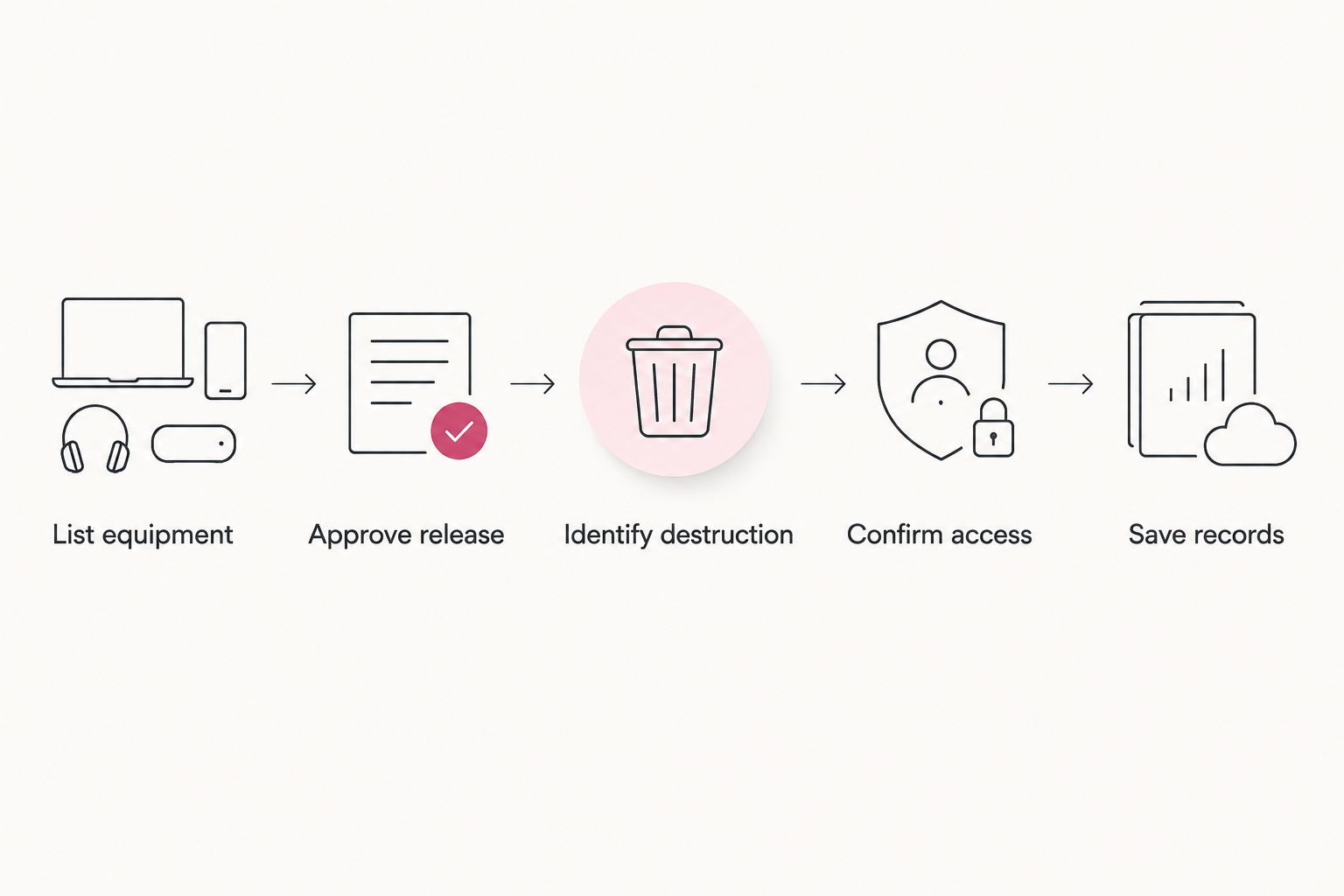
Prepare your construction firm's pickup in 5 steps
Use this sequence for a 2026 office refresh or project-office close-out. Complete the approval and data decisions before moving equipment into the outgoing area.
1. List equipment
Create a list of the devices proposed for retirement. Include equipment type, quantity, collection location, and any identifiers your business already uses.
Keep equipment awaiting reassignment off the outgoing list. Your team should be able to identify the approved batch without relying on someone remembering which desk it came from.
2. Approve release
Name the business contact authorized to release the equipment. Where IT, the project team, and a property manager share responsibility, identify who resolves questions before pickup.
For rented or leased equipment, check the applicable agreement before including it. Being located in your office does not establish that your business can dispose of it.
3. Identify destruction
Mark which devices require a destruction discussion and which are approved for recycling without that additional request. Keep this decision with the equipment list.
Pickup alone does not destroy data. If your team has not decided what should happen to a device's stored information, leave that device out of the approved collection batch until the decision is made.
4. Confirm access
Provide the business address and describe the equipment's location. Explain any reception check-in, building access, loading arrangements, or property-manager coordination that needs agreement.
Ask for confirmation rather than promising your team an unapproved collection arrangement. Equipment eligibility and location eligibility belong in the same conversation.
5. Save records
Save the Certificate of Recycling, sent within 3 days of pickup, with your equipment list. For arranged destruction services, keep the certificate of destruction separately and identify the work it documents.
Use these records to update your internal retirement status. Do not mark destruction complete solely because the equipment was collected.
When your list is ready, contact the team with the business location, equipment details, access arrangements, and any destruction request. Keep the first message practical: the information should explain what needs collecting and which decisions are already approved.
Request your business pickup
Send your equipment list, business location, and any destruction requirements for confirmation.
Keep pickup and destruction records separate
Your retirement file should distinguish collection from destruction. That distinction matters even when both services are part of the same equipment retirement project.
- Certificate of Recycling: Keep it with the approved equipment list; it lists computers, laptops and screens by the piece and other e-waste by weight. Do not use it as evidence that stored data was destroyed.
- Certificate of destruction: Keep the certificate for arranged destruction services with the corresponding job information.
- Internal approval: Retain your business's authorization to retire and release the equipment. Neither service document replaces that decision.
Before closing the task, compare the records with the approved batch. If an item remained at the office or its destruction request is unresolved, keep its internal status open rather than marking the whole project complete.
Which IT asset disposition services should you choose?
Choose Recycle for Life IT asset disposition services for local business electronics pickup, with destruction arranged explicitly when required. Start with the equipment list, not a broad request to remove everything from the room.
For your 2026 retirement plan, routine approved electronics belong in the pickup discussion. Devices requiring destruction belong in an additional scope discussion. Shared-property batches also need clear tenant authorization.
That is the practical default: confirm eligibility, agree on the work, and retain the right records. Keep equipment with unresolved decisions out of the collection batch.
FAQ
What’s the best IT asset disposition option for a construction firm?
The best option matches the approved equipment and its data requirements. Use business electronics pickup for eligible recycling equipment and arrange destruction explicitly for devices that require it.
Does Recycle for Life collect from construction businesses?
Recycle for Life provides free business-only electronics pickup in Orange County, Los Angeles, and San Diego. Confirm your construction firm’s equipment and exact collection location before scheduling.
Does electronics pickup destroy the data on our computers?
No, pickup alone does not destroy data. Discuss any destruction requirement before collection and keep devices with unresolved data decisions outside the approved outgoing batch.
Can we arrange on-site data destruction?
On-site data destruction is an offered service that requires an arrangement for your job. Confirm equipment eligibility, location, scope, and documentation before scheduling.
Is a Certificate of Recycling the same as a Certificate of Destruction?
No, the Certificate of Recycling records what was collected, while a Certificate of Destruction documents arranged destruction services. Keep the records separate in your equipment retirement file.
Can a property manager coordinate equipment from several tenants?
A property manager can coordinate the proposed collection location and access arrangements. Each business should identify its equipment, approve release, and state any destruction requirements; confirm the collection arrangement before moving equipment.
What should we send with a business pickup request?
Send the business address, equipment types and quantities, collection contact, and access details. Include any requested destruction work so it can be discussed separately from pickup.
One last thing
An empty project office does not mean the equipment retirement task is finished. Collection, internal asset updates, and arranged destruction are separate tasks with separate evidence.
Before closing the project, check whether your records show only that equipment left the site or also that the required destruction work was completed. Close each device's retirement record against the work actually documented.
Related guides
- Business electronics recycling before an office lease ends
- Business electronics recycling for property managers
- Hard-drive destruction services for engineering firms