
Data center decommissioning is the planned shutdown, sanitization, and disposal of servers, storage, and networking gear when a facility, lease, or IT environment reaches end of life. The right approach treats it as a documented project, not a demolition: certified data sanitization under NIST Special Publication 800-88 Rev. 2, a serialized chain of custody, and signed certificates for every drive and device that leaves the building.
If you’re staring at a decommission date right now, freeze new disposals immediately, inventory what’s on-site today, and loop in a certified data destruction or ITAD partner before anyone unplugs a rack.
Three actions to take this week:
- Freeze asset movement and lock down access to the racks slated for retirement.
- Pull a current asset inventory, including serial numbers, from your CMDB or a manual walk.
- Engage a certified partner now if you’re handling regulated data, more than a handful of racks, or a tight closeout deadline.
Key Takeaways
Data center decommissioning succeeds when planning, migration verification, certified sanitization, and documented chain-of-custody all happen in that order, with no phase skipped.
| Point | Details |
|---|---|
| Plan before you touch hardware | Reconcile inventory, map dependencies, and confirm contract terms before setting a shutdown date. |
| Verify migrations first | Run integration tests and restore checks before any shutdown sequence begins. |
| Match sanitization to sensitivity | Use NIST SP 800-88’s Clear, Purge, or Destroy levels based on data type and regulatory requirements. |
| Document every handoff | Certificates of Destruction and serialized custody logs are what auditors actually request. |
| Bring in certified support when scale or sensitivity is high | Usedcartridge offers on-site destruction, Certificates of Destruction, and IT asset recovery quotes for decommissioning projects. |
Table of Contents
- Why data center decommissioning matters and who should own it
- Planning and discovery: building an accurate scope before you touch anything
- How do you migrate data safely before decommissioning?
- What does a decommissioning shutdown runbook look like?
- Data sanitization, certified destruction, and staying compliant
- Asset disposition: resale, recycling, and secure transport
- Site restoration: returning the space to baseline
- What documentation do auditors expect after decommissioning?
- Common decommissioning mistakes and quick fixes
- When should you bring in a certified decommissioning partner?
- A practical lesson on decommissioning discipline
- Standards and reference documents
- Ready to Retire Your Data Center the Right Way?
- Frequently Asked Questions
- Sources
Why data center decommissioning matters and who should own it
A decommission gone wrong doesn’t fail quietly. It fails as a data breach, a landlord dispute over unreturned space, or a compliance officer asking where forty drives went. Each of those is common enough that experienced teams plan for them by default rather than reacting after the fact.
The financial exposure is real on both sides of the ledger. A lease that isn’t formally closed keeps generating rent and maintenance fees. A resold server farm, handled correctly, can offset a meaningful chunk of the decommission budget. That tension, between compliance risk and value recovery, is exactly why this can’t be a task you hand to whoever has a free afternoon.
Compliance teams increasingly treat NIST SP 800-88 as the floor, not a suggestion. Auditors expect documented sanitization method, serialized device tracking, and signed certificates for anything that touches regulated data, whether that’s health records, financial data, or customer PII.
Ownership should sit with a defined stakeholder group, not one overloaded IT manager. A workable matrix looks like this:
- Project lead (IT operations): owns the timeline, the runbook, and go/no-go decisions.
- Compliance or legal: signs off on sanitization method and retention requirements.
- Facilities: manages power-down sequencing, HVAC, and physical site conditions.
- Finance: tracks asset value recovery against decommission cost.
- Certified ITAD/data destruction partner: executes sanitization, destruction, and disposition with documented custody.
Skip any one of those roles and you tend to discover the gap during an audit, not before.
Planning and discovery: building an accurate scope before you touch anything
Every decommission that runs on schedule starts with a scope document that names a single accountable owner, a hard deadline, and a defined budget envelope. Everything else in this phase exists to make that scope accurate.
- Confirm the trigger and success criteria. Lease expiration, migration completion, or infrastructure refresh each carry different urgency and different stakeholders.
- Reconcile your CMDB against physical reality. Configuration management databases drift. Walk the racks, verify serial numbers against records, and flag anything undocumented.
- Map application dependencies. A server that looks idle might still be serving a batch job that runs once a quarter. Dependency mapping tools or a manual traffic audit catch these before they cause an outage.
- Inventory contracts and leases. Maintenance agreements, colocation contracts, and hardware leases all carry notice periods and return conditions that directly shape your timeline.
- Build the rack-by-rack disposition plan. Decide, per asset class, what gets migrated, resold, recycled, or destroyed.
Timelines vary sharply with scale. A small footprint of 2 to 5 racks typically wraps in 4 to 8 weeks, while a medium 10 to 20 rack environment runs 3 to 4 months, and a large-scale project of 50 or more racks stretches to 6 to 12 months. Migration complexity and regulatory sanitization requirements are the two biggest drivers of where you land in that range.
Pro Tip: Run a pre-decommission physical sweep before you finalize the schedule. Insiders consistently flag overlooked non-IT infrastructure, like underfloor cabling and HVAC fluid lines, as the single biggest cause of last-minute delays.
For businesses coordinating multiple stakeholders across facilities and IT, structured planning steps built around clear ownership tend to prevent the scope creep that turns a two-month project into a five-month one.
How do you migrate data safely before decommissioning?
Nothing gets powered down until every migration has passed an integration test in its new environment. That single rule prevents most of the data loss incidents tied to decommissioning projects.
The 3-2-1 backup principle, three copies of your data, on two different media types, with one stored off-site, gives you a real safety net rather than a theoretical one. Before you touch a shutdown switch, verify that safety net actually works:
- Run checksum or hash verification on migrated data to confirm bit-for-bit integrity, not just file counts.
- Perform an actual restore test from backup, not just a backup completion log.
- Monitor the new environment for a defined window, often one to two full business cycles, before calling migration complete.
- Update DNS records, IP routing, firewall ACLs, and any downstream API integrations that still point at the old environment.
- Document a final, verified backup checkpoint that’s timestamped and stored separately from the production systems being retired.
Set rollback criteria in writing before you start. If the new environment throws errors past a defined threshold, or a critical integration fails during the monitoring window, you need a pre-agreed trigger to pause the shutdown and revert, rather than an argument in a war room at 2 a.m.
One detail teams underestimate: downstream systems that pull data from the environment you’re retiring, reporting dashboards, third-party integrations, backup jobs, often aren’t listed anywhere in the CMDB. The application dependency mapping from the discovery phase should surface most of these, but budget time for stragglers. A quiet failure two weeks after decommission, when a monthly report job finally runs and finds nothing, is harder to diagnose than one that shows up immediately.
What does a decommissioning shutdown runbook look like?
Shut systems down in reverse dependency order: applications first, then databases, then the storage and network layers underneath them. Powering off in the wrong sequence is how a routine decommission turns into an unplanned outage for a system nobody thought was still connected.
A workable runbook template follows this structure:
- Pre-shutdown verification. Confirm final backups, confirm migration sign-off, confirm no active user sessions.
- Application layer power-down. Stop application services, verify no error alerts fire downstream.
- Database and storage layer power-down. Follow documented dependency order, checking each tier before moving to the next.
- Network layer decommission. Remove routing entries and disable switch ports only after confirming nothing above them is still active.
- Physical power-down. Cut power at the rack or row level, verify with facilities that circuits are confirmed dead before anyone touches cabling.
Every step needs a go or no-go checkpoint, and a communications protocol that names who signs off and who gets notified. Slack channels work fine for this as long as someone is actually accountable for reading them in real time.
On-site logistics deserve their own attention. Equipment lifts for heavier chassis, tip guards on loaded pallets, physical tagging tied to your asset inventory, defined access windows so contractors aren’t wandering a live facility, and PPE appropriate to the space, all of this is unglamorous and all of it prevents injuries and damaged equipment.
Pro Tip: Assign a second person to verify and initial each major shutdown step against the runbook. A single point of verification is exactly where mistakes slip through unnoticed.
Data sanitization, certified destruction, and staying compliant
NIST SP 800-88 defines three sanitization outcomes, and picking the wrong one for your data sensitivity is one of the most consequential mistakes in this entire process. Clear uses standard read/write commands to overwrite data, suitable for lower-sensitivity environments being reused internally. Purge applies more aggressive methods, cryptographic erase or degaussing, appropriate for media leaving your organization’s control. Destroy physically disintegrates or shreds the media so data recovery becomes infeasible by any known method, which is the standard for regulated or highly sensitive data.
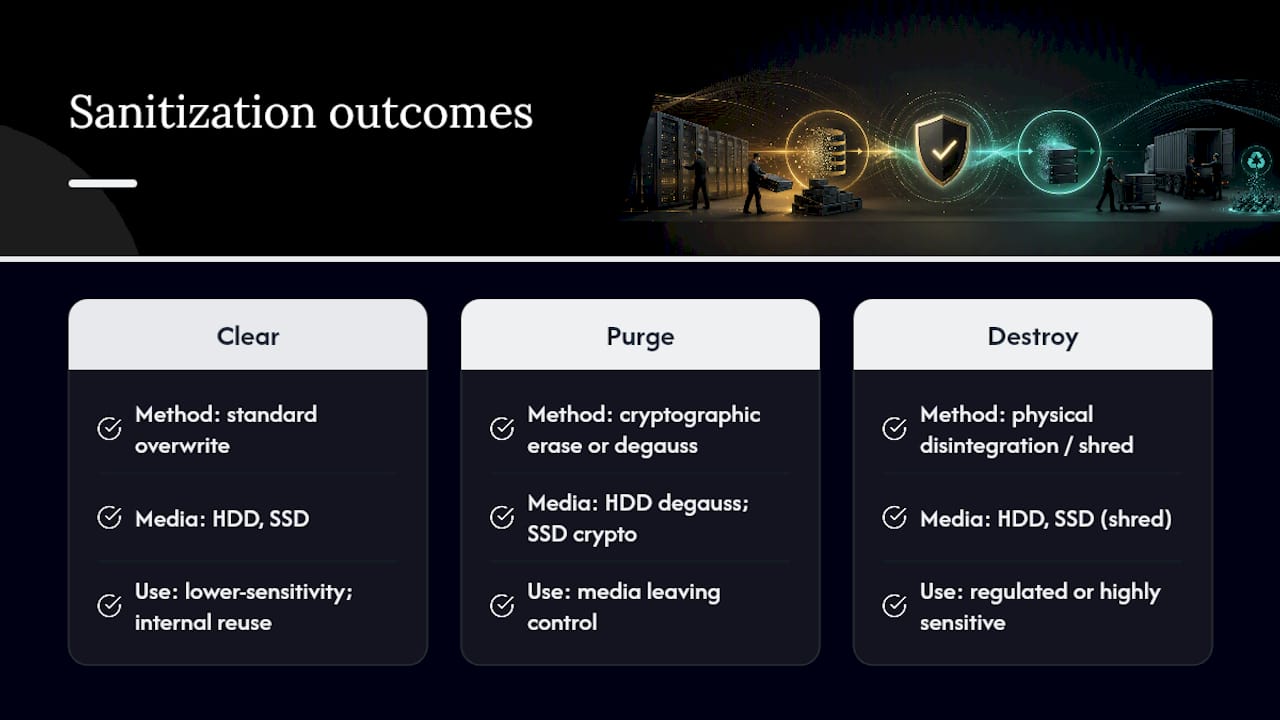
The method also depends heavily on media type. Solid-state drives don’t respond to degaussing the way hard disk drives do, since there’s no magnetic platter to erase. Cryptographic erase or physical shredding are the reliable options for SSDs, while HDDs can often be purged through degaussing or sanitized via multi-pass overwrite before physical destruction if required.
A Certificate of Destruction is not a formality, it’s the audit trail. It should list the serial number of each destroyed device, the sanitization method used, the date, the technician or facility performing the work, and a signature chain that ties back to your original asset inventory. Missing any of those fields turns a supposedly complete audit trail into a liability.
Regulated industries, healthcare under HIPAA, financial services, government contractors, frequently mandate physical destruction over software-based erasure regardless of drive type, simply because the cost of a sanitization failure is too high to accept residual risk. Document that mandate explicitly in your project scope so nobody substitutes a cheaper method later.
Usedcartridge’s data destruction services generate serialized certificates for exactly this reason: an auditor needs to trace a specific drive from your rack to its destruction record without gaps.
Asset disposition: resale, recycling, and secure transport
Not every retired server is trash, and not every retired server is worth reselling. The decision tree is straightforward: functional hardware with remaining market value goes to remarketing, damaged or obsolete hardware goes to certified recycling, and anything that held sensitive data gets sanitized or destroyed before either path.
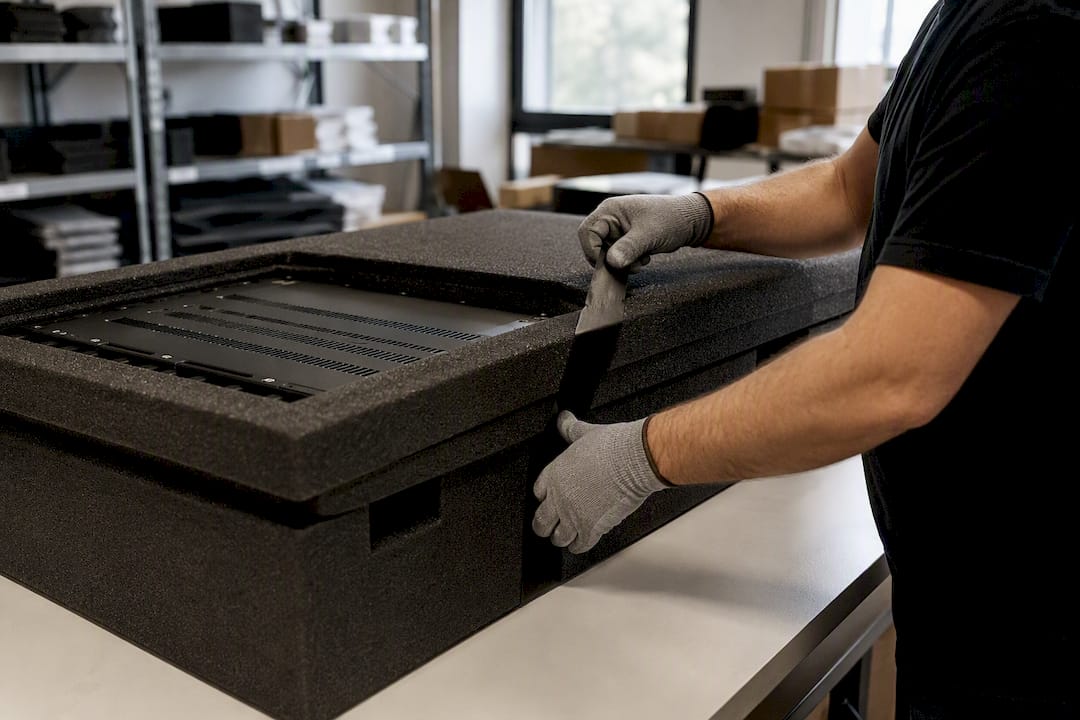
Packing and transport deserve more rigor than most teams give them. Custom cut-to-fit crating, rather than generic boxes, materially reduces damage to high-value hardware in transit and directly protects resale value. Tamper-evident seals and a chain-of-custody log updated at every handoff close the gap where equipment tends to disappear between the loading dock and the recycling facility.
Certifications matter here in a way that’s easy to skip past. R2 and R2v3 standards set requirements for responsible recycling and downstream chain-of-custody tracking, while e-Stewards and WEEE labeling address environmental handling and international export controls. Ask any disposition vendor for their actual certificate, not a claim on their website, and verify it against the certifying body’s public registry.
Remarketing proceeds should flow back into the project’s accounting as a credit against decommission costs, not vanish into general revenue. That distinction matters when you’re building the business case for the next decommission and need to show leadership what this one actually cost. Usedcartridge’s IT asset recovery process values equipment before disposition, so functional hardware gets a payout rather than getting shredded by default. For hardware with no resale path, certified e-waste recycling keeps the disposal chain compliant and documented.
Site restoration: returning the space to baseline
The gear leaving the building is only half the job. Landlords and facility owners expect the physical space back in a defined condition, and that checklist gets missed more often than the data sanitization piece.
- Remove all cabling, including underfloor runs, and patch floor penetrations to local building code.
- Handle HVAC coolants and refrigerants through licensed technicians, since most jurisdictions regulate their disposal separately from general e-waste.
- Return electrical panels, breakers, and fire-suppression systems to their pre-installation baseline state, with documentation for anything that was modified.
- Conduct a final walkthrough with facilities and, where applicable, the landlord’s representative, and keep signed records of that walkthrough.
- Photograph the empty space before handover. It’s the cheapest insurance against a later dispute over “damage.”
Facility-specific environmental controls, like insulating film on server room glazing, are worth revisiting during restoration planning if the space is being repurposed rather than vacated. Data center window film solutions are one example of the kind of facility upgrade that comes up in these handoffs.
What documentation do auditors expect after decommissioning?
Every serialized handoff needs a log entry verified by two people, not one, because a single point of sign-off is exactly where records get disputed later. That second signature turns a claim into evidence.
Auditors and compliance officers will ask for a specific set of documents, so build them as you go rather than reconstructing them afterward:
- Asset reconciliation report, matching your original inventory against final disposition for every serial number.
- Certificates of Destruction, one per sanitization batch, with the full field set described earlier.
- Transport manifests showing chain-of-custody for every shipment leaving the site.
- Exception logs documenting anything that deviated from the runbook, and why.
Pro Tip: Store these records in a format that survives a system migration, PDF with a version-controlled backup, not a live database that might not exist in five years when an auditor comes calling.
Retention periods should match your industry’s regulatory minimums, but three to seven years is a reasonable default when no specific rule applies.
Common decommissioning mistakes and quick fixes
Most failures trace back to the same handful of oversights, and all of them are preventable with a checklist you actually follow.
- Missing non-IT infrastructure. Underfloor cabling and HVAC fluid lines get forgotten until they block the final walkthrough. Fix: run the physical sweep during discovery, not during teardown.
- Weak chain-of-custody. Unverified handoffs create both theft risk and compliance gaps. Fix: require second-person sign-off at every transfer point.
- Skipping final verification. Shutting down without a tested rollback plan turns a minor error into an outage. Fix: never proceed past a go/no-go checkpoint without documented sign-off.
- Underestimating logistics. Heavy equipment handling and custom crating needs get discovered too late. Fix: scope transport and packing requirements during planning, not the week of pickup.
When should you bring in a certified decommissioning partner?
Outsourcing makes sense once you’re dealing with regulated data, a scale beyond what your internal team handles routinely, or a deadline that leaves no room for the learning curve of a first-time decommission. In-house teams often manage small, low-sensitivity retirements fine; anything larger or more sensitive benefits from certified execution.
Usedcartridge’s role in that decision comes down to a few concrete capabilities:
- On-site destruction, so sensitive drives never leave the building unsanitized.
- Certificates of Destruction with full serialized documentation for every device.
- IT asset recovery with disposition quotes, turning functional retired hardware into recovered value rather than a straight write-off.
- Compliance-aligned processes that map directly to the sanitization, transport, and audit deliverables auditors expect.
If your project touches any of the phases above and your team is stretched thin, a free quote request costs nothing and gives you a real comparison point against doing it in-house.
A practical lesson on decommissioning discipline
The projects that go sideways almost never fail on the technical steps. They fail on the handoffs, the moment nobody double-checked whether a drive actually made it from the rack to the destruction bin. Chain-of-custody and certified destruction aren’t paperwork for its own sake; they’re the only thing standing between you and an unanswerable question during an audit. If your project has real scale or real data sensitivity, get a certified partner on the phone before you touch a power switch.
Standards and reference documents
- NIST Special Publication 800-88 Rev. 2: the federal standard for media sanitization methods.
- R2 (Responsible Recycling) standard: certification for responsible electronics recycling and custody tracking.
- A checklist for data center decommissioning — DataCenterKnowledge: phased operational guidance for planning through restoration.
Ready to Retire Your Data Center the Right Way?
Usedcartridge handles the two parts of decommissioning most teams struggle to do in-house: certified data destruction with documented chain-of-custody, and IT asset recovery that turns retired hardware into recovered value instead of a write-off. Where a generic recycler hands you a generic receipt, Usedcartridge issues serialized Certificates of Destruction tied to your exact asset inventory, the paperwork auditors actually want to see.

Whether you’re retiring five racks or fifty, the process starts the same way: get a clear picture of what your hardware is worth and what it costs to sanitize and remove. Request a free IT asset recovery quote or explore Usedcartridge’s e-waste recycling services to see where your decommission budget can go further.
Frequently Asked Questions
What is data center decommissioning?
It’s the structured process of shutting down, sanitizing, and disposing of servers, storage, and networking equipment when a data center or IT environment reaches end of life, covering everything from planning through certified data destruction and site restoration.
How long does data center decommissioning take?
Small environments of 2 to 5 racks typically take 4 to 8 weeks, medium environments of 10 to 20 racks run 3 to 4 months, and large-scale projects of many racks can take several months depending on migration complexity and sanitization requirements.
What is the difference between Clear, Purge, and Destroy under NIST SP 800-88?
Clear uses standard commands to overwrite data for lower-sensitivity reuse cases, Purge applies stronger methods like cryptographic erase for media leaving your control, and Destroy physically disintegrates the media so recovery is infeasible, generally required for regulated or highly sensitive data.
Do I need a Certificate of Destruction for every device?
Yes, for any device that held sensitive or regulated data. The certificate should list the serial number, sanitization method, date, and responsible party, forming the audit trail compliance teams and regulators expect to see.
Can I recover value from retired data center hardware?
Often, yes. Functional servers, storage, and networking gear with market demand can be resold through IT asset recovery programs, with proceeds offsetting the cost of the decommissioning project rather than treating everything as scrap.
Sources
- NIST Special Publication 800-88 Rev. 2
- R2 (Responsible Recycling) standard
- A checklist for data center decommissioning — DataCenterKnowledge
- The end is nigh? Then you need a decommissioning checklist — Data Center Dynamics
- Data Center Decommissioning Checklist: Step-by-Step 2026 — Reboot Monkey