
DoD 5220.22-M wiping is a legacy overwrite standard that erases data by writing patterns of zeros, ones, and random characters across a hard drive, usually multiple times. It still works reasonably well on older mechanical hard drives, but it was never designed for SSDs, NVMe drives, or self-encrypting drives, and the standard itself has been dropped from current federal guidance. For most organizations today, NIST SP 800-88 is the reference that matters, and what actually satisfies an auditor is verification, documentation, and a clean chain of custody, not the DoD name on a certificate.
TL;DR:
- DoD 5220.22-M wiping is outdated and not recommended for SSDs, NVMe drives, or self-encrypting drives, with current guidance favoring NIST SP 800-88.
- Overwriting methods are limited by drive remapping, firmware-level reserved areas, and wear leveling, especially on flash-based storage where physical destruction or cryptographic erasure is more effective.
- A verified single-pass overwrite on traditional hard drives remains valid and faster than multi-pass schemes, and proper verification plus documentation are crucial for compliance.
- Certificates of sanitization must detail the method, verification outcome, drive serial numbers, chain of custody, and operator to effectively prove data destruction.
- Using professional destruction services with certified, documented processes is recommended for large or sensitive drive decommissioning to ensure compliance and reduce legal risks.
Table of Contents
- What Is DoD 5220.22-M Wiping, and Where Did the Short and Long Passes Come From?
- How Does a DoD-Style Overwrite Actually Reach the Data on a Drive?
- Why DoD 5220.22-M Wiping Struggles on SSDs, NVMe, and Self-Encrypting Drives
- What Do NIST SP 800-88 and IEEE 2883 Recommend Instead of a Fixed Pass Count?
- What Should a Certificate of Sanitization Actually Prove?
- When Does It Make Sense to Hire a Professional Data Destruction Vendor?
- What Software and Tools Still Implement DoD 5220.22-M Wiping?
- Common Myths About DoD 5220.22-M Wiping That Won’t Die
- How Do You Run a DoD 5220.22-M Wipe Correctly, Step by Step?
- What Are the Legal and Compliance Risks of Relying on This Standard Alone?
- How Does DoD Overwriting Compare to Degaussing and Physical Destruction?
- Editorial Take: Stop Chasing a Retired Standard and Start Documenting the One That Works
- Where to Turn for Certified Data Destruction and Compliant E-Waste Recycling
- Sources
What Is DoD 5220.22-M Wiping, and Where Did the Short and Long Passes Come From?
The name comes from the National Industrial Security Program Operating Manual, the Pentagon document that once governed how defense contractors handled classified information on computer storage. NISPOM didn’t originally spell out a specific overwrite pattern. Software vendors built their own interpretations, and a de facto standard emerged around a small handful of pass sequences that stuck around in marketing copy long after the federal rule itself dropped explicit overwrite specifications in 2006.
Two variants show up most often in tools that still advertise the name:
- Short (3-pass): writes zeros, then ones, then a random character, with a verification pass to confirm the final write took hold.
- Long / ECE (7-pass): repeats an extended pattern, sometimes described as an “erase, verify, write, verify” cycle, aimed at higher assurance for more sensitive material.
Neither variant is mandated by current defense regulations. Contractors handling classified systems today are directed to their Cognizant Security Agency for sanitization guidance rather than a fixed pass count, which tells you something about how far the industry has moved past this specific standard.
How Does a DoD-Style Overwrite Actually Reach the Data on a Drive?
An overwrite pass works at the logical block level. Software issues write commands across the addressable sectors the operating system can see, replacing whatever bits were there with the pattern of the pass. On a traditional mechanical hard drive with no bad-sector remapping, that’s a fairly complete job. The problem is that “addressable” and “actual” storage haven’t been the same thing for a long time.
Drives quietly remap failing sectors to a reserved pool as part of normal aging. Once a sector gets marked bad and swapped out, the operating system loses the ability to address it directly. Whatever data was sitting there before the remap can survive an overwrite untouched, because the overwrite never gets a command path to it. Firmware-level reserved areas, host protected areas, and device configuration overlays create similar blind spots.
Verification is where DoD-style wiping gets honest about its own limits. Full physical readback of every sector on a modern high-capacity drive is time-consuming, so many tools default to percentage-based sampling instead.
- Full verification reads back every written sector, which is thorough but slow on multi-terabyte drives.
- Percentage verification, often 10% or 25% of logical block addresses, is the common operational compromise for large device fleets.
- Neither approach can confirm what happened inside a remapped or firmware-hidden region, because that region was never in the overwrite’s reach to begin with.
That gap matters more than most compliance checklists acknowledge, especially for drives with a documented history of reallocated sectors.
Why DoD 5220.22-M Wiping Struggles on SSDs, NVMe, and Self-Encrypting Drives
Overwrite-based erasure assumes a fairly direct relationship between the logical address you write to and the physical cell that stores the bit. Flash storage breaks that assumption on purpose. Solid-state drives use wear leveling to spread writes evenly across memory cells and extend the drive’s lifespan, which means a logical block address rarely maps to the same physical location twice in a row.
Overprovisioning compounds the problem. SSD controllers reserve a chunk of physical flash that never shows up in the addressable capacity at all, and data written to a cell before it gets rotated into that reserved pool can sit there indefinitely. NIST’s own guidance flags overwriting as ineffective for some flash-based storage media, precisely because the controller, not the operating system, decides where bits physically land.
- Wear leveling and overprovisioning make the outcome of a logical overwrite non-deterministic on most SSDs and NVMe drives.
- Cryptographic erase, which destroys the encryption key protecting data rather than touching every cell, is usually faster and more reliable on drives that support it.
- Hardware secure erase or ATA/NVMe purge commands built into the drive’s own firmware reach areas that host-level software commands cannot.
- Self-encrypting drives (SEDs) are typically better sanitized by destroying or resetting the encryption key than by running any overwrite pass at all.
None of this means overwriting is obsolete everywhere. On conventional spinning hard drives without encryption, a documented overwrite plus verification remains a reasonable clearing method, and it’s often cheaper and faster than physical destruction when the drive still has resale or reuse value.
Pro Tip: Before choosing a sanitization method, check whether the drive supports a native ATA Secure Erase or NVMe Format with Secure Erase Settings command. Manufacturer-implemented purge commands almost always outperform a generic software overwrite on the same hardware.
What Do NIST SP 800-88 and IEEE 2883 Recommend Instead of a Fixed Pass Count?
NIST SP 800-88 replaced the old fixed-pass-count mentality with a three-tier model: Clear, Purge, and Destroy. Clear covers logical techniques like overwriting that protect against basic data recovery attempts. Purge applies physical or logical techniques that resist laboratory-grade recovery, including cryptographic erase and manufacturer-implemented sanitize commands. Destroy means the media is physically rendered unusable, through shredding, disintegration, or incineration.
The framework’s real strength is that it matches the technique to the media type instead of assuming one pattern works everywhere. NIST states plainly that multi-pass overwrite schemes add no extra assurance for many modern devices compared to a single well-verified pass, which quietly undercuts decades of marketing built around “military-grade 7-pass” wiping.
IEEE 2883 builds on that foundation with device-specific recommendations, addressing newer storage classes like NVMe, SEDs, and emerging non-volatile memory types that didn’t exist when the original NISPOM overwrite conventions took shape. Together, the two documents give IT teams a decision framework instead of a single number to chase.
In practice, that framework boils down to a few rules of thumb:
- Choose Clear (overwrite, single pass is usually adequate) for conventional magnetic media headed for reuse, resale, or donation.
- Choose Purge or cryptographic erase for flash-based drives whenever the hardware supports it.
- Choose Destroy for classified material, regulated health or financial records, or any drive where the sensitivity level makes residual risk unacceptable.
That last category is where physical destruction and the older overwrite mindset actually agree: some data shouldn’t survive in recoverable form under any circumstances, regardless of which standard’s name is on the paperwork.
What Should a Certificate of Sanitization Actually Prove?
A method name on a report proves almost nothing by itself. What convinces an auditor, an insurer, or a regulator is evidence that the erasure happened, was checked, and can be traced back to a specific device and a specific operator.
Three verification approaches cover most real-world needs:
- Full or percentage-based verification, where the tool reads back written sectors to confirm the pattern took hold, whether that’s every sector or a documented sample size.
- Cryptographic attestation, common with self-encrypting drives, where a signed record confirms the encryption key was destroyed rather than relying on a readback of erased content.
- Metadata logging, capturing drive serial numbers, capacity, method used, start and end timestamps, and pass/fail status for every device processed.
A certificate of destruction that actually holds up under review states the standard referenced, the exact method applied, individual drive serial numbers, the verification outcome, timestamps for each stage, the operator’s name, and an unbroken chain of custody from pickup to final disposition.
| What to check | Why it matters |
|---|---|
| Standard referenced (NIST SP 800-88, not just “DoD”) | Confirms the method matches current guidance, not a retired label |
| Drive serial numbers logged individually | Ties the certificate to specific hardware, not a batch estimate |
| Verification method stated | Shows whether full readback, sampling, or crypto attestation was used |
| Chain-of-custody record | Establishes who had physical access at every stage |
| Operator name and timestamp | Creates accountability if the record is ever challenged |
Custody controls matter as much as the wipe itself. A drive that sits unlogged in a van overnight between pickup and processing creates a gap that no certificate can paper over later, and that gap is exactly what regulators look for during an audit.
When Does It Make Sense to Hire a Professional Data Destruction Vendor?
In-house wiping works fine for a handful of retired laptops with low sensitivity data and no regulatory scrutiny attached. The calculation changes fast once you’re dealing with hundreds of drives, health or financial records, or any device count large enough that a missed unit becomes a real liability rather than an inconvenience.
Weigh these factors before deciding:
- Sensitivity level of the data involved, and whether regulation (HIPAA, state privacy law, contractual data protection clauses) dictates a specific outcome.
- Device count and timeline — a fleet refresh of 500 units needs logistics that a single IT technician with wiping software can’t realistically provide.
- Proof requirements from insurers, clients, or regulators who expect documented, third-party certification rather than an internal spreadsheet.
Vendors that specialize in this work typically deliver on-site destruction, degaussing or shredding for magnetic media, a formal certificate of destruction, secure chain-of-custody logistics, and recycling documentation that satisfies environmental compliance alongside data security.
Pro Tip: Ask any vendor for a sample certificate before signing a contract. If it doesn’t list individual serial numbers, verification method, and a named operator, keep looking. A certificate that just says “DoD wipe completed” with no supporting detail is a red flag, not proof.
What Software and Tools Still Implement DoD 5220.22-M Wiping?
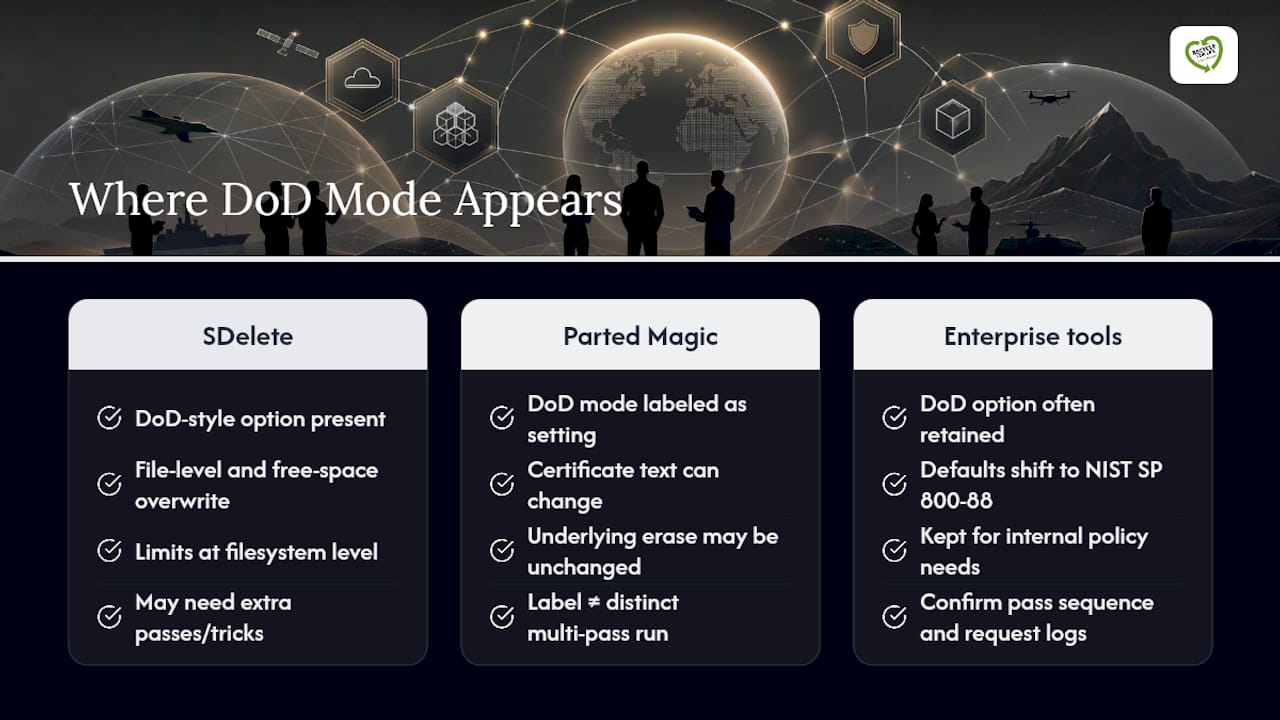
A fair number of free and commercial tools still ship a “DoD 5220.22-M” option in their menu, usually alongside NIST-aligned single-pass and Gutmann-style 35-pass modes. SDelete, Microsoft’s free Sysinternals utility, implements DoD-style clearing for individual files and free space on Windows systems, though its documentation is candid about the limits of working purely at the filesystem level. It can overwrite file contents effectively, but fully scrubbing NTFS Master File Table entries and free-space remnants requires additional passes and allocation tricks most users never run.
Boot-based sanitization utilities like Parted Magic offer a labeled DoD mode as one setting among several. That’s worth knowing because the label doesn’t always mean what buyers assume. Parted Magic’s own documentation notes that enabling DoD mode can change what appears on the output certificate while the underlying erase command sent to the drive stays the same. In other words, the certificate might say “DoD 5220.22-M” without the drive ever running a distinct multi-pass routine beyond what the tool would have done anyway.
For enterprise deployments, most reputable sanitization platforms have shifted their default recommendations toward NIST SP 800-88 aligned methods, keeping the DoD option around mainly for organizations whose internal policy documents still name it explicitly. If your compliance paperwork requires the DoD label specifically, confirm with your software vendor exactly which pass sequence runs under that setting and request the underlying log, not just the summary certificate.
Common Myths About DoD 5220.22-M Wiping That Won’t Die
The biggest myth is that more passes automatically mean more security. A single well-verified overwrite pass on a conventional hard drive removes data just as effectively as seven passes in nearly every practical scenario; the extra passes mainly add processing time, not additional protection. NIST’s own position is that multi-pass overwrite schemes provide no measurable benefit over a single verified pass for most modern devices.
The second myth is that DoD 5220.22-M is a currently mandated federal standard. It isn’t. The NISPOM rule that gave the name its authority dropped explicit overwrite specifications back in 2006, and defense contractors now get sanitization direction from their Cognizant Security Agency rather than a named pass count.
A third misconception treats “DoD wipe” as a guarantee that a drive is unrecoverable regardless of hardware type. That claim falls apart on SSDs and NVMe drives, where wear leveling means logical overwrites never reliably touch every physical cell that once held data.
Finally, plenty of buyers assume any tool advertising DoD compliance runs the same process. It doesn’t. As noted earlier, some tools apply the DoD label to a certificate without changing the actual erase command underneath, which is exactly why detailed logs and verification data matter more than a named standard on a report.
How Do You Run a DoD 5220.22-M Wipe Correctly, Step by Step?
If your organization’s policy still specifically calls for this method, follow a disciplined sequence rather than trusting a default software setting to handle everything correctly.
- Inventory the drive. Record the serial number, capacity, interface type, and whether it’s a conventional hard drive or flash-based media, since the method should change based on that answer.
- Confirm the drive is a suitable candidate. Reserve overwrite-based wiping for magnetic media without encryption. Route SSDs, NVMe drives, and SEDs toward cryptographic erase or a manufacturer secure-erase command instead.
- Select the pass sequence (short 3-pass or extended 7-pass) based on your organization’s written policy, not just software defaults.
- Run the overwrite and capture logs in real time, including start and end timestamps for each pass.
- Verify the result, ideally with full sector readback; if fleet size makes that impractical, document the percentage sampled and the sampling method used.
- Generate a certificate that names the standard, method, drive serial number, verification outcome, operator, and timestamps.
- Maintain chain of custody from the moment the drive leaves production use until final disposition, whether that’s reuse, resale, or destruction.
Skipping step 5 is the most common shortcut that causes trouble later. A wipe without documented verification is a claim, not proof, and the difference matters enormously the first time an auditor or a client’s legal team asks for evidence.
What Are the Legal and Compliance Risks of Relying on This Standard Alone?
Regulatory frameworks like HIPAA, state data breach notification laws, and contractual data protection clauses generally require “reasonable” or “appropriate” safeguards for data destruction, without naming a specific overwrite standard. That flexibility cuts both ways. It means DoD 5220.22-M isn’t legally required anywhere in current U.S. federal civilian regulation, but it also means citing an outdated standard by name, without matching evidence of verification, won’t automatically satisfy an auditor either.
The bigger exposure comes from a mismatch between what a certificate claims and what a forensic review would actually find; following guidelines to protect candidate data in recruitment helps reinforce compliance practices. If a breached organization’s paperwork says “DoD wipe completed” on drives that were flash-based media where overwriting is known to be unreliable, that gap becomes a liability in litigation or a regulatory inquiry, not a defense. Referencing NIST SP 800-88 by name in internal policy, and matching the sanitization method to the actual media type, gives compliance teams a far stronger position than citing a retired defense standard out of habit.
Organizations bound by federal contract requirements should also recognize that current NISPOM rules point contractors toward their Cognizant Security Agency for sanitization decisions rather than a fixed method, which means blanket internal policies still built around “DoD 5220.22-M” language may need updating to stay defensible.
How Does DoD Overwriting Compare to Degaussing and Physical Destruction?
Three broad approaches dominate real-world data sanitization decisions, and each fits a different risk profile.
Overwriting (DoD-style or NIST Clear-level) works only on media that remains functional and addressable afterward, which makes it the right choice when a drive has resale or reuse value. It’s the slowest of the three per drive but the only one that preserves the hardware for a second life.
Degaussing exposes magnetic media to a powerful magnetic field that scrambles the drive’s magnetic domains, destroying the data and usually the drive’s usability at the same time. It works only on magnetic storage. Degaussing does nothing to flash-based SSDs, which don’t store data magnetically at all, a limitation that trips up organizations still running mixed fleets of old and new hardware.
Physical destruction, whether shredding, disintegration, or crushing, is the only method that provides absolute assurance regardless of media type, which is why ISO/IEC 21964-3 specifies particle-size requirements for shredded data carriers used in high-assurance destruction processes. It’s irreversible, media-agnostic, and the standard choice for classified material or drives too damaged to sanitize logically.
The practical takeaway: overwriting suits drives you want back, degaussing suits magnetic drives you’re retiring entirely, and destruction suits anything where residual risk is unacceptable no matter the media type.
Editorial Take: Stop Chasing a Retired Standard and Start Documenting the One That Works
The obsession with DoD 5220.22-M says more about marketing history than actual security. Vendors kept the name on their menus for years after the federal government moved on, because “military-grade” sells software licenses better than “NIST SP 800-88 Clear-level, single pass, verified.” That branding gap is the single biggest source of confusion I see in this space.
What the evidence actually supports is simpler than most guides make it sound: match the method to the media, verify what you did, and keep a record good enough to survive a hostile audit. A single verified overwrite on a conventional hard drive does the job. A cryptographic erase does the job on a self-encrypting drive. Physical destruction does the job on anything you can’t afford to be wrong about. None of that requires reciting a Cold War-era pass count.
If your organization’s policy still names DoD 5220.22-M specifically, don’t panic and don’t ignore it either. Update the policy language to reference NIST SP 800-88, keep the verification standards you already have, and make sure whoever performs the sanitization can produce a certificate with real detail behind it. That shift protects you far more than any pass count ever did.
— Keith
Where to Turn for Certified Data Destruction and Compliant E-Waste Recycling
Reading through pass counts and verification standards is useful right up until you actually have a stack of retired drives sitting in a storage closet with a compliance deadline attached. Usedcartridge handles that gap directly: on-site and off-site data destruction with documented, audit-ready certification for every drive processed, paired with environmentally compliant recycling so the hardware itself doesn’t become a separate liability.

That combination matters more than it sounds. A vendor that only destroys drives and leaves you to figure out e-waste disposal separately hands you two compliance problems instead of one. Usedcartridge’s process covers secure equipment destruction, chain-of-custody logistics, and IT asset recovery for hardware that still has resale value, all under one engagement instead of three separate vendors.
If your organization is weighing in-house wiping against a professional destruction service, or you’re simply staring at a fleet refresh with no clear disposition plan, request a quote and get specifics on turnaround, certification detail, and pickup logistics before your next audit cycle puts the question on someone else’s desk.
Sources
- SP 800-88 Rev. 2, Guidelines for Media Sanitization | CSRC
- Guidelines for Media Sanitization (NIST SP 800-88r2)
- SDelete (Secure Delete) – Microsoft Sysinternals
- ISO/IEC 21964-3:2018 – Destruction of data carriers