
Federal law requires covered entities and business associates to render electronic protected health information unreadable before a device leaves their control, using a documented, defensible method, not a factory reset and a shrug. That obligation comes from 45 CFR 164.310(d), the Security Rule’s device and media controls standard. In practice, it means choosing a sanitization approach mapped to NIST SP 800-88 Rev. 2, validating that it worked, and, if a vendor does the work, holding a signed Business Associate Agreement and a certificate of destruction to prove it.
TL;DR:
- Using factory resets or simple deletion does not ensure data is unreadable; validated sanitization methods or physical destruction are necessary for compliance.
- Overwrite techniques work well for spinning hard drives but are unreliable for solid-state drives unless cryptographic erase is supported and verified.
- Vendors handling devices with ePHI require a signed Business Associate Agreement, chain-of-custody records, and immediate certificates of destruction to avoid legal exposure.
- On-site destruction can eliminate the risk of data breaches by preventing devices from leaving your premises before being properly sanitized.
- Maintaining detailed asset records, validation proof, and ongoing process testing creates an audit trail that satisfies regulatory requirements and reduces compliance gaps.
Table of Contents
- The Legal Anchors Behind HITECH Disposal Rules
- Sanitization Methods: Clear, Purge, or Destroy
- Vendor Requirements: BAAs, Chain of Custody, and Proof
- A Step-By-Step Disposal Workflow You Can Adapt
- Recordkeeping That Actually Survives an Audit
- Why Most Compliance Programs Treat Disposal as an Afterthought
- Get HITECH-Compliant Disposal Done Right the First Time
- Where to Verify These Rules Yourself
- Sources
- FAQ
The Legal Anchors Behind HITECH Disposal Rules
The core requirement lives in a single subsection most compliance officers have never read in full. 45 CFR 164.310(d) requires policies and procedures for the final disposition of ePHI and for removing ePHI from media before reuse, plus accountability for tracking hardware and electronic media movement. HHS has said plainly that clearing, purging, or destroying media are all acceptable techniques, as long as the choice is documented and appropriate to the sensitivity of the data involved.
HITECH changed the stakes. Before that law, business associates sat mostly outside direct federal enforcement. HITECH pulled them in, making vendors, IT recyclers, and contractors directly subject to Security Rule obligations and potentially liable in their own right. That shift is why “our vendor handles it” is no longer an acceptable answer during an audit.
What this means day to day:
- Your organization needs written disposal and media reuse procedures, not just a verbal understanding among IT staff.
- Workforce training has to cover disposal specifically, including what counts as ePHI-bearing media.
- Every device movement, from a desk to a storage closet to a truck, needs a record of custody.
Sanitization Methods: Clear, Purge, or Destroy
NIST SP 800-88 Rev. 2 splits sanitization into three tiers, and picking the wrong one for the media type is the single most common technical mistake in healthcare data disposal. Clear uses standard read/write commands or software to overwrite data. Purge applies techniques like cryptographic erase or degaussing that resist advanced lab recovery. Destroy physically disables the media through shredding, disintegration, or incineration so it can never be read again.
The catch is that clear and purge don’t work equally well across all hardware. Overwrite-based clearing was designed for spinning hard drives, and it performs unpredictably on SSDs because of wear-leveling and hidden reserve blocks that standard commands can’t reach. NIST’s own guidance flags a related problem: if you can’t verify who controls the encryption keys on a device, no software wipe gives you real assurance the data is gone.
A quick reference for common healthcare IT assets:
- Spinning hard drives: clear or purge with verified overwrite tools, or destroy for high-risk data.
- SSDs and flash storage: purge via cryptographic erase where supported, or destroy when key control is uncertain.
- Backup tapes: purge via degaussing or destroy.
- Networked printers and copiers with internal storage: often overlooked, but they hold scanned patient documents and need the same clear/purge/destroy decision.
Pro Tip: Never accept “factory reset” as proof of sanitization for anything that touched patient records. Ask what method was used, whether it matches NIST SP 800-88 Rev. 2, and how the result was verified before you sign off.
Vendor Requirements: BAAs, Chain of Custody, and Proof
Any vendor that handles devices containing ePHI, even for pickup and transport, is a business associate under HIPAA, and that relationship needs a signed BAA before a single hard drive leaves your building. HITECH’s extension of liability to business associates means a weak vendor contract isn’t just a paperwork gap. It’s a direct compliance exposure if that vendor mishandles data.
Before signing with any disposal or recycling provider, confirm:
- A current BAA is in place, with subcontractor flow-down clauses if the vendor uses its own downstream partners.
- The vendor can produce insurance documentation and, ideally, third-party audit or certification evidence.
- Chain-of-custody tracking starts the moment your equipment is picked up, not after it arrives at a facility.
- Devices are staged in a locked, access-controlled area, not left on a loading dock or open cart.
- You receive a certificate of destruction with asset identifiers immediately after the work is done, not weeks later.
On-site destruction removes a layer of risk entirely, since devices never leave your premises before they’re rendered unreadable. That’s a meaningful advantage when the alternative involves trucking unwiped drives across state lines to a third-party warehouse.
A Step-By-Step Disposal Workflow You Can Adapt
Most disposal failures trace back to a skipped step, not a bad decision. A workflow built around five checkpoints closes the gaps auditors actually look for.
- Identify every device that may hold ePHI, and check whether any are under a legal hold or inside a mandatory retention window before doing anything else.
- Stage cleared-for-disposal devices in a locked area with restricted access, and log who has custody at each handoff.
- Select a sanitization method by media type, clear, purge, or destroy, and write down why that method fits the data’s sensitivity.
- Validate the sanitization result or witness the physical destruction directly, then collect a certificate of destruction and full chain-of-custody paperwork.
- File every record in a centralized audit trail, and periodically test that your vendor’s process still matches what they promised in the contract.
Statistic Callout: HHS guidance is explicit that PHI must be rendered essentially unreadable, indecipherable, and not reconstructable before it ever reaches a public dumpster or unsecured bin. Skipping straight from Step 1 to a curbside pickup is the fastest way to turn a routine cleanout into a reportable breach.
Recordkeeping That Actually Survives an Audit
A certificate of destruction alone doesn’t close the loop. Auditors want to trace a straight line from a specific device to a specific outcome, and a certificate sitting disconnected from custody records leaves an unexplained gap that looks worse than having no certificate at all.
A defensible audit file should include:
- Asset identifiers and serial numbers for every device disposed of.
- The sanitization or destruction method used, with the rationale documented.
- The name of the responsible person who authorized and oversaw disposal.
- A signed BAA covering any vendor involved.
- The certificate of destruction, linked by asset ID to the custody log and validation results.
One rule overrides all of this: never destroy a device tied to an open litigation hold or an active retention requirement, no matter how urgent the disposal backlog feels. A HIPAA-compliant destruction process that violates a discovery obligation trades one legal problem for a worse one.
Why Most Compliance Programs Treat Disposal as an Afterthought
Disposal gets less attention than access controls or breach notification, and that’s backwards. A device sitting in a storage closet for eight months after decommissioning is a bigger, quieter risk than most of the controls compliance teams spend their budget on, because nobody is watching it and nobody has a deadline attached to it.
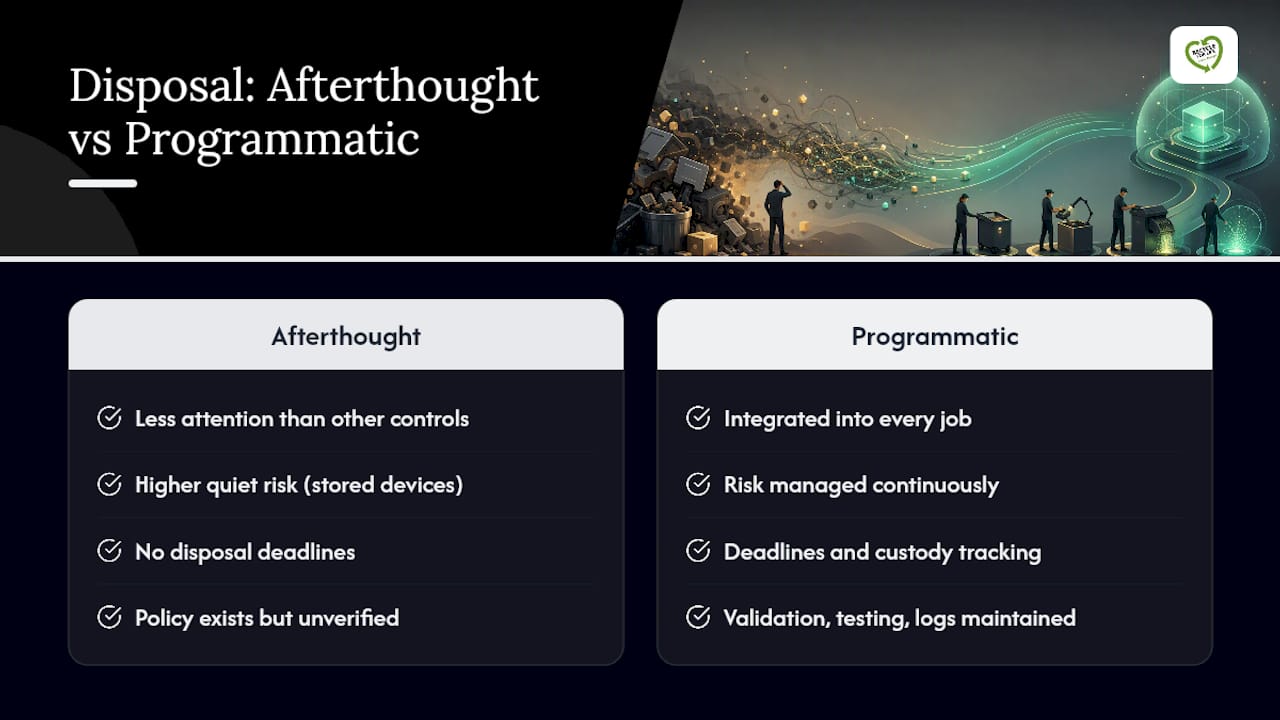
The HHS framing that guides this whole area is flexibility, not a fixed technology mandate. Regulators don’t tell you to buy a specific shredder or wipe tool. They tell you to pick a method proportionate to the risk and write down why you picked it. That flexibility gets abused constantly. Organizations treat “we have a policy” as equivalent to “we followed the policy,” and those are not the same thing during an actual audit.
The newer NIST direction on sanitization pushes toward programmatic thinking, meaning validation and testing frequency matter as much as which technique you name in a policy document. A provider that builds custody logging and validation into every job, rather than treating destruction as a one-time event, is operationalizing that guidance rather than just referencing it. That’s the gap between a compliance program that looks good on paper and one that actually holds up.
— Keith
Get HITECH-Compliant Disposal Done Right the First Time
A documented alternative to guessing your way through disposal is on-site destruction that keeps devices from ever leaving your building unsanitized, backed by a certificate of destruction and chain-of-custody records for every job.

Every service ties back to the checklist above. Onsite Data Destruction puts a shredder on your property so a witnessed destruction event replaces a wipe you’d otherwise have to trust blindly. Hard Drive Destruction handles bulk decommissioning when a full server room or fleet of desktops needs sanitizing on a deadline. For broader equipment, Equipment Destruction and Local Electronics Recycling cover everything from network gear to printers with internal storage. Clients receive certificates of destruction and asset-level records immediately, the exact documentation an auditor asks for first.
Getting a quote takes a short form and a few details about your equipment volume. If your organization has a backlog of devices sitting in a closet waiting on a decision, request a quote for on-site destruction and get a fixed plan for clearing it out before it becomes next year’s audit finding.
Where to Verify These Rules Yourself
For the regulatory text itself, read 45 CFR 164.310 on device and media controls. HHS’s FAQ on computer and media disposal explains accepted techniques in plain language. For the technical standard, NIST SP 800-88 Rev. 2 covers sanitization method selection and validation in full.
This article is general information, not a substitute for advice from a qualified doctor. Consult a qualified healthcare professional about your own circumstances before acting on anything here.
Sources
- eCFR :: 45 CFR 164.310 – Physical safeguards.
- Hhs
- Guidelines for Media Sanitization (NIST SP 800-88 Rev. 2)
FAQ
What Are HITECH Disposal Rules, Exactly?
They’re the disposal obligations that flow from HIPAA’s Security Rule, specifically 45 CFR 164.310(d), combined with HITECH’s expansion of enforcement to business associates. Together they require documented sanitization methods and vendor accountability whenever ePHI-bearing devices are retired.
Is a Factory Reset Enough to Comply With HITECH Disposal Rules?
No. A factory reset doesn’t meet the clear, purge, or destroy standard NIST SP 800-88 Rev. 2 sets, especially on SSDs where standard commands can’t reach all stored data. Validated sanitization or physical destruction is the defensible path.
Can We Put Old Hard Drives in a Regular Dumpster?
No. HHS guidance states PHI must be essentially unreadable, indecipherable, and not reconstructable before it reaches any publicly accessible container. Unwiped drives in an open dumpster are a reportable exposure, not a minor oversight.
Does Our Disposal Vendor Need a Business Associate Agreement?
Yes, if they handle any device that may contain ePHI. HITECH makes business associates directly subject to Security Rule obligations, so a BAA isn’t optional paperwork, it’s the contract that defines who’s liable if something goes wrong.
How Much Does Usedcartridge Charge for On-Site Data Destruction?
Pricing depends on device volume and service scope, and current rates are available directly through Usedcartridge’s data destruction page after a quick quote request.