
Only about 22% of global e-waste gets properly recycled each year, yet a single data breach now costs organizations an average of $4.44 million. For businesses retiring computers and IT hardware, that combination of low recycling rates and high breach risk is a serious problem. Most organizations assume dropping old equipment in a collection bin counts as “recycling,” but that approach leaves sensitive data exposed and creates real legal liability. This guide breaks down what responsible computer recycling actually means, the standards that matter, the process steps you need to follow, and how to protect your organization every step of the way.
Table of Contents
- Defining responsible computer recycling
- Core standards: R2 vs. e-Stewards certifications
- The responsible recycling process: Step-by-step
- Data destruction: Why secure erasure is essential
- Maximizing value and sustainability from recycling
- Responsible computer recycling: What most guides miss
- Secure your organization’s e-waste the responsible way
- Frequently asked questions
Key Takeaways
| Point | Details |
|---|---|
| Certified recycling is crucial | Select recyclers with R2 or e-Stewards credentials for legal protection and true data security. |
| NIST 800-88 for data | Make sure all data destruction follows NIST 800-88 standards for overwritten, purged, or destroyed media. |
| Track chain of custody | Insist on documentation at every stage to prove legal compliance and prevent liabilities. |
| Reuse maximizes value | Prioritize refurbishment and materials recovery to boost ROI and improve sustainability reports. |
| Poor recycling costs more | Improper practices risk expensive breaches and fines—responsible recycling protects your bottom line. |
Defining responsible computer recycling
The term “recycling” gets thrown around loosely, but for organizations handling regulated data or operating under ESG (Environmental, Social, and Governance) commitments, the definition matters a great deal. Responsible computer recycling is not just about diverting hardware from landfill. It is a structured, documented process that protects data, protects people, and protects the environment simultaneously.
According to the EPA, responsible recycling means working with certified recyclers operating under recognized standards like R2 and e-Stewards. These programs require data destruction protocols, environmental safeguards, worker safety standards, and traceable downstream management for every device that comes through the door. That last point about downstream management is often overlooked. It means your recycler must track where components go after processing, not just what happens on their own floor.
For your organization, the practical benefits break down like this:
- Legal liability reduction: Documented compliance with data destruction and environmental standards shields you in the event of an audit or investigation.
- Reputation protection: A single news story about improperly disposed devices with exposed patient or customer data can cause lasting brand damage.
- ESG alignment: Investors, clients, and regulators increasingly expect demonstrable environmental accountability from the organizations they work with.
- Employee and community safety: Electronics contain hazardous materials like lead, mercury, and cadmium. Certified recyclers ensure these are handled without exposing workers or communities to harm.
“Responsible computer recycling isn’t a single event. It’s a program with documentation, certified partners, and accountability built in at every stage.”
A good starting point for understanding what this looks like in practice is the computer recycling overview at UsedCartridge.com, which outlines what a compliant program includes. For a broader look at policy and process, the responsible IT disposal resource covers key elements organizations frequently miss.
Core standards: R2 vs. e-Stewards certifications
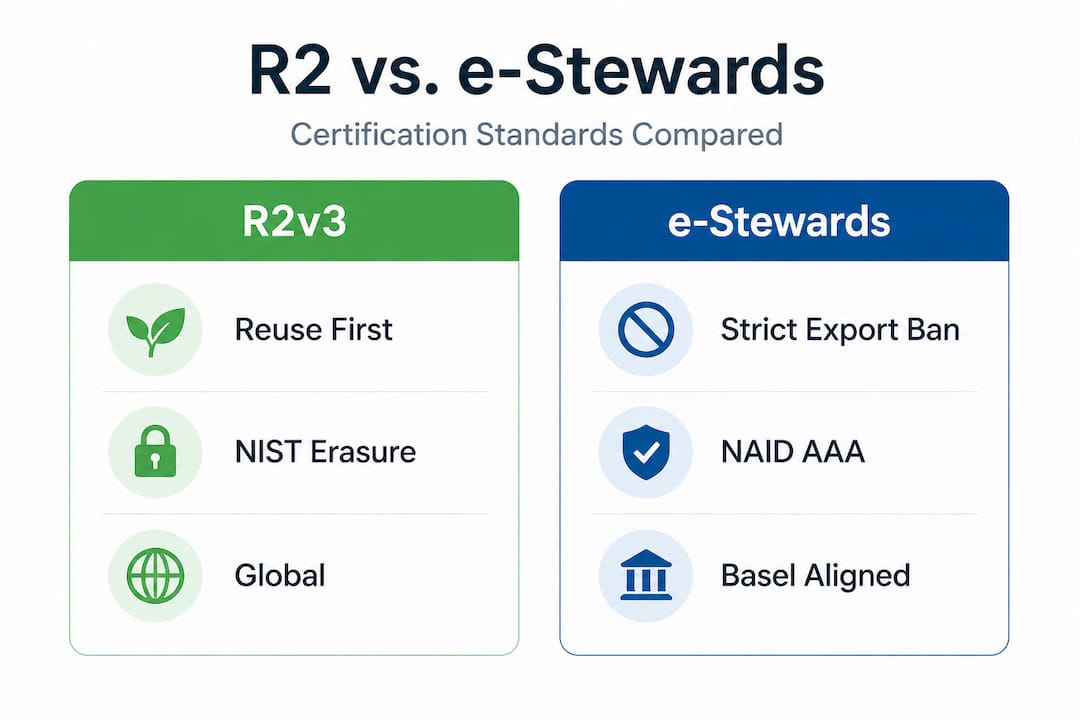
Not all certified recyclers are the same, and understanding the difference between the two dominant certification frameworks helps you make a stronger vendor decision. Both R2 (Responsible Recycling) and e-Stewards are recognized by the EPA, but they take different approaches to what “responsible” means.
R2v3 is the more widely adopted standard globally. It emphasizes a reuse-first hierarchy, meaning recyclers prioritize refurbishing and reselling equipment before breaking it down for materials. R2v3 aligns data security requirements with NIST 800-88 guidelines, allows exports to countries with compliant infrastructure, and requires ISO-conformant management systems across certified facilities.
e-Stewards is the stricter of the two. It bans hazardous e-waste exports to developing countries under the Basel Convention framework, requires NAID AAA certified data destruction, and mandates full ISO 14001 (environmental) and ISO 45001 (occupational health and safety) certification for every facility in the chain. It is the preferred standard for organizations with strong environmental commitments or those operating in sectors with heightened data privacy requirements.
Here is a direct comparison to help you evaluate vendors:
| Feature | R2v3 | e-Stewards |
|---|---|---|
| Data destruction standard | NIST SP 800-88 aligned | NAID AAA required |
| Export rules | Flexible, to compliant countries | Bans exports to developing nations |
| Environmental management | ISO-conformant systems | Full ISO 14001 mandatory |
| Worker safety | Required protocols | Full ISO 45001 mandatory |
| Reuse priority | Yes, reuse-first hierarchy | Yes, with stricter downstream rules |
| Best suited for | Most organizations | High-security, strict ESG mandates |
Pro Tip: Always ask a potential recycling vendor for their current certification certificate, not just a logo on a website. Certifications expire and can be suspended. Verifying through the computer recycling certifications database or directly with the certifying body takes five minutes and could save you significant legal exposure.
Neither certification is “bad.” Choosing between them depends on your industry, your risk tolerance, and where you operate. What matters most is that your vendor holds one of them and can prove it.
The responsible recycling process: Step-by-step
Understanding the standards is useful. Knowing how to actually run a recycling program is what keeps organizations out of trouble. Here is a practical walkthrough of how responsible computer recycling works from start to finish.
- Complete a full asset inventory. Before any device leaves your building, document every piece of hardware. Serial numbers, device types, assigned users, and data classification levels should all be recorded. This inventory becomes your baseline for the chain-of-custody documentation you will need later.
- Classify data sensitivity. Not every machine holds the same risk. A general-purpose laptop used for web browsing carries less risk than a finance department workstation with access to payroll systems. Classifying devices by data sensitivity helps you choose the right sanitization method for each.
- Apply the correct data sanitization method per NIST SP 800-88. NIST defines three levels: Clear (overwrite using software tools, appropriate for lower-risk devices), Purge (degaussing or cryptographic erasure for higher-risk media), and Destroy (physical shredding, appropriate for the most sensitive data or end-of-life drives that cannot be wiped). Matching the method to the device’s sensitivity level is essential.
- Select a recycling outcome. Not every retired device needs to be shredded. The decision tree looks like this:
| Device condition | Data sensitivity | Recommended outcome |
|---|---|---|
| Functional, moderate age | Low to medium | Refurbish and resell |
| Functional, high sensitivity | High | Wipe and resell or donate |
| Non-functional | Any | Materials recovery and recycling |
| Non-functional with sensitive data | High | Physical destruction |
- Obtain and retain documentation. After processing, your recycler should provide a certificate of data destruction and a downstream tracking report. These documents are your legal protection. Keep them for the retention period required by your applicable regulations, typically a minimum of three to seven years.
- Audit your vendor periodically. A one-time vendor check is not enough. Responsible programs include regular reviews of your recycler’s certifications, downstream management practices, and documentation quality.
Pro Tip: Build your asset decommissioning checklist directly into your IT offboarding workflow. When an employee leaves or equipment is refreshed, the recycling process should start automatically, not as an afterthought weeks later. More guidance on managing IT asset management methods can help you structure this into a repeatable process.
For teams newer to the process, the guide on proper e-waste recycling offers practical context, and device preparation steps covers exactly how to get hardware ready for handoff to a certified recycler.
Data destruction: Why secure erasure is essential
This is the section most organizations underestimate, sometimes with costly consequences. Deleting files or even doing a factory reset does not erase data. With widely available recovery tools, a moderately skilled person can reconstruct data from a “wiped” drive in under an hour. For regulated businesses, that is not a theoretical risk. It is a documented one.

The cost of getting this wrong is steep. The average data breach now costs organizations $4.44 million, and that figure does not include reputational damage, customer churn, or the operational disruption that follows a breach investigation. Breaches traced to improperly disposed hardware are particularly damaging because they are entirely preventable, which makes them harder to defend in court or in the press.
Here is what proper data destruction actually requires for businesses:
- Method must match media type and sensitivity. Software overwriting works for standard hard drives. SSDs (solid-state drives) require cryptographic erasure or physical destruction because their architecture makes traditional overwriting unreliable.
- Third-party verification matters. Even if your IT team performs internal wipes, independent certification from your recycler adds a layer of legal protection that internal documentation alone cannot provide.
- Certificates of destruction are non-negotiable. Every device that leaves your control should generate a certificate with the serial number, the method used, the date, and the certifying technician’s credentials. The certified hard drive destruction process at UsedCartridge.com follows this exact standard.
- Compliance frameworks require it. HIPAA mandates secure disposal of protected health information on any media. GDPR requires organizations to ensure personal data cannot be recovered from retired equipment. Industry frameworks like PCI DSS have similar requirements for payment card data environments.
“NIST-compliant sanitization, whether through certified software or physical destruction, is the baseline, not a premium option.”
Both R2 and e-Stewards certified recyclers use NIST-aligned sanitization as a core program requirement. Choosing one of these providers means your data destruction is built into the recycling program itself rather than managed as a separate, often inconsistent process.
For a broader look at what this means in practice, the data destruction essentials resource covers the full landscape. Organizations with high-volume hardware retirements may want to explore secure equipment recycling or equipment destruction services for on-site options that eliminate chain-of-custody gaps entirely.
Maximizing value and sustainability from recycling
Responsible recycling is often framed purely as a cost and compliance function. That framing leaves real money and real business value on the table. When done well, a recycling program can generate measurable returns while simultaneously supporting sustainability goals that matter to customers and investors.
The ITAD market is projected to reach $40.1 billion by 2035, growing at 8.9% annually. That growth is driven largely by organizations realizing that retiring hardware is not just an expense. It is an asset recovery opportunity. Devices that are two to three years old often retain resale value, and components from older equipment can be harvested for parts.
Key ways responsible recycling creates value for your organization:
- Resale revenue offsets program costs. Functional equipment sent to certified refurbishers can generate credits or direct payment that partially or fully offsets the cost of your recycling program.
- ESG reporting documentation. Certified recyclers provide downstream tracking reports that can be used directly in ESG disclosures, sustainability reports, and supply chain audits, saving your team significant time.
- Stakeholder confidence. Clients, partners, and regulators are increasingly asking for proof of responsible disposal. Having a documented program with certified vendor partners is a concrete differentiator.
- Reduced regulatory risk. Documented, compliant programs reduce the likelihood of fines or enforcement actions under state e-waste laws, which vary widely across the US but generally place responsibility on the generator.
Pro Tip: Request a value recovery report from your ITAD provider alongside the certificate of data destruction. This document itemizes the resale or materials recovery value of your retired hardware and gives your finance team concrete data for budget planning. The guide on eco-friendly asset recovery tips walks through how to structure this conversation with vendors.
For organizations looking to quantify the full return on a responsible recycling program, hardware recycling ROI breaks down the financial and sustainability case in detail.
Responsible computer recycling: What most guides miss
Most articles on this topic stop at listing certifications and checking compliance boxes. What they rarely address is where programs actually break down in practice, and it almost never happens at the policy level. It happens at the vendor relationship level.
Organizations routinely sign contracts with certified recyclers and then never verify what actually happens to their equipment downstream. A recycler can hold R2 certification and still route devices through subcontractors who operate with looser standards. The certification covers the primary facility. It does not automatically guarantee every link in the downstream chain.
This is where chain-of-custody documentation earns its importance. It is not just a compliance form. It is your evidence that the device you handed over was handled in the way your recycler promised. If a breach is ever traced back to a retired device, that documentation is what determines whether your organization was negligent or diligent.
The other gap we see consistently is the assumption that responsible recycling is only about environmental duty. Organizations that treat it purely as a compliance checkbox miss the data security dimension entirely. They invest in shredding paper and encrypting cloud storage but hand over hard drives to vendors they have never audited. The electronics recycling process only works as a security program when your organization treats it as one, with the same rigor you apply to any other data handling process.
The strongest programs we see share three characteristics. They have a documented vendor selection process that includes certification verification. They require specific, named data destruction methodologies in their contracts. And they conduct periodic downstream audits, at least annually, to verify that what was promised is being delivered. That is the standard worth building toward, not because it is required, but because it is what actually works.
Secure your organization’s e-waste the responsible way
Covering this topic thoroughly is one thing. Putting it into practice is another, and that is exactly where UsedCartridge.com steps in as your certified partner.

UsedCartridge.com provides certified e-waste services designed specifically for organizations that need secure, documented, and environmentally responsible disposal programs. From computer recycling specialists who manage the full asset lifecycle to on-site data destruction with certified documentation, every service is built around protecting your organization’s data and compliance standing. Whether you need a one-time hardware retirement or an ongoing ITAD program with regular pickups and sustainability reporting, the team can tailor a solution to your volume and regulatory requirements. Get a free ITAD quote today and find out exactly what a responsible program looks like for your organization.
Frequently asked questions
Do we need EPA-certified recyclers for computers?
For best compliance and security, businesses should use EPA-recognized R2 or e-Stewards certified recyclers to ensure data destruction standards and environmental accountability are met.
What happens if old devices aren’t properly sanitized?
Undestroyed data can lead to breaches, fines, and reputational harm. The average data breach costs $4.44 million, making secure erasure one of the highest-return risk mitigation steps an organization can take.
What is the difference between reuse, recycling, and destruction?
Reuse means refurbishing devices for continued operation; recycling recovers materials from hardware that can no longer function; destruction ensures no data can ever be recovered, using NIST SP 800-88 methods like overwriting, degaussing, or physical shredding.
How do I know if my recycler is truly responsible?
Verify current R2 or e-Stewards certification directly with the certifying body, and require written documentation for both data destruction and downstream handling before signing any contract.
Who is liable if sensitive data is leaked from recycled equipment?
The originating organization remains liable, especially when certified recycling and destruction best practices were not followed. Choosing certified vendors and retaining documentation is your primary legal protection.