
NIST data destruction refers to media sanitization under NIST SP 800-88 Rev. 2: choosing and applying the correct sanitization outcome, clear, purge, or destroy, to render target data infeasible to recover for a given level of effort. That’s the whole standard in one sentence. Everything else is implementation detail.
Three things to do immediately:
- Classify the data by sensitivity before you touch the hardware.
- Decide whether the device gets reused, resold, or scrapped. That decision drives which of the three outcomes you need.
- Require documented verification for every job, no exceptions.
Key Takeaways
The correct NIST sanitization outcome, clear, purge, or destroy, depends on data sensitivity and reuse intent, and it’s worthless without documented verification.
| Point | Details |
|---|---|
| Definition anchors everything | Sanitization means rendering target data infeasible to recover for a given effort level, per SP 800-88. |
| Three outcomes, not one | Clear suits internal reuse; purge suits data leaving your control; destroy suits the highest-sensitivity cases. |
| SSDs need different handling | Wear-leveling can defeat standard overwrites, so secure erase or cryptographic erase is preferred for flash media. |
| Cryptographic erase has conditions | It only equals purge-level assurance with validated crypto, full coverage, and verified key destruction. |
| Verification is non-negotiable | Certificates with serial numbers, method, date, and chain-of-custody records prove sanitization happened. |
Table of Contents
- What Is NIST Data Sanitization Under SP 800-88?
- Clear, Purge, and Destroy: What Each One Actually Means
- HDD, SSD, Tape, Optical, Mobile: Method Differs by Media
- Cryptographic Erase: When It Works and When It Doesn’t
- What Auditors Expect to See After Sanitization
- A Decision Framework for Choosing Your Sanitization Outcome
- How UsedCartridge Puts NIST Guidelines Into Practice
- What the Standard Gets Right, and Where Practitioners Still Get It Wrong
- Sources
What Is NIST Data Sanitization Under SP 800-88?
SP 800-88 isn’t a checklist you run once. It’s a lifecycle policy built into how you classify, authorize, and dispose of media. NIST ties sanitization decisions to security categorization under FIPS 199 and the control baselines in SP 800-53, so the sensitivity rating your organization already assigns to a system determines how aggressively you sanitize its storage when that system retires.
The standard defines “target data” as the specific information you’re trying to protect, not just “everything on the drive.” That distinction matters: a laptop headed for resale needs different treatment than a server that held payroll records for a decade.
What SP 800-88 expects from your program:
- A written sanitization policy tied to data classification, not ad hoc decisions made at disposal time.
- Documented procedures per media type: HDD, SSD, tape, mobile, cloud.
- Role assignments for who authorizes, executes, and verifies sanitization.
NIST’s own definition, render access to target data infeasible for a given level of effort, is deliberately risk-based. It doesn’t promise mathematical impossibility. It promises a level of assurance matched to what the data is worth to an attacker.
Clear, Purge, and Destroy: What Each One Actually Means
These three outcomes are the backbone of the entire standard, and confusing them is the single most common mistake IT teams make when writing disposal policy.
- Clear applies logical techniques, standard overwrite passes, factory resets, to protect against simple, non-invasive recovery methods like keyboard-based file recovery tools. It’s appropriate when the device stays inside your organization’s control or goes to a low-risk secondary market, and the data wasn’t classified as sensitive.
- Purge uses techniques that resist laboratory-grade recovery: dedicated overwrite utilities, degaussing for magnetic media, and cryptographic erase. Purge is the right call when a device is leaving your control, being resold, donated, or returned to a lessor, and it held anything above low-sensitivity data.
- Destroy physically disables the media through shredding, disintegration, incineration, or pulverization so that reconstruction is infeasible even in a forensic lab. NIST reserves destroy for the highest-confidentiality data or for media where purge techniques don’t reliably work, and notes that shredding methods must match particle size to the storage technology or they can fail on high-density modern drives.
Pro Tip: Don’t default to destroy for everything. It’s the most expensive option and it forecloses resale value. If purge gives you the assurance level your data classification actually requires, you’re burning money destroying assets you could have safely remarketed.
HDD, SSD, Tape, Optical, Mobile: Method Differs by Media
NIST guidelines for data destruction stop being theoretical the moment you’re standing in front of a pallet of mixed hardware, because the correct technique changes completely by media type.
HDDs respond well to overwrite software and degaussing, since magnetic storage writes data in a way overwrite passes can reliably reach. Multiple-pass overwrites remain a valid purge-level method for spinning disks.
SSDs and flash media are the trap. Wear-leveling spreads data across cells in ways a standard overwrite command can’t guarantee it reaches, because the drive’s controller, not the operating system, decides where blocks physically live. Overwriting methods designed for magnetic HDDs can fail entirely on flash-based SSDs, which is why NIST and independent guidance both point toward ATA Secure Erase commands or cryptographic erase for flash devices instead.
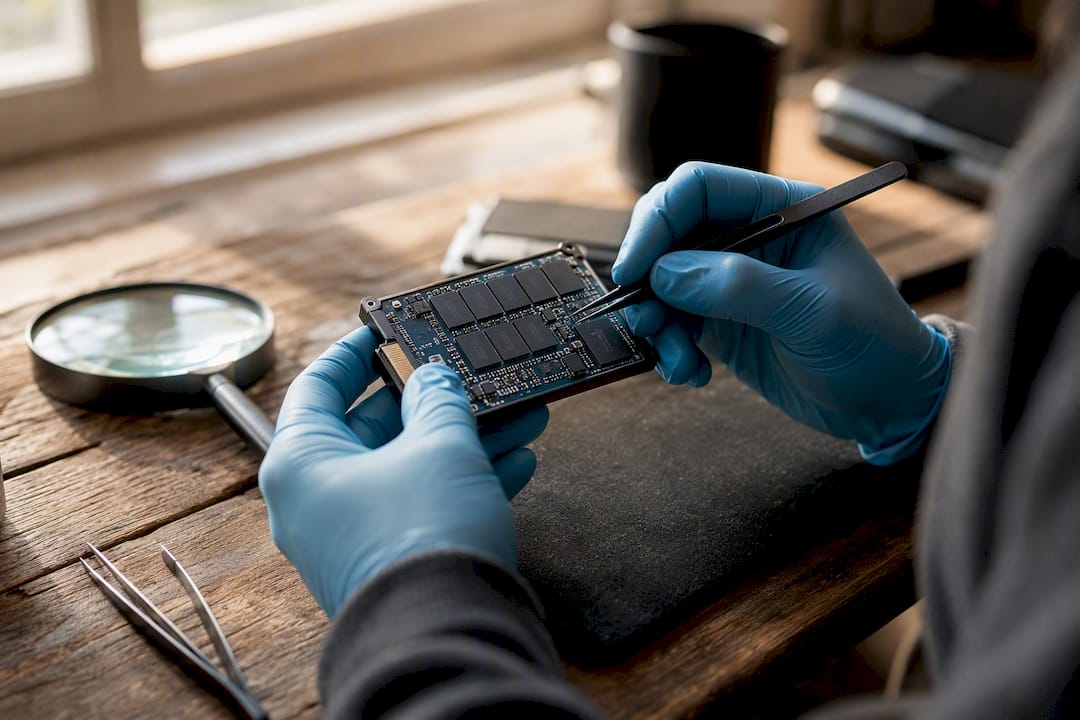
Tape and optical media generally need degaussing (tape) or vendor-specific commands, with physical destruction as the fallback when the media can’t verify sanitization any other way.
Mobile devices and cloud or virtual storage depend heavily on encryption status and provider responsibility. A phone with full-disk encryption enabled can often be sanitized via cryptographic erase; unencrypted mobile storage usually needs a manufacturer-supported wipe followed by verification. Cloud environments shift the sanitization burden partly onto the provider, so you need documentary proof, not just a service-level promise, that logical deletion actually happened at the storage layer.

Our guide on hard drive disposal for IT compliance breaks down the physical-destruction failure modes in more depth.
Cryptographic Erase: When It Works and When It Doesn’t
Cryptographic erase (CE) sanitizes data by destroying the encryption keys rather than touching the data itself. If the data was encrypted end-to-end with validated cryptography, deleting the key renders the ciphertext permanently unreadable, which is functionally equivalent to a purge-level outcome and dramatically faster than a full overwrite pass.
CE only holds up under specific conditions:
- The encryption must use validated, currently accepted cryptographic algorithms, not a legacy or deprecated cipher.
- Encryption coverage must be complete. Partial encryption, say, only the OS partition, leaves target data exposed on unencrypted sectors.
- The key destruction procedure has to be verifiable and irreversible, not just “delete and hope.”
CE fails as a sanitization method when key management is sloppy: escrowed keys nobody destroyed, weak or outdated algorithms, or self-encrypting drives where the encryption was never actually enabled in the first place. Cryptographic erase speeds sanitization considerably, but only when the crypto and the key handling are both airtight.
What Auditors Expect to See After Sanitization
Verification is where a lot of otherwise-solid sanitization programs fall apart, because the work happened but nobody can prove it.
- Certificates of destruction should list device serial numbers, the sanitization method used, the date, and who witnessed or tested the outcome, ideally including lab validation for high-sensitivity data.
- Sampling and lab validation matter more as data confidentiality rises. Spot-checking a percentage of a batch is reasonable for low-risk assets; anything classified higher warrants full-lot verification or third-party attestation.
- Chain-of-custody records need to track the asset from pickup through final disposition, with retention periods that match your compliance obligations.
Pro Tip: Ask any vendor for a sample certificate before you sign a contract. If it doesn’t list serial numbers and method per device, it’s a marketing document, not proof of sanitization.
A Decision Framework for Choosing Your Sanitization Outcome
Building policy from scratch gets simpler once you treat it as a three-step decision rather than a single judgment call.
- Classify the data and decide disposition. Is the asset being reused internally, resold, donated, or scrapped? That answer, combined with data sensitivity, sets your floor.
- Match the outcome to the risk. Low sensitivity plus internal reuse usually justifies clear. Anything leaving your control, or classified above low, needs purge at minimum. Highest-sensitivity data or unreliable media pushes you to destroy.
- Write verification into the contract. Require certificates, audit rights, and disposal proof as contract terms with any IT asset disposition (ITAD) vendor, not as a courtesy they might provide.
Reuse plus purge is almost always cheaper and greener than blanket destruction, and it recovers resale value destroy throws away. Save destroy for the data and devices that genuinely demand it. Our IT end-of-life disposal steps walk through building this into formal policy.
How UsedCartridge Puts NIST Guidelines Into Practice
Usedcartridge operationalizes this framework directly: on-site destruction with serialized inventory tracking gives you verification you can hand to an auditor, not just a vendor’s word.
- Serialized asset lists tied to each certificate of destruction.
- Purge-level recommendations, secure erase or cryptographic erase, when reuse or resale value justifies it over outright destruction.
- Eco-compliant recycling steps that keep disposal aligned with environmental regulations, not just data security ones.
Audit-ready documentation isn’t a nice add-on to sanitization. It’s the difference between a compliance program that holds up under review and one that just hopes nobody asks.
See our certified hard drive destruction guide for what a compliant certificate should include.
Ready to align your disposal process with SP 800-88? Get a quote for IT asset recovery and disposition and see how on-site destruction with serialized certificates fits your compliance requirements. For broader electronics disposal needs, Usedcartridge’s e-waste recycling services cover both data security and environmental compliance in a single engagement.
What the Standard Gets Right, and Where Practitioners Still Get It Wrong
The conventional advice on data destruction treats “destroy” as the safe default, when it’s often the expensive overcorrection. NIST built a three-tier system precisely because not every asset carries the same risk, and treating every retired laptop like it held classified files wastes budget and resale value you’ll never recover.
Where I think the standard gets underused is verification. Organizations will spend real money selecting the right sanitization method and then accept a one-line invoice as proof it happened. That’s backwards. The method matters less than whether you can prove it to an auditor eighteen months later.
If you take one thing from this: fix your classification process before you touch a sanitization technique. Every failure I’ve seen traced back to skipping that step, treating every drive the same, applying HDD logic to SSDs, or trusting a vendor’s word over a serialized certificate. Get the classification right, and the rest of SP 800-88 nearly selects itself.
Sources
- SP 800-88 Rev. 2, Guidelines for Media Sanitization
- Guidelines for Media Sanitization (NIST SP 800-88 Rev.2 PDF)
- Stanford UIT: Data sanitization guidance (SSD caveats)