
Secure data destruction is the guaranteed, irreversible removal of data from storage media so that no recovery is possible by any technical means. Unlike deleting a file or formatting a drive, which leaves data physically intact and recoverable with basic forensic tools, true destruction renders information unreadable at every level. The governing standard for this process is NIST SP 800-88 Rev. 2, which defines three sanitization levels: Clear, Purge, and Destroy. Organizations subject to HIPAA, PCI-DSS, or GDPR are expected to follow these levels when retiring or repurposing storage devices. Getting this wrong is not a technical oversight. It is a compliance failure with legal and financial consequences.
What is secure data destruction and why does it matter?
Secure data destruction is the process of permanently eliminating data from storage devices using methods matched to the sensitivity of the information and the type of media involved. The distinction from casual deletion matters enormously. When you delete a file in Windows or macOS, the operating system removes the pointer to that file but leaves the underlying data on the disk. A free recovery tool like Recuva or PhotoRec can restore it in minutes. Formatting a drive produces the same result. The data remains physically present until new data overwrites it, and even then, partial recovery is often possible.
The role of data destruction in organizational security goes beyond IT hygiene. A single improperly retired hard drive containing patient records, financial data, or employee information can trigger a breach notification under HIPAA or GDPR, with penalties reaching into the millions. The HIPAA Security Rule mandates that electronic protected health information be rendered unreadable and undecipherable upon disposal, explicitly recommending NIST 800-88 methods. For organizations in finance, healthcare, or government contracting, secure destruction is not optional. It is a baseline requirement.

Understanding why secure data destruction matters also means recognizing that storage technology has changed. The methods that worked reliably on magnetic hard drives do not translate directly to solid-state drives, USB flash media, or NVMe storage. Organizations that have not updated their destruction policies since the era of spinning disks are carrying real risk without knowing it.
What are the main types of data destruction methods?
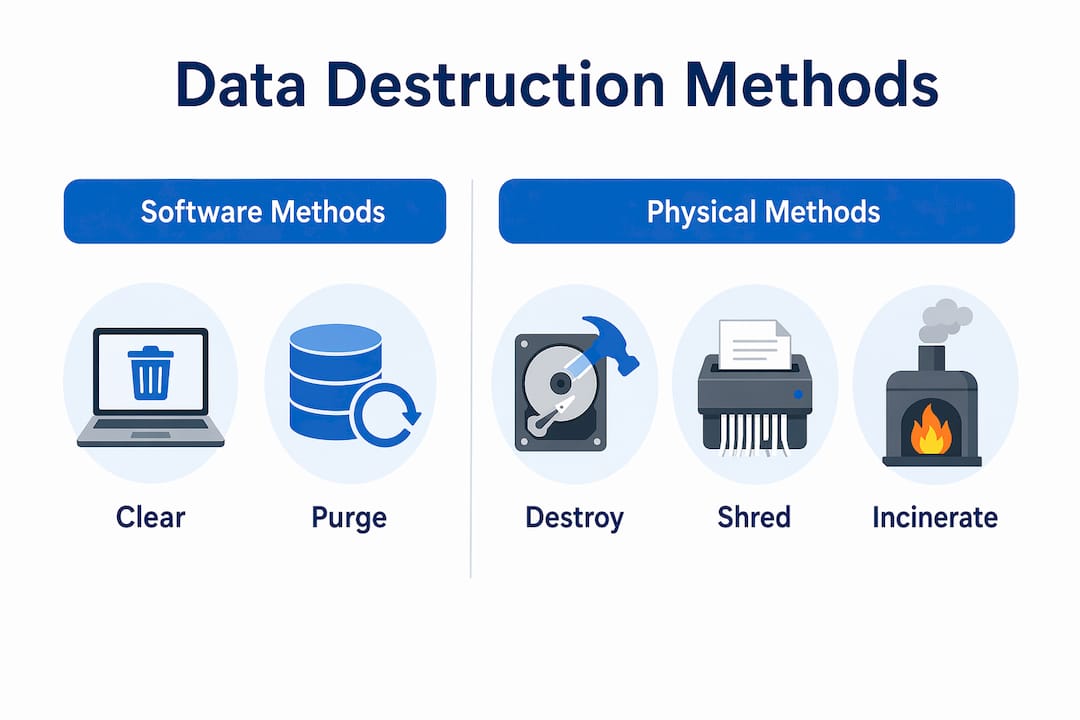
NIST SP 800-88 Rev. 2 defines three sanitization levels, each representing a different degree of data removal and a different set of applicable techniques.
| Method | Technique | Best for | Recovery risk |
|---|---|---|---|
| Clear | Software overwrite | HDD reuse in trusted environments | Low, if done correctly |
| Purge | Firmware sanitize, crypto erase | SSDs, self-encrypting drives | Very low |
| Destroy | Shredding, incineration, pulverizing | End-of-life or classified media | None |
Clear uses software to overwrite every addressable storage location with a single pass of non-sensitive data. A single-pass overwrite suffices for HDD Clear under NIST guidelines, which corrects the outdated belief that seven or thirty-five passes are necessary. Clear is appropriate when a device will be reused within a trusted organizational environment and the data involved is not classified or highly sensitive. Tools like Blancco Drive Eraser and DBAN implement this level for magnetic media.
Purge goes further. For solid-state drives, Purge uses either manufacturer-specific firmware sanitize commands or cryptographic erase. Crypto erase on self-encrypting drives works by destroying the encryption key, which instantly renders all stored data unreadable regardless of drive capacity. This method requires hardware encryption compliant with TCG OPAL or IEEE 1667 standards. Purge is the minimum recommended level for SSDs being repurposed or transferred outside organizational control.
Destroy covers physical destruction methods including shredding, pulverizing, and incineration. These techniques make data unrecoverable by physically eliminating the media itself. Destroy is required for classified data, damaged drives that cannot process software commands, and any media at the end of its useful life. The NSA requires classified media to be shredded to particles of 2mm or smaller, and NSA/CSS EPL-listed equipment is the verified standard for achieving that particle size.
Pro Tip: Never rely on a single destruction method for mixed media environments. Audit your device inventory first, then assign the appropriate NIST level to each category. A policy that applies HDD overwrite rules to SSDs creates a false sense of security.
Why simple deletion fails and what NIST SP 800-88 requires
The gap between what most organizations practice and what regulators expect is wider than most IT teams realize. File deletion, drive formatting, and even multi-pass overwriting all leave data recoverable under the right conditions. Multi-pass overwriting, once considered the gold standard under the Gutmann method, has been formally retired by NIST for modern drives. The physical density of current magnetic media means a single pass is sufficient for HDDs, and no number of passes adequately addresses SSDs.
NIST SP 800-88 Rev. 2 addresses this directly by organizing sanitization requirements around media type and data sensitivity rather than a fixed number of overwrite passes. The standard covers:
- Clear: Appropriate for low-sensitivity data on magnetic media being reused in a controlled environment
- Purge: Required for moderate to high-sensitivity data, SSDs, flash media, and any device leaving organizational control
- Destroy: Mandatory for classified data, damaged media, or any situation where Purge cannot be verified
The standard also updated its guidance for SSDs to include firmware sanitize commands and cryptographic erase, recognizing that traditional overwriting cannot reach data stored in wear-leveling reserves or overprovisioned sectors. Regulatory frameworks including HIPAA, PCI-DSS, and GDPR all reference or align with NIST 800-88 as the accepted technical baseline for media sanitization.
“Legacy approaches to data sanitization are increasingly ineffective as storage technology evolves, necessitating regular updates to organizational policies and practices.” — NIST SP 800-88 guidance commentary
The practical implication is that organizations must treat their destruction policy as a living document. A policy written in 2015 for a fleet of spinning hard drives does not cover a 2026 environment where NVMe SSDs, encrypted laptops, and cloud-synced endpoints are the norm. Reviewing and updating your sanitization procedures annually is not excessive. It is the minimum standard for a credible compliance posture.
HDD vs SSD: why the difference changes everything
The single most common mistake in enterprise data destruction is applying HDD overwrite procedures to solid-state drives. Software overwrite methods are ineffective on SSDs because of two architectural features: wear leveling and overprovisioning. Wear leveling distributes write operations across all memory cells to extend drive life, which means a software overwrite command does not reach every cell that has stored data. Overprovisioning reserves a portion of flash storage that is invisible to the operating system and therefore unreachable by any software tool.
Here is the correct approach for SSD sanitization:
- Identify the drive type. Confirm whether the SSD is a SATA, NVMe, or eMMC device, as sanitize command support varies by interface and manufacturer.
- Check for self-encryption. If the drive supports TCG OPAL or IEEE 1667, cryptographic erase is the fastest and most reliable Purge method.
- Issue the firmware sanitize command. For drives without hardware encryption, use the manufacturer’s sanitize command via tools like hdparm (Linux) or the drive vendor’s utility. Samsung Magician, Crucial Storage Executive, and Western Digital Dashboard all support this for their respective drives.
- Verify the result. Run a post-sanitization read test to confirm no data sectors return readable content. Document the result with a timestamp and operator ID.
- Default to physical destruction if verification fails. If the sanitize command returns an error or the drive is damaged, shredding is the only reliable fallback.
Detailed knowledge of manufacturer-specific sanitize commands and firmware erase protocols is required to guarantee SSD data cannot be reconstructed. This is not a task for general IT staff without specific training. Organizations handling large volumes of SSDs should work with certified destruction vendors who maintain current knowledge of drive-specific protocols.
Pro Tip: Before retiring any SSD, check the drive’s firmware version. Some older firmware versions have known bugs in the sanitize command implementation that leave data partially intact. Always update firmware before running sanitize, or default to physical destruction.
How to integrate secure data destruction into your compliance workflow
Embedding secure destruction into your IT asset lifecycle requires more than selecting the right method. It requires policy, documentation, and accountability at every stage. Destruction certificates documenting the method used, media ID, verification results, and operator signatures are the primary evidence organizations present during compliance audits under HIPAA, PCI-DSS, and GDPR.
A practical integration framework covers five areas:
- Media inventory and classification: Maintain a register of all storage devices, categorized by data sensitivity and media type. This determines which NIST sanitization level applies to each device.
- Policy assignment: Define destruction requirements by device category. SSDs leaving the organization require Purge or Destroy. HDDs reused internally may qualify for Clear with documented verification.
- Responsibility and chain of custody: Assign named individuals to each destruction event. Chain-of-custody documentation prevents gaps that auditors flag immediately.
- Certificate generation: Every destruction event produces a certificate with timestamp, operator details, and media ID. Verifiable destruction certificates with these details are critical to passing external audits.
- On-site vs off-site destruction: On-site destruction keeps media within your physical control until the moment of destruction. Off-site services through certified vendors offer scale and specialized equipment. Both options are valid when the vendor provides documented chain of custody and certificates.
Connecting destruction to your broader IT asset recycling process closes the loop between security and sustainability. Devices that pass sanitization can be recovered for resale or donation. Devices that require physical destruction feed into certified e-waste streams. Neither outcome requires a trade-off between data security and environmental responsibility when the process is properly structured.
Automated sanitization tools with built-in audit trail generation transform data destruction from a compliance challenge into a repeatable, policy-driven process. Blancco, White Canyon WipeDrive, and Certus Software all offer enterprise platforms that generate certificates automatically and integrate with IT asset management systems.
Key takeaways
Secure data destruction requires matching the sanitization method to the media type and data sensitivity, with NIST SP 800-88 Rev. 2 as the authoritative standard for every organization subject to HIPAA, PCI-DSS, or GDPR.
| Point | Details |
|---|---|
| Three NIST sanitization levels | Clear, Purge, and Destroy each apply to specific media types and data sensitivity levels. |
| SSDs require Purge or Destroy | Software overwriting cannot reach wear-leveled or overprovisioned sectors on flash media. |
| Destruction certificates are mandatory | Certificates with timestamps, media IDs, and operator details are required for HIPAA, PCI-DSS, and GDPR audits. |
| Crypto erase is the fastest Purge method | Destroying the encryption key on a TCG OPAL or IEEE 1667 drive instantly renders all data unreadable. |
| Policy must evolve with storage technology | A destruction policy written for HDDs does not cover SSDs, NVMe, or encrypted endpoints. |
Where most organizations are getting this wrong
The pattern I see most often is not malicious negligence. It is outdated confidence. An IT team that has been running DBAN on retiring hard drives for a decade assumes the same process covers the SSDs that replaced those drives three years ago. It does not, and the gap between that assumption and reality is where data exposure lives.
The second problem is documentation. I have reviewed compliance programs where the destruction process was technically sound but completely undocumented. No certificates, no chain of custody, no operator records. When an auditor asks for evidence of HIPAA-compliant disposal and you hand them a spreadsheet with “wiped” written in a column, that is not a passing answer. The technical work means nothing without the paper trail.
What I find genuinely underappreciated is the sustainability angle. Organizations that treat physical destruction as the default for all retiring media are not just over-engineering their security posture. They are also generating unnecessary e-waste. A properly sanitized SSD that passes verification can be recycled or recovered through certified IT asset disposition channels, recovering value and reducing environmental impact. The choice between security and sustainability is false when your process is built correctly.
The organizations that handle this well share one trait: they treat destruction as a workflow, not an event. Automated tools, defined policies, named accountability, and regular policy reviews. That combination eliminates most of the risk that comes from human judgment calls at the point of disposal.
— Keith
Protect your business with certified data destruction services
Choosing the right partner for secure data destruction means more than finding someone with a shredder. Usedcartridge provides certified hard drive destruction and e-waste recycling services with documented chain of custody, destruction certificates, and compliance-ready audit trails. Every device processed through Usedcartridge follows NIST SP 800-88 guidelines, giving your organization the documentation it needs for HIPAA, PCI-DSS, and GDPR audits.

For organizations managing large volumes of retiring IT assets, Usedcartridge combines secure destruction with responsible e-waste recycling to recover value from sanitized devices while keeping hazardous materials out of landfills. Request a free quote and learn how certified destruction services protect your data and your compliance standing.
FAQ
What is the difference between data deletion and secure data destruction?
Data deletion removes the file pointer but leaves the underlying data physically intact and recoverable with forensic tools. Secure data destruction uses NIST SP 800-88 methods to make data unrecoverable at every technical level.
Which data destruction method is required for SSDs?
SSDs require Purge or Destroy under NIST SP 800-88 because software overwriting cannot reach wear-leveled or overprovisioned sectors. Cryptographic erase or firmware sanitize commands are the standard Purge methods for flash media.
What regulations require secure data destruction?
HIPAA, PCI-DSS, and GDPR all require that sensitive data be rendered unreadable upon disposal, with NIST SP 800-88 recognized as the technical standard for meeting those requirements. Non-compliance can result in significant financial penalties and mandatory breach notifications.
What is a destruction certificate and why do you need one?
A destruction certificate documents the sanitization method, media ID, verification results, operator signature, and timestamp for each device processed. It serves as the primary audit evidence for demonstrating regulatory compliance under HIPAA, PCI-DSS, and GDPR.
Can a physically destroyed drive still expose data?
Physical destruction only guarantees data unrecoverability when particle size meets the required standard. The NSA requires classified media to be shredded to 2mm particles or smaller, using NSA/CSS EPL-listed equipment to verify the process meets that specification.