
Most people treat old hard drives like broken appliances. When a computer dies or a server gets replaced, the drive goes in the trash or sits forgotten in a drawer. That thinking creates two serious problems: your data is still readable on that “dead” drive, and the toxic materials inside it are one landfill away from contaminating drinking water. Understanding why recycle hard drives matters is not just about doing the right thing. It is about protecting yourself, your organization, and the environment from consequences that are both expensive and irreversible.
Table of Contents
- Key takeaways
- Why recycle hard drives: the environmental case
- Data security risks and how to erase hard drives properly
- What happens to recycled hard drives
- How to recycle hard drives responsibly
- Common misconceptions about recycling old drives
- My take on what actually matters in hard drive recycling
- Secure hard drive recycling with Usedcartridge
- FAQ
Key takeaways
| Point | Details |
|---|---|
| Data survives simple deletion | Standard delete and reformat do not remove data; professional sanitization is required before recycling. |
| Hard drives contain toxic materials | Lead, mercury, and cadmium inside drives contaminate soil and groundwater when landfilled. |
| E-waste recycling rates are critically low | Only 22.3% of global e-waste is formally recycled, creating a massive and growing environmental risk. |
| Certified recyclers protect you legally | NAID AAA and R2-certified providers issue Certificates of Destruction that satisfy most privacy regulations. |
| Recycling recovers real material value | PCBs, aluminum casings, and rare earth magnets from drives can re-enter the supply chain responsibly. |
Why recycle hard drives: the environmental case
Hard drives are not inert hunks of metal. Inside every drive you will find lead solder on circuit boards, mercury in switches, cadmium in plating layers, and beryllium in connectors. When these materials end up in a landfill, they do not stay put. Rain carries them into soil, groundwater, and eventually into crops and drinking water. Improper e-waste disposal exposes ecosystems and human health to over 1,000 distinct chemicals including these heavy metals.
The scale of the problem is staggering. Global e-waste reached 64.8 million metric tonnes in 2024, and the projection climbs past 82 million tonnes by 2030. Yet only 22.3% of that waste reaches formal recycling channels. The rest gets landfilled, incinerated, or shipped to unregulated processors in developing countries where toxin exposure becomes someone else’s public health crisis.
The manufacturing side of the equation matters too. One ton of laptops generates ten tons of CO2 during production. When you recycle a drive instead of buying entirely new materials to manufacture replacements, you reduce that carbon burden. Recycling keeps materials in the supply chain longer and cuts the energy required to extract virgin metals from ore.
The benefits of hard drive recycling extend beyond avoiding contamination:
- Reduced landfill toxicity. Keeping lead and mercury out of municipal waste sites protects communities living near those facilities.
- Resource conservation. Recovered aluminum, copper, and steel reduce the demand for new mining operations.
- Lower carbon footprint. Secondary materials processing uses significantly less energy than primary extraction.
- Circular economy support. Materials recovered from one device can become components in another, closing the production loop.
Proper recycling is not a feel-good gesture. It is the only way to prevent a predictable chain of environmental damage from the moment you throw a drive in the trash.
Data security risks and how to erase hard drives properly
Here is the fact that surprises most people: deleting files and reformatting a drive does not actually remove the data. The operating system simply marks that storage space as available. The original bits remain until new data physically overwrites them. A basic recovery tool, freely available online, can pull back documents, photos, passwords, and financial records from a drive you considered wiped clean.

59% of used hard drives sold on the open market still contain residual data from previous owners. That statistic is not an edge case. It represents a widespread, systematic failure to sanitize drives before disposal or resale. For individuals, this means identity theft exposure. For organizations, it means regulatory liability under HIPAA, GDPR, FACTA, and similar frameworks.
Understanding why erase hard drives before recycling means understanding the three sanitization levels defined by NIST SP 800-88:
- Clear. Overwrites storage using standard read/write commands. Adequate for low-risk consumer reuse but insufficient for regulated data environments.
- Purge. Uses techniques like ATA Secure Erase, cryptographic erasure, or degaussing. Appropriate for most organizational drives before redeployment or recycling.
- Destroy. Physical shredding, disintegration, or incineration. Required for Top Secret data and any media where Purge cannot be verified.
SSDs require special attention here. Unlike traditional hard drives, SSDs use wear-leveling algorithms that deliberately store data across multiple cells. A standard overwrite may miss cells that the drive firmware has marked inactive. Cryptographic erasure or physical destruction is the only reliable method for SSDs.
Pro Tip: Always request a Certificate of Destruction from your recycler. Valid certificates include the drive’s serial number, the sanitization method used, the technician’s ID, and a verification timestamp. Without those four elements, the certificate is not defensible in an audit.
Documented sanitization with full traceability is what turns a security practice into a legal defense. Good intentions without paper trails do not satisfy regulators.
What happens to recycled hard drives
The hard drive recycling process is more precise than most people picture. Drives do not just get crushed and melted. A responsible processor breaks them down methodically to separate materials with different recycling pathways.
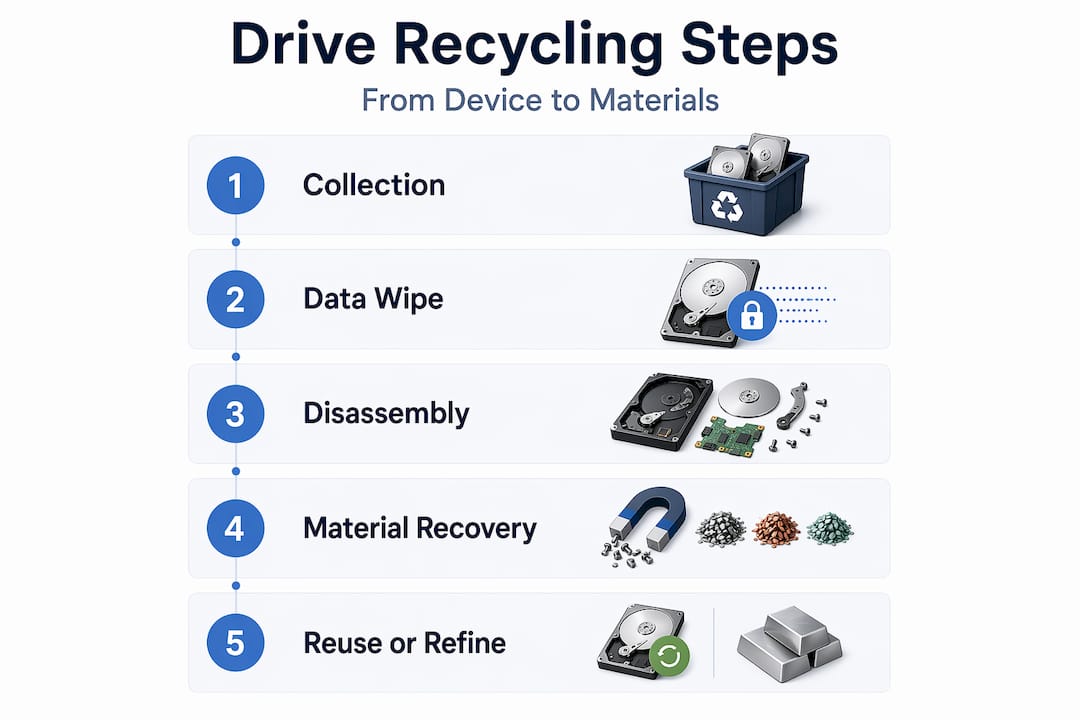
Here is what happens at the component level:
| Component | Material | Recycling outcome |
|---|---|---|
| Printed circuit board (PCB) | Gold, copper, lead solder | Smelted for precious and base metal recovery |
| Aluminum casing | Aluminum alloy | Melted and recast for manufacturing use |
| Platters | Aluminum or glass | Shredded and separated by material type |
| Spindle magnets | Neodymium, iron, boron | Typically recovered as scrap rather than rare earth refinement |
| Read/write heads | Rare earth elements | Low recovery value; mostly treated as hazardous waste |
The economic realities of the hard drive recycling process are worth knowing. HDD magnet recycling is not economically viable at small scale. The rare earth elements in hard drive magnets, primarily neodymium, are valuable in EV motors and wind turbines where volumes justify the extraction process. Hard drives do not contain enough volume to make rare earth recovery profitable on their own. The real value in recycled drives comes from PCB metals and aluminum casings.
SSDs present a different challenge. They contain far less material value than HDDs and require a distinct approach. Most of the recoverable material is in the PCB, but the process is more labor-intensive relative to return value. Physical destruction is often prioritized for SSDs precisely because thorough data erasure is harder to verify and the material recovery economics are weaker.
For a deeper look at how electronic devices move through certified recycling streams, the e-waste recycling logistics process at Usedcartridge shows how security and material recovery are handled together.
How to recycle hard drives responsibly
Knowing the importance of hard drive recycling is one thing. Acting on it correctly is another. Whether you are an individual clearing out a home office or an IT manager decommissioning hundreds of servers, the process should follow a clear sequence.
- Back up any data you still need. Before anything else, verify that no recoverable data on the drive is the last copy of something you want to keep.
- Choose your sanitization method. Use certified software to perform a NIST-compliant wipe for drives being repurposed or donated. For drives going to recycling, physical destruction or degaussing provides a higher assurance level.
- Select a certified recycler. Look for NAID AAA certification for data destruction and R2 (Responsible Recycling) certification for environmental handling. These are not marketing labels. They represent third-party audited processes with real accountability.
- Verify the documentation. Confirm that your recycler issues Certificates of Destruction with serial number tracking. If they cannot produce that documentation, find a different recycler.
- Consider on-site destruction for sensitive environments. Healthcare providers, financial institutions, and government contractors often require witnessed, on-site shredding rather than transporting drives offsite.
Pro Tip: For large-volume recycling, ask your ITAD (IT Asset Disposition) provider for a data destruction report broken down by asset tag and serial number. That granularity is what compliance officers and auditors actually need to see.
NIST 800-88 compliance builds a defensible legal foundation that satisfies most major privacy regulations. Small businesses often overlook this until a breach forces the issue. Choosing a certified provider from the start is far cheaper than managing the aftermath of a data exposure incident.
For organizations building out a repeatable program, hard drive disposal for IT compliance covers the specific steps that keep audits clean and liability low.
Common misconceptions about recycling old drives
Several persistent myths cause both individuals and organizations to make poor decisions about old hard drives.
“I can just keep old drives as backup storage.” A drive sitting in a drawer is not a backup strategy. Drives degrade over time regardless of use, and unencrypted drives stored offsite create exactly the kind of uncontrolled data exposure that compliance frameworks prohibit. If you need an archive, use encrypted cloud storage or a properly managed tape system.
“Physical destruction means the data and the materials are both gone forever.” Physical destruction ensures data is unrecoverable, but shredded drives still go into the recycling stream. The shredded material is sorted and processed for metal recovery. Destruction and recycling are not opposites. They are sequential steps in the same responsible disposal process.
“Recycling hard drives always recovers rare earth metals profitably.” As noted above, economic viability of rare earth recovery from hard drives is low. Rare earth processing at scale happens in EV and wind power supply chains, not from desktop hard drives. Your recycler recovers value from aluminum and PCB metals, not neodymium refinement.
“A factory reset is enough before recycling.” It is not. Factory resets on both HDDs and SSDs typically delete partition tables and re-initialize the file system. Forensic recovery tools can still extract meaningful data. Certified wiping or physical destruction is always the right call before a drive leaves your custody.
Recycling also supports digital equity. Properly wiped drives and refurbished systems can be redirected to nonprofits, schools, and underserved communities through programs that follow standards for recycling electronics securely. This is where the circular economy argument becomes tangible rather than theoretical.
My take on what actually matters in hard drive recycling
I have reviewed a lot of recycling programs over the years, and the biggest gap I consistently see is not about equipment. It is about documentation. Organizations invest in industrial shredders and certified recyclers, then fail an audit because their Certificate of Destruction lacks a serial number or their chain of custody has a two-week gap nobody can explain.
Hardware sophistication matters far less than thorough documentation and process controls when it comes to passing data sanitization audits. I have seen sophisticated operations fail on paperwork that a small recycler with a clear process got right every time.
The environmental side gets underestimated in the same way. People treat it as a checkbox rather than a real risk. But the toxin pathways from improperly disposed drives are not abstract. They affect communities near landfills and informal recycling sites in ways that show up in public health data over decades. Understanding the full picture makes you take both the security and sustainability dimensions seriously, not just the one your compliance officer is focused on this quarter.
My practical advice: treat data destruction and environmental recycling as a single workflow, not two separate decisions. The best providers handle both together, and that integration is where you actually reduce your total risk exposure.
— Keith
Secure hard drive recycling with Usedcartridge

Usedcartridge provides certified data destruction and e-waste recycling services built around both NIST-compliant sanitization and responsible material recovery. Whether you need on-site hard drive shredding for a regulated industry or a scheduled pickup program for decommissioned IT assets, Usedcartridge handles the full process with documented chain of custody and official Certificates of Destruction.
For organizations working toward sustainability and compliance goals simultaneously, the business e-waste recycling program at Usedcartridge supports both requirements without compromise. Free quotes and flexible pickup options make it straightforward to get started. Do not let old drives create risks that a phone call could eliminate.
FAQ
Why should you recycle hard drives instead of throwing them away?
Hard drives contain toxic materials like lead, mercury, and cadmium that contaminate soil and groundwater in landfills. They also retain readable data that can be recovered for identity theft or corporate espionage if not properly destroyed first.
Is deleting files enough before recycling a hard drive?
No. Standard file deletion and reformatting leave data recoverable with basic forensic tools. NIST SP 800-88-compliant wiping, degaussing, or physical destruction is required to make data unrecoverable before recycling.
What certifications should I look for in a hard drive recycler?
Look for NAID AAA certification for data destruction and R2 (Responsible Recycling) certification for environmental compliance. Both involve third-party audits and require documented processes with traceable chain of custody.
What materials are recovered when hard drives are recycled?
Recyclers primarily recover aluminum from casings, copper and gold from printed circuit boards, and steel from structural components. Rare earth magnet recovery is generally not economically viable at hard drive volumes alone.
Do SSDs require a different recycling approach than HDDs?
Yes. SSDs use wear-leveling that makes standard overwrite methods unreliable for data erasure. Cryptographic erasure or physical destruction is recommended for SSDs before recycling, and material recovery value is lower than for traditional HDDs.