
Instead of chasing equipment lists and removal arrangements as your 2026 office lease ends, use one business electronics recycling workflow: confirm ownership, arrange pickup, and collect the right records. Usedcartridge offers free business pickup, quick email receipts, and certificates of destruction for arranged destruction services; confirm equipment and location eligibility before booking.
- Business electronics recycling office lease end planning starts with ownership, equipment eligibility, and building access—not the moving truck.
- Usedcartridge suits Tustin and Irvine business teams arranging electronics pickup and separately requested data destruction.
- Free business pickup does not mean every destruction service is free; confirm the scope before approval.
- A pickup receipt records collection; a certificate of destruction documents the arranged destruction service.
Why this matters
An empty office and a completed data-disposal job are different outcomes. Computers can leave the premises while your team still needs to resolve ownership, destruction instructions, or missing paperwork.
Usedcartridge business electronics recycling is best for Tustin and Irvine business teams coordinating pickup and separately arranged destruction. Start with Usedcartridge to confirm whether your equipment and pickup address qualify, rather than treating every Southern California location as automatically covered.
For a 2026 lease exit, work backward from the building handover date. Make equipment removal a separate task from furniture moving, and give one person responsibility for approvals, access, and final records. That person does not need to perform every task; they need to know who signs off on each one.
Before you start
- Gather the basics: Your equipment list, pickup address, lease handover date, building access instructions, and the contact who can approve removal. Ask Usedcartridge to confirm equipment and location eligibility, free business pickup arrangements, and the documentation provided.
- Get the right authority: Have IT approve devices for release, confirm required files are retained, and identify who owns leased, shared, or tenant equipment. For property-managed sites, obtain tenant authorization before including tenant devices.
- Resolve the hidden gotcha: Collection does not erase data. Before your 2026 move-out, identify data-bearing equipment and arrange the required handling, including on-site destruction when requested and confirmed. Do not assume destruction is included in pickup or that every destruction job is free.
The workflow below uses a shared worksheet, not a particular software platform. The bold column names are suggested labels you create yourself; they are not booking-form fields or required provider settings.
Equipment inventory and release approval
- Create one inventory. Add the columns Equipment, Quantity, Owner, Location, Data status, Release approval, and Pickup status. Describe what you actually have rather than guessing which equipment qualifies for collection. Record loose drives separately from the computers they came from.
- Assign 3 release statuses. Use Approved, Hold, and Owner confirmation needed. Only equipment marked Approved belongs in the collection area. Keep uncertain items in a separate location so a mover or building employee cannot accidentally include them.
- Confirm the owner. Ask the responsible department about equipment leases, return obligations, and shared assets. A device being unused does not establish permission to recycle it. For tenant equipment, record the person who authorized removal and keep that authorization with the job file.
- Verify the final list with IT. Confirm that required files have been retained and that no device is still needed for business operations. If a machine supports an active service, leave it out until IT releases it. Do not let the office packing schedule substitute for a technical decision.
Expected result: You have one approved equipment list and a separate hold list. Everyone handling the move can tell which devices are ready to leave without making their own disposal decisions.
Property managers should also distinguish building-owned equipment from tenant property. The guide to business electronics recycling for property managers addresses that separate coordination need. Keep each tenant’s approval attached to the relevant inventory rather than relying on a building-wide assumption.
Data handling and service scope
- Identify data-bearing equipment. Flag computers, servers, loose hard drives, and other devices that store business information. Ask IT about unfamiliar equipment rather than classifying it by appearance. A device that no longer starts can still contain stored information.
- Choose the handling route. Tell the provider which items need recycling and which require arranged destruction services. If you need on-site destruction, request it explicitly and confirm the service scope before releasing the equipment.
- Agree on documentation. Request the quick email pickup receipt and confirm how certificates of destruction will be provided for arranged destruction services. Ask what each document will identify so your records can be matched to the approved job.
- Record unresolved decisions. Keep equipment on hold if the required handling, approval, or documentation remains unclear. Resolve the question before collection rather than expecting the pickup team to decide your organization’s data requirements.
Expected result: Every approved item has a handling instruction, and the service request distinguishes collection from destruction. Your team knows which records to expect without assuming that one document proves everything.
Which handling route fits the equipment?
| Handling route | Best for | Practical benefit | Limit or trade-off |
|---|---|---|---|
| Recycling pickup after IT release | Equipment cleared for removal with data handling already resolved | Coordinates business equipment removal | Pickup alone does not prove data destruction |
| Recycling with arranged destruction | Devices requiring an agreed destruction service | Connects removal planning with destruction documentation | Requires separate scope confirmation; do not assume the entire job is free |
| Temporary hold | Unclear ownership, active equipment, or unresolved data instructions | Prevents premature release | Equipment still needs a removal or retention decision before handover |
Choose the route by the equipment’s status, not by how urgently you need the room cleared. The fastest physical removal is not a substitute for authorization or documented data handling.
Pickup coordination and building access
- Submit the confirmed scope. Share the approved inventory, pickup address, site contact, and required removal deadline. Ask Usedcartridge to confirm eligibility and pickup arrangements. Keep items requiring destruction clearly identified instead of burying the request in a general equipment description.
- Check building requirements. Ask the property manager about loading access, elevator arrangements, security check-in, and any contractor paperwork the building requires. Confirm which requirements actually apply to your site; do not assume the recycling provider already knows the building’s move-out procedure.
- Prepare the collection area. Group approved equipment together and keep held items physically separate. Leave access routes clear, and tell the provider about stairs, restricted entry, or equipment that cannot be moved to the planned collection point.
- Confirm the handoff contact. Name a person who can admit the pickup team and resolve inventory questions. Give that person the approved list and destruction instructions. If the original organizer will be off-site, arrange a handover before collection day.
Expected result: The provider has an agreed scope and access information, while the building contact knows what is leaving. Any unconfirmed item remains outside the collection area.
A simple sequence keeps the work visible: Approve equipment, Confirm scope, Arrange access, and Collect records. Keep the sequence attached to the move-out checklist so equipment removal does not disappear inside a general moving task.
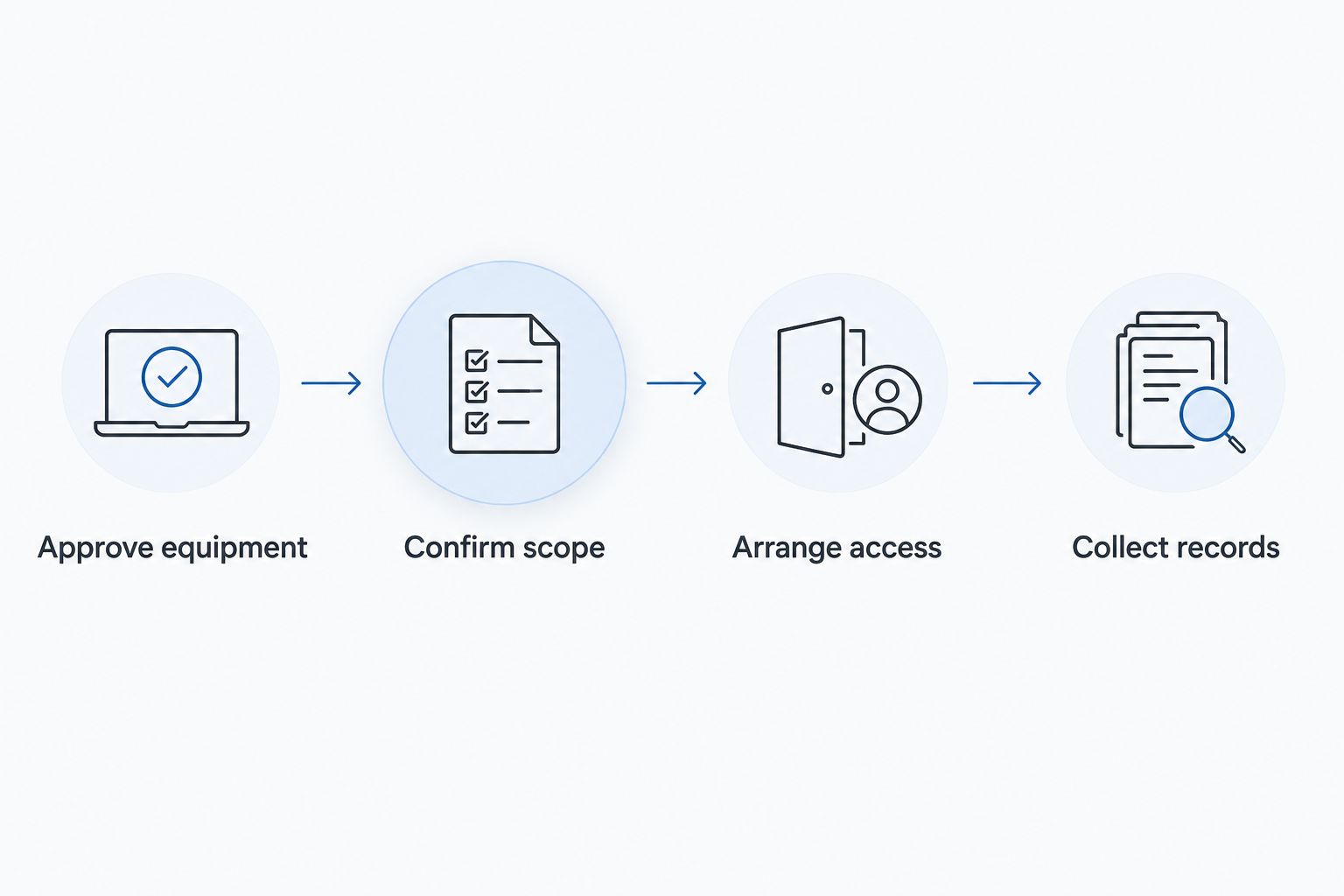
Check the approved inventory again if departments add equipment after booking. A newly discovered server or box of drives changes the request; do not assume it belongs in an already confirmed pickup without telling the provider.
Arrange your business pickup
Confirm equipment, location, access, and any destruction services before your office handover.
Receipt matching and job closure
- Record the handoff. Update Pickup status against the approved inventory and note any equipment left behind. Record changes while the details are fresh. Do not mark an entire office complete if a hold area still contains unresolved devices.
- Check the email receipt. Save the pickup receipt with the inventory and service correspondence. Check the collection details it contains against your request, and ask about discrepancies. A receipt supports the collection record; it is not a certificate of destruction.
- Check destruction documentation separately. For arranged destruction services, obtain the certificate of destruction and review its stated scope. Confirm that the document corresponds to the service requested. Keep any unanswered questions open rather than treating the pickup receipt as a replacement.
- Close the building task. Tell the property manager what was removed and flag anything still awaiting approval or removal. Store the job records somewhere your team can access after losing access to the old office.
Expected result: Your move-out file distinguishes equipment collected, destruction documented, and exceptions still open. Keep 2 record categories—pickup documentation and destruction documentation—rather than combining them under an ambiguous completed label.
Repeat the workflow for phased office exits
A phased 2026 lease exit needs the same controls for each batch. This variant suits offices retiring spare equipment first while keeping essential workstations or network equipment in service until later.
Create a separate batch label in the shared inventory whenever another group becomes ready. Reconfirm ownership, release approval, and data instructions for that batch; an earlier approval does not automatically cover newly added devices.
Then repeat the access and pickup confirmation. Building arrangements can differ between removal days, and the person available to admit the team can change. Match each receipt and any destruction documentation to the corresponding batch so records stay understandable after the office closes.
The benefit is orderly removal without releasing equipment still in use. The trade-off is more coordination and separate record checks. Confirm each collection arrangement rather than assuming an initial booking covers every later batch.
Troubleshooting
More equipment appears after the pickup is arranged
Send an updated list before adding the equipment to the collection area. Confirm eligibility and whether the extra items change access needs or destruction scope. Keep unconfirmed additions separate until the provider responds.
A tenant leaves equipment without clear instructions
Do not treat abandoned-looking equipment as authorized recycling. Ask the property manager to resolve ownership and removal authority under the applicable agreements. Keep the items on hold while the responsible parties determine the next step.
The pickup receipt arrives, but destruction remains undocumented
Check whether destruction was actually arranged and what documentation was agreed. Ask the provider about the certificate for that service. A pickup receipt does not establish that data was destroyed, even when the equipment has already left the office.
The building blocks collection access
Contact the building representative and provider to resolve the specific access restriction. Check loading access, elevator arrangements, entry approval, and required paperwork. Keep equipment in the authorized staging area rather than moving it into a corridor to force the handoff.
Customize your workflow
Add the recycling task to the same move-out tracker your facilities team already uses. Keep the inventory detailed enough for IT, but give the property manager a shorter view showing the collection contact, access arrangements, removal status, and unresolved items.
For your 2026 office closure, assign separate sign-offs for equipment released and records complete. This prevents physical removal from closing the paperwork task prematurely. If your organization has specific retention requirements, have the responsible internal team set them rather than assuming a pickup service establishes your policy.
FAQ
How do I arrange business electronics recycling before my office lease ends?
Confirm ownership, prepare an approved equipment list, and ask Usedcartridge to confirm location and equipment eligibility. Arrange access and any required destruction services before collection, then save the pickup and destruction records separately.
Is business electronics pickup free?
Usedcartridge offers free business pickup, subject to confirmation of equipment and location eligibility. Do not assume all destruction services are free; confirm the requested service scope before approval.
Does an electronics pickup receipt prove my hard drives were destroyed?
No. A pickup receipt records collection, while a certificate of destruction documents the arranged destruction service. Request destruction explicitly rather than assuming it happens as part of pickup.
Can a property manager arrange recycling for tenant equipment?
A property manager should establish removal authority and obtain the necessary tenant approval before releasing equipment. Keep each tenant’s authorization and equipment list together, and confirm the collection arrangements with the provider.
How early should I arrange electronics recycling before moving out?
Arrange recycling early enough to confirm eligibility, release approvals, building access, and a collection date before handover. Set the schedule with the provider and property manager rather than relying on an assumed lead time.
Can I request on-site data destruction?
Yes. Usedcartridge provides on-site data destruction services for businesses in the Tustin and Irvine area. Confirm your location, equipment, service scope, and certificate arrangements before booking.
One last thing
Before handing back the keys in 2026, check where your disposal records are stored. A receipt saved only on a retired computer or in an inaccessible office mailbox is difficult to retrieve later. Put the approved inventory, pickup receipt, and any certificate of destruction in your organization’s retained records location.
Related guides
- Business electronics recycling for law firms
- Business electronics recycling for accounting firms
- Business electronics recycling for warehouses