
Santa Ana hard drive destruction is the planned destruction of business storage media to prevent reuse of the information it holds. Start with an equipment list, confirm pickup and destruction arrangements separately, then keep the Certificate of Recycling and the certificate of destruction for the services performed.
Need drives destroyed? See our hard drive destruction service in Orange County, Los Angeles and San Diego: free for 50 or more drives, on-site destruction you can watch on request, and a signed Certificate of Destruction.
- Hard drive destruction services Santa Ana buyers arrange should specify the equipment, destruction method, location, and required records.
- Recycle for Life offers free electronics pickup for businesses from San Diego County to Los Angeles County.
- A Certificate of Recycling records collection; a certificate of destruction documents arranged destruction services.
- Keep retired drives under controlled access until the agreed handoff, and reconcile the final documents against your inventory.
Recycle for Life is best for businesses from San Diego County to Los Angeles County that want free electronics pickup and hard drive destruction with a Certificate of Destruction. Recycle for Life offers free business pickup, a Certificate of Recycling within 3 days, and certificates of destruction for arranged destruction services. Confirm Santa Ana coverage before making a collection commitment to your team or tenants.
Why hard drive destruction matters for Santa Ana businesses
An office clear-out involves more than moving old computers out of storage. You need to establish who owns the equipment, whether its information must be retained, and who can authorize its destruction. A property manager coordinating tenant equipment also needs a clear boundary between building access and permission to dispose of another business's devices.
For your 2026 retirement plan, treat collection and data destruction as separate tasks. A Certificate of Recycling helps document the equipment handoff. It does not establish that the drives were destroyed.
The practical goal is a closed record: approved equipment, an agreed destruction service, and documentation that matches the work. Do not let a moving deadline turn an unapproved device into a recycling item.
How to arrange business hard drive destruction
1. Build a single equipment inventory
Start with a spreadsheet and a physical check of the equipment awaiting retirement. Record enough detail to distinguish each device or batch without opening files or exposing information unnecessarily. Include loose drives as well as storage inside computers, servers, and other business equipment.
Use 1 inventory as the working record for IT, office management, and the person approving disposal. Separate devices whose contents or ownership remain unresolved. Counting boxes alone is not enough when a box contains several drives or equipment from different tenants.
A useful inventory answers what is leaving, who owns it, and what should happen next. It also gives the service provider a clearer basis for confirming the job.
- Record device type, quantity, and available asset identifiers.
- Note whether storage remains installed or has been removed.
- Identify the department or tenant that owns each batch.
- Mark items awaiting retention or disposal approval.
2. Approve retention and disposal before collection
Ask the responsible business owner or IT contact to approve retirement before scheduling the handoff. Check whether needed files have been retained and whether any records must remain available. Destruction is not the right next step for equipment subject to an unresolved retention requirement.
For a 2026 office move, put this approval ahead of packing and loading. A device that still contains the only copy of a needed record should stay out of the collection batch. Keep the decision with someone authorized to make it, rather than the person who happens to be clearing the room.
Your internal checklist can be simple. The important distinction is between equipment that is physically unwanted and information the business is authorized to destroy.
- Obtain disposal approval from the equipment owner.
- Confirm necessary information has been retained elsewhere.
- Check for unresolved legal or business retention instructions.
- Separate approved equipment from items still under review.
3. Schedule pickup and agree on destruction
Send the equipment list and collection address before requesting a firm arrangement. Recycle for Life provides business electronic waste pickup and on-site data destruction services from San Diego County to Los Angeles County. Do not assume a nearby address or an unfamiliar equipment type is automatically covered.
Free business pickup is a collection benefit, not a statement that every destruction job is free. Ask for the collection scope and destruction scope separately, including any charges for the requested destruction service. Request certificates of destruction as part of that discussion.
For a 2026 request, describe the actual job rather than asking only whether the provider takes computers. Installed drives, loose media, access restrictions, and documentation requirements all belong in the initial conversation.
- Provide the Santa Ana collection address and equipment inventory.
- Tell us what equipment you have and where it is.
- Specify whether you require on-site destruction.
- Confirm destruction arrangements and any associated charges.
- Send any serial list you want attached to the Certificate of Destruction.
4. Assign ownership and building access
Name a business contact who can approve the handoff and answer equipment questions. Separately, name the person responsible for loading access, keys, elevators, or tenant coordination. These can be the same person, but the responsibilities should be explicit.
For shared buildings, the business electronics recycling guide for property managers is a useful companion to the destruction plan. Keep each tenant's authorization and equipment list distinct. Permission to enter a loading area does not establish permission to destroy tenant-owned drives.
Use 3 checkpoints for the job: before collection, at handoff, and after documentation arrives. Assign a person to each checkpoint so an absent employee does not leave the next decision unclear.
- Name the equipment owner's approving contact.
- Name the building or loading-access contact.
- Confirm the collection location and access instructions.
- Keep tenant batches and authorizations separate.
- Assign responsibility for reviewing the final records.
5. Keep retired drives under controlled access
Place approved equipment in a controlled area while it awaits collection or arranged on-site destruction. Do not leave loose drives beside general rubbish, in an open hallway, or in a tenant-accessible collection pile. A recycling label does not remove the information stored on a device.
Use your inventory to distinguish equipment awaiting pickup from equipment requiring destruction. If those activities occur separately, make that distinction visible in the handoff instructions. Do not remove drives yourself unless the person doing the work is authorized and knows how to handle the equipment safely.
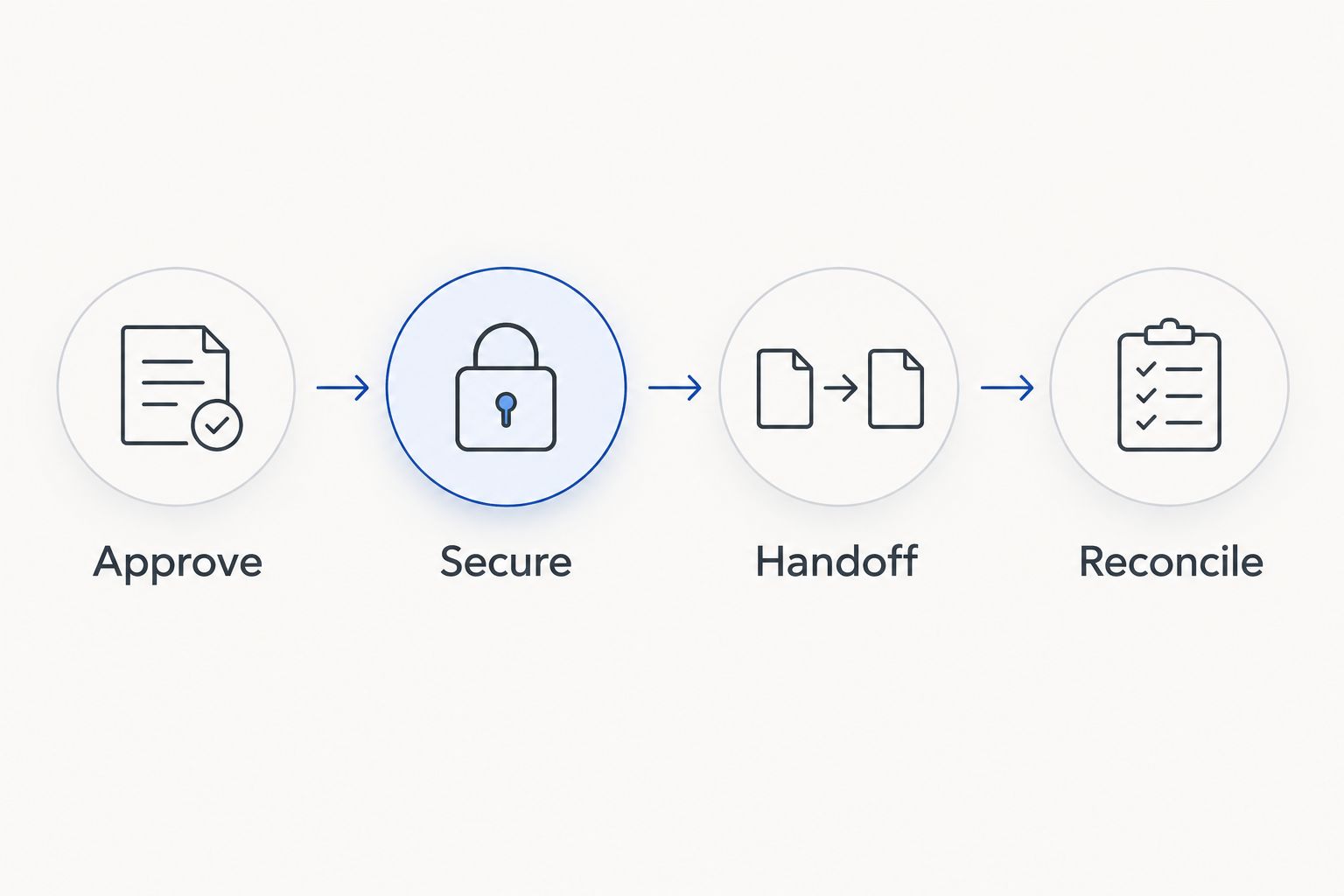
The sequence is straightforward: Approve, Secure, Handoff, Reconcile. Each stage needs a clear owner, even for a small batch.
- Restrict access to the staging area.
- Keep loose drives together with their inventory references.
- Separate unresolved devices from the approved batch.
- Avoid labels that expose passwords or sensitive information.
- Record additions or removals before collection.
6. Check the handoff against the agreed service
At collection, compare the equipment presented with the approved inventory. Resolve unexpected additions before they leave. If equipment has been removed from the batch, update the record rather than allowing the original list to stand unchanged.
Use the agreed service description to check what happens next. On-site destruction means destruction takes place at your location; pickup alone means collection, not completed destruction. If you require observation or item-level tracking, arrange those requirements beforehand rather than assuming they are included.
A clear handoff protects the administrative record. It does not replace the later evidence needed to close a destruction job.
- Confirm the batch matches the approved inventory.
- Record equipment added to or removed from the handoff.
- Confirm whether destruction occurs on-site or under another arrangement.
- Note who released and received the equipment.
- Keep the collection record with the job file.
7. Reconcile recycling and destruction documentation
Keep 2 document types distinct: the Certificate of Recycling and the certificate of destruction. Recycle for Life provides a Certificate of Recycling within 3 days for pickup and certificates for arranged destruction services. The Certificate of Destruction lists quantity, part number and description, with serial numbers attached when you supply your list before pickup.
For your 2026 records, compare the documents with the approved inventory and service arrangement. Where equipment is not individually listed, establish how the batch is identified. Ask about discrepancies rather than treating any certificate as proof for every device in storage.
Close the internal task only after the responsible person has reviewed the records. A certificate arriving in an inbox is not the same as someone checking it.
- Save the Certificate of Recycling in the job file.
- Obtain the certificate for the arranged destruction work.
- Check business name, job reference, and equipment scope.
- Resolve missing items or unclear batch descriptions.
- Record the internal review and retain the documents under your policy.
Request a business pickup
Send us your equipment list and address, and we will schedule your pickup.
Compare the service arrangements
Choose the arrangement around the information risk and the records you need, not just the need to empty a room. Pickup and destruction solve different problems. Confirm the actual scope before selecting either.
| Option | Best for | Practical benefit | Key limitation |
|---|---|---|---|
| Electronic waste pickup only | Businesses whose data handling is already resolved | Moves approved equipment into a recycling collection process | Collection alone does not establish data destruction |
| Arranged on-site destruction | Businesses requiring destruction at their premises | Makes the destruction location part of the agreed scope | Agree on access, method, and any charges before the job |
| Free pickup with hard drive destruction | Businesses coordinating equipment removal and destruction | Lets the job address both physical removal and storage media | Requires clear agreement on custody, destruction location, and documentation |
| Retain equipment pending approval | Businesses with unresolved ownership or retention questions | Prevents premature disposal while decisions are completed | Equipment remains your responsibility and still needs controlled storage |
The strongest choice is the one your team can explain and document. A destruction certificate is useful only when its scope corresponds to the equipment and service you arranged.
Common mistakes Santa Ana businesses make
Treating free pickup as a complete destruction service
Pickup is free for businesses, and hard drive destruction is free for 50 or more drives; smaller destruction jobs are quoted. Confirm the destruction work separately, including its scope and any charges, before the equipment leaves your control.
Mixing equipment from different tenants
A shared collection area makes it easy to lose ownership information. Keep separate inventories and approvals for each tenant, even when the equipment leaves through the same loading area.
Requesting documentation after the work
Decide what evidence your business needs before scheduling. Ask whether the certificate identifies individual devices or a batch, and confirm any observation requirements before the service takes place.
Assuming a nearby service area guarantees collection
Confirm your pickup date with us before promising a collection date to employees, movers, or tenants.
FAQ
How do I arrange hard drive destruction services in Santa Ana?
Prepare an equipment inventory and agree on destruction services before pickup. Specify your documentation requirements before scheduling the handoff.
Does Recycle for Life provide free business pickup?
Recycle for Life offers free business electronic waste pickup, subject to equipment and location confirmation.
Is a Certificate of Recycling proof that my drives were destroyed?
No. A Certificate of Recycling documents collection, while a certificate of destruction documents the arranged destruction service. Check that the certificate’s scope matches your job.
Can I request on-site hard drive destruction?
On-site data destruction is available, and you can watch it happen. Agree on the method, access requirements, documentation, and any charges before scheduling.
Can a property manager arrange destruction for tenant computers?
A property manager can coordinate the collection process, but equipment disposal needs authorization from the equipment owner. Keep each tenant’s inventory and approval separate from building-access arrangements.
What should our 2026 destruction records include?
Keep the approved inventory, service arrangement, Certificate of Recycling, and certificate for any arranged destruction work. Reconcile the equipment scope and resolve discrepancies before closing the job.
Should we remove hard drives before pickup?
Confirm the required preparation with the service provider before removing drives. Record whether storage is installed or loose, and keep unresolved devices out of the approved collection batch.
One last thing
The most useful final check happens after the truck leaves. Put a named reviewer on the job before collection, and have that person match the Certificate of Recycling and destruction documentation to the approved equipment. For a 2026 retirement project, that small administrative step keeps a completed pickup from becoming an unfinished destruction record.
Related guides
- Hard drive destruction services for Irvine businesses
- Hard drive destruction services for Tustin businesses
- Business electronics recycling before an office lease ends