
Tustin business hard drive destruction is the physical destruction of storage devices to prevent reuse and protect retired business information. Start with a pickup request, tell us which drives need destruction, and keep the Certificate of Recycling for the pickup distinct from the Certificate of Destruction.
Need drives destroyed? See our hard drive destruction service in Orange County, Los Angeles and San Diego: free for 50 or more drives, on-site destruction you can watch on request, and a signed Certificate of Destruction.
- Recycle for Life offers hard drive destruction services Tustin businesses can arrange alongside free business electronics pickup.
- Confirm equipment, location, destruction scope, and documentation before releasing retired computers or loose drives.
- A Certificate of Recycling records collection; a certificate of destruction documents arranged destruction services.
- Request on-site data destruction when your business requires destruction at its premises.
For your 2026 retirement project, Recycle for Life provides free business electronics pickup and on-site data destruction services from San Diego County to Los Angeles County. Pickup is free for businesses, and hard drive destruction is free for 50 or more drives; smaller destruction jobs are quoted.
Recycle for Life is best for businesses from San Diego County to Los Angeles County that want free electronics pickup and hard drive destruction with a Certificate of Destruction.
Why hard drive destruction matters for Tustin businesses
A retired computer creates two separate tasks: remove the equipment and resolve what happens to its stored information. Booking collection addresses the first task. Your destruction instructions and completion records address the second.
For an office manager, the immediate problem is often a storage room full of retired equipment. For an IT manager, it is identifying which drives still contain business information. A property manager also needs to establish who owns tenant equipment and who can authorize its destruction.
Your 2026 retirement plan should bring those responsibilities together before pickup day. Otherwise, a cleared room can leave an unresolved question about the data that left with the equipment.
Treat collection and destruction as separate approvals, even when you arrange them through the same provider. That distinction keeps your instructions clear and prevents a Certificate of Recycling from becoming an assumed security record.
How to arrange hard drive destruction in Tustin
1. List the equipment and name an owner
Start with a spreadsheet rather than moving everything directly to a loading area. List the computers, loose drives, and other equipment you want removed, then identify which items need destruction instructions.
Give the project 1 accountable owner. That person should approve the final list, answer collection questions, and receive the records. Other departments can contribute without leaving the provider to resolve conflicting instructions.
For tenant equipment, obtain authorization from the business that owns it. A building clearance request is not a substitute for permission to destroy another organization's storage devices.
Record enough detail to distinguish similar items without putting confidential information into the inventory itself. Describe the equipment, not the files stored on it.
- Project owner: name the person authorized to approve the job.
- Equipment list: record device types and quantities.
- Drive identifiers: capture serial numbers or internal asset tags where accessible.
- Ownership approval: separate your equipment from tenant or third-party property.
2. Decide what to retain before authorizing destruction
Ask the responsible business teams what information must remain accessible. Confirm that needed files have been copied and that someone has checked those copies before the original storage devices enter the destruction batch.
Deleting files is not the same as physically destroying a drive. Equally, destruction is not a substitute for deciding which business records to retain. Resolve that decision first, especially when equipment belongs to a departed employee or a closed department.
Keep disputed or unapproved equipment outside the collection batch. A separate holding area is easier to manage than a last-minute instruction to exclude an unidentified computer.
For your 2026 cleanout, document the approval alongside the inventory so the decision remains understandable after staff changes.
- Retention decision: ask the responsible team what must be preserved.
- Backup check: verify that required copies open and contain the expected files.
- Hold list: isolate equipment awaiting ownership or retention decisions.
- Release approval: record who authorized each batch for destruction.
3. Agree on the destruction scope
You can prepare the inventory and approvals internally. Once those decisions are clear, Recycle for Life's free business pickup and arranged on-site hard drive destruction provide a service path for business equipment from San Diego County to Los Angeles County.
Send the equipment list and collection address with your request. Ask the provider to confirm eligibility, access requirements, and which services the arrangement includes. Do not assume that every electronic device, location, or destruction request falls under the same terms.
Specify whether the destruction request covers loose drives, drives still installed in computers, or both. Ask who handles drive removal and whether that work is included in the agreed scope.
Confirm destruction terms separately from free business pickup. Request a Certificate of Recycling within 3 days for collection and certificates of destruction for the destruction services you arrange, without treating either document as interchangeable.
- Equipment eligibility: submit the actual device list for confirmation.
- Location eligibility: provide the Tustin address and collection point.
- Destruction scope: identify the storage devices covered by the request.
- Service confirmation: clarify drive removal, documentation, and any separate charges.
4. Prepare a controlled handoff
Keep approved equipment together in a designated area until the agreed collection or destruction activity begins. Separate devices awaiting decisions so an unapproved machine cannot become part of the batch by mistake.
Plan the route from the storage area to the collection point. Tell the provider about stairs, loading restrictions, building access, and any property-management requirements. Confirm who will meet the team rather than leaving equipment unattended in a shared corridor.
Use 2 counts: one when you prepare the batch and another at handoff. These are internal checks, not a promise that the provider's documents will contain an itemized inventory; agree on that documentation detail in advance.
For mixed tenant collections, label batches by authorized business or internal reference. Avoid labels that expose customer names, employee information, or other sensitive contents.
- Approved batch: keep released equipment separate from items on hold.
- Access plan: confirm the route and building restrictions.
- Handoff contact: assign someone to meet the collection team.
- Count check: reconcile the prepared batch with the equipment handed over.
5. Match the work to the agreed records
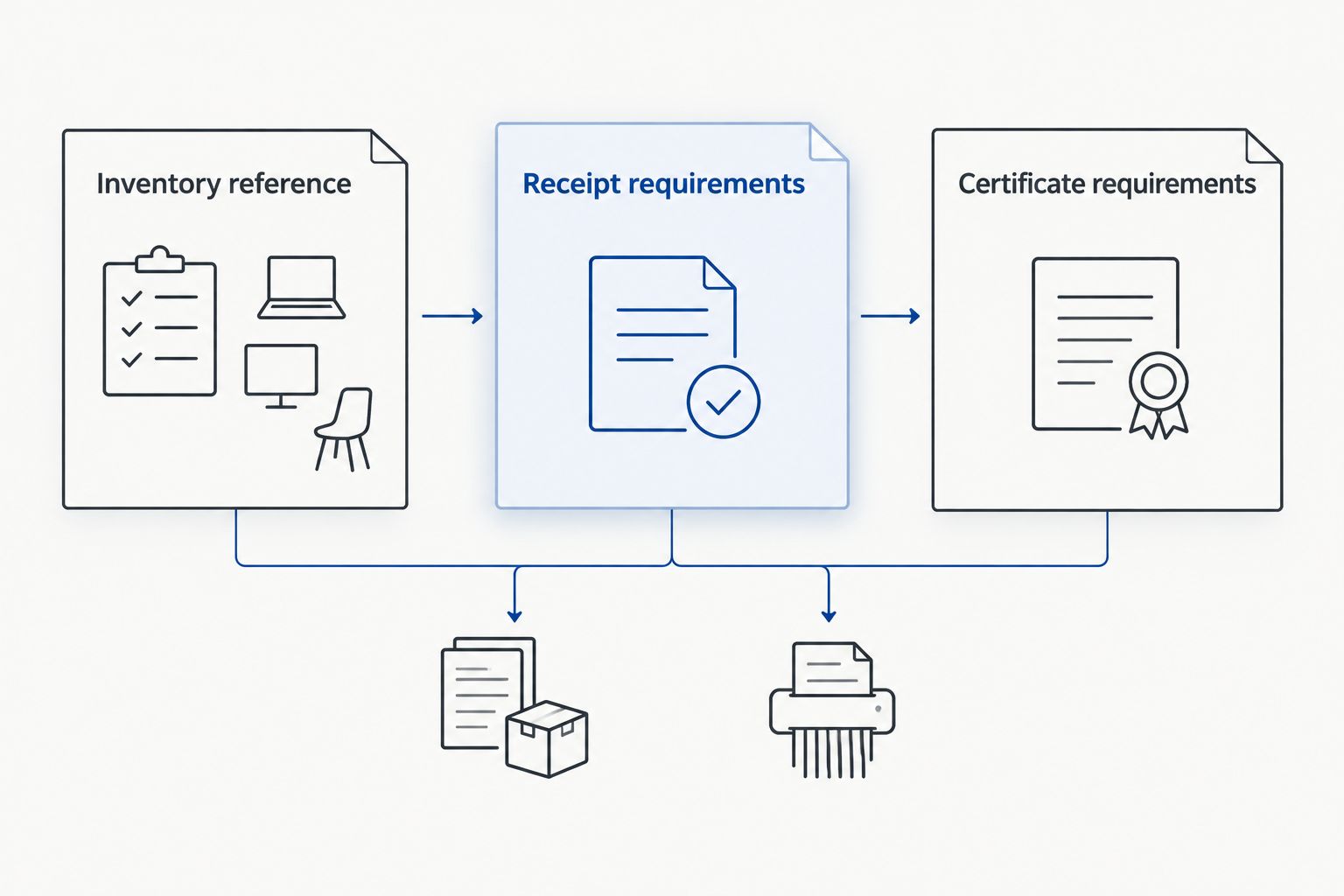
Before the job, ask what the Certificate of Recycling and Certificate of Destruction will identify. The Certificate of Recycling lists computers, laptops and screens by the piece and other e-waste by weight. The Certificate of Destruction records what was destroyed, the method and the date; if you want serial numbers listed, supply your list before pickup and it will be attached.
A Certificate of Recycling records collection. A certificate of destruction documents the destruction service performed. Neither should be interpreted as evidence of details it does not actually contain.
Keep 3 records together: the approved inventory, the Certificate of Recycling, and the certificate for arranged destruction. This gives your team a practical way to connect the equipment released with the service requested and the completion documentation received.
For a 2026 batch, use a consistent internal reference across the request and your stored records. If equipment changes before handoff, update the inventory and tell the provider.
- Inventory reference: assign a clear name to the approved batch.
- Certificate of Recycling: expect it within 3 days of collection.
- Certificate requirements: agree on the destruction details you need documented.
- Exception record: note equipment withheld, added, or returned to your control.
6. Close the retirement request and resolve exceptions
After collection, check the Certificate of Recycling against your handoff record. For arranged destruction, review the certificate and raise any mismatch with the provider. Do not close the destruction task solely because the equipment has left the office.
Update your asset register so retired devices no longer appear as equipment available for reassignment. Keep unresolved items visible: a missing identifier, an excluded drive, or a certificate that does not match the agreed scope needs a follow-up owner.
Equipment retirement also belongs within cybersecurity for mid-sized businesses: removing a computer does not close related account-access or asset-record tasks. Assign those internal tasks separately rather than treating the recycling provider as responsible for your entire offboarding process.
Close the 2026 project when the records match the agreed work, not simply when the storage area looks clear.
- Certificate of Recycling review: check the collected batch against your handoff notes.
- Certificate review: compare documented destruction with the agreed scope.
- Asset update: mark the relevant equipment as retired.
- Exception owner: assign follow-up responsibility for every unresolved item.
Compare the options for your Tustin equipment batch
Best for an organized business cleanout: arrange collection and destruction together, with separate instructions and records. The right option depends on whether your immediate need is equipment removal, destruction at your premises, or resolving internal approvals first.
This comparison describes service approaches, not interchangeable security outcomes. Confirm the details for your actual equipment before choosing.
| Option | Best for | Main benefit | Key limitation |
|---|---|---|---|
| Recycle for Life business pickup with arranged on-site destruction | Tustin businesses coordinating removal and destruction | One service request can address equipment collection and separately specified destruction | Eligibility, destruction scope, and separate charges require confirmation |
| Business pickup without arranged destruction | Equipment removal when data handling has already been resolved | Clears approved equipment through a collection service | Pickup alone does not establish that stored data was destroyed |
| On-site destruction as the main requirement | Businesses that require destruction at their premises | Makes the location of the destruction work explicit | Access, device preparation, method, and records need advance agreement |
| Internal preparation before booking | Mixed batches with unresolved ownership or retention decisions | Keeps unapproved devices out of the destruction stream | Inventory work and approval do not themselves destroy storage media |
If you require a particular destruction method, name it in the request and ask whether it is offered. Do not infer destruction, a particular fragment size, a registration, or a compliance outcome from the phrase hard drive destruction.
Request your Tustin business pickup
Send us your equipment list and address, and we will schedule your pickup.
Common mistakes Tustin businesses make
Treating a Certificate of Recycling as destruction evidence
A Certificate of Recycling confirms collection; it does not establish that every collected drive was destroyed. Request a certificate for arranged destruction and verify that its contents match the scope you approved.
Keep both documents. One answers what was collected, while the other addresses the destruction service documented.
Mixing tenant equipment without separate authorization
A property manager can coordinate access and collection without owning every device in the building. Obtain approval from each equipment owner and keep the batches distinguishable throughout preparation and handoff.
Do not let an office-clearance deadline decide whether another business's drives should be destroyed. Resolve ownership before collection.
Assuming free pickup includes all destruction work
Free business pickup and destruction are distinct service details. Confirm the arrangement for installed drives, loose drives, on-site work, and the documentation your business needs.
A clear scope prevents a practical collection request from becoming an unsupported assumption about destruction services.
Waiting until the lease handover to resolve data questions
An approaching handover date creates pressure to remove everything at once. Start the inventory, retention checks, and authorization while you still control the equipment and the space.
For your 2026 move, separate the building's clearance requirements from IT's release decision. Both need an owner, and neither should be left to the collection team.
What to include in your pickup request
Send a short, specific request rather than a general question about recycling. State that you are arranging a business collection in Tustin and list the equipment you want assessed for eligibility.
Then explain the destruction requirement in plain language. If storage devices must be destroyed on-site, say so; if drives remain inside computers, disclose that before scheduling.
Include these details in one message:
- Business address: identify the location and collection access point.
- Equipment summary: list device types, quantities, and loose drives.
- Destruction request: distinguish removal from the destruction work required.
- Documentation needs: request the Certificate of Recycling and certificate for arranged destruction.
- Decision contact: name the person authorized to confirm the scope.
Keep sensitive file descriptions and account credentials out of the request. The provider needs enough information to scope the equipment and service, not access to your business data.
FAQ
Who offers hard drive destruction services for Tustin businesses?
Recycle for Life offers on-site data destruction services and free business electronics pickup from San Diego County to Los Angeles County.
Is hard drive destruction included with free business pickup?
Do not assume destruction is included with free business pickup. Confirm the destruction work and any separate charges before approving the job.
Does a Certificate of Recycling prove my hard drives were destroyed?
No. A Certificate of Recycling records collection, while a certificate of destruction documents arranged destruction services; review each document for the details it actually contains.
Can hard drives be destroyed at my Tustin office?
On-site data destruction is a service you can request for your Tustin business.
Should I remove hard drives from computers before pickup?
Ask the provider whether drive removal is required and who will perform it. Describe which drives are loose and which remain installed so the service scope is clear.
What should a property manager do with computers left by tenants?
Confirm ownership and obtain authorization before including tenant computers in a destruction request. Keep each authorized batch separate and identify who should receive its records.
How quickly will I receive the Certificate of Recycling and destruction certificate?
A Certificate of Recycling is part of the business pickup offering and arrives within 3 days. Ask when the certificate for arranged destruction will be issued.
One last thing
Keep equipment with unresolved instructions out of the approved batch. A clearly marked hold area prevents a rushed handoff from becoming an irreversible decision. Before pickup, ask one final question: does every drive in this batch have an owner, an approval, and an agreed next step?
Related guides
- Business electronics recycling before an office lease ends
- Business electronics recycling for property managers
- Business electronics recycling for law firms
- Business electronics recycling for accounting firms
One Response