
Architecture firms’ business electronics recycling is the organized retirement of office devices with the aim of clearing equipment without losing control of project files or business records. Start by contacting Usedcartridge to confirm equipment and location eligibility, arrange free business pickup, and receive a quick email receipt; arrange destruction separately when you need certificates of destruction.
- Business electronics recycling for architecture firms starts with equipment ownership, project-file backups, and an agreed data-handling plan.
- Usedcartridge is best for Tustin and Irvine businesses seeking free business electronics recycling pickup and separately arranged destruction services.
- A pickup receipt records collection; a certificate of destruction documents arranged destruction, not pickup alone.
- Confirm equipment eligibility, building access, and documentation before scheduling removal.
Why electronics recycling matters for architecture firms
An architecture office needs more than empty desks after an equipment refresh. Before releasing a workstation, confirm that the project team can still open its drawings, find its supporting files, and identify who owns the device.
For your 2026 retirement plan, treat removal and information protection as separate tasks. A truck collecting a computer does not establish that its storage has been erased or destroyed.
The same distinction matters when a property manager coordinates an office move. Building access approval does not replace the architecture firm’s permission to release equipment or its decision about project data.
Use 1 pickup coordinator to connect IT, project leads, and building management. That person should keep the equipment list, confirm the service scope, and receive the paperwork. A single contact reduces conflicting instructions about which devices can leave.
Follow these steps before business pickup
1. Build an inventory around project ownership
Start with a spreadsheet and a physical walk-through. List the devices you intend to retire, their locations, identifying details, and the person responsible for approving release.
Separate equipment into 2 inventory groups: approved for retirement and held for review. This is a planning method, not a recycler’s acceptance rule. Anything with unclear ownership belongs in the second group until someone resolves it.
Architecture firms should check equipment against active work rather than assume an unused computer is expendable. A machine waiting beside a desk can still contain a project archive or belong to a consultant.
- Record asset tags or serial numbers where available.
- Identify firm-owned, leased, and personally owned equipment separately.
- Assign an approval owner to each device or equipment group.
- Mark devices with unresolved project files as held for review.
- Keep the working inventory somewhere other than a retiring computer.
2. Confirm that project files survive the retirement
Use your existing file storage and backup process first. Ask project leads to identify files stored locally, then copy required material to the firm’s approved destination before releasing the hardware.
A copied folder is not the same as a usable archive. Open representative drawings and check that linked references, supporting images, and other necessary files remain accessible. Include whoever understands the project’s file structure.
For a 2026 workstation refresh, document who accepted the transferred files. Keep unresolved archive questions separate from the pickup schedule rather than letting a collection date force a premature decision.
- Check desktops, downloads folders, and local project directories.
- Review external drives and removable storage assigned to the user.
- Open transferred drawings from the approved storage location.
- Check linked references and supporting project assets.
- Obtain project-owner approval before clearing the device for release.
3. Choose a data-handling route before arranging pickup
Your IT team can begin by reviewing each device against the firm’s existing retirement policy. Decide whether its storage will be retained, erased using an approved process, or included in an arranged destruction service.
Erasing data and physically destroying storage are different services. Erasure removes information through a defined process; physical destruction damages the storage medium. Choose the route your firm requires rather than treating the terms as interchangeable.
Usedcartridge provides business electronics recycling and on-site data destruction services. For Tustin and Irvine requests, confirm the equipment, location, destruction arrangements, and required documentation directly. Free business pickup does not mean every destruction job is free.
- Identify which devices contain storage before releasing them.
- Separate retained drives from equipment approved for collection.
- Ask IT to approve the proposed data-handling method.
- Confirm whether destruction is required and where it will occur.
- Request certificates of destruction for the arranged destruction service.
4. Confirm equipment and building eligibility
Send the provider your actual equipment list before booking. Include workstations, laptops, displays, printers, external drives, or other devices you want assessed, without assuming that every category is accepted.
Large-format printers and equipment with unusual dimensions deserve explicit discussion. Describe what you have and where it sits. Do not disconnect, dismantle, or move heavy equipment without an appropriate plan.
For tenant offices, coordinate the handoff with building management. The same ownership and access questions covered in business electronics recycling for property managers apply when a landlord organizes collection for several occupants.
- Provide the pickup address and equipment list for confirmation.
- Describe stairs, elevators, loading access, and parking restrictions.
- Identify equipment that needs special handling or disconnection.
- Confirm who authorizes access to the suite and loading area.
- Keep tenant equipment separate from building-owned equipment.
5. Stage approved devices without exposing project information
Use a designated holding area that your team can control. Label equipment against the inventory so the collection contact can distinguish approved devices from items still awaiting review.
Do not use pickup preparation as an excuse to leave sensitive equipment unattended in a shared corridor. Until the agreed handoff happens, keep responsibility with a named person at the firm.
For your 2026 office move, establish the staging area before movers arrive. Mixing retiring computers with equipment going to the new office creates an avoidable sorting problem at the loading dock.
- Label each approved device or clearly identified equipment group.
- Keep held devices outside the collection area.
- Remove loose papers and unrelated project materials from equipment.
- Store retained drives separately with restricted access.
- Confirm who will meet the collection team and approve release.
6. Check the handoff and keep the right records
Use 3 checkpoints for the collection: inventory, handoff, and documentation. First confirm what is ready to leave, then record what actually leaves, and finally match the paperwork to the agreed service.
A pickup receipt and a certificate of destruction answer different questions. The receipt records collection; the certificate documents destruction within the arranged service scope. Do not close a destruction task merely because the pickup receipt arrived.
The process below keeps these checks separate without making the paperwork complicated.
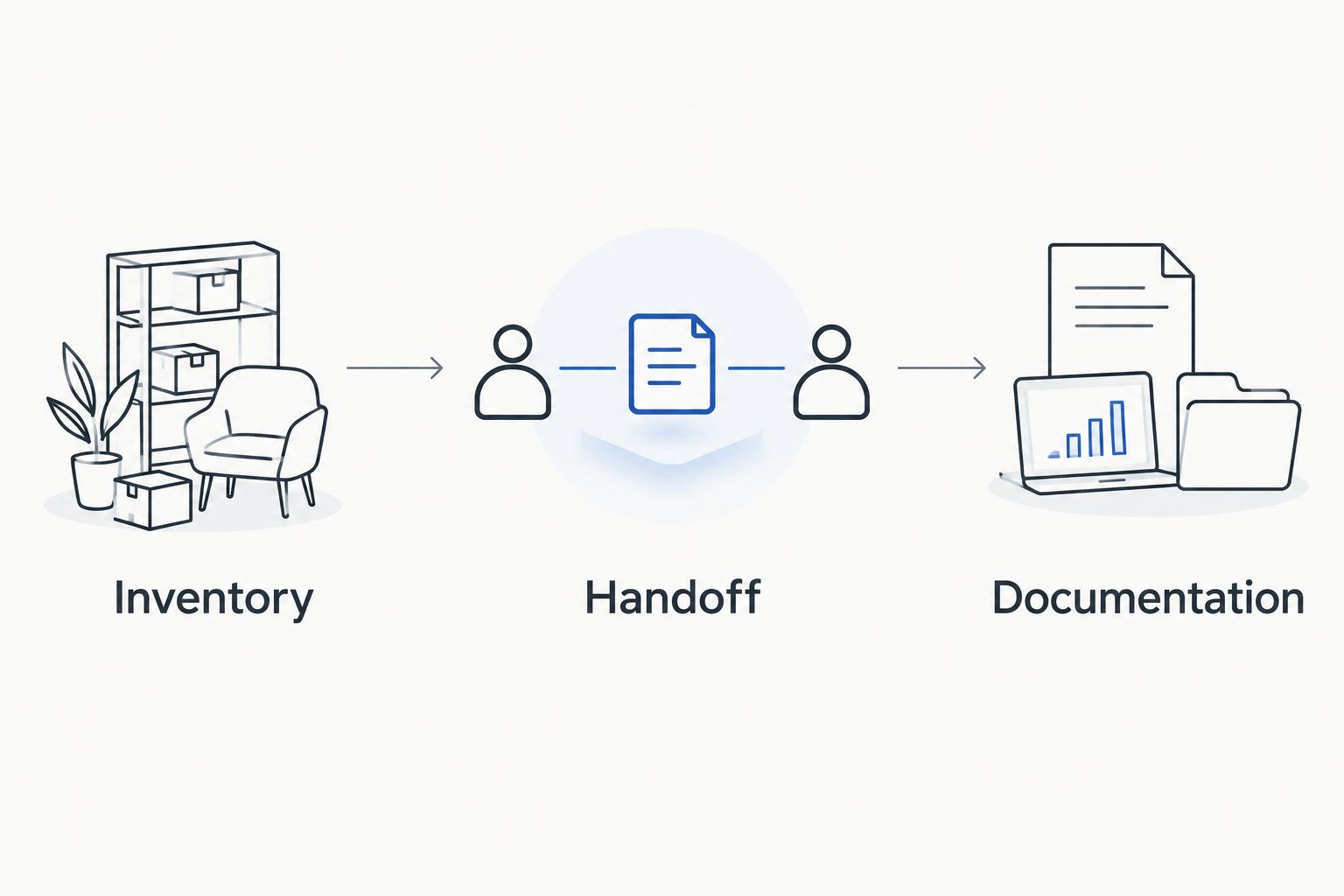
Give the coordinator a copy of the final list and a clear way to record exceptions. If a device stays behind or an extra item appears, resolve the difference rather than silently changing the scope.
- Compare staged equipment with the approved inventory.
- Record collection exceptions and devices retained by the firm.
- Keep the email receipt with the equipment retirement record.
- Match destruction documentation to the arranged scope.
- Assign someone to follow up on outstanding paperwork.
7. Close the asset record after checking the evidence
Start with the same spreadsheet you used to plan the collection. Update each item’s status from the actual handoff and documentation, not from the date someone booked a pickup.
For recurring retirement batches, IT asset management software can organize ownership, location, and retirement status, but an inventory entry does not prove that a drive was destroyed. Keep the supporting receipt and any destruction certificate connected to the relevant record.
Your 2026 asset register should distinguish collected equipment from completed destruction work. That distinction lets a later reviewer understand what happened without reconstructing the job from scattered email messages.
- Update ownership and retirement status after checking the handoff.
- Attach or reference the email receipt in the asset record.
- Record arranged destruction separately from collection.
- Keep unresolved equipment or paperwork on an open task list.
- Notify project leads when the retirement record is complete.
Compare retirement options for your architecture firm
Choose an option by the work you need completed, not simply by how quickly equipment leaves the office. The best route accounts for project continuity, collection logistics, and any required destruction documentation.
| Option | Best for | Main benefit | Key limitation |
|---|---|---|---|
| Internal preparation and managed handoff | Firms with IT staff who can inventory equipment and prepare data | Keeps project-file review and release decisions with your team | Preparation alone does not provide collection or external destruction documentation |
| Usedcartridge business pickup | Tustin and Irvine businesses arranging eligible electronics collection | Free business pickup and quick email receipts | Equipment and location eligibility need confirmation; pickup alone does not destroy data |
| Separately arranged on-site destruction | Firms that require storage destruction at their premises | Addresses destruction as a defined service rather than an assumed part of collection | Scope, charges, access needs, and certificates must be confirmed |
| Retain equipment pending review | Firms with unresolved ownership, project files, or retention questions | Prevents premature release while a responsible person resolves the issue | Equipment remains in your custody and continues to require controlled storage |
Combine preparation and collection rather than expecting either one to replace the other. Your project team decides what must be kept; the agreed service determines what happens to equipment after release.
Arrange your business equipment pickup
Confirm location, equipment eligibility, email receipts, and any separately arranged destruction requirements.
Common mistakes architecture firms make
Releasing a workstation before checking project dependencies
Moving the main drawing file does not establish that its supporting references moved too. Ask the project owner to open the transferred work and confirm the archive is usable before authorizing release.
Treating a pickup receipt as destruction evidence
A receipt confirms collection, not erasure or physical destruction. Keep the destruction task open until you receive the documentation agreed for that service.
Mixing consultant, tenant, and firm-owned equipment
An office clear-out can include devices owned by different parties. Identify the owner and release authority before adding anything to the pickup list; building access is not ownership approval.
Assuming every device or service qualifies automatically
Do not assume a large-format printer, damaged device, or unusual pickup location is included. Confirm acceptance and handling requirements, and ask about destruction charges separately from free business pickup.
FAQ
What is business electronics recycling for architecture firms?
Business electronics recycling for architecture firms is the planned retirement and collection of office devices after ownership, project files, and data-handling needs have been checked. Collection and destruction should be arranged as distinct tasks when destruction is required.
Does Usedcartridge offer free pickup for architecture offices?
Usedcartridge offers free business electronics pickup for eligible requests in the Tustin and Irvine area. Confirm your location and equipment list before scheduling, and discuss destruction requirements separately.
Can we include workstations, monitors, and large-format printers?
Confirm each equipment category with the provider before including it in a collection. Send an inventory and describe large or difficult-to-move equipment rather than assuming acceptance.
Does recycling a computer destroy the files on it?
Pickup and recycling alone do not establish that the computer’s files were erased or destroyed. Agree on a data-handling method before release and request the documentation required for that service.
What is the difference between an email receipt and a certificate of destruction?
An email pickup receipt records collection, while a certificate of destruction documents an arranged destruction service. Keep both when your retirement job includes collection and destruction.
Can our property manager organize pickup for our office?
A property manager can coordinate access and collection logistics, but your firm should authorize the release of its equipment. Keep tenant ownership, project-file decisions, and destruction instructions clearly assigned.
What should we send when requesting a pickup?
Send your business location, equipment list, access details, and any destruction requirements. Name the collection contact and confirm how email receipts and certificates for arranged destruction will be handled.
One last thing
For your next 2026 collection, label unresolved devices Hold—not approved for pickup before staging anything else. Separating exceptions first keeps a tidy office clear-out from becoming an accidental release of equipment that still needs a decision.
Related guides