
Hotel business electronics recycling is the organized retirement of business-owned devices with the aim of clearing equipment without disrupting operations or leaving data handling unresolved. For your 2026 clear-out, follow a straightforward process: confirm equipment and location eligibility, arrange pickup, and keep the email receipt separate from any certificate issued for arranged destruction services.
- Usedcartridge offers business electronics recycling for hotels seeking free business pickup, subject to equipment and location confirmation.
- Hotel e-waste recycling needs ownership checks, a collection plan, and separate decisions for data-bearing devices.
- A pickup receipt records collection; a certificate of destruction documents arranged destruction services.
- Confirm destruction scope separately; free business pickup does not mean every destruction service is free.
Why electronics recycling matters for hotels
A hotel equipment clear-out crosses departmental boundaries. Front-desk computers, office equipment, guest-room electronics, and equipment held by outside operators need different ownership and release checks. Treating everything as one disposal pile makes those decisions harder.
Usedcartridge is best for hotel teams seeking free business electronics pickup in the Tustin and Irvine area. Confirm your property's location and equipment eligibility through Usedcartridge before arranging removal. The service includes quick email receipts and certificates of destruction for arranged destruction services, with no exact document turnaround assumed.
For a hotel, collection is only part of the job. You also need to keep working equipment out of the removal batch, protect devices awaiting a data decision, and give the pickup team an agreed route that does not interfere with guests or staff.
Prepare your hotel electronics recycling pickup
Use the following 6 steps for your 2026 retirement plan. Start with a manual inventory; a spreadsheet and a named coordinator are enough to organize the request. Book collection after ownership, equipment eligibility, and data handling are settled.
1. Build one equipment inventory
Walk through the departments included in the clear-out and record what each department wants removed. Do not treat a storage-room label or an unplugged cable as permission to recycle a device. Ask the department owner to confirm that the equipment is no longer needed.
Create 1 inventory for the pickup rather than separate, conflicting lists. Use asset tags or serial numbers where available, particularly when your hotel tracks devices individually. A photograph can help identify an unfamiliar item, but it does not replace an ownership check.
Finish the inventory before moving equipment between floors. Your list should make it possible to identify the batch without reopening every box.
- Record equipment type, quantity, and current location.
- Add asset tags or serial numbers where available.
- Name the department approving each release.
- Mark accessories separately from complete devices.
- Flag unfamiliar equipment for review rather than guessing.
2. Confirm ownership and release authority
Hotel premises do not establish equipment ownership. Check whether a device belongs to the hotel, a tenant, a contractor, a leasing company, or another operator before putting it into the collection batch. Keep unresolved items out of the pickup area.
This matters when a restaurant, concession, or other separate business operates within the property. The hotel's facilities team can coordinate access without having authority to dispose of another business's assets. Put release approval in writing so the collection coordinator has a clear record.
For shared premises, the business electronics recycling for property managers guide addresses the related coordination problem. Apply the same separation between managing a building and authorizing equipment removal.
- Identify the owner of each equipment group.
- Check lease or service arrangements before releasing devices.
- Get approval from the responsible business or department.
- Separate tenant-owned and contractor-owned equipment.
- Remove disputed items from the collection list.
3. Decide how each data-bearing device will be handled
A device does not become safe to release because it no longer starts or has been removed from service. Ask your IT lead which equipment contains storage and which handling method your organization requires. Include removable media in that review rather than considering only complete computers.
Use 3 device groups: approved for release, awaiting a data decision, and assigned to arranged destruction. These are working categories for your hotel, not claims that a recycler accepts every device or performs every service during pickup.
Usedcartridge provides computer and hard drive recycling and on-site data destruction services. Confirm the devices covered, the agreed destruction scope, and the documentation before booking that work. Pickup alone does not destroy data.
- Identify computers, drives, and other equipment with storage.
- Ask IT to confirm retention and backup requirements.
- Record the approved handling decision for each device group.
- Keep unresolved devices in controlled storage.
- Arrange destruction separately when required.
4. Confirm pickup eligibility and service scope
Send the equipment list and property location before asking for a collection date. Include access details that affect the job, such as where equipment will be staged and whether the route includes stairs or a loading dock. Let the provider confirm what the proposed pickup covers.
Free business pickup is a core service benefit, but do not extend that statement to every location, equipment category, or destruction request. A hotel outside the stated Tustin and Irvine area should ask about location eligibility rather than assume coverage across Southern California.
For your 2026 request, keep the pickup decision and destruction decision in the same written exchange. That makes it easier for your hotel coordinator to distinguish equipment collection from additional arranged services.
- Send the property address and equipment inventory.
- Confirm which listed equipment is eligible.
- Describe the collection point and access route.
- Ask what the pickup includes and excludes.
- Confirm any separately arranged destruction services.
- Identify who will receive the email documents.
5. Stage equipment without disrupting hotel operations
Choose a secure collection area that staff can manage without using guest corridors as temporary storage. Keep the batch clearly separated from equipment still in service. If a device is removed from the batch, update the inventory before collection.
Use a simple handoff sequence: Inventory, Approval, Data decision, Pickup, Documents. Each stage needs an owner. A facilities manager can coordinate the physical move while IT retains responsibility for the data decision.
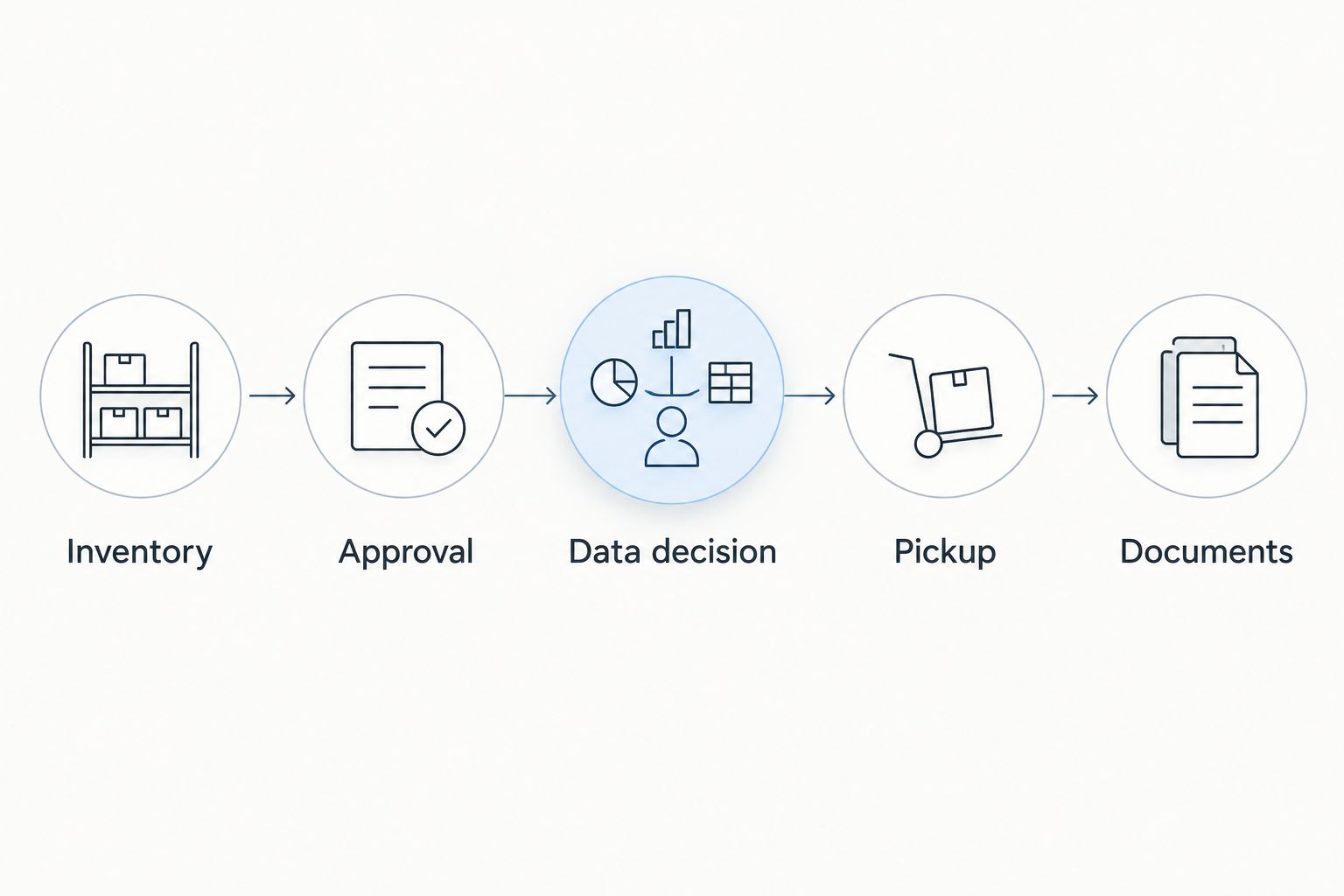
Plan the route with the property's operations lead. Do not promise a pickup window to departments until the provider has confirmed it, and do not leave data-bearing devices unattended while waiting for collection.
- Choose a controlled staging area.
- Keep collection items separate from working equipment.
- Confirm elevator, loading, and access arrangements.
- Assign a staff member to oversee the handoff.
- Update the inventory if the batch changes.
6. Reconcile collection and destruction documents
Keep 2 document types distinct in your 2026 records: the pickup receipt and the certificate of destruction. A receipt records collection. A certificate of destruction documents the destruction service that was arranged; it is not a substitute for checking which devices the service covered.
The email receipt gives your hotel a practical record of the pickup. For arranged destruction, compare the certificate's stated scope with your approved equipment list and ask about any discrepancy. Do not mark every collected device as destroyed merely because a certificate exists for part of the batch.
Close the internal retirement record only after the responsible staff have checked the documents. Keep unresolved items open rather than treating an email attachment as automatic completion.
- Confirm the correct email recipient before pickup.
- Save the pickup receipt with the inventory.
- Request the certificate for arranged destruction services.
- Check device identifiers or batch descriptions where provided.
- Resolve missing or mismatched records with the provider.
Request your hotel business pickup
Confirm equipment, location eligibility, and any destruction requirements before arranging collection.
Compare your hotel's equipment retirement options
Choose the route after checking ownership and data handling, not simply whether an item still powers on. Your hotel can use different routes for different equipment groups, provided each group has a clear release decision and destination.
When considering recycling and donating usable items, separate the condition decision from the data decision: working equipment still needs ownership approval and appropriate data handling before it leaves the hotel. Donation is not a substitute for resolving stored information.
The options below describe planning choices, not promises that a particular recipient accepts your equipment. Confirm acceptance and arrangements with the party receiving each batch.
| Option | Best for | Practical advantage | Key limitation |
|---|---|---|---|
| Internal redeployment | Equipment another hotel department has approved for use | Keeps a working asset in service | Requires an internal owner, condition checks, and an approved data transition |
| Donation | Usable equipment with a confirmed recipient | Gives approved equipment another use | Requires recipient acceptance and resolved ownership and data handling |
| Business recycling pickup | Retired electronics eligible for collection | Organizes removal around the business's equipment batch | Collection eligibility must be confirmed; pickup alone does not destroy data |
| Arranged on-site destruction | Data-bearing equipment assigned to destruction | Lets the hotel plan destruction at its site | Scope and service arrangements need separate confirmation |
Usedcartridge combines business pickup with computer and hard drive recycling and offers on-site data destruction. Its stated service area centers on Tustin and Irvine; hotels elsewhere need location confirmation. Keep that boundary in the decision rather than treating a Southern California address as automatic eligibility.
Common mistakes hotel teams make
Mixing hotel equipment with tenant equipment
A shared loading area is not a shared disposal authorization. Keep each business's equipment identifiable and get approval from its owner before collection. This prevents the hotel coordinator from releasing items on someone else's behalf.
Sending an equipment count without a location plan
An inventory tells the provider what is involved, but it does not explain how equipment reaches the collection point. Include staging and access details in the request, then confirm responsibilities before asking staff to move the batch.
Treating a factory reset as the entire data decision
Do not substitute a reset instruction for your organization's approved handling process. Ask IT to choose and verify the appropriate method for the device and its intended destination. Keep equipment on hold when that decision is unresolved.
Filing a receipt as proof of destruction
Collection and destruction are different events. A pickup receipt does not establish that drives were destroyed, and a destruction certificate should be checked against the work arranged. Label the records separately in your 2026 retirement folder.
Booking before the batch is approved
An early booking does not solve missing ownership approvals or unresolved data questions. Confirm the release list first, then arrange collection around a batch that is actually ready. Report changes before the handoff instead of adding unreviewed equipment at the loading area.
FAQ
Can my hotel arrange free business electronics pickup?
Usedcartridge offers free business pickup, subject to confirmation of equipment and location eligibility. Send your hotel’s address and equipment list before arranging collection, and confirm any destruction services separately.
Does electronics pickup include hard drive destruction?
Pickup alone does not include an assurance that hard drives have been destroyed. Arrange the required destruction service explicitly and confirm which devices it covers and what documentation will follow.
What’s the difference between a pickup receipt and a certificate of destruction?
A pickup receipt records collection; a certificate of destruction documents arranged destruction services. Keep both with the equipment inventory and check that the destruction record matches the agreed scope.
Can a hotel recycle electronics owned by a tenant?
A hotel should obtain the equipment owner’s authorization before releasing tenant-owned electronics. Coordinating collection access does not establish authority to dispose of another business’s assets.
Can we include guest-room electronics with office computers?
Include both categories in your proposed inventory and ask the provider to confirm eligibility. Do not assume every equipment type is accepted or that every device has the same data-handling requirements.
Can hotels outside Tustin and Irvine request pickup?
Hotels outside Tustin and Irvine should request location confirmation before planning collection. The stated service area does not establish eligibility for every Southern California property.
How should our hotel prepare for electronics recycling in 2026?
Build an approved inventory, resolve ownership and data handling, and confirm collection eligibility before booking. Stage the equipment securely, assign a handoff coordinator, and reconcile the receipt and any destruction certificate afterward.
One last thing
The most useful retirement field is often the release approver, not the device model. A detailed inventory still leaves the pickup stalled if nobody can authorize removal. Name that person for each equipment group before requesting collection, and give the pickup coordinator a final approved list.
Related guides