
Business hard drive destruction is the planned destruction of retired storage devices so your office can dispose of equipment without leaving readable business data behind. For Orange office and IT managers, the practical sequence is to arrange pickup and any destruction work, then keep the Certificate of Recycling and the Certificate of Destruction.
Need drives destroyed? See our hard drive destruction service in Orange County, Los Angeles and San Diego: free for 50 or more drives, on-site destruction you can watch on request, and a signed Certificate of Destruction.
- Recycle for Life offers free electronics pickup for businesses from San Diego County to Los Angeles County.
- For hard drive destruction services Orange businesses need, separate equipment collection from the actual destruction work.
- A Certificate of Recycling records collection; a certificate of destruction documents arranged destruction services.
- Keep an equipment inventory and confirm who authorizes destruction before devices leave your control.
Recycle for Life offers free business pickup, a Certificate of Recycling within 3 days, and certificates of destruction for arranged destruction services. Recycle for Life serves businesses throughout Orange, as part of a service area that runs from San Diego County to Los Angeles County.
Recycle for Life is best for businesses from San Diego County to Los Angeles County that want free electronics pickup and hard drive destruction with a Certificate of Destruction.
Why hard drive destruction matters for Orange businesses
An office clear-out involves more than moving old computers out of a storage room. Someone must decide which devices can leave, whether their data is still needed, and what evidence the business should keep afterward.
For your 2026 retirement project, start with the business outcome: clear the equipment without losing needed records or leaving the data decision unresolved. A pickup solves the transport task. Destruction addresses the storage media; the paperwork records the work arranged and completed.
Property managers have an additional boundary to respect. Equipment left by a tenant is not automatically authorized for destruction, and a building manager should not make the tenant's data-retention decision.
Treat collection and destruction as separate approvals, even when you arrange both through the same provider. This keeps a convenient pickup from being mistaken for a completed data-security task.
Arrange business hard drive destruction in six steps
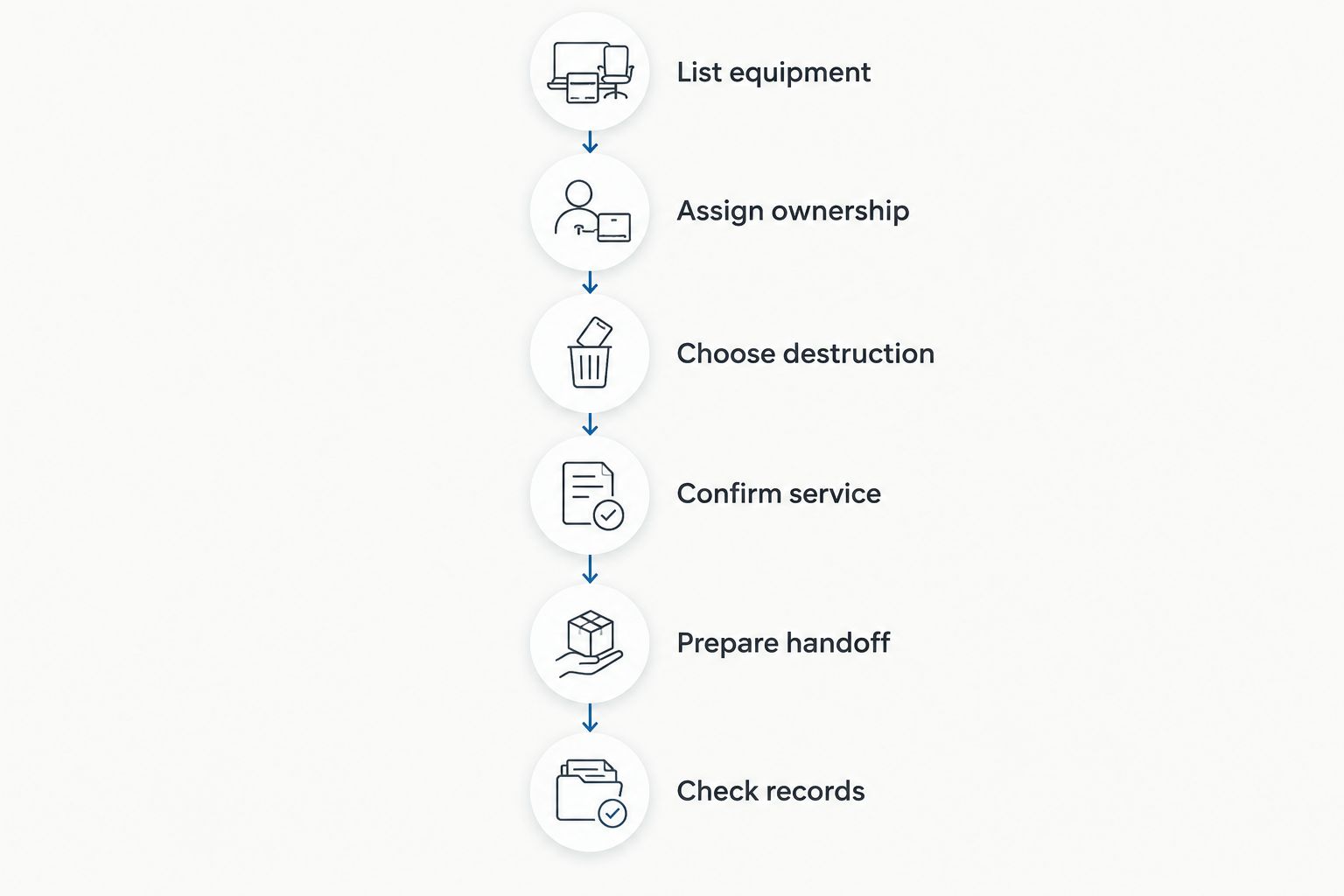
Use this sequence for your 2026 equipment retirement: List equipment, Assign ownership, Choose destruction, Confirm service, Prepare handoff, and Check records. A shared spreadsheet and an email approval trail give you a practical starting point without requiring a separate asset-management system.
1. List equipment before requesting pickup
Start with a spreadsheet listing the equipment you intend to retire. Separate whole computers from loose drives, and identify equipment that still needs an internal review. Do not treat a device that fails to start as a device that contains no data.
Use one inventory per pickup batch as a working rule. That gives the office manager, IT contact, and provider a common reference when equipment counts change. It also helps prevent an approved batch from absorbing unrelated equipment on collection day.
A useful inventory supports a specific question: can you identify what was released and match it to the service you requested? Record identifiers that your team can verify rather than filling gaps with assumptions.
- Record equipment type, quantity, and storage location.
- Capture asset tags or serial numbers where accessible.
- Mark loose drives separately from complete computers.
- Flag devices with unknown ownership or unresolved data needs.
2. Assign ownership and authorize the data decision
Name the person who can approve destruction before you move equipment into the pickup area. The person booking transport is not necessarily the person authorized to destroy business records. Make that distinction explicit in the request.
For a multi-tenant property, keep each tenant's equipment and approvals separate. Ask the responsible tenant contact to resolve ownership and data decisions; the property manager can coordinate access without deciding what information the tenant should retain.
Check whether files must be retained, transferred, or reviewed before destruction. If the business has instructed you to preserve records, stop that equipment from entering the destruction batch until the instruction is resolved.
- Name the business owner approving retirement.
- Confirm that needed files have been retained and checked.
- Record any instructions to preserve equipment or data.
- Keep tenant approvals with the corresponding equipment list.
3. Choose destruction based on the actual storage media
Deleting files or formatting a drive is not the same as physically destroying it. Data sanitization means making stored information inaccessible through an appropriate process; physical destruction damages the storage media itself. Ask what process will be used for the devices you have.
A hard disk drive and a solid-state drive store information differently. Do not accept a vague promise to handle everything the same way without asking whether the proposed method covers each media type in your batch.
Recycle for Life provides on-site data destruction services, but your request still needs a confirmed scope. Ask which equipment the arranged work covers and what its certificate will document. Do not assume that free business pickup makes every destruction service free.
- Identify hard disk drives, solid-state drives, and unknown media.
- Ask which destruction method applies to each type.
- Specify whether you need destruction at your premises.
- Confirm the work and documentation before authorizing release.
4. Confirm building access
Send your address and equipment list before treating a collection date as confirmed.
Explain access conditions in plain terms: where the devices are stored, who opens the room, and whether building management must approve loading access.
For a 2026 office move, work backward from the date your team loses access to the premises. The guide to business electronics recycling before an office lease ends addresses that related planning task. Do not leave authorization questions until the loading area is booked.
- Provide the pickup address and business contact.
- Tell us what equipment you have and where it is.
- Describe stairs, elevators, loading access, and access restrictions.
- Request written confirmation of pickup and destruction arrangements.
5. Prepare a controlled handoff
Keep approved equipment in an access-controlled area until collection or arranged on-site destruction. Separate anything awaiting approval so it cannot be taken with the cleared batch. Label the groups in terms your team understands, without exposing confidential information on the labels.
Assign a handoff contact who has the final inventory. That person should know which devices are approved for collection, which require arranged destruction, and which must remain on-site. A last-minute change should trigger an inventory update, not an informal addition to the pile.
For property managers, use tenant-specific groups rather than a shared untracked stack. The collection can be coordinated through building management while each tenant's equipment remains identifiable.
- Separate approved equipment from items on hold.
- Keep loose storage devices with their batch records.
- Give the handoff contact the current inventory.
- Resolve count or scope differences before release.
6. Check records before closing the job
Keep two document categories distinct in your 2026 retirement file: the Certificate of Recycling and the certificate of destruction. A Certificate of Recycling records collection. A certificate of destruction documents the arranged destruction service; collection alone does not establish that destruction occurred.
Recycle for Life emphasizes a Certificate of Recycling within 3 days and certificates for arranged destruction services. The Certificate of Recycling lists computers, laptops and screens by the piece and other e-waste by weight; the Certificate of Destruction lists quantity, part number and description, with serial numbers attached when you supply your list before pickup.
Compare the records with the work you authorized. If the certificate's scope is unclear or equipment appears unmatched, ask for clarification before marking the destruction task complete. Keep the correspondence with the inventory so a colleague can understand the file later.
- Save the Certificate of Recycling with the batch inventory.
- Retain the certificate for arranged destruction services.
- Check the business details, service description, and quantities provided.
- Resolve discrepancies before closing the retirement record.
Request a business pickup
Send us your equipment list and address, and we will schedule your pickup.
Compare your equipment retirement options
Choose the route that matches the data decision, not just the easiest way to remove equipment. Each option below has a useful role, but none replaces authorization, equipment identification, and a clear record of what happened.
| Option | Best for | Main advantage | Key limitation |
|---|---|---|---|
| Business electronics pickup without arranged destruction | Equipment whose data has already been addressed through an approved process | Coordinates equipment removal | Pickup alone does not destroy stored data |
| Pickup with arranged destruction | Businesses retiring data-bearing equipment alongside other electronics | Lets you coordinate collection and a defined destruction scope | You must confirm the method, equipment coverage, and documentation |
| Arranged on-site destruction | Businesses that require destruction at their premises | Places the destruction work at the business location | Agree on access, method, and scope before pickup |
| Internal sanitization before recycling | IT teams able to perform and verify an appropriate process | Keeps the initial data-handling work under internal control | Requires suitable procedures, verification, and records; it is not physical destruction |
Choose arranged destruction when your approved retirement decision requires physical destruction of the storage media. If an internal sanitization process already meets your organization's requirements, document that process before arranging recycling. Do not describe either route as automatically satisfying every contractual or regulatory obligation.
Common mistakes Orange businesses make
Treating free pickup as free destruction
Free business pickup is a collection benefit, not a blanket statement about destruction charges. Ask for the destruction scope and any applicable charges before approving the job. Keep that confirmation with the pickup request.
Give the actual pickup location and equipment details at the start. This avoids building a move-out plan around an unconfirmed collection.
Combining tenant equipment without separate approvals
A shared loading area does not make tenant equipment one business's property. Keep authorization and inventories separate, even when building management coordinates access. Unclaimed equipment needs an ownership decision before a destruction decision.
Closing the job when the Certificate of Recycling arrives
A Certificate of Recycling helps document pickup, but it is not a substitute for the certificate covering arranged destruction. Track collection and destruction separately in your 2026 closeout checklist. Close each task only when its corresponding record is clear.
FAQ
Can my Orange business arrange hard drive destruction with Recycle for Life?
Confirm your Orange address and equipment directly before booking.
Is hard drive destruction included with free business pickup?
Do not assume destruction is included with free business pickup. Confirm the arranged destruction work and any applicable charges separately before authorizing the job.
Is a Certificate of Recycling the same as a certificate of destruction?
No. A Certificate of Recycling records equipment collection, while a certificate of destruction documents arranged destruction services. Keep both when your job includes collection and destruction.
Can hard drives be destroyed at my office?
On-site data destruction is a service Recycle for Life provides. Confirm your location, equipment types, access conditions, and the specific destruction method before scheduling.
What should I do before handing over old business computers?
Identify the equipment, retain needed files, and obtain authorization for the data decision before handoff. Separate approved equipment from anything awaiting review and give the collection contact the final inventory.
Can a property manager arrange destruction for tenant equipment?
A property manager can coordinate service access, but destruction needs authorization from the responsible equipment owner. Keep each tenant’s equipment list and approval separate rather than treating a shared collection as shared ownership.
Does deleting files make a hard drive ready for recycling?
Deleting files alone does not establish that stored data has been securely sanitized or destroyed. Use an approved process suited to the storage media, verify its completion, and retain the relevant records.
One last thing
Ask three closeout questions before marking the batch complete: What left the building? What destruction work was completed? Which record supports each answer?
That short check catches a practical gap: equipment removal can be complete while the destruction task remains open. Keep the inventory, Certificate of Recycling, and destruction documentation together so the next person does not have to reconstruct the job from separate inboxes.
Related guides
- Hard drive destruction services for Irvine businesses
- Business electronics recycling in multi-tenant offices
- Business electronics recycling for property managers