
A single improperly wiped hard drive sold at auction exposed thousands of patient records at a regional healthcare network, triggering a regulatory investigation that cost millions before it was resolved. For IT managers and compliance officers, that scenario is not a worst-case outlier. It is a predictable outcome of treating device disposal as an afterthought. Onsite destruction, when executed with a structured, documented workflow, eliminates the transport risk, closes custody gaps, and gives auditors exactly what they need. This guide walks you through every stage of a defensible onsite destruction process, from setup through environmental compliance, so your organization never becomes that cautionary example.
Table of Contents
- Understand the onsite device destruction workflow
- Prepare for secure onsite destruction: Requirements and setup
- Step-by-step: Executing onsite device destruction
- Post-destruction protocols: Verification, compliance and environmental outcomes
- A practitioner’s perspective: Why ‘destroy and forget’ is not enough
- Next steps: Partnering for compliant device destruction
- Frequently asked questions
Key Takeaways
| Point | Details |
|---|---|
| Eliminate transport risks | Completing device destruction onsite keeps custody in your control and reduces breach opportunities. |
| Prioritize documentation | Maintaining thorough records and certificates ensures you pass any compliance audit. |
| Consider environmental impact | Proper disposal of byproducts meets legal requirements and reduces liability. |
Understand the onsite device destruction workflow
Onsite device destruction means physically rendering storage media unreadable and unrecoverable at your facility or a controlled location you designate, before the device ever leaves your custody. Unlike offsite services where equipment travels to a third-party facility, onsite destruction keeps every stage visible to your team. That visibility matters enormously when regulators ask for proof.
The workflow follows a clear sequence:
| Stage | Action | Purpose |
|---|---|---|
| Identification | Inventory assets, tag by classification | Scope and risk-tier devices |
| Destruction | Destroy, crush, or disintegrate media | Eliminate recovery potential |
| Verification | Witness sign-off, photo documentation | Create audit evidence |
| Disposal | Recycle remaining materials compliantly | Meet environmental obligations |
Onsite destruction consistently favors the Destroy category because it eliminates transport risk entirely and gives your team direct, observable confirmation.
Every compliance-driven sector benefits from this model. Healthcare organizations protecting PHI, financial institutions handling account data, government contractors managing classified records, and legal firms safeguarding privileged communications all share the same need: certainty that sensitive information cannot be recovered after a device leaves service.
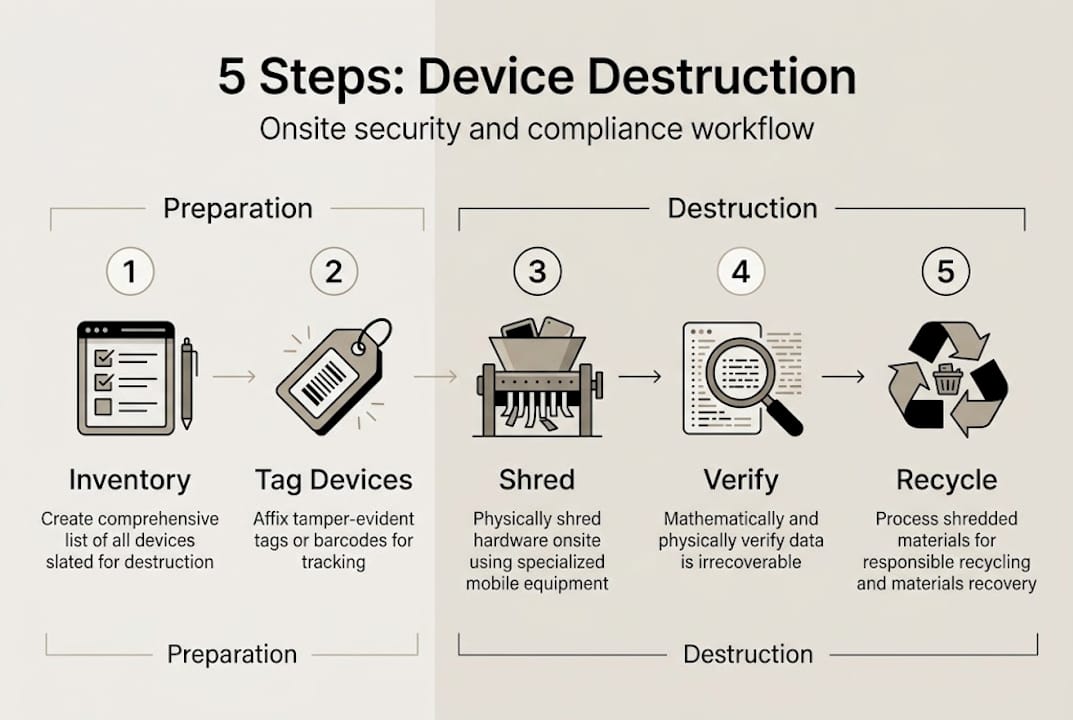
Understanding the difference between destroy versus sanitization is foundational. Sanitization methods like overwriting can work for low-risk reuse scenarios, but they are harder to verify at scale and leave room for process error. Reviewing your electronic waste overview alongside your data security policies helps you identify which device categories warrant full destruction versus other methods.
Key benefits of onsite destruction include:
- Zero transport risk: Devices never leave your controlled environment before destruction
- Witness accountability: Staff and compliance officers observe every step
- Audit-ready documentation: Evidence is captured in real time
- Reduced breach surface: No third-party handling gaps
For secure computer disposal tips, organizing devices by data classification before the destruction event saves time and prevents costly sorting mistakes on the day.
Prepare for secure onsite destruction: Requirements and setup
Knowing the workflow is the foundation, but your preparation determines whether the event holds up under an audit or falls apart at the first question. The gap between a good destruction event and a defensible one almost always comes down to documentation and registration.
Before scheduling a destruction event, verify these prerequisites:
- Destruction or crushing equipment rated for the media types involved
- A controlled, access-restricted area with no unauthorized personnel
- Trained staff or a credentialed vendor team
- Pre-event device inventory logs with serial numbers and data classification
- A designated compliance officer or witness present throughout
Registration of your provider matters as much as the equipment they bring. Here is how the primary registrations compare:
Verify your provider’s active registration status, not just their claimed credentials.
Pre-event documentation is not optional paperwork.

Aligning your tracking and custody controls process with your provider’s system before the event closes loopholes that auditors routinely exploit. Review compliance requirements specific to your industry to confirm your setup matches the applicable standard.
Pro Tip: Run a pre-destruction audit two weeks before your scheduled event. Walk through every device on the inventory list, confirm data classifications, and identify any that may need separate handling. This catches compliance gaps before they become day-of problems.
Check your provider registration standards early in the vendor selection process. A provider who cannot produce current, verifiable registration documentation is a liability, not a resource.
Step-by-step: Executing onsite device destruction
With preparation locked in, execution comes down to discipline and documentation at every step. This is where custody records are built, not recovered after the fact.
Follow this sequence for every onsite destruction event:
- Confirm inventory: Cross-check physical devices against the pre-event log. Flag any discrepancies before proceeding.
- Decommission assets: Remove devices from active network and system records. Confirm deactivation with IT.
- Stage for destruction: Sort by device type and destruction method. Hard drives, SSDs, and optical media may require different processes.
- Execute destruction: Destroy or crush devices using compliant equipment. A designated witness observes the entire process.
- Document in real time: Photograph or video the destruction process. Record completion time and personnel involved.
The IBM decommissioning process follows a comparable seven-step model: identify, decommission, sanitize, destroy, custody transfer, reuse or recycle, and document. Executing destruction in a controlled environment with a documented chain satisfies the compliance intent of that framework.
Safety warning: Electronic devices contain hazardous materials including mercury, beryllium, and lithium. Never operate destruction or crushing equipment without appropriate PPE, proper ventilation, and fire suppression equipment nearby. Physical destruction of lithium batteries requires specialized equipment and should only be performed by trained personnel using explosion-resistant machinery.
For guidance on tracking and custody tips throughout the event, maintaining a real-time log, not a reconstructed one, is critical when regulators review your process.
Common mistakes that compromise otherwise solid events include skipping the device sorting step (which can result in wrong destruction methods for certain media types), failing to capture witness signatures immediately after destruction, and allowing unauthorized personnel near the destruction area. Each one creates an audit finding that is difficult to resolve retroactively.
Pro Tip: Schedule destruction events during off-peak operational hours. Early morning or weekend slots reduce foot traffic near the controlled area, limit interruptions, and make it easier to maintain access control throughout the event.
The secure device destruction process works best when everyone on the team knows their role before the event starts, not during it.
Post-destruction protocols: Verification, compliance and environmental outcomes
Destroying the devices closes one chapter. The post-destruction phase is where compliance is actually proven, and where e-waste obligations begin.
Once destruction is complete, issue a Certificate of Destruction (COD) that includes: the date and location of the event, the destruction method used, the quantity and description of destroyed devices (with your serial number or asset tag list attached when you supply it in advance), the name and registration of the provider, and the signature of the witness. File this document in your compliance records immediately.
- Store photographic and video documentation linked to individual device records where possible
- Archive records per your industry’s retention requirement (HIPAA requires six years minimum)
- Conduct a post-event reconciliation review within 48 hours to catch any documentation gaps
The financial stakes of getting this wrong are significant. Those figures underscore why every post-destruction step deserves the same rigor as the physical destruction itself.
Environmental compliance is not a secondary concern.
Partnering with an environmentally responsible recycling provider ensures the material stream after destruction follows a compliant path. The regulatory consequences of mishandled e-waste extend beyond environmental fines and can expose your organization to reputational damage that is harder to quantify than the fine itself.
A practitioner’s perspective: Why ‘destroy and forget’ is not enough
Most organizations focus heavily on the physical act of destruction and treat everything after as administrative cleanup. That mindset is where compliance fails quietly.
In our experience, the majority of audit findings and regulatory penalties do not result from substandard destruction equipment or flawed destruction methods. They come from incomplete custody records, mismatched inventory logs, missing witness signatures, or recycled materials that ended up in non-compliant downstream channels. The destruction machine worked fine. The paperwork did not.
Physical destruction feels conclusive because it is visible and immediate. But an auditor cannot verify what they cannot see documented. If your COD does not match your pre-event inventory, that gap becomes the finding. If your e-waste stream lacks a verified recycling pathway, that is an environmental violation regardless of how thoroughly the drives were destroyed.
Treat every single step as auditable. If it is not documented, it did not happen. Review your asset recovery best practices with the same audit lens and you will find the gaps before regulators do.
Next steps: Partnering for compliant device destruction
Executing a defensible onsite destruction event requires compliant equipment, trained personnel, rigorous documentation, and verified environmental outcomes. Building all of that in-house is possible, but it takes time, training, and ongoing investment to maintain registration-level standards.
Recycle for Life specializes in exactly this. Our equipment destruction services include on-site destruction and a Certificate of Destruction. Need compliant downstream handling for destroyed materials? Our computer recycling solutions keep your e-waste out of landfills and in verified recycling streams. Get a destruction quote today and have a specialist map the right workflow for your organization's compliance requirements.
Frequently asked questions
What devices require onsite destruction versus offsite processing?
High-risk devices storing sensitive or regulated data, such as hard drives, SSDs, and backup tapes in healthcare or financial environments, require onsite destruction because onsite pros include zero transport risk and full witnessability, while offsite suits lower-risk bulk volumes with strong custody controls.
How do I ensure my onsite destruction event meets environmental regulations?
When choosing a recycler, confirm it is EPA-registered and regulated by the state (in California, the DTSC), with annual reporting on how waste is handled.
Can I reuse wiped devices instead of always destroying them onsite?
Wiping works for lower-risk reuse scenarios, but for regulated or sensitive data, physical destruction is preferred because verification is straightforward and there is no residual risk of recoverable information remaining on the media.