
Hard drive destruction is the physical destruction of storage media by cutting, grinding, and pulverizing it into fragments too small to reconstruct, making data recovery permanently infeasible. Unlike deleting files or formatting a drive, destruction renders data completely unrecoverable because the physical medium itself no longer exists in any usable form.
Need drives destroyed? See our hard drive destruction service in Orange County, Los Angeles and San Diego: free for 50 or more drives, on-site destruction you can watch on request, and a signed Certificate of Destruction.
What is hard drive destruction and why does it matter?
Hard drive destruction is the process of feeding storage devices into an industrial destruction machine that slices, crushes, and reduces them to metal fragments. The goal is not simply to damage a drive but to make data access infeasible regardless of the tools or expertise an attacker might bring. A formatted drive still holds recoverable data. A destroyed drive does not.
This distinction matters because delete or format commands do not remove data at the physical level. They only remove the file system’s pointer to that data. Forensic software can reconstruct files from a “wiped” drive in minutes. Physical destruction eliminates that risk entirely.

For businesses handling medical records, financial data, or personally identifiable information, destruction is not optional. Regulations like HIPAA, GDPR, and CCPA each impose obligations around secure disposal, and destruction is widely recognized as a compliant method under all three frameworks. For individuals, destroying a retired laptop drive before recycling it is the only way to guarantee that old tax returns, passwords, and personal photos cannot be recovered.
How does hard drive destruction work?
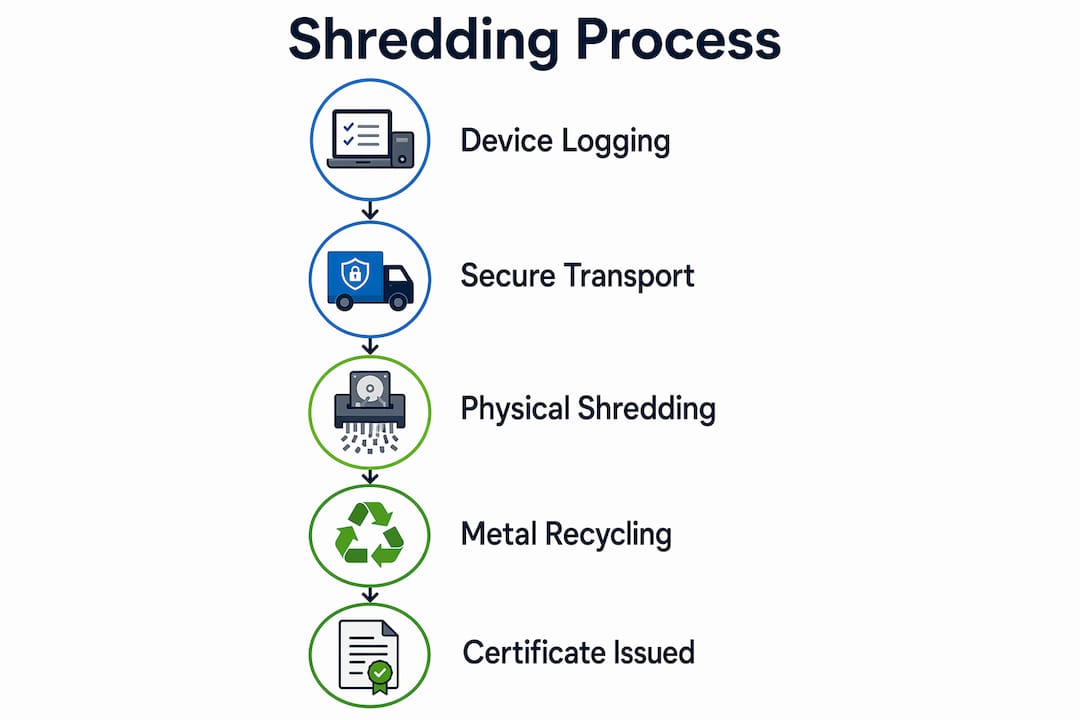
The process begins before the drive ever enters a destruction machine. This audit trail is what separates a compliant service from someone smashing drives in a parking lot.
Once logged, drives enter an industrial destruction machine that applies cutting, slicing, and pulverizing force through sharp rotating blades or discs. The machine strips away the outer casing, then destroys the internal platters, read/write heads, and circuit boards into fragments. High-capacity destruction machines apply thousands of pounds of force per cycle, processing dozens of drives per hour.
The key variables in this process are:
- Fragment size. Smaller fragments mean lower recovery risk. NSA/CSS EPL-listed destruction machines produce particles of 2mm or less for classified media.
- Drive type. HDDs contain magnetic platters that destruction physically destroys. SSDs store data on flash chips, which require finer destruction or disintegration to fully neutralize.
- Destruction machine vs. disintegrator. Standard destruction machines cut drives into strips or chunks. Disintegrators produce finer particles, meeting stricter government and defense requirements.
Pro Tip: Ask any destruction provider for their particle size specification before signing a contract.
After destruction, the metal fragments are typically sent to a compliant recycler, closing the loop on responsible e-waste disposal. No usable component leaves the facility.
What standards define secure data destruction?
It defines three sanitization outcomes: Clear, Purge, and Destroy. Destruction falls under Destroy, the outcome applied when data sensitivity is highest or when the media will not be reused. The standard does not mandate a specific method but requires that the chosen technique make recovery infeasible for the defined threat level.
The table below maps the major regulatory frameworks to their destruction requirements:
| Regulation | Requirement | Destruction status |
|---|---|---|
| HIPAA | Physical destruction of PHI-containing media | Accepted and recommended |
| GDPR | Irreversible destruction of personal data | Compliant when compliant |
| CCPA | Secure disposal of consumer personal information | Compliant with documentation |
A certificate of destruction issued after each job serves as your documented proof of compliance, which is exactly what auditors and regulators ask for.
How does destruction compare with other destruction methods?
Physical destruction takes several forms, and destruction is not always the only answer. Understanding the alternatives helps you choose the right method for your situation.
| Method | Data security level | Best use case | Limitation |
|---|---|---|---|
| Destruction | Very high | All drive types, compliance-driven disposal | Drive cannot be reused |
| Crushing/punching | High | Quick on-site destruction | Fragments remain large; less thorough |
| Software wiping | Moderate | Drives intended for reuse or resale | Ineffective if drive is failing |
| Melting/smelting | Very high | Government/defense classified media | Expensive, not widely available |
Crushing deforms the drive physically but leaves larger fragments that a determined attacker with specialized equipment could potentially analyze.
Destruction wins on two counts: it works on every media type, and it produces the most thorough physical destruction available outside of a smelting furnace. For organizations retiring large volumes of mixed media, including HDDs, SSDs, USB drives, and mobile devices, destruction is the most practical path to secure data destruction across the board.
The environmental angle also favors documented destruction services over informal destruction. Reputable providers send destroyed metal to compliant recyclers, keeping hazardous materials out of landfills and satisfying e-waste regulations in states like California, New York, and Texas.
What should you look for in hard drive destruction services?
Selecting a destruction provider is a compliance decision as much as a logistics one. The wrong choice can leave you exposed to regulatory penalties even if the drives are physically destroyed. Here is how to evaluate your options:
- Verify registration. Look for an EPA-registered, state-regulated provider that issues a Certificate of Destruction. This confirms the provider's processes meet documented security standards.
- Request a certificate of destruction. Every reputable provider issues one. It should include the drive quantity, destruction date, method used, and a signature, with serial numbers listed when you supply them.
- Ask about fragment size. For standard business data, 2mm particles are sufficient. For healthcare or government data, request NSA-compliant particle sizes.
- Confirm recycling practices. A responsible provider recycles destroyed material through compliant e-waste channels rather than sending it to a general landfill.
Pro Tip: For high-volume IT asset retirement, combine on-site destruction with an IT asset disposition (ITAD) audit. This gives you a complete inventory of what was destroyed and its estimated residual value, which matters for both compliance and accounting.
Recycle for Life offers free hard drive destruction for businesses with 50 or more drives, with pickup from San Diego County to Los Angeles County. The hard drive destruction services market includes dozens of regional and national options, so comparing registrations and service terms before committing is worth the time.
Why we think most organizations underestimate what destruction actually protects
We have reviewed a lot of data disposal policies over the years, and the same mistake appears repeatedly. Organizations treat destruction as a final checkbox rather than as a security control with its own requirements. They hand drives to a vendor, receive a certificate, and file it away without ever verifying the vendor’s registration status or fragment size specification.
The uncomfortable reality is that a certificate of destruction from an unvetted provider is worth nothing in a regulatory audit. HIPAA enforcement actions have cited improper disposal as a contributing factor in breach investigations, and “We used a destruction service” is not a defense if that service cannot produce a Certificate of Destruction and a clear record of what was destroyed.
What we find more concerning is the SSD blind spot. As flash-based storage now accounts for the majority of new enterprise deployments, the gap between assumed security and actual security is growing. Destruction, specifically with verified particle sizes, is the only method that closes that gap across your entire media inventory.
The organizations that get this right treat destruction as part of a documented data lifecycle policy, not a one-time event. They schedule destruction cycles, maintain serial number logs, and cross-reference certificates against their asset inventory. That level of rigor is what separates a defensible compliance posture from one that collapses under scrutiny. You can explore IT compliance best practices to build that kind of policy from the ground up.
Secure, documented hard drive destruction with Recycle for Life
Recycle for Life offers documented hard drive destruction services for businesses that need documented, compliant disposal. Every destruction job includes a Certificate of Destruction; we recommend recording your drives' serial numbers and sending them to us. Recycle for Life integrates destruction with its broader e-waste recycling services, so destroyed material is processed responsibly rather than sent to a landfill. Whether you need a one-time purge of retired IT assets or a recurring destruction program, Recycle for Life provides on-site options that eliminate transport risk entirely. Request a free quote and get your data destroyed the right way.
FAQ
What is hard drive destruction in simple terms?
Hard drive destruction is the physical destruction of a storage drive using an industrial destruction machine that cuts and grinds it into fragments too small to read or reconstruct. It is the most thorough method of permanent data destruction available for both HDDs and SSDs.
Is destruction better than wiping a hard drive?
Destruction is more secure than software wiping because it destroys the physical medium rather than overwriting data.
Does destruction work on SSDs as well as HDDs?
Yes. Destruction is one of the few destruction methods effective on both SSDs and HDDs.
What proof do I get that my drives were destroyed?
A documented destruction provider issues a signed certificate of destruction recording what was destroyed, the method used, and the date, with drive serial numbers listed when you supply your list before pickup. This document is your compliance evidence for HIPAA, GDPR, and CCPA audits.
How do I choose between on-site and off-site destruction?
On-site destruction is the more secure option because drives never leave your premises before destruction, eliminating transport risk.