
Printer hard drive disposal is the process of securely erasing or physically destroying the storage inside a printer before you recycle or discard the device. Most people treat old printers like old toasters. They don’t. Non-volatile memory and hard drives inside multifunction printers store print job histories, scanned documents, network credentials, and fax logs. That data sits there long after the last print job, waiting for whoever picks up the device next.
Why does this matter right now? Because the FTC, HIPAA, and state privacy laws all treat printer storage the same way they treat computer storage. Improper disposal can trigger a reportable data breach, not just an awkward situation.
Key reasons to dispose of printer hard drives securely:
- Privacy protection: Scanned tax returns, medical records, and HR documents are recoverable from an improperly wiped drive.
- Regulatory compliance: Laws like HIPAA, the Gramm-Leach-Bliley Act, and the FTC Disposal Rule apply to data stored on printer drives.
- Environmental responsibility: Hard drives contain hazardous materials that require proper recycling, not landfill disposal.
- Liability reduction: A documented, certified destruction process protects your organization if a breach is ever investigated.
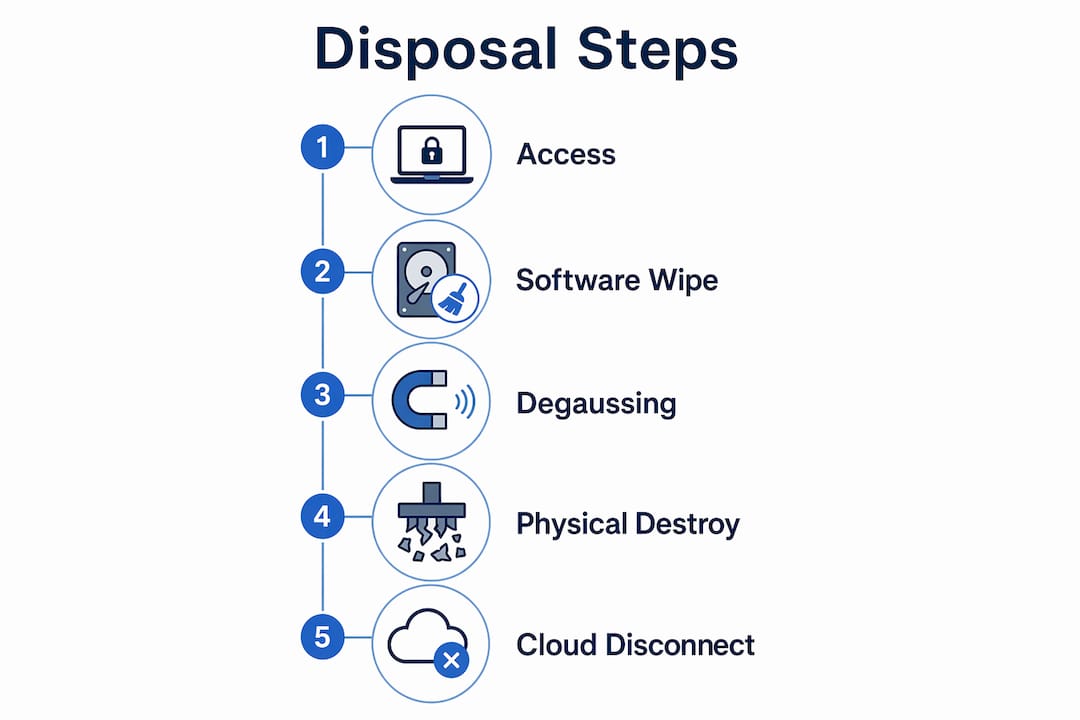
The main disposal methods covered below are software wiping, degaussing, and physical destruction. Each has a specific use case, and choosing the wrong one for your situation is one of the most common mistakes organizations make.
What is printer hard drive disposal, and which methods actually work?
Three approaches dominate secure printer data destruction: software wiping, degaussing, and physical destruction. The right choice depends on whether the device still powers on and how sensitive the data is.

Software-based wiping works through the printer’s admin web interface. You log in with admin credentials, navigate to Security or Storage settings, and select an option like “Secure Disk Erase” or “Overwrite All Data.” The most thorough setting uses multi-pass overwriting, such as the DoD 5220.22-M standard, which writes random characters over existing data repeatedly. This can take several hours depending on drive size. After the wipe completes, run a factory reset as well. One critical distinction: deleting or reformatting a drive does not remove data. It only changes how the drive locates files. The underlying data remains and can be recovered with common utility software.
Degaussing exposes the drive to a powerful magnetic field that scrambles stored data at the magnetic layer. It’s fast and effective, but it permanently disables the drive. You can’t reuse a degaussed drive.
Physical destruction is the most absolute method. Shredding or drilling through the drive platters provides near-complete assurance that data cannot be recovered, especially when software wiping isn’t viable. The Lexmark data cleanup guide also lists crushing and milling as accepted physical destruction methods. For devices that won’t power on, physical destruction is your only real option.
Pro Tip: For high-security environments, combine a software wipe with physical destruction of the removed drive. Software wipes handle the device; physical destruction handles the drive itself.
Common mistakes that put your data at risk
Most disposal failures come down to a handful of predictable errors, and they’re all avoidable.
- Treating deletion as destruction. Hitting “delete” or running a quick format leaves data fully intact and recoverable. Secure overwriting or physical destruction is required.
- Skipping the firmware check before removing the drive. Removing a hard drive from a leased printer may disable the device if essential firmware lives on that drive. Always check the manufacturer’s documentation and your lease terms first.
- Leaving cloud accounts connected. Modern printers sync with cloud services. If you dispose of the device without revoking access, those accounts can still expose document histories.
- Using uncertified disposal services. A vendor without documented compliance credentials offers no legal protection if a breach occurs later.
- Throwing printers in regular trash or unsecured recycling. This violates e-waste regulations in most U.S. states and creates both environmental and data breach liability.
Additional best practices for thorough, compliant disposal
Going beyond the basics protects you from the gaps that standard disposal checklists miss.
Perform secure overwriting regularly during the printer’s active life, not just at end-of-life. The FTC recommends overwriting the entire hard drive at least once a month during normal use. When you’re ready to decommission the device, run a full factory reset after the final wipe.
Specify in lease or purchase agreements that your organization retains ownership of the hard drive at end-of-life, or that the vendor is contractually required to wipe it. Without that language, a leased printer returned to the vendor may be resold with your data still on it.
For compliance-heavy environments, HIPAA-covered entities and financial institutions should use professional IT disposal services that issue certificates of destruction. That certificate is your documented proof of compliance if you’re ever audited.
Pro Tip: Add a physical label to every printer at acquisition that reads: “This device contains a hard drive. Secure destruction required before disposal.” It prevents accidental disposal by staff who don’t know the device stores data.
Why disconnecting cloud accounts matters as much as wiping the drive
Cloud connections tied to a printer can retain extensive document histories even after the device itself is wiped. Disabling cloud integrations is as important as wiping the hard drive, because the account-level data lives on external servers, not on the drive you just destroyed.
Before disposal, log into every connected cloud service, revoke the printer’s access credentials, and remove the device from your account. This includes Google Drive integrations, Microsoft 365 connections, and any vendor-managed cloud print services. Also change network passwords the printer stored, since those credentials can expose your broader infrastructure if recovered from the device.
Review any vendor data agreements as well. Some printer manufacturers retain copies of scanned documents or usage logs in their cloud infrastructure. Check the terms of service and submit a data deletion request if the agreement allows it.
Legal and regulatory compliance for printer hard drive disposal
U.S. law treats printer storage as covered data under several frameworks. The FTC’s Disposal Rule requires proper disposal of consumer information stored on digital copiers, the same standard applied to paper records and computers. Financial institutions must comply with the Gramm-Leach-Bliley Safeguards Rule, which mandates a security plan covering all stored personal consumer information. Healthcare organizations fall under HIPAA’s Security Rule, which covers electronic protected health information regardless of the device type storing it.
State laws add another layer. California’s CCPA and similar statutes in other states impose data handling obligations that extend to decommissioned devices. The FTC’s broader information security standard requires “reasonable procedures” scaled to the nature of your business and the sensitivity of the data you handle. For IT asset disposal compliance, a certificate of destruction from a certified vendor is the clearest way to demonstrate that reasonable standard was met.
Step-by-step checklist for printer hard drive disposal
Follow these steps in order before any printer leaves your control:
- Identify storage type. Check the model specs to confirm whether the printer has a hard drive, non-volatile memory, or both.
- Back up any needed data. Retrieve stored forms, fonts, or configurations you want to keep.
- Run a secure disk erase. Use the printer’s admin interface to perform a multi-pass overwrite. Complete a factory reset afterward.
- Disconnect all cloud accounts. Revoke credentials, remove the device from connected services, and change shared network passwords.
- Remove and destroy the drive (for high-security environments). Physically remove the drive and have it shredded or drilled by a certified service.
- Obtain a certificate of destruction. Get written documentation from whoever performs the destruction.
- Recycle the remaining hardware. Send the printer body to a certified e-waste recycling program.
For printer removal services that handle the full process, a professional vendor can manage steps 3 through 7 and provide the compliance documentation your organization needs.
Environmental considerations when recycling printer hard drive components
Printer hard drives contain lead, mercury, cadmium, and beryllium compounds. Landfill disposal leaches these materials into soil and groundwater, which is why most U.S. states prohibit e-waste in regular trash. The environmental impact of printer disposal extends beyond the drive itself: toner residue, circuit boards, and plastics all require specific handling.
Certified e-waste recyclers disassemble drives and recover reusable metals while safely managing hazardous components. Staples offers in-store recycling for printers and multifunction devices at $9.99 per unit in most states, with fees waived in California, Connecticut, Illinois, North Carolina, New Jersey, New York, Pennsylvania, and Rhode Island. Manufacturer take-back programs are another option, though availability varies by brand.
For organizations disposing of multiple devices, a certified IT asset recovery service handles both the data destruction and the environmental compliance in one step, which is more practical than managing each separately. Usedcartridge provides secure hard drive destruction with documented chain-of-custody and compliant recycling for the remaining components.
Key Takeaways
Secure printer hard drive disposal requires software wiping, physical destruction, cloud disconnection, and documented compliance, not just a factory reset.
| Point | Details |
|---|---|
| Deletion is not destruction | Deleting or reformatting leaves data recoverable; multi-pass overwriting or physical destruction is required. |
| Physical destruction is absolute | Shredding or drilling drive platters provides near-complete assurance data cannot be recovered. |
| Cloud accounts need revocation | Printer cloud connections can retain document histories even after the drive is wiped. |
| Contracts must address ownership | Lease and purchase agreements should specify who is responsible for wiping or retaining the drive at end-of-life. |
| Certified disposal covers compliance | A certificate of destruction from a qualified vendor satisfies HIPAA, Gramm-Leach-Bliley, and FTC Disposal Rule requirements. |